Freedom251 › Map Creation Software
Maputnik
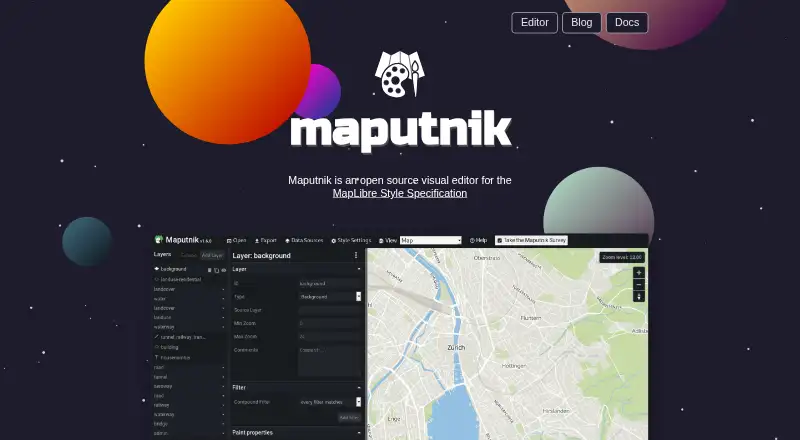
What Maputnik is
Maputnik is a free, open-source visual editor for MapLibre GL styles. These styles define how a map looks and which data and drawing order it uses. The project targets developers and map designers, and the editor can be opened in a modern browser without a signup or download. Local development is also supported through a CLI and Docker instructions.
Users can begin with open-source styles such as Positron, OSM Liberty and Toner, and import custom data. Finished styles can be exported as Mapbox GL JSON, saved to a flat file or sent to an anonymous GitHub gist. Online map design stores data in local storage. The documentation explains integration with Mapbox Studio. Maputnik is licensed under MIT and maintained by MapLibre, which develops free and open-source mapping libraries and tools. The project points users to its wiki for troubleshooting and to its GitHub issue tracker for reporting issues.
Who it suits
Maputnik suits developers and map designers who need to edit MapLibre GL styles in a browser or local workflow. It is also relevant to users who want to export styles or integrate with Mapbox Studio.
What it does well
- Browser editor requires no signup or download.
- CLI and Docker instructions support local use.
- Exports include Mapbox GL JSON and flat files.
- Open-source starting styles include Positron and Toner.
What to know first
- Online design stores data in local storage.
- The editor is specifically for MapLibre GL styles.
Plans
| Plan | Billed and limits | Price |
|---|---|---|
| Free and open-source | Free visual editor · online, CLI, or Docker use | Free |
As maputnik.github.io lists them, read 7 Oct 2026. The maker's own page has the final word.
Getting started
- Open the Maputnik website in a modern browser to try the editor without signup or download.
- Choose an offered starting style, such as Positron, OSM Liberty, or Toner.
- Import custom data if needed and edit the style.
- For local development, use the Maputnik CLI or the Docker instructions.
- Export the finished style as Mapbox GL JSON, an anonymous GitHub gist, or a flat file.
Maputnik is a focused visual editor for people who need to shape MapLibre map styles rather than build complete mapping projects. It suits developers and map designers who want an open-source workflow in a browser or local environment. The absence of a price, account requirement, or download barrier makes it an unusually low-friction choice, while its narrow MapLibre focus limits its audience.
Overview
Maputnik edits MapLibre GL styles: the JSON definitions that control a map’s visual appearance, the data it uses, and the order in which that data is drawn. The result is an interactive map output, with support for importing custom data. That makes Maputnik a practical styling workspace for teams already using MapLibre, rather than a general-purpose cartography or publishing platform.
The project is open source under the MIT License and is maintained by MapLibre, the organization behind free and open-source mapping libraries and tools. You can open it in a modern browser without signing up or downloading anything. Online map design stores data in browser local storage, so the browser route is convenient but tied to that local environment.
Key features
Visual MapLibre style editing
The editor gives developers and map designers a visual way to work with MapLibre GL styles instead of editing style definitions exclusively as code. Because the scope is the MapLibre Style Specification, it is most useful when your intended map renderer and data workflow already align with MapLibre.
Starting styles and exports
Open-source starting styles such as Positron, OSM Liberty, and Toner provide usable foundations for a new design. Finished styles can be exported as Mapbox GL JSON, an anonymous GitHub gist, or a flat file. Gist export is convenient for sharing a style quickly; a flat file is better suited to keeping a controlled project artifact.
Local workflows and integration
The Maputnik CLI supports local style development, and Docker instructions let you run the application locally. Documentation also explains integration with Mapbox Studio, which helps when Maputnik is one part of a broader style-production workflow. Troubleshooting guidance is provided through the project wiki, with bug reports and support routed to the GitHub issue tracker.
Pricing
| Plan | Price | Includes |
|---|---|---|
| Free and open-source | free | Free visual editor with online, CLI, or Docker use |
There is no free trial because the product itself is free, and no paid tier or renewal charge is presented. That makes it suitable for individual designers, open-source projects, and teams that can manage their own local or hosted workflow. In exchange, Maputnik is a specialized editor rather than a bundled hosted mapping service with commercial support or broader publishing features.
Platforms
Maputnik runs on the web and supports Linux, macOS, and Windows through local use. Self-hosting is supported through the CLI and Docker instructions. The browser option is the quickest way to start; local or self-hosted deployment is the stronger fit when you want a controlled development environment.
Who it's for
Choose Maputnik if you are a developer or map designer working with MapLibre GL styles and want visual control over layers, data, and drawing order. It is also a good fit for open-source and self-managed teams that value an MIT-licensed tool, local workflows, and file-based exports.
Look elsewhere if your priority is a broad map-making service, collaborative publishing workspace, or a consumer-friendly way to assemble maps without MapLibre-specific style work. Maputnik’s value comes from precision within one style specification, not from covering every mapping task.
Pros and cons
- Pro: Free and open-source under the MIT License, so there is no subscription barrier and the project can be run locally.
- Pro: Browser use requires no signup or download, allowing immediate style work in a modern browser.
- Pro: Online, CLI, and Docker options accommodate quick experiments and structured local development.
- Pro: Mapbox GL JSON, GitHub gist, and flat-file exports support both sharing and project storage.
- Con: The editor is centered on MapLibre GL styles, so it is a poor match for users seeking a general map builder or presentation tool.
- Con: Browser projects use local storage, which makes the online workflow dependent on that browser environment.
Alternatives
For a wider set of map, chart, and table publishing features, consider Datawrapper, whose free plan includes web publishing, embedding, PNG downloads, and attribution. Felt is the better choice for personal map sharing when unlimited maps are more important than uploading your own data file; its free Personal plan is for personal use.
Mapotic suits community-style maps with places, data layers, filters, ratings, and comments, while its free tier is capped at 100 places and may show ads. Choose Visme for broader visual presentations; its Basic plan provides 500MB of storage and 50 slides or pages per project. BatchGeo is aimed at marker-heavy map creation and offers paid features such as 100,000 markers per map, password protection, and multi-user access.
EasyMapMaker is a simpler pin-based option, with its free Basic plan allowing 250 pins per map and 20 maps per day. Pick Mapbox Studio when you want Mapbox’s hosted studio ecosystem; the studio is available to all Mapbox users, while related API and custom tileset use may be billed separately. MapChart is an alternative for straightforward map-making rather than MapLibre style development.
For more choices, browse Map Creation Software.
Verdict
Maputnik is the right recommendation for MapLibre developers and map designers who want a free visual style editor with browser, CLI, and Docker workflows. Its strongest reason to choose it is the combination of open-source licensing, immediate browser access, and practical style exports. Look elsewhere if you need a general-purpose map creator, collaborative publishing suite, or a workflow not tied to the MapLibre Style Specification.
Verdict
Maputnik offers a free visual workflow for editing and exporting MapLibre GL styles, with browser and local-use options. Its focus is narrow: it is a style editor rather than a general mapping tool.
Questions
How much does Maputnik cost?
The listed Free and open-source plan is free and includes the visual editor for online, CLI, or Docker use.
Is there a free plan or free trial?
Maputnik has a free plan. There is no free trial.
Which platforms does Maputnik support?
The listed platforms are Linux, macOS, Windows, web, and self-hosted use.
Is Maputnik open source?
Yes. It is licensed under the MIT License.
Who maintains Maputnik?
The Maputnik site says the project is maintained by MapLibre.
Can I export styles or integrate Maputnik with Mapbox Studio?
Styles can be exported as Mapbox GL JSON, an anonymous GitHub gist, or a flat file. Project documentation includes instructions for integrating with Mapbox Studio.
Facts from Maputnik's own pages
- Audience
- The project describes the editor as targeted at developers and map designers. · github.com, 7 Oct 2026
- Browser use
- The site says Maputnik works in a modern browser and requires no signup or download to try. · maputnik.github.io, 7 Oct 2026
- Data handling
- The README says online map design stores data in local storage. · github.com, 7 Oct 2026
- Exports
- The site says styles can be exported to an anonymous GitHub gist or a flat file. · maputnik.github.io, 7 Oct 2026
- Integration
- The project documentation includes instructions for integrating with Mapbox Studio. · github.com, 7 Oct 2026
- License
- Maputnik is licensed under the MIT License. · github.com, 7 Oct 2026
- Local use
- The README provides a Maputnik CLI for local style development and Docker instructions for running the app locally. · github.com, 7 Oct 2026
- Maintainer
- The Maputnik site says the project is maintained by MapLibre. · maputnik.github.io, 7 Oct 2026
- Organization
- MapLibre says it develops free and open-source mapping libraries and tools. · maplibre.org, 7 Oct 2026
- Purpose
- Maputnik is an open-source visual editor for the MapLibre Style Specification. · maputnik.github.io, 7 Oct 2026
- Starting styles
- The site offers open-source styles as starting points, including Positron, OSM Liberty, and Toner. · maputnik.github.io, 7 Oct 2026
- Style editing
- Maputnik edits MapLibre GL styles, which define a map’s visual appearance and the data and order used to draw it. · maplibre.org, 7 Oct 2026
- Support
- The project directs users to its wiki troubleshooting page for issues and to its GitHub issue tracker. · github.com, 7 Oct 2026
Where Maputnik stands on Freedom251
- Map Creation Software#15 of 26