Freedom251 › Interactive Map Software
EasyMapMaker
What EasyMapMaker is
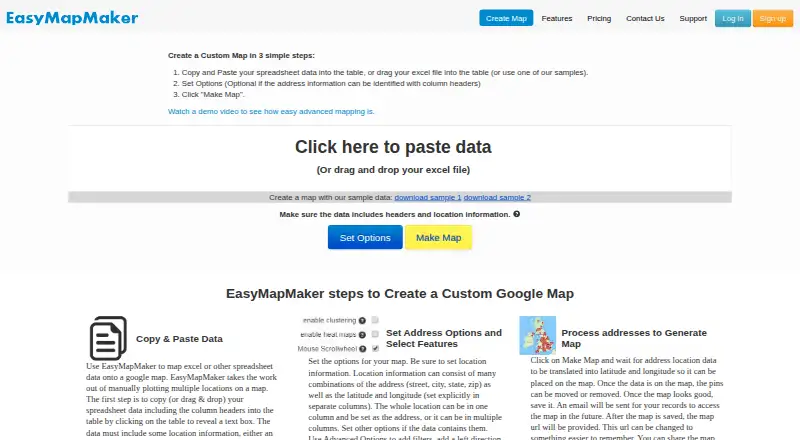
EasyMapMaker turns spreadsheet data containing addresses or latitude and longitude into a map. Users can paste data or drag in an Excel file, choose settings, and generate a map. Tools include clustering, colored and custom markers, filters, radius searches, heat maps, map styles, pin labels, and numbered pins. Saved maps can be shared, embedded on a webpage, or printed. Maps can be exported as images or PDFs, and visible map data can be exported to Excel. The free plan uses OSM for geocoding, while paid plans use Google Maps and Google geocoding; the service can also generate KML for Google Earth. Maps work on most Apple and Android phones and tablets, though some features may not be available on every device. Building and editing maps on mobile is possible, but the maker does not recommend or support it. The Basic plan is free, with 250 pins per map and 20 maps a day. Paid plans start with Pro at $29 per month, and a 7-day trial is listed. The service identifies EasyMapMaker as a service of TC Cloud Solutions LLC.
Who it suits
EasyMapMaker suits people who want to turn address or coordinate spreadsheets into maps they can share, embed, print, or export. It is less suited to users who need supported mobile editing.
What it does well
- Accepts pasted spreadsheet data or Excel files.
- Offers clustering, heat maps, filters, and custom markers.
- Saved maps can be shared, embedded, or printed.
- Exports maps as images or PDFs.
- Free Basic plan includes 250 pins per map.
What to know first
- Basic plan is limited to 20 maps a day.
- Mobile map editing is not supported.
- Some features may not work on every device.
- Former Premium Big Data plan is unavailable to new sign-ups.
Limits
Basic allows 250 pins per map, 20 maps a day, and seven unique groups. Pro allows 1,500 pins per map and 15,000 geocodes monthly; Premium allows 15,000 pins and 50,000 geocodes monthly; Enterprise allows 30,000 pins and 50,000 geocodes monthly. The former Premium Big Data plan for up to 100,000 locations is no longer open to new sign-ups.
Plans
| Plan | Billed and limits | Price |
|---|---|---|
| Basic | Free · 250 pins per map · 20 maps a day · 7 unique groups | Free |
| Pro | $29 per month · 1,500 pins per map · 15,000 geocodes per month · 1 user · no limit on maps | $29 a month |
| Premium | $59 per month · 15,000 pins per map · 50,000 geocodes per month · 1 user · no limit on maps | $59 a month |
| Enterprise | $99 per month · 30,000 pins per map · 50,000 geocodes per month · first 10 users included · no limit on maps | $99 a month |
As easymapmaker.com lists them, read 7 Oct 2026. The maker's own page has the final word.
Getting started
- Open easymapmaker.com.
- Paste spreadsheet data or drag and drop an Excel file.
- Set map options and generate the map.
- Choose Basic or a subscription plan; a 7-day trial is offered.
- Save the map to share, embed, print, or export it.
EasyMapMaker turns spreadsheet rows with addresses or coordinates into maps you can share and export. It is best suited to people who already organize location data in Excel and need a focused way to visualize it. The free tier makes it accessible for small maps, but growing datasets quickly run into pin and geocoding caps.
Overview
Paste spreadsheet data or drag in an Excel file, set options, and generate a map. That makes EasyMapMaker a practical choice for turning an existing location list into a visual rather than building a mapping workflow from scratch. Maps can be saved, shared, embedded in a webpage, or printed; visible map data can also be exported to Excel.
The service uses Google Maps and Google geocoding on paid plans, while free-plan geocoding uses OSM. It can generate KML for Google Earth. Refreshing data is manual, so changes to a source spreadsheet will not automatically update a map. The privacy policy says map data is not stored until a map is saved, is not sold, and can be removed by deleting the map. Subscription plans support password-protected maps, and editing a map requires login.
Key features
Clustering, filters, radius searches, and heat maps help users make dense or varied location sets easier to read. Colored and custom markers, map styles, pin labels, and numbered pins add useful ways to distinguish places and communicate information. These tools suit straightforward operational or public-facing maps, though manual refresh means they are less convenient when the underlying data changes often.
Sharing and export options cover common ways to distribute a finished map: iframe embedding, printing, image or PDF export, Excel export of visible map data, and KML generation for Google Earth. Custom branding is supported. The former Premium Big Data plan for up to 100,000 locations is no longer open to new sign-ups, so users with very large datasets should not assume that capacity is available.
Pricing
EasyMapMaker is freemium, with a 7-day trial and paid plans starting at $29/user/mo. The free Basic plan costs nothing and allows 250 pins per map, 20 maps a day, and seven unique groups. It is a sensible way to create occasional small maps, but the daily map cap and per-map pin limit constrain regular or larger projects.
Pro costs $29 a month, billed at $29 per month. It raises capacity to 1,500 pins per map and 15,000 geocodes per month, includes one user, and has no map-count limit. It fits an individual with recurring but moderate mapping needs. Premium costs $59 a month, billed at $59 per month, and increases the limits to 15,000 pins per map and 50,000 geocodes per month; it remains limited to one user. That makes it a better fit for larger individual projects, not a team collaboration tier.
Enterprise costs $99 a month, billed at $99 per month, and includes the first 10 users, 30,000 pins per map, 50,000 geocodes per month, and no map-count limit. It is the clearest fit for a small team needing shared access and higher per-map capacity. All paid tiers use a per-month price; the free tier has the tighter caps described above.
Platforms
EasyMapMaker is available on web, Android, and iOS. Maps work on most Apple and Android phones and tablets, although some features may not work on every device. The maker does not recommend or support building and editing maps on mobile or tablet, so users who need to create maps away from a desktop should look elsewhere.
Who it's for
Choose EasyMapMaker if your locations already live in a spreadsheet and you want to turn them into a styled map with practical filters, sharing, and export options. Basic suits occasional small jobs; Pro and Premium fit individual users whose pin and geocoding needs justify a subscription; Enterprise is the sensible tier when up to 10 users need access. It is a weaker fit for mobile-first editing, frequently refreshed data, or datasets that exceed the published plan caps.
Pros and cons
- Pros: Spreadsheet paste and Excel upload provide a direct path from location rows to a map.
- Pros: Clustering, heat maps, filters, and marker styling support both dense data and clearer presentation.
- Pros: Maps can be embedded, printed, exported as images or PDFs, and shared through KML or Excel outputs.
- Cons: Free maps are capped at 250 pins, and the free plan permits only 20 maps a day.
- Cons: Data refresh is manual, which adds work when source spreadsheets change.
- Cons: Mobile devices can display maps, but map creation and editing are not supported there.
- Cons: Pro and Premium include only one user; multi-user access starts with Enterprise at $99 a month.
Alternatives
For charts, maps, and tables with web publishing and embedding, PNG downloads, and visible attribution on its free plan, consider Datawrapper. Felt is another freemium option, with a free Personal plan offering unlimited maps and sharing but no own data file uploads and personal-use-only terms.
Mapotic may suit users who want custom fields, data layers, filters, ratings, and comments on a free plan capped at 100 places, with ads potentially shown. If you need a much higher stated per-map marker limit and password protection, BatchGeo offers a Pro plan at $99 a month with 100,000 markers per map and 10 users included.
Mapbox Studio is worth considering when a free plan is attractive, provided you account for possible separate billing for related API and custom tileset usage. MapChart is another freemium option. For personal or testing use with a free tier that specifies storage, sessions, API requests, and uploads, consider MapTiler Cloud. Modest Maps is a free library.
Browse more options in Interactive Map Software and Map Creation Software.
Verdict
EasyMapMaker is a strong fit for individuals and small teams that need a straightforward spreadsheet-to-map workflow, useful presentation controls, and flexible sharing or export. Its core advantage is the short route from spreadsheet data to a distributable map. Look elsewhere if you need supported mobile editing, automatic data refresh, or capacity beyond the plan limits; team access also requires the $99 a month Enterprise tier.
Verdict
EasyMapMaker covers spreadsheet-to-map creation, sharing, and several export options. Its free plan has pin and daily-map limits, and mobile editing is not supported, so check those constraints first.
Questions
Is EasyMapMaker free?
Yes. Basic is free and allows 250 pins per map, 20 maps a day, and seven unique groups.
How much do the paid plans cost?
Pro is $29 per month, Premium is $59 per month, and Enterprise is $99 per month. A 7-day trial is offered.
Can I use EasyMapMaker on a phone or tablet?
Maps work on most Apple and Android phones and tablets, though some features may not work on every device. Map building and editing on mobile or tablet is possible, but the maker does not recommend or support it.
Can I protect or share a map?
Saved maps can be shared, embedded on a webpage, or printed. Password-protected maps are available on subscription plans, and login is required to access a map’s edit page.
What happens to saved map data?
The privacy policy says EasyMapMaker does not sell data and does not store map data until a map is saved. Saved map data can be removed by deleting the map.
Who provides EasyMapMaker?
The site identifies EasyMapMaker as a service of TC Cloud Solutions LLC.
Facts from EasyMapMaker's own pages
- Company
- The site identifies EasyMapMaker as a service of TC Cloud Solutions LLC. · easymapmaker.com, 7 Oct 2026
- Exports
- Maps can be exported as images or PDFs, and visible map data can be exported to Excel. · easymapmaker.com, 7 Oct 2026
- Features
- Features include clustering, colored and custom markers, filtering, radius searches, heat maps, map styles, pin labels, and numbered pins. · easymapmaker.com, 7 Oct 2026
- Input
- Users can paste spreadsheet data or drag and drop an Excel file, then set options and generate a map. · easymapmaker.com, 7 Oct 2026
- Integrations
- The service uses Google Maps and Google geocoding on paid plans; its free plan uses OSM for geocoding, and it can generate KML for Google Earth. · easymapmaker.com, 7 Oct 2026
- Limits
- The maker says the former Premium Big Data plan for up to 100,000 locations is no longer available to new sign-ups. · easymapmaker.com, 7 Oct 2026
- Map access
- Password protected maps are available on subscription plans, and access to a map's edit page requires login. · easymapmaker.com, 7 Oct 2026
- Mobile editing
- Building and editing maps on mobile and tablet devices is possible but the maker says it is not recommended and is not supported. · easymapmaker.com, 7 Oct 2026
- Privacy
- The privacy policy says the service does not sell data, does not store map data until a map is saved, and allows users to remove saved map data by deleting the map. · easymapmaker.com, 7 Oct 2026
- Purpose
- EasyMapMaker turns spreadsheet data with address or latitude and longitude information into a map. · easymapmaker.com, 7 Oct 2026
- Sharing
- Saved maps can be shared, embedded on a webpage, or printed. · easymapmaker.com, 7 Oct 2026
- Support
- The contact page provides a support email address, [email protected]. · easymapmaker.com, 7 Oct 2026
- Supported devices
- Maps work on most Apple and Android mobile and tablet devices, though some features may not be supported on all devices. · easymapmaker.com, 7 Oct 2026
Where EasyMapMaker stands on Freedom251
- Interactive Map Software#4 of 40
- Map Creation Software#5 of 26