Freedom251 › Sales Territory Management Software
Maptive
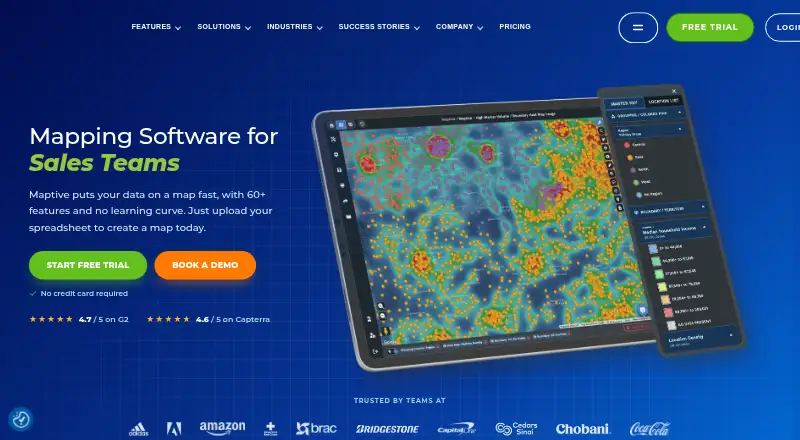
What Maptive is
Maptive is cloud-based mapping software that turns spreadsheets into interactive maps without requiring GIS skills. It accepts Excel and CSV files, Google Sheets, and data added by copy-paste or drag-and-drop. Tools include lasso selection, territory creation, boundary mapping, drive-time polygons, and driving-radius maps; route optimization supports up to 70 stops. CRM mapping supports Salesforce, HubSpot, Zoho, Pipedrive, and Keap.
Every paid plan includes more than 60 mapping and analysis tools. The platform includes US Census variables at several geographic levels, Canadian census data, and UK postcode statistics. Maps can be shared by link, embedded with HTML, or exported as PNG or PDF files up to 5120×3200 pixels. Maptive works in a browser, including on smartphones and tablets, and lists Android, iOS, Windows, and API availability. A free plan and 10-day trial are listed; pricing is listed from $250. The service is cloud-only and has no self-hosted version. The Pro plan is listed at $1,250 a year and the Team plan at $2,500 a year.
Who it suits
It suits teams that want to turn spreadsheet data into maps, plan territories, or optimize routes without GIS skills. Its browser access and CRM integrations may also fit organizations coordinating mapping across different devices or customer systems.
What it does well
- Accepts Excel, CSV, and Google Sheets data.
- Route optimization supports up to 70 stops.
- CRM mapping supports five named platforms.
- Paid plans include more than 60 tools.
- Maps can be exported as PNG or PDF.
What to know first
- There is no self-hosted version.
- The 10-day trial is limited in duration.
- Pro is listed at $1,250 a year.
- Team is listed at $2,500 a year.
Limits
The 45 Day Pass includes 1 user, 100,000 locations per data set, and 1,500 public map views per day; API access is not included. Pro includes 1 user and 3,500 public map views per day. Maptive also offers a free plan, but its limits are not detailed in the listed facts.
Plans
| Plan | Billed and limits | Price |
|---|---|---|
| Pro | $110/mo billed monthly option · 1 user · Additional users $750 each · Unlimited maps · 100,000 locations per data set · 3,500 public map views/day · API included | $110 a month |
| Team | $220/mo billed monthly option · 5 users · Additional users $500 each · Unlimited maps · 100,000 locations per data set · 5,000 public map views/day · Map collaboration · Dedicated success manager | $220 a month |
| 45 Day Pass | One-time, short-term access · 1 user · Unlimited maps · 100,000 locations per data set · 1,500 public map views/day · API access not included | $25,045, paid once |
| Enterprise | Volume-based pricing · 10+ users · Unlimited maps · Volume-based data capacity · 5,000 public map views/day · Map collaboration · Dedicated success manager · White-glove onboarding | On request |
As maptive.com lists them, read 1 Oct 2026. The maker's own page has the final word.
Getting started
- Visit https://www.maptive.com/.
- Start the 10-day trial.
- Open Maptive in a browser; no software installation is required.
- Import an Excel or CSV file, connect Google Sheets, or add data by copy-and-paste or drag-and-drop.
- Share a map by link, embed it in HTML, or export it as PNG or PDF.
Overview
Maptive is browser-based mapping software for turning spreadsheet data into interactive maps and analyzing it geographically. It is best suited to teams that need territory planning, route optimization, or demographic context without adopting a GIS workflow. Its broad mapping toolkit is compelling, but annual pricing, per-user charges, and cloud-only access narrow the fit.
Founded in 2010 and headquartered in San Francisco, Maptive runs entirely online: it requires no installation and has no self-hosted option. It spans Sales Territory Management Software, Location Intelligence Software, Interactive Map Software, and Map Creation Software.
Key features
Territory work and route planning
Every paid plan includes more than 60 mapping and analysis tools. Lasso selection, automated territory creation, boundary mapping, drive-time polygons, and driving-radius maps give users several ways to define and assess geographic areas. Route optimization handles up to 70 stops, a useful ceiling for many multi-stop planning tasks, though teams with needs beyond that limit should look elsewhere.
Imports, CRM data, and demographics
Users can import XLS, XLSX, and CSV files, connect Google Sheets directly, or bring in data by copy-paste and drag-and-drop. This accommodates common spreadsheet workflows. CRM mapping supports Salesforce, HubSpot, Zoho, Pipedrive, and Keap, reducing the need to work from a spreadsheet export when data resides in one of those systems.
Demographic coverage includes more than 50 US Census variables at state, county, ZIP, tract, and block-group levels, as well as Canadian census data and UK postcode statistics. That breadth is useful for market and territory analysis across those geographies; the stated coverage does not extend beyond them.
Sharing, access, and security
Maps can be shared by link, embedded with HTML, or exported as high-resolution PNG or PDF files up to 5120×3200 pixels. Maptive publishes security measures including 256-bit SSL encryption, multi-factor authentication, SSO, role-based access controls, audit logging, redundant backups, penetration testing, and Cloudflare endpoint protection. It also states that it passed the Salesforce AppExchange security review.
Support comes from trained mapping experts by live chat, phone, and email, Monday through Friday from 8:00 AM to 8:00 PM Eastern Time. The service is accessible in modern mobile browsers and supports iOS, Android, and Windows mobile devices, alongside web access and an API. That browser-based approach avoids installation, but organizations requiring self-hosting will need another product.
Pricing
Maptive offers a free plan and a 10-day trial. Its paid plans vary not only in cost but also in seats, public map-view allowances, API access, and collaboration features, so the least expensive entry is not automatically the best fit for a team.
- 45 Day Pass: $25,045, paid once, billed One-time. It provides one user, unlimited maps, up to 100,000 locations per data set, and 1,500 public map views per day; API access is not included. This suits a short-term, single-user project, but the one-time price and lower view allowance make it a poor match for ongoing shared use.
- Pro: $1,250,110 a year, with a $110/mo billed monthly option. It includes one user, unlimited maps, up to 100,000 locations per data set, 3,500 public map views per day, and API access. Additional users cost $750 each. Pro is the lower annual option for an individual who needs the API, but the steep per-seat charge can make adding colleagues costly.
- Team: $2,500,220 a year, with a $220/mo billed monthly option. Five users are included, with additional users at $500 each. It keeps unlimited maps and the 100,000-location data-set limit, raises the daily public-view allowance to 5,000, and adds map collaboration and a dedicated success manager. This is the more practical fit for a small group that needs shared work; it costs more than Pro but includes four additional seats and collaboration.
- Enterprise: custom pricing, billed on a volume basis. It starts at 10+ users and includes unlimited maps, volume-based data capacity, 5,000 public map views per day, map collaboration, a dedicated success manager, and white-glove onboarding. It is aimed at larger organizations that need capacity beyond the fixed data-set allowance, but the price requires a tailored quote.
The published paid-plan descriptions specify location and public-view limits, so teams should match those ceilings to their expected use before choosing a tier.
Platforms
Maptive supports web, API, Android, iOS, and Windows access. Mobile use is through modern web browsers on smartphones and tablets; the product remains cloud-only, with no self-hosted deployment. That favors teams comfortable with online access and rules out organizations that require an on-premises or self-managed installation.
Who it's for
Maptive fits spreadsheet users who need to turn location data into territories, routes, or demographic views without requiring GIS skills. A solo user can start with the Pass or Pro, while a small team has a clearer collaboration path in Team. Organizations with more than ten users or substantial data-capacity needs can consider Enterprise. It is less suitable for buyers who need self-hosting, routes beyond 70 stops, or predictable free-plan limits.
Pros and cons
- Pro: More than 60 tools combine territory analysis, demographic data, and route optimization in one paid service, giving planners several geographic workflows without separate GIS software.
- Pro: Broad spreadsheet and CRM import support helps teams map data from common files and five named CRM systems.
- Pro: Team adds collaboration and a dedicated success manager while including five users, making it more suited to shared work than the one-seat Pro plan.
- Con: Pro and Team include only one and five users respectively, and additional seats cost $750 and $500 each; growing teams need to account for those charges.
- Con: Route optimization is capped at 70 stops, and the standard paid plans cap each data set at 100,000 locations.
- Con: Cloud-only access excludes organizations that require a self-hosted deployment.
Alternatives
- Gradient Works is worth considering if a free plan is the priority: its free tier includes 1,000 credits, five rep users, one Carve scenario, Market Map, basic Bookbuilder, and analytics.
- TerraMap may suit buyers seeking a lower-priced published starting point: its Starter plan is $49 a month and includes up to three territory models, 15 territories, 10,000 data points, and two users.
- Galigeo Sales Territory Mapping is an alternative for teams considering a self-hosted option, alongside Android, iOS, web, Windows, and API platforms.
- Optymyze is another paid option for buyers comparing sales territory software.
- Forma.ai is an alternative with paid onboarding and implementation and a tailored-proposal platform plan.
- LINEN Cloud Territory Management is another paid, web-based territory management option.
- Veeva Network MDM is a paid iOS and web option for buyers comparing enterprise software.
- Nomadia Territory Manager offers a paid web-based alternative with a free trial.
Verdict
Choose Maptive if your work starts with spreadsheet or CRM data and you need a broad set of territory, route, and demographic tools in a browser. Its strongest case is the combination of those workflows with flexible imports and map sharing. Look elsewhere if self-hosting is required, 70 stops or 100,000 locations per data set is insufficient, or per-user costs make the plan economics unattractive.
Verdict
Maptive combines spreadsheet imports, territory tools, route optimization, and map sharing in a cloud service. Consider the listed plan prices and cloud-only access when deciding whether it fits your setup.
Questions
Does Maptive have a free plan or trial?
The listed facts say Maptive has a free plan and a 10-day trial.
How much does Maptive cost?
Pricing is listed from $250. Pro has a $110/mo billed monthly option; Team has a $220/mo billed monthly option.
Which platforms does Maptive support?
The listed platforms are Android, API, iOS, web, and Windows. It runs in a browser and can be accessed on smartphones and tablets.
Can I import spreadsheet data?
Yes. Maptive accepts Excel .xlsx and .xls files, CSV files, direct Google Sheets integration, copy-and-paste, and drag-and-drop uploads.
Does Maptive offer a self-hosted version?
No. Maptive is entirely cloud-based and does not offer a self-hosted version.
Which CRM integrations are listed?
CRM mapping supports Salesforce, HubSpot, Zoho, Pipedrive, and Keap.
Facts from Maptive's own pages
- Audience
- Maptive says it is built for people with a spreadsheet and a question, including teams from one-person shops to global organizations. · maptive.com, 1 Oct 2026
- Browser access
- Maptive is entirely cloud-based, requires no software installation, and does not offer a self-hosted version. · answers.maptive.com, 1 Oct 2026
- CRM integrations
- The CRM mapping feature supports Salesforce, HubSpot, Zoho, Pipedrive, and Keap data. · maptive.com, 1 Oct 2026
- Data imports
- Maptive accepts Excel .xlsx and .xls files, CSV files, direct Google Sheets integration, copy-paste, and drag-and-drop uploads. · maptive.com, 1 Oct 2026
- Demographics
- The platform includes more than 50 US Census variables at state, county, ZIP, tract, and block-group levels, plus Canadian census data and UK postcode statistics. · maptive.com, 1 Oct 2026
- Founded
- 2010 · maptive.com, 28 Sept 2026
- Headquarters
- San Francisco, California, United States · maptive.com, 28 Sept 2026
- Mapping tools
- Every paid plan includes more than 60 mapping and analysis tools. · maptive.com, 1 Oct 2026
- Mobile access
- The platform is accessible through modern web browsers on smartphones and tablets and supports iOS, Android, and Windows mobile devices. · maptive.com, 1 Oct 2026
- Product
- Maptive is online mapping software that turns spreadsheets into interactive maps without requiring GIS skills. · maptive.com, 1 Oct 2026
- Route optimization
- Route optimization supports the best route across up to 70 stops. · maptive.com, 1 Oct 2026
- Security
- Maptive publishes 256-bit SSL encryption, multi-factor authentication, SSO, role-based access controls, audit logging, redundant backups, penetration testing, and Cloudflare endpoint protection. · maptive.com, 1 Oct 2026
- Security review
- Maptive states that it passed the Salesforce AppExchange security review. · maptive.com, 1 Oct 2026
- Sharing and export
- Maps can be shared by link, embedded with HTML, and exported as high-resolution PNG or PDF files up to 5120×3200 pixels. · maptive.com, 1 Oct 2026
- Support
- Support is provided by trained mapping experts through live chat, phone, and email Monday through Friday from 8:00 AM to 8:00 PM Eastern Time. · maptive.com, 1 Oct 2026
- Territory analysis
- Features include lasso selection, automated territory creation, boundary mapping, drive-time polygons, and driving-radius maps. · maptive.com, 1 Oct 2026
Where Maptive stands on Freedom251
- Sales Territory Management Software#1 of 27
- Store Locator Software#1 of 16
- Location Intelligence Software#5 of 36
- Interactive Map Software#15 of 40
- Map Creation Software#14 of 26