Freedom251 › Sales Territory Management Software

TerraMap
What TerraMap is
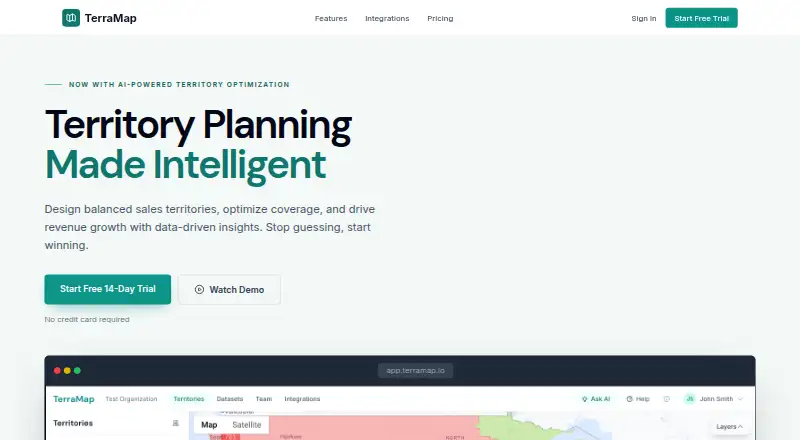
TerraMap is web-based territory planning software for sales and field service teams. Its interactive map lets users draw, merge, and split territories using ZIP codes, counties, states, or custom boundaries. CSV account lists can be imported and records assigned to territories by location. Built-in geocoding resolves addresses and indicates whether accuracy reaches a rooftop or ZIP centroid. An AI optimizer can generate territory proposals for balanced distribution, compact geography, or minimal disruption, then preview changes before they are applied. Scenario Comparison lets users examine territory models and metrics side by side before changing a live plan. The AI territory assistant responds to plain-English questions, analyzes performance, recommends improvements, and exports data or reports. Smart Filtering builds reusable filters from natural-language requests using attributes, locations, or values. Connected-data integrations listed include Salesforce, HubSpot, Snowflake, and Workday. The Free plan allows one model, five territories, 500 data points, and one user, with a single-metric optimizer and CSV import. TerraMap offers a 14-day free trial without requiring a credit card. Paid plans include Starter at $49 a month and Professional at $149 a month; Enterprise adds approval workflows and SSO using SAML or OIDC.
Who it suits
TerraMap suits sales and field service teams that need to create territory models around geographic boundaries and account locations. Teams comparing scenarios, balancing workloads, or coordinating manager review can draw on its optimizer, scenario comparison, and Enterprise approval workflows.
What it does well
- Draws, merges, and splits territories on an interactive map.
- Imports CSV accounts and assigns records by location.
- Previews AI-generated territory changes before applying them.
- Compares models and metrics side by side.
- Lists Salesforce, HubSpot, Snowflake, and Workday integrations.
- Offers a 14-day trial without a credit card.
What to know first
- The Free plan allows only one model, five territories, 500 data points, and one user.
- Starter is limited to 10,000 data points and two users.
- SSO and approval workflows are included in Enterprise.
Limits
The Free plan includes one territory model, up to five territories, 500 data points, and one user. It has a single-metric optimizer and CSV import. The 14-day trial is free and does not require a credit card.
Plans
| Plan | Billed and limits | Price |
|---|---|---|
| Professional | $1,430/year (save $358) · unlimited territory models · unlimited territories · up to 100,000 data points · up to 10 users · multi-metric optimizer · drive time balancing · CSV + CRM integrations · PDF & Excel reports · shareable territory links · priority support | $149 a month |
| Starter | $470/year (save $118) · up to 3 territory models · up to 15 territories · up to 10,000 data points · 2 users · single-metric optimizer · CSV import & export · PDF territory reports · email support | $49 a month |
| Free | 1 territory model · up to 5 territories · up to 500 data points · 1 user · single-metric optimizer · CSV import | On request |
| Enterprise | everything in Professional · unlimited data points · unlimited users · approval workflows · SSO (SAML/OIDC) · custom integrations & API · dedicated success manager · SLA guarantee | On request |
As terramap.io lists them, read 30 Sept 2026. The maker's own page has the final word.
Getting started
- Open the TerraMap website and use the web app.
- Start with the Free plan or begin the 14-day trial without a credit card.
- Import a CSV account list if you want to assign records by location.
- Draw or adjust territories using ZIP codes, counties, states, or custom boundaries.
- Select a plan that fits your model, territory, data point, and user needs.
TerraMap is web-based territory planning software for sales and field service teams. It is best suited to teams that need to shape geographic assignments, balance workloads, and compare proposed models before changing a live plan. Its strongest case is the combination of flexible map editing and scenario analysis; its free tier is too constrained for most shared team work.
Overview
Teams can draw, merge, and split territories using ZIP codes, counties, states, or custom boundaries. That makes TerraMap useful when coverage does not follow one standard geography. It imports CSV account lists and assigns records by location, while built-in geocoding shows whether an address resolves to rooftop or ZIP-centroid accuracy.
Scenario Comparison puts territory models and their metrics side by side before a team changes its live plan. The AI optimizer previews proposed changes and can target balanced distribution, compact geography, or minimal disruption. These tools support careful redesign, though the optimizer is single-metric on Free and Starter; teams weighing several constraints need Professional or Enterprise.
Key features
- Map-based territory design: Drawing, merging, and splitting across standard and custom boundaries gives planners useful control over geographic assignments.
- Planning and optimization: Scenario Comparison helps teams evaluate alternatives before committing. Professional adds multi-metric optimization and drive-time balancing, a meaningful upgrade for teams balancing more than one measure.
- Data and assistant tools: CSV imports, location assignment, and geocoding provide a route from account lists to mapped territories. The AI assistant can answer plain-English questions, analyze performance, recommend improvements, and export data or reports. Smart Filtering creates reusable natural-language filters by attribute, location, or value.
- Connections and governance: Connected-data integrations include Salesforce, HubSpot, Snowflake, and Workday. Enterprise adds manager review, comments, approval histories, rollback, and SSO via SAML or OIDC, making it the relevant tier for formal controls.
Pricing
TerraMap offers a free 14-day trial with no credit card required. The Free plan has no published price and includes one model, up to five territories, 500 data points, one user, a single-metric optimizer, and CSV import. It is suitable for an individual exploring a small territory plan, but the one-user and low data caps rule it out for team deployment.
- Starter: $49 a month, or billed $470/year (save $118). It allows up to three models, 15 territories, 10,000 data points, and two users, with a single-metric optimizer, CSV import and export, PDF reports, and email support. This fits small teams with modest planning needs, but the model and territory caps leave little room for multiple scenarios or growth.
- Professional: $149 a month, or billed $1,430/year (save $358). It includes unlimited models and territories, up to 100,000 data points and 10 users, multi-metric optimization, drive-time balancing, CSV and CRM integrations, PDF and Excel reports, shareable links, and priority support. It is the clearest fit for teams that need broader planning capacity and CRM-connected workflows; its user and data ceilings still matter for larger deployments.
- Enterprise: Custom pricing. It includes everything in Professional, unlimited data points and users, approval workflows, SSO, custom integrations and API, a dedicated success manager, and an SLA guarantee. It is aimed at organizations that need formal approvals, identity controls, or capacity beyond Professional.
The annual prices are presented as yearly billing with stated savings. The Free plan has a narrower feature set than the paid tiers, particularly in users, data, and territory capacity.
Platforms
TerraMap runs on the web. Its stated CRM synchronization and connected-data integrations make it relevant to teams working from CRM or warehouse data, while CSV import supports a simpler file-based workflow.
Who it's for
TerraMap is a strong fit for sales and field service planners who need to build geographic assignments, compare scenarios, or balance workload and quota plans. Starter suits small teams; Professional is the practical step up for multiple metrics, drive-time balancing, and CRM integrations. Teams needing approvals, SSO, unlimited users, or unlimited data should consider Enterprise. It is a weaker fit for anyone seeking a robust multi-user plan at no cost.
Pros and cons
- Pros: Flexible boundary editing accommodates territories that do not follow standard geographies; previewed optimization and side-by-side scenario comparison support review before a live change; Professional adds multi-metric and drive-time balancing alongside CRM integrations.
- Cons: Free is limited to one user, five territories, and 500 data points; Starter remains single-metric and capped at two users; larger deployments need Enterprise custom pricing for unlimited capacity and approval or SSO controls.
Alternatives
For a broader shortlist, compare Sales Territory Management Software and Sales Mapping Software. Gradient Works is worth considering if a free option with five rep users and a Market Map is more important than a free trial; its free plan is credit- and scenario-limited. Maptive may suit buyers seeking broad platform coverage and a one-time access option, though its 45 Day Pass is priced at $25,045, paid once.
Galigeo Sales Territory Mapping is another paid territory-mapping option with a free trial and a self-service offer. Optymyze is a paid alternative. Forma.ai is a paid option with tailored platform pricing and a one-time onboarding and implementation fee. LINEN Cloud Territory Management is another paid web-based option. Veeva Network MDM is a paid iOS and web option. Nomadia Territory Manager is a paid web-based option with a free trial.
Verdict
Choose TerraMap for map-based territory design when scenario comparison, optimization, and CRM-connected planning belong in the same workflow. Professional is the strongest fit for teams that need multi-metric planning and drive-time balancing; the main reason to look elsewhere is the sharp capacity ceiling on lower plans or the custom pricing required for Enterprise controls and scale.
Verdict
Choose TerraMap if your team needs map-based territory design, optimization, or comparisons between territory models. The Free plan has limited model, territory, data, and user capacity; teams needing approval workflows or SSO need Enterprise.
Questions
How much does TerraMap cost?
Starter costs $49 a month, or $470/year billed annually (save $118). Professional costs $149 a month, or $1,430/year billed annually (save $358). Prices for Free and Enterprise are not given here.
Is there a free plan or trial?
Yes. The Free plan supports one model, up to five territories, 500 data points, and one user. TerraMap also offers a 14-day free trial without a credit card.
Which platforms does TerraMap support?
TerraMap is available on the web.
What integrations are listed?
The connected-data section lists Salesforce, HubSpot, Snowflake, and Workday.
What does Enterprise add?
Enterprise includes everything in Professional, unlimited data points and users, approval workflows, SSO using SAML or OIDC, custom integrations and API, a dedicated success manager, and an SLA guarantee.
What support comes with each paid plan?
Starter includes email support, Professional includes priority support, and Enterprise includes a dedicated success manager and SLA guarantee.
Facts from TerraMap's own pages
- AI optimization
- The AI optimizer generates territories for balanced distribution, compact geography, or minimal disruption and previews changes before applying them. · terramap.io, 30 Sept 2026
- Approval controls
- Enterprise workflows support manager review, comments, approval status history, and rollback to previous versions. · terramap.io, 30 Sept 2026
- Assistant
- The AI territory assistant answers plain-English questions, analyzes performance, recommends improvements, and exports data or reports. · terramap.io, 30 Sept 2026
- Data import
- TerraMap imports CSV account lists and assigns records to territories by location. · terramap.io, 30 Sept 2026
- Filtering
- Smart Filtering creates natural-language filters by attribute, location, or value and can save filters for reuse. · terramap.io, 30 Sept 2026
- Geocoding
- Built-in geocoding resolves addresses with accuracy shown down to rooftop or ZIP centroid. · terramap.io, 30 Sept 2026
- Integrations
- The connected-data section lists Salesforce, HubSpot, Snowflake, and Workday integrations. · terramap.io, 30 Sept 2026
- Purpose
- TerraMap is territory planning software for sales and field service teams. · terramap.io, 30 Sept 2026
- Scenario planning
- Scenario Comparison lets users compare territory models and metrics side by side before changing the live plan. · terramap.io, 30 Sept 2026
- Security
- The Enterprise plan includes SSO using SAML or OIDC. · terramap.io, 30 Sept 2026
- Support
- Starter includes email support, Professional includes priority support, and Enterprise includes a dedicated success manager and SLA guarantee. · terramap.io, 30 Sept 2026
- Trial
- TerraMap advertises a free 14-day trial with no credit card required. · terramap.io, 30 Sept 2026
- Visual builder
- Users can draw, merge, and split territories on an interactive map using ZIP codes, counties, states, or custom boundaries. · terramap.io, 30 Sept 2026
Where TerraMap stands on Freedom251
- Sales Territory Management Software#4 of 27
- Sales Mapping Software#11 of 33