Freedom251 › Map Creation Software

MapHub
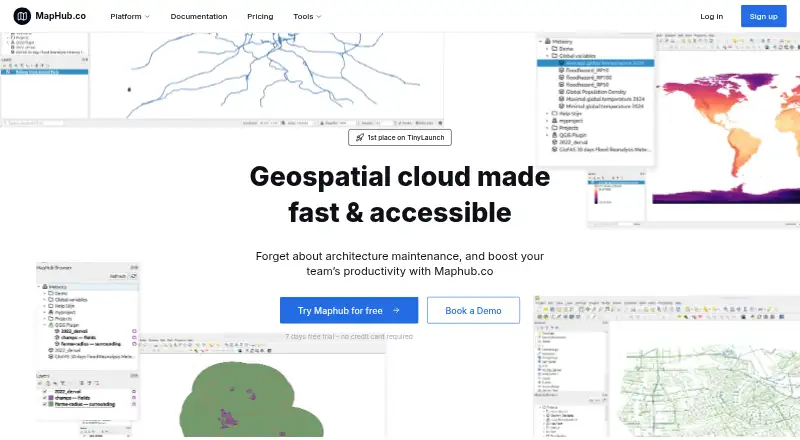
What MapHub is
MapHub is a geospatial cloud for storing datasets and accessing them through a browser or QGIS. It organizes geospatial data as a cloud catalog, with sharing through map links, website embeds, or tiling URLs for external applications. Teams can create an organization, invite members, and manage project access. MapHub supports formats including Shapefiles, GeoJSON, and TIFFs, and says it uses cloud-optimized PMTiles and COG by default. Its kepler.gl-based tools let users filter, style, analyze, and interact with data. A QGIS plugin supports importing and combining files and saving data to the cloud. Developer options include a Python package, CLI, API, and MCP integration; the Python wrapper is early-stage with limited endpoint support. External tiling URLs pass raster colormap settings, while vector URLs provide geometries and properties without custom visualization settings. Explorer is free, with 3Gb of storage and limited tool access. Plus costs $15 a month and Professional costs $45 a month. A 7-day free trial is available without a credit card.
Who it suits
MapHub suits people and teams who store, work with, and share geospatial datasets through a browser or QGIS. It also offers developer tools for integrating with its data services.
What it does well
- Supports major geospatial formats
- QGIS plugin moves files between tools
- Team projects include access management
- Map links and website embeds supported
- Seven-day trial requires no credit card
What to know first
- Python wrapper is early-stage with limited endpoint support
- Vector tiling URLs omit custom visualization settings
- Explorer has limited tool access
Limits
The Explorer plan includes 3Gb of cloud storage and limited access to tools. The Python wrapper has limited endpoint support, and vector tiling URLs do not carry custom visualization settings.
Plans
| Plan | Billed and limits | Price |
|---|---|---|
| Plus | 15Gb cloud storage · Unlimited access to tools · Unlimited team seats · Member access management | $15 a month |
| Professional | 50Gb cloud storage · Role-based access control · Centralized billing · Priority customer support | $45 a month |
| Business | Custom cloud storage · Custom pricing · Flexible payment options · Dedicated customer support | On request |
| Explorer | 3Gb cloud storage · QGIS plugin integration · Limited access to tools | On request |
As maphub.co lists them, read 3 Oct 2026. The maker's own page has the final word.
Getting started
- Open the MapHub website
- Start the 7-day trial without a credit card or choose the free plan
- Create an organization and invite team members
- Upload geospatial datasets in supported formats
- Connect QGIS with the MapHub plugin or use browser tools
- Share maps through links, embeds, or tiling URLs
Verdict
MapHub brings dataset storage, visualization, sharing, and QGIS workflows into a geospatial cloud catalog. Consider its vector URL limitation and the Python wrapper’s early-stage status if those functions matter to your work.
Questions
Is MapHub free?
Yes. MapHub offers a free plan. A 7-day free trial is also offered without a credit card.
What are the paid plan prices?
Plus costs $15 a month, and Professional costs $45 a month. Business uses custom pricing.
Which formats can MapHub handle?
The maker lists formats including Shapefiles, GeoJSON, and TIFFs. Export formats include TIF, FGB, GeoJSON, SHP, GPKG, XLSX, XYZ Tiles, and Vector Tiles.
Can teams collaborate?
Yes. Teams can create an organization, invite members, and manage access to projects.
Does it integrate with QGIS?
Yes. A QGIS plugin supports importing, combining, and saving files between MapHub and QGIS.
What developer tools are available?
MapHub lists a Python package, CLI, API, and MCP integration. The Python wrapper is described as early-stage with limited endpoint support.
Facts from MapHub's own pages
- Catalog
- The service turns geospatial data into a cloud catalog accessible anywhere. · maphub.co, 3 Oct 2026
- Cloud optimization
- MapHub says it automatically uses cloud-optimized formats such as PMTiles and COG by default. · maphub.co, 3 Oct 2026
- Collaboration
- Users can create an organization, invite their team, and manage access to projects. · maphub.co, 3 Oct 2026
- Developer tools
- The maker lists a Python package, CLI, API, and MCP integration; its Python wrapper is described as early-stage with limited endpoint support. · maphub.co, 3 Oct 2026
- Formats
- The maker says MapHub supports major geospatial formats, including Shapefiles, GeoJSON, and TIFFs. · maphub.co, 3 Oct 2026
- Map sharing limitation
- External tiling URLs pass raster colormap settings, while vector URLs provide geometries and properties without custom visualization settings. · maphub.co, 3 Oct 2026
- Purpose
- MapHub.co is a geospatial cloud for storing datasets and accessing them through a browser or QGIS. · maphub.co, 3 Oct 2026
- QGIS integration
- A QGIS plugin supports moving files between MapHub and QGIS, including importing, combining, and saving data to the cloud. · maphub.co, 3 Oct 2026
- Security
- The maker describes MapHub as offering a shared and secure workspace for teams to access, upload, and visualize geospatial datasets. · maphub.co, 3 Oct 2026
- Sharing
- Users can share a map link, embed a map in a website, or use a tiling URL in external applications. · maphub.co, 3 Oct 2026
- Support
- The Professional plan includes priority customer support, and the Business plan includes dedicated customer support. · maphub.co, 3 Oct 2026
- Trial
- The homepage offers a 7-day free trial and says no credit card is required. · maphub.co, 3 Oct 2026
- Visualization
- MapHub lets users filter, style, analyze, and interact with data using kepler.gl. · maphub.co, 3 Oct 2026
Where MapHub stands on Freedom251
- Map Creation Software#11 of 26