Freedom251 › Email Design Software
MailStyler
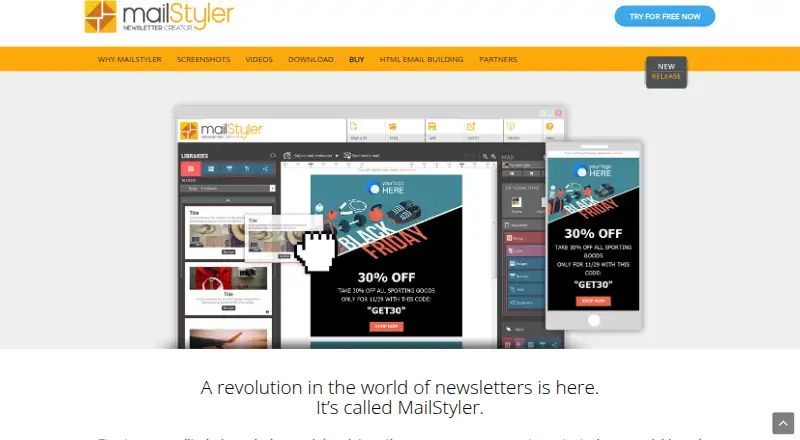
What MailStyler is
MailStyler is desktop software for creating newsletter and email templates with a drag-and-drop editor. It generates responsive HTML newsletters with inline CSS, and lets users rearrange or remove blocks and add elements from personal or software libraries. Image tools support repositioning and resizing pictures within frames and applying image and text effects. Ready-to-customize templates are included. Templates can be exported for Gmail, Thunderbird and Outlook, with compatibility also listed for eMailChef, SendBlaster and Mailchimp. Users can save or open templates through Dropbox, Google Drive and OneDrive. Export formats include EML and HTML, and the features page also lists PDF. The free demo is available indefinitely, but its exported files are scrambled and cannot be used as finished exports. MailStyler runs on Windows; there is no native Mac version, though the FAQ provides instructions for running it on OS X. Paid licenses include assistance and updates for the first year. After that, the software continues to work, while assistance and updates may be extended for a fee.
Who it suits
MailStyler suits Windows users who want a visual editor for creating and exporting newsletter templates. Its free demo can help explore the editor, but its exports are not usable as finished files.
What it does well
- Drag-and-drop editing with reusable content blocks
- Generates responsive HTML with inline CSS
- Supports EML, HTML and PDF exports
- Templates can connect to cloud storage services
- Paid licenses include first-year assistance and updates
What to know first
- Free demo exports are scrambled and unusable as finished templates
- No native Mac version
- Basic license is limited to one computer
- Updates and assistance after the first year may cost extra
Limits
The free demo is available indefinitely, but exported files are scrambled and cannot be used as finished exports; its image library and template gallery are limited. Basic provides unlimited exports but no cloud space and limited image and template libraries. Paid plans include assistance and updates for the first year.
Plans
| Plan | Billed and limits | Price |
|---|---|---|
| MailStyler Free Demo | Lifetime license · No license required · trial exports are scrambled · limited image library · limited template gallery | Free |
| MailStyler Pro | One-off payment; lifetime license · Unlimited exports · unlimited cloud space · over 3.5 million images · full template gallery · 1 computer · assistance and updates for 1 year | $19,900, paid once |
| MailStyler Basic | One-off payment; lifetime license · Unlimited exports · no cloud space · limited image library and template gallery · 1 computer · assistance and updates for 1 year | $9,900, paid once |
| MailStyler Server | One-off payment; lifetime license · Unlimited exports · unlimited cloud space · over 3.5 million images · full template gallery · 1 Windows Server and up to 25 clients · assistance and updates for 1 year | On request |
As newslettercreator.com lists them, read 9 Oct 2026. The maker's own page has the final word.
Getting started
- Visit the MailStyler website.
- Choose the free demo or a paid lifetime license.
- Download the software for Windows, or follow the FAQ instructions for running it on OS X.
- Create or customize a template in the drag-and-drop editor.
- Export the finished template in a supported format or for a listed email service.
MailStyler is desktop software for building newsletter and email templates with a drag-and-drop editor. It suits people who want to design reusable layouts on a computer rather than work in a browser-based builder. Its strongest case is visual editing paired with responsive HTML export, but finished exports require a paid license and Mac users lack a native version.
Overview
The editor lets you assemble templates from ready-made designs, adjust reusable blocks, and save or reopen work through Dropbox, Google Drive, or OneDrive. MailStyler is focused on producing templates, not sending campaigns: it can export to Gmail, Thunderbird, and Outlook, and its features page names compatibility with eMailChef, SendBlaster, and Mailchimp.
Key features
MailStyler generates responsive newsletters as HTML with inline CSS, a practical format for moving a design into an email workflow. Users can move or remove block items and add elements from personal or software libraries, making reusable content a meaningful part of the editor rather than a one-off layout tool.
Image controls cover repositioning and resizing within frames, plus image and text effects. Professionally designed templates provide a starting point, while Pro and Server licenses include the full gallery and a library of more than 3.5 million images. Basic and the free demo have limited template and image libraries, so users who depend on broad asset choice will need to pay more.
Exports include EML and HTML, with PDF also named on the features page. The demo can be used indefinitely, but its exported files are scrambled and cannot serve as finished work. That makes it useful for exploring the editor, not for producing deployable templates.
Pricing
MailStyler uses a freemium model. The free demo costs nothing and requires no license, but has a limited image library and template gallery and scrambles exports. There is no free trial.
- Basic: $9,900, paid once, a one-off payment for a lifetime license. It includes unlimited exports and one computer, but no cloud space and limited image and template libraries. Assistance and updates are included for the first year. This is the entry paid option for someone who can manage files locally and does not need the full asset collections.
- Pro: $19,900, paid once, a one-off payment for a lifetime license. It adds unlimited cloud space, more than 3.5 million images, and the full template gallery, while remaining limited to one computer. It fits a solo designer who expects to use those resources regularly.
- Server: $149,900, paid once, a one-off payment for a lifetime license. It includes the Pro features and supports one Windows Server and up to 25 clients, making it the relevant tier for a multi-client or server setup.
Paid licenses continue to work after the first year, but assistance and updates may require a fee to extend. The one-computer cap on Basic and Pro is important for anyone expecting to use the software across multiple machines.
Platforms
MailStyler is Windows-focused: the download page names Windows 8, 8.1, 10, and 11, as well as Windows Server 2016 and 2019. There is no native Mac version. The FAQ describes a way to run it on OS X by following linked instructions, but that is not equivalent to native Mac support.
Who it's for
MailStyler is a sensible fit for Windows users who want a visual desktop editor, reusable blocks, responsive HTML, and a choice of local or cloud storage. Basic works for users willing to accept restricted asset libraries; Pro is the more complete single-user choice. The Server plan is aimed at Windows Server use with up to 25 clients. It is a poor fit for anyone who needs usable free exports, native Mac software, or a low-cost recurring plan.
Pros and cons
- Pro: Responsive HTML with inline CSS and EML export support moving designed templates into common email workflows.
- Pro: Reusable blocks, image controls, and ready-made layouts support repeatable template production.
- Con: Free-demo exports are scrambled, so there is no usable free production tier.
- Con: Basic and Pro are restricted to one computer, and their lifetime licenses include assistance and updates for only the first year.
- Con: Mac users have no native version, and OS X use depends on following the FAQ's instructions.
Alternatives
Email Design Software is a broader category directory for comparing tools. Choose Canary instead if you want a free email client with a unified inbox and email templates across mobile, desktop, web, and browser extension platforms. MJML is the better fit for developers seeking an open-source email framework and a free-to-use REST API rather than a visual desktop editor.
Choose Mail Designer 365 if its Mac-oriented offering and monthly plan better suit your workflow. Mail Studio is another option for Linux, Mac, and Windows users, with a free plan restricted to non-commercial use and paid monthly plans. Pick Beefree (now RGE Studio) if you want a web-based builder with a free Starter tier capped at 10 designs and 6 exports per month. Blocks Edit is an alternative web-based option with plans that include storage or multiple users. Consider Dragble for a web, API, or self-hosted builder whose free tier caps projects, storage, and core blocks. EmailBuilder.ai offers a browser-based alternative with a free Playground tier that caps emails, templates, assistant calls, and sends or exports.
Verdict
Choose MailStyler if you work on Windows and want a desktop tool for reusable, visually edited newsletter templates with responsive HTML output. The paid licenses unlock usable exports, with Pro the clearest choice for a solo user who needs the full image and template libraries. Look elsewhere if you need a native Mac app, usable free exports, or a plan priced monthly rather than a substantial one-off payment.
Verdict
MailStyler provides visual template editing, responsive HTML output and several export and storage options. Choose a paid license for usable exports, and account for the Windows-focused platform support.
Questions
Is there a free plan?
Yes. The MailStyler Free Demo costs nothing and has no license requirement. Its exports are scrambled, and its image library and template gallery are limited.
How much do paid plans cost?
Basic is $9,900, paid once, Pro is $19,900, paid once, and Server is $149,900, paid once. Each is described as a one-off payment for a lifetime license.
Which platforms does MailStyler support?
The listed platforms are macOS and Windows. There is no native Mac version, though the FAQ says users can run it on OS X by following linked instructions; Windows requirements include Windows 8, 8.1, 10, and 11, plus Windows Server 2016 and 2019.
What can I export?
MailStyler saves templates in EML and HTML, and PDF export is also listed. Templates can be exported for Gmail, Thunderbird, and Outlook, with compatibility also listed for eMailChef, SendBlaster, and Mailchimp.
What is included with a paid license?
Paid licenses are lifetime licenses and include assistance and updates for the first year. After that, the software continues to work, and assistance and updates may be extended for a fee.
Can templates use cloud storage?
Templates can be saved to or opened from Dropbox, Google Drive, and OneDrive. Basic has no cloud space; Pro and Server include unlimited cloud space.
Facts from MailStyler's own pages
- Cloud storage
- Templates can be saved to or opened from Dropbox, Google Drive, and OneDrive. · newslettercreator.com, 9 Oct 2026
- Custom blocks
- Users can edit blocks, move or delete items, and add elements from personal or software libraries. · newslettercreator.com, 9 Oct 2026
- Email integrations
- Templates can be exported to Gmail, Thunderbird, and Outlook, and the features page lists compatibility with eMailChef, SendBlaster, and Mailchimp. · newslettercreator.com, 9 Oct 2026
- Export formats
- The software can save templates in EML and HTML formats, and the features page also lists PDF export. · newslettercreator.com, 9 Oct 2026
- Free demo limit
- The free demo is available indefinitely, but exported files appear scrambled and cannot be used as finished exports. · newslettercreator.com, 9 Oct 2026
- Headquarters
- San Diego, California, United States · newslettercreator.com, 28 Sept 2026
- Image editing
- The editor lets users reposition and resize images within frames and apply image and text effects. · newslettercreator.com, 9 Oct 2026
- Mac support
- There is no native Mac version, though the FAQ says users can run it on OS X by following the linked instructions. · newslettercreator.com, 9 Oct 2026
- Privacy and GDPR
- The maker's GDPR page says its document explains what data Delivery Tech collects, why, how long it is kept, where it is stored, and how users can manage, export, or delete it. · newslettercreator.com, 9 Oct 2026
- Purpose
- MailStyler is desktop software for creating newsletter and email templates with a drag-and-drop editor. · newslettercreator.com, 9 Oct 2026
- Responsive HTML
- The software automatically generates responsive newsletters using HTML with inline CSS. · newslettercreator.com, 9 Oct 2026
- Support and updates
- Paid licenses include assistance and updates for the first year; after that, the software continues to work and assistance and updates may be extended for a fee. · newslettercreator.com, 9 Oct 2026
- Templates
- MailStyler includes ready-to-customize templates created by professional graphic designers. · newslettercreator.com, 9 Oct 2026
- Windows requirements
- The download page lists Windows 8, 8.1, 10, and 11, plus Windows Server 2016 and 2019, among its system requirements. · newslettercreator.com, 9 Oct 2026
Where MailStyler stands on Freedom251
- Email Design Software#15 of 63