Freedom251 › Email Design Software
Canary
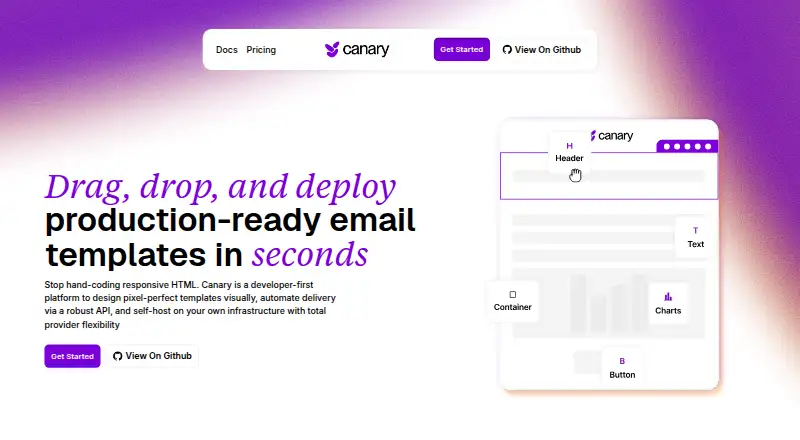
What Canary is
Canary Mail is an email client that connects to accounts users already have; it does not provide or host email accounts. It supports Gmail, Outlook, iCloud, Exchange, and IMAP accounts on Android, iOS, macOS, Windows, web, and extension platforms. A unified inbox, priority and unread views, selective notifications, snooze, pinning, and cleanup tools help organize messages. Growth and Pro+ include AI Copilot, which can draft replies, suggest subject lines, revise messages in a chosen tone, summarize threads, and search across accounts. The maker says email is not used to train AI models, and triage and indexing run on the device. Asana and Todoist integrations can turn emails into tasks. Pro+ adds PGP encryption and SecureSend, which can password-protect messages and set expiration. Canary says tracker blocking is on by default and phishing detection checks suspicious links and spoofed senders. The maker describes it as intended mainly for individuals and small teams, not as a full helpdesk platform. Free is available; Growth costs $36 a year and Pro+ costs $100 a year. A seven-day trial requires no credit card and does not auto-bill.
Who it suits
It suits individuals and small teams who want to manage existing mail accounts in one client. Teams needing a full helpdesk platform should note that Canary is not described as one.
What it does well
- Connects Gmail, Outlook, iCloud, Exchange, and IMAP accounts.
- AI Copilot can summarize threads and draft replies.
- Triage and indexing run on the device.
- Includes Asana and Todoist integrations.
- Seven-day trial requires no card and does not auto-bill.
What to know first
- Does not provide or host email accounts.
- Growth costs $36 a year.
- Pro+ costs $100 a year.
- Not a full helpdesk platform.
Limits
Free does not include AI Copilot, which is listed with Growth and Pro+. PGP encryption and SecureSend are listed with Pro+.
Plans
| Plan | Billed and limits | Price |
|---|---|---|
| Free | Free forever · Core inbox · Unified Inbox · Read Receipts (Lite) · Snooze & Pin · Email Templates · Inbox Zero · Basic Customization · Unlimited Mail Accounts | Free |
| Pro+ | Billed yearly at $100/year - 2 months free · Everything in Growth · PGP Encryption · SecureSend Encryption (HIPAA) · Phishing & Ransomware · Impersonation detection · Misdirection Prevention · Priority Support | $100 a year |
| Growth | Billed yearly at $36/year · Everything in Free · AI Copilot · Read Receipts · Send Later · Calendar & Scheduling · Inbox Cleaner · App Integrations · Advanced Customization | $36 a year |
As canarymail.dev lists them, read 4 Oct 2026. The maker's own page has the final word.
Getting started
- Visit https://www.canarymail.dev/.
- Choose a supported platform: Android, extension, iOS, macOS, web, or Windows.
- Connect an existing Gmail, Outlook, iCloud, Exchange, or IMAP account.
- Start with the Free plan or use the 7-day trial without a credit card.
- Upgrade to Growth or Pro+ for their additional features; paid subscriptions are yearly, and lifetime purchases are also available.
Overview
Canary Mail brings existing email accounts together in a client rather than hosting mail itself. It suits individuals and small teams looking to organize several inboxes, with AI and security options for those who need them. Its Free plan covers core inbox management; the key trade-off is that Copilot and stronger security are reserved for paid tiers.
Key features
Canary connects Gmail, Outlook, iCloud, Exchange, and IMAP accounts in a unified inbox. Priority and unread views, selective notifications, snooze, pinning, and cleanup tools give users several ways to sort and control incoming mail. Free also includes templates, Inbox Zero, basic customization, and Lite read receipts, making it a useful starting point for people who want better inbox organization without a subscription.
Growth adds AI Copilot for drafting replies, suggesting subject lines, rewriting messages in a chosen tone, summarizing threads, and searching across accounts. The maker says email is not used to train AI models and that triage and indexing run on the device. Those are relevant safeguards for privacy-conscious users, though they are distinct from the encryption features available only in Pro+.
Growth also adds Send Later, calendar and scheduling tools, inbox cleaning, and direct Asana and Todoist integrations for turning emails into tasks. These tools can help people who use email to manage work, but Canary is still an email client, not a full helpdesk platform. Pro+ adds PGP and SecureSend encryption; SecureSend can password-protect messages and set them to expire. It also includes tracker blocking, phishing detection, and protections against impersonation and misdirected messages. The maker says Canary supports HIPAA compliance and offers a BAA on request.
Pricing
Free costs nothing and is billed Free forever. It includes the core inbox, unified inbox, Lite read receipts, snooze and pin, templates, Inbox Zero, basic customization, and unlimited mail accounts. The main compromise is giving up Copilot, scheduling, integrations, and the advanced security features in paid plans.
Growth costs $36 a year, billed yearly at $36/year. It includes everything in Free plus AI Copilot, full read receipts, Send Later, calendar and scheduling, Inbox Cleaner, app integrations, and advanced customization. It fits individuals who want AI assistance and workflow tools without paying for Pro+ encryption and threat protections.
Pro+ costs $100 a year, billed yearly at $100/year, with 2 months free. It includes everything in Growth plus PGP, SecureSend encryption, phishing and ransomware protection, impersonation detection, misdirection prevention, and priority support. It is the tier for users who need these additional protections; otherwise, Growth is the less expensive way to get Copilot and productivity features.
A 7-day trial requires no credit card, does not auto-bill, and downgrades to Free unless the user upgrades. Paid subscriptions are yearly, and lifetime purchases are also available. Support is provided by ticket.
Platforms
Canary is available on Android, iOS, macOS, Windows, web, and as an extension, giving users a choice of desktop, mobile, and browser access.
Who it's for
Canary is a good fit for individuals and small teams who want to consolidate accounts, keep email organized, and optionally add AI or encryption. It is less suitable for organizations seeking a full helpdesk platform or for users who need Pro+ protections but do not want to pay the highest subscription price.
Pros and cons
- Pros: Free includes unlimited mail accounts and core organization tools, so users can consolidate inboxes without paying.
- Pros: Growth combines Copilot with scheduling, cleanup, and Asana and Todoist integrations for email-centered workflows.
- Pros: Pro+ adds message encryption and several threat protections, while SecureSend can password-protect messages and set expiry.
- Cons: Copilot and the productivity additions require Growth, while encryption and advanced threat protections require Pro+.
- Cons: Paid plans are yearly subscriptions, which may not suit users who want a monthly option.
- Cons: Canary is not a full helpdesk, limiting its fit for teams that need one.
Alternatives
For email-template work rather than managing inboxes, consider MJML, an open-source option with a free-to-use REST API. Blocks Edit is another option in the email design category. Dragble is also an alternative for email design. Foundation for Emails is another option to consider. MailEditor is an alternative for email-template work. Mosaico is a free, open-source email template builder under the GPL license. Postcards is another email-template option. Serious Email Studio is another alternative for email templates. For a broader selection, browse Email Template Software or Email Design Software.
Verdict
Choose Canary if you want one client for several existing accounts, with a capable free inbox and the option to add AI tools as your workflow grows. Growth is the practical step up for Copilot and productivity features; Pro+ is worth considering when its encryption and threat protections matter. Look elsewhere if you need a full helpdesk rather than an email client.
Verdict
Canary Mail combines multi-account inbox tools with AI features and optional encryption on Pro+. Its plans distinguish basic inbox features from Copilot and security tools, so check which tier includes the capabilities you need.
Questions
Does Canary Mail have a free plan?
Yes. Free costs nothing and is billed Free forever. It includes core inbox tools and unlimited mail accounts.
What do the paid plans cost?
Growth is $36 a year. Pro+ is $100 a year.
Is there a free trial?
Yes. The 7-day trial requires no credit card and has no auto-billing; it downgrades to Free unless the user upgrades.
Which email accounts and platforms does Canary support?
It supports Gmail, Outlook, iCloud, Exchange, and IMAP accounts. Platforms are Android, extension, iOS, macOS, web, and Windows.
Is Canary Mail open source?
The pricing note describes Canary Mail as open source.
Who makes Canary Mail, and does it offer support?
The site provides ticket support. It lists [email protected] for BAA requests and vulnerability reports.
Facts from Canary's own pages
- Account support
- It supports Gmail, Outlook, iCloud, Exchange, and IMAP accounts. · web.canarymail.io, 4 Oct 2026
- AI Copilot
- AI Copilot can draft replies, suggest subject lines, rewrite messages in a selected tone, summarize threads, and search across accounts. · web.canarymail.io, 4 Oct 2026
- AI privacy
- The maker says email is not used to train AI models, and triage and indexing run on the device. · web.canarymail.io, 4 Oct 2026
- API authentication
- Programmatic requests use API keys in the X-API-Key header, with scoped permissions such as send. · feezyhendrix.github.io, 14 Oct 2026
- API documentation
- The documentation links to an API reference and describes OpenAPI/Swagger documentation for actions. · canarymail.dev, 14 Oct 2026
- Authentication options
- Dashboard access supports Google and GitHub OAuth in addition to API-key authentication. · feezyhendrix.github.io, 14 Oct 2026
- Block library
- The editor documents 19 block types covering basic content, layouts, media, advanced HTML, and charts. · feezyhendrix.github.io, 14 Oct 2026
- Compliance
- The maker says Canary Mail supports HIPAA compliance and offers a BAA on request. · web.canarymail.io, 4 Oct 2026
- Delivery queue
- Email sending runs asynchronously through a job queue with automatic retries. · feezyhendrix.github.io, 14 Oct 2026
- Developer ports
- The local setup exposes the web app on port 3000, the API on 3001, Swagger at /docs, and MinIO on 9001. · feezyhendrix.github.io, 14 Oct 2026
- Direct integrations
- Canary Mail lists Asana and Todoist as direct integrations for turning emails into tasks. · canarymail.io, 4 Oct 2026
- Dynamic charts
- Chart blocks support bar, line, area, pie, and doughnut visualizations with static or runtime data. · feezyhendrix.github.io, 14 Oct 2026
- Email logs
- The logs API supports pagination, filtering, delivery statistics, detailed records, and resending failed or bounced messages. · feezyhendrix.github.io, 14 Oct 2026
- Email providers
- Documented adapters include SendGrid, Resend, Mailgun, Amazon SES, Postmark, and generic SMTP. · feezyhendrix.github.io, 14 Oct 2026
- Encryption
- Pro+ includes PGP encryption and SecureSend, which can password-protect messages and set them to expire. · web.canarymail.io, 4 Oct 2026
- Inbox tools
- The product includes a unified inbox, priority and unread views, selective notifications, snooze, pinning, and inbox cleanup tools. · web.canarymail.io, 4 Oct 2026
- Limit: adapter dependency
- Sending fails when no active email adapter is configured. · feezyhendrix.github.io, 14 Oct 2026
- Limit: infrastructure burden
- Self-hosting requires operating several services, including PostgreSQL, Redis, MinIO, and Gotenberg. · feezyhendrix.github.io, 14 Oct 2026
- Limit: missing variables
- Undeclared or absent template variables render as empty strings unless defaults are supplied. · feezyhendrix.github.io, 14 Oct 2026
- Limit: resend scope
- The logs API only permits resending messages whose status is failed or bounced, and the original template must still exist. · feezyhendrix.github.io, 14 Oct 2026
- Open-source status
- The official site and documentation describe Canary as open source and self-hostable. · canarymail.dev, 14 Oct 2026
- PDF templates
- Templates can generate PDF versions and attach those PDFs to outbound emails. · feezyhendrix.github.io, 14 Oct 2026
- Personalization
- Handlebars variables, nested values, conditionals, loops, and helper functions are supported. · feezyhendrix.github.io, 14 Oct 2026
- Platforms
- The app is available for macOS, iOS, Android, and Windows, and its Chrome extension is for read receipts only. · web.canarymail.io, 4 Oct 2026
Where Canary stands on Freedom251
- Email Design Software#1 of 63
- Email Template Software#1 of 26