Freedom251 › Email Design Software

MailForge
What MailForge is
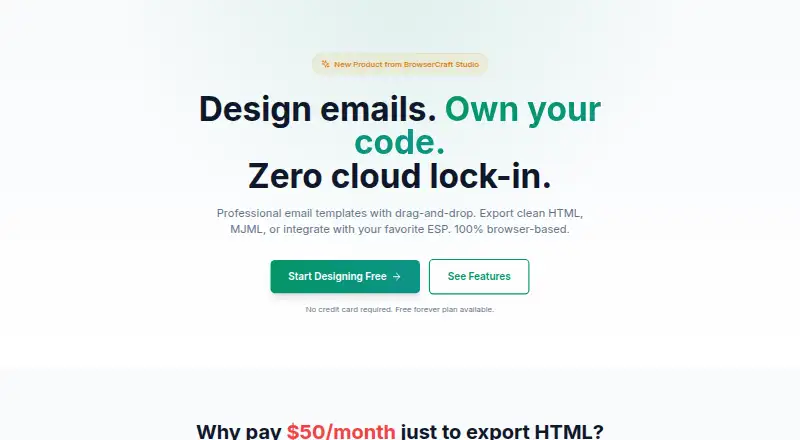
MailForge is a web-based editor for designing email templates with drag-and-drop blocks and exporting them as HTML or MJML. Its visual builder uses pre-built blocks and does not require coding. Users can import MJML files and convert them into editable blocks; raw HTML paste is listed as a future item. Designs are processed in the browser, and the maker says email content is not sent to a server and projects are kept in local storage. After the page loads, MailForge can work offline. Exports include HTML with inline CSS and MJML source, with presets for Mailchimp and Klaviyo merge tag syntax. The maker says standard HTML works with services including Mailchimp, Klaviyo, SendGrid, and ConvertKit. An AI assistant runs a lightweight model in the browser; advanced features can optionally use the customer’s OpenAI API key. Free includes five exports per month and three projects. Pro costs $12/month, and Team costs $29/month; Team includes five seats, shared blocks, project folders, and an activity log.
Who it suits
MailForge suits people creating email templates with visual blocks rather than code. Its Team plan is aimed at teams collaborating on email design.
What it does well
- Drag-and-drop builder uses pre-built blocks.
- Can work offline after the page loads.
- Processes designs in the browser.
- Exports HTML with inline CSS and MJML.
- Team plan includes five seats and shared blocks.
What to know first
- Free plan is limited to five monthly exports.
- Free plan is limited to three projects.
- Raw HTML paste is listed as a future item.
- Custom code editing is not supported.
Limits
The Free plan includes five exports per month and three projects. Pro removes those caps; Team includes five team seats.
Plans
| Plan | Billed and limits | Price |
|---|---|---|
| Free | $0 forever · 5 exports per month · 3 projects · all block types · HTML & MJML export · email preview | Free |
| Pro | $12/month · Unlimited exports · unlimited projects · AI assistant · custom block library · Mailchimp & Klaviyo export · priority support | $12 a month |
| Team | $29/month · Everything in Pro · 5 team seats · shared block library · team project folders · activity log · priority support | $29 a month |
| Pro | $99/year · Unlimited exports · unlimited projects · AI assistant · custom block library · Mailchimp & Klaviyo export · priority support | $99 a year |
As browsercraftstudio.com lists them, read 7 Oct 2026. The maker's own page has the final word.
Getting started
- Open https://browsercraftstudio.com/mailforge in a browser.
- Start with the Free plan, which includes three projects and five monthly exports.
- Import an MJML file to convert it into editable blocks, or create a design with the visual builder.
- Export the design as HTML or MJML.
- Choose Pro for unlimited exports and projects, or Team for five seats and collaboration features.
Verdict
MailForge offers a visual route to email templates, with browser-based processing and HTML or MJML export. Check the free plan’s export and project caps, or consider the paid plans for higher limits and collaboration features.
Questions
Is MailForge free?
Yes. The Free plan is listed as free and includes five exports per month and three projects.
What does Pro cost?
Pro is listed at $12 a month. It includes unlimited exports and projects, an AI assistant, a custom block library, Mailchimp and Klaviyo export options, and priority support.
What does the Team plan include?
Team is listed at $29 a month. It includes five seats, a shared block library, team project folders, an activity log, and priority support.
Which platforms does MailForge support?
The listed platform is web.
Can MailForge export email designs?
Yes. It exports HTML with inline CSS and MJML source code.
Which email services are named as compatible?
The maker says generated standard HTML works with Mailchimp, Klaviyo, SendGrid, and ConvertKit.
Facts from MailForge's own pages
- AI assistant
- The AI assistant runs a lightweight model in the browser using WebAssembly, and advanced features can optionally use the customer's OpenAI API key. · browsercraftstudio.com, 7 Oct 2026
- Builder
- Its visual builder uses pre-built blocks and requires no coding. · browsercraftstudio.com, 7 Oct 2026
- Exports
- MailForge exports clean HTML with inline CSS and MJML source code, with presets for Mailchimp and Klaviyo merge tag syntax. · browsercraftstudio.com, 7 Oct 2026
- Free plan limit
- The Free plan includes 5 exports per month and 3 projects. · browsercraftstudio.com, 7 Oct 2026
- Import limit
- Users can import MJML files for conversion into editable blocks; raw HTML paste is listed as on the roadmap. · browsercraftstudio.com, 7 Oct 2026
- Integrations
- The maker says generated standard HTML works with ESPs including Mailchimp, Klaviyo, SendGrid, and ConvertKit. · browsercraftstudio.com, 7 Oct 2026
- Offline use
- After the page loads, MailForge works offline and processes designs in the browser. · browsercraftstudio.com, 7 Oct 2026
- Privacy
- The maker says email content is never sent to a server and projects are stored in the browser's local storage. · browsercraftstudio.com, 7 Oct 2026
- Purpose
- MailForge is a browser-based drag-and-drop tool for designing email templates and exporting HTML or MJML. · browsercraftstudio.com, 7 Oct 2026
- Support
- The Pro and Team plans list priority support. · browsercraftstudio.com, 7 Oct 2026
- Team plan
- The Team plan is described for teams collaborating on email design and includes 5 team seats, shared blocks, project folders, and an activity log. · browsercraftstudio.com, 7 Oct 2026
Where MailForge stands on Freedom251
- Email Design Software#16 of 63