Freedom251 › Email Design Software

Mail Designer 365
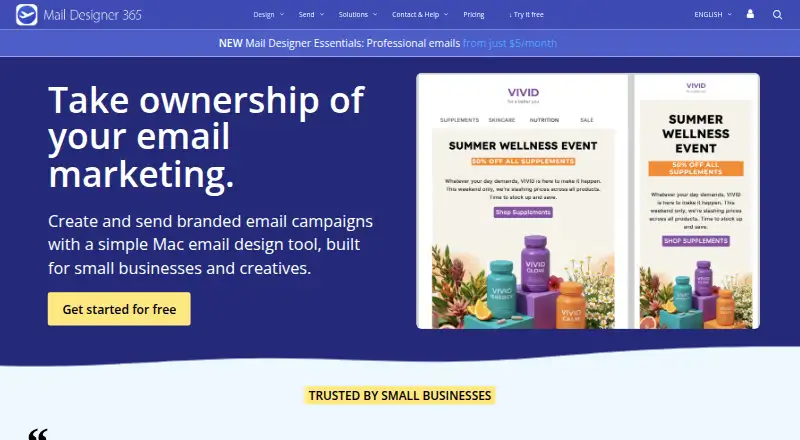
What Mail Designer 365 is
Mail Designer 365 is a Mac email design app for creating and sending branded campaigns. Its visual drag-and-drop editor builds responsive newsletters from text, images, buttons, links, and layout blocks without code. The template gallery lists 291 newsletter templates, and the app creates a mobile-optimized version with a preview. Campaign tools include scheduling, contact import, audience segmentation, and reports on opens, clicks, unsubscribes, and bounces. Contacts can be imported with a Mailchimp or Campaign Monitor API key. The API can fill design placeholders and send emails automatically, including through FileMaker workflows. Each API delivery uses 25 stamps; regular campaign delivery uses one stamp per recipient as a base. Browser participants, including Windows users, can preview and discuss drafts, but editing shared designs requires the Mac app and a plan. The free Karlsfeld plan includes 500 stamps per month and lets users store and fully edit up to 20 designs; additional designs can be viewed but not edited or saved. Mail Designer Essentials costs $5.00 per month, and a 7-day trial is listed. The maker says users can send through their own email account, with credentials kept on the Mac and messages sent through the email provider.
Who it suits
Mail Designer 365 suits small businesses and creatives creating branded email campaigns, including restaurants, retailers, agencies, and ecommerce businesses. It is designed for Mac editing, with browser access for draft previews and discussion.
What it does well
- Editor builds responsive newsletters without code.
- Gallery lists 291 newsletter templates.
- Campaign tools include scheduling and audience segmentation.
- Free Karlsfeld plan includes 500 stamps per month.
What to know first
- Free Karlsfeld allows only 20 fully editable designs.
- Shared-design editing requires the Mac app and a plan.
- Each API delivery uses 25 stamps.
- Only one editor seat is included.
Limits
The free Karlsfeld plan includes 500 stamps per month and allows up to 20 designs to be stored and fully edited. Designs over that limit can be viewed but cannot be edited or saved. The listed paid Essentials plan costs $5 per month; its description is Professional emails.
Plans
| Plan | Billed and limits | Price |
|---|---|---|
| Karlsfeld | 500 stamps/month · included with each Mac Design Plan · up to 20 editable designs | Free |
| Mail Designer Essentials | Professional emails | $5 a month |
| Seoul | 100,000 stamps/month · Link Rescue available from this plan onwards | On request |
| Roma | 5,000 stamps/month | On request |
| Capetown | 50,000 stamps/month | On request |
| Paris | 15,000 stamps/month | On request |
| London | 25,000 stamps/month | On request |
As maildesigner365.com lists them, read 9 Oct 2026. The maker's own page has the final word.
Getting started
- Visit the Mail Designer 365 website.
- Use the Mac app to create and edit designs.
- Start with the free Karlsfeld plan, or choose Mail Designer Essentials at $5 per month.
- Use the listed 7-day trial if you want to try a paid plan.
- Import contacts with a Mailchimp or Campaign Monitor API key, or use the API for automated sending.
Overview
Mail Designer 365 is a Mac app for designing branded email campaigns, with sending and reporting tools alongside its visual editor. It best suits small businesses and creatives that want to produce newsletters on a Mac and manage campaign delivery in the same product. The main trade-off is that browser access supports review, while editing remains tied to the Mac app.
Key features
The drag-and-drop editor builds responsive newsletters from text, images, buttons, links and layout blocks without requiring code. Its gallery of 291 templates offers a useful launch point, and reusable content blocks can help keep recurring elements consistent. Mail Designer 365 also generates a mobile-optimized version and provides a preview, reducing the need to build a separate mobile layout.
Campaign tools include scheduling, contact imports, audience segmentation and reports covering opens, clicks, unsubscribes and bounces. Users can import contacts with a Mailchimp or Campaign Monitor API key. The API can populate design placeholders and send emails automatically, including from FileMaker workflows. That automation uses 25 stamps per delivery; regular campaign delivery starts at one stamp per recipient, so API sending draws down a quota much faster.
Participants can preview and discuss drafts in a browser, including on Windows. Editing shared designs requires the Mac app and a plan, so browser collaboration supports feedback rather than a fully browser-based team workflow. The maker says users can send through their own email account, with credentials kept on the Mac and messages and images routed through the email provider. It also states that its products and services comply with GDPR.
Pricing
The free Karlsfeld plan includes 500 stamps per month and allows up to 20 designs to be stored and fully edited. Designs beyond that cap can still be viewed, but not edited or saved. This is a workable way to begin or maintain a small set of newsletters, but the cap constrains anyone building a larger library.
Mail Designer Essentials costs $5 a month and is described as offering professional emails. It is the paid entry point for users who need more than the free plan, though the plan includes one editor seat, making it a solo-user fit rather than a shared editing license. The free Karlsfeld plan is included with each Mac Design Plan.
Stamp plans include Roma at 5,000 stamps per month, Paris at 15,000, London at 25,000, Capetown at 50,000, and Seoul at 100,000. Seoul also includes Link Rescue. These plans have custom pricing. Their stamp allowances matter especially for API users, since each automated delivery costs 25 stamps, while campaign delivery uses one stamp per recipient as a base. The free plan, Essentials price and paid-from figure establish a low-cost starting point, but the published plan terms do not describe additional paid-plan allowances.
A 7-day trial is offered. Readers should weigh the free plan's design ceiling and the different stamp rates against their campaign volume before choosing a sending tier.
Platforms
Editing is for macOS. The product also supports web access for draft preview and discussion, and an API for automated design filling and sending. Windows participants can take part in browser review, but cannot edit shared designs without the Mac app.
Who it's for
Mail Designer 365 is a strong fit for Mac-based small businesses and creatives that produce branded newsletters and want scheduling, audience segmentation and campaign reporting in the same workflow. Its named audiences include restaurants, retail, real estate, agencies and ecommerce. It is less suitable for teams that need everyone to edit in a browser, or for users with more than 20 designs who want to stay on the free plan.
Pros and cons
- Pros: A visual editor, 291 templates, reusable blocks and automatic mobile layouts support newsletter creation without code.
- Pros: Sending, scheduling, segmentation and engagement reports sit alongside design, while API support extends automation to workflows such as FileMaker.
- Pros: The free plan includes 500 monthly stamps and 20 editable designs, and the maker offers one-to-one in-house support.
- Cons: Shared-design editing depends on the Mac app and a plan; browser users can review and discuss, but not edit.
- Cons: The free plan's 20-design ceiling limits larger libraries, and designs above the limit cannot be saved or edited.
- Cons: API deliveries consume stamps at 25 per delivery, a steep increase over the one-stamp-per-recipient base for regular campaigns.
Alternatives
For a broader set of email design options, start with the Email Design Software directory. Canary is an email client with a free plan and support for mobile, desktop, browser and extension platforms; choose it when managing an inbox is the priority. MJML is an open-source option with a free REST API, better suited to readers seeking an API-based tool under the MIT license.
Mail Studio offers a free plan limited to non-commercial use, plus monthly Pro and Team plans; consider it if that pricing and its Linux, macOS and Windows support better match your needs. MailStyler has a free demo with scrambled exports and a limited image library and template gallery, so it is an option for evaluating the software before buying a lifetime license.
Beefree (now RGE Studio) runs in a browser and has a free Starter plan with up to 10 designs and six exports per month; choose it if browser-based design is essential. Blocks Edit, Dragble and EmailBuilder.ai are other alternatives to compare.
Verdict
Choose Mail Designer 365 if you work on a Mac and want newsletter design, campaign delivery and reporting together, with an API for automated sending. Its strongest case is that combined workflow; look elsewhere if browser-based editing is a requirement, or if the free plan's 20-design cap and API stamp cost do not fit your volume.
Verdict
Mail Designer 365 combines visual newsletter design with campaign tools, mobile previews, and API sending. Consider the Mac requirement for editing, the 20-design free-plan limit, and the different stamp use for API deliveries.
Questions
Is Mail Designer 365 free?
Yes. The Karlsfeld plan is free and includes 500 stamps per month, plus up to 20 editable designs.
How much does Mail Designer 365 cost?
Mail Designer Essentials is listed at $5 per month, and a 7-day trial is listed. Other named plans have no price listed in these facts.
Which platforms does it support?
The listed platforms are API, macOS, and web. Editing shared designs requires the Mac app, while browser participants can preview and discuss drafts.
Can I import contacts or automate sending?
Contacts can be imported using a Mailchimp or Campaign Monitor API key. Its API can fill design placeholders and send emails automatically, including from FileMaker workflows.
How does stamp usage work?
Regular campaign delivery uses one stamp per recipient as a base. Each API delivery uses 25 stamps.
Who makes Mail Designer 365?
The company is headquartered in Karlsfeld/Munich, Germany. It offers one-to-one support described as in-house.
Facts from Mail Designer 365's own pages
- API limit
- Each API delivery uses 25 stamps; regular campaign delivery uses one stamp per recipient as a base. · maildesigner365.com, 9 Oct 2026
- Audience
- The maker presents Mail Designer for small businesses and creatives, and names restaurants, retail, real estate, agencies, and ecommerce among its audiences. · maildesigner365.com, 9 Oct 2026
- Browser collaboration
- Project participants can preview and discuss drafts in a browser, including Windows users, while editing shared designs requires the Mac app and a plan. · maildesigner365.com, 9 Oct 2026
- Compliance
- The maker states that all equinux products and services comply with the EU General Data Protection Regulation (GDPR). · maildesigner365.com, 9 Oct 2026
- Editor
- Its visual drag-and-drop editor lets users build responsive newsletters with text, images, buttons, links, and layout blocks without writing code. · maildesigner365.com, 9 Oct 2026
- Free plan limit
- The free Karlsfeld plan allows up to 20 designs to be stored and fully edited; designs beyond that can be viewed but not edited or saved. · maildesigner365.com, 9 Oct 2026
- Headquarters
- Karlsfeld/Munich, Germany · maildesigner365.com, 28 Sept 2026
- Integrations
- The product supports importing contacts using a Mailchimp or Campaign Monitor API key, and its API can fill design placeholders and send emails automatically, including from FileMaker workflows. · maildesigner365.com, 9 Oct 2026
- Mobile design
- The app automatically creates a mobile-optimized version of a design and provides a preview. · maildesigner365.com, 9 Oct 2026
- Privacy
- The maker says users can send through their own email account, with credentials stored only on the Mac and messages and images sent through the email provider rather than the maker’s servers. · maildesigner365.com, 9 Oct 2026
- Product
- Mail Designer 365 is a Mac email design app for creating and sending branded email campaigns. · maildesigner365.com, 9 Oct 2026
- Sending
- Campaign tools include scheduling, contact import, audience segmentation, and reports on opens, clicks, unsubscribes, and bounces. · maildesigner365.com, 9 Oct 2026
- Support
- The company offers one-to-one support from its team and describes it as in-house, without chatbots or outsourcing. · maildesigner365.com, 9 Oct 2026
- Templates
- The template gallery lists 291 newsletter templates. · maildesigner365.com, 9 Oct 2026
Where Mail Designer 365 stands on Freedom251
- Email Design Software#11 of 63