Freedom251 › Email Design Software
Mail Studio
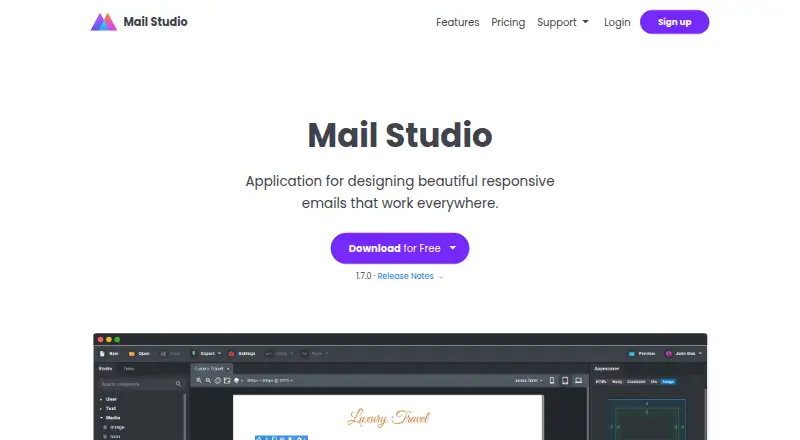
What Mail Studio is
Mail Studio is a desktop email editor for composing messages with a drag-and-drop interface. Reusable content blocks let users bring repeatable sections into their designs, while custom code editing provides a way to make code-level changes. The editor also supports custom fonts and HTML export, so completed work can be exported as HTML. Mail Studio is available for Linux, macOS, and Windows. Its Free plan costs nothing and is restricted to non-commercial use. Pro costs $9.99 a month, billed monthly for one user. Team costs $29.99 a month, billed monthly for five users. The listed included editor seats are one. This gives individual users a paid option and provides a separate plan for a five-user team. Mail Studio’s listed features cover both visual composition and code editing, with reusable blocks and export available alongside its desktop platform support.
Who it suits
Mail Studio suits people creating email designs who want a drag-and-drop editor, reusable content blocks, custom fonts, and HTML export. It can also fit individual users or five-person teams, depending on the plan; the free option is limited to non-commercial use.
What it does well
- Drag-and-drop editing for composing email designs.
- Reusable content blocks are supported.
- HTML export is available.
- Custom code editing and custom fonts are supported.
- Available on Linux, macOS, and Windows.
What to know first
- The Free plan is for non-commercial use only.
- Pro is $9.99 a month for one user.
- Team is $29.99 a month for five users.
Limits
The Free plan is restricted to non-commercial use. Pro costs $9.99 a month for one user; Team costs $29.99 a month for five users.
Plans
| Plan | Billed and limits | Price |
|---|---|---|
| Free | Non-commercial use only | Free |
| Pro | per month · 1 user | $9.99 a month |
| Team | per month · 5 users | $29.99 a month |
As mailstudio.app lists them, read 23 Sept 2026. The maker's own page has the final word.
Getting started
- Visit https://mailstudio.app/.
- Choose the Free plan for non-commercial use, Pro for one user, or Team for five users.
- Use Mail Studio on Linux, macOS, or Windows.
- Create designs with the drag-and-drop editor, reusable blocks, and custom code editing.
- Export finished work as HTML.
Mail Studio is a desktop email editor for building messages with visual tools or custom code. It suits people who want reusable content and HTML export in one editor, but its free plan is restricted to non-commercial use.
Overview
That flexibility makes it a practical fit for users who want to build and export email designs from a desktop app. The commercial-use restriction on the free plan means businesses need to budget for a paid subscription.
Key features
- Drag-and-drop editor: Compose visually rather than working only in code, a useful starting point for users who prefer a graphical workflow.
- Reusable content blocks: Save and reuse parts of a design, which can reduce repeated work across emails.
- Custom code editing and HTML export: Edit code directly and export HTML, giving developers and designers a route beyond the visual editor.
- Custom fonts: Add another design choice when styling an email.
Together, these features cover a broader workflow than a visual-only editor. The tradeoff is that the product is desktop software rather than a browser-based editor, so it is not the natural choice for someone who specifically wants to work in a web app.
Pricing
Mail Studio has a free plan and two monthly paid plans. The Free plan costs nothing and is limited to non-commercial use. It is a no-cost way for non-commercial users to work with the editor, but it does not suit commercial email work.
- Free: free; non-commercial use only.
- Pro: $9.99 a month, billed per month, for 1 user. This is the entry paid option for an individual using Mail Studio commercially.
- Team: $29.99 a month, billed per month, for 5 users. It is the relevant tier for a small group that needs five seats, rather than a solo user paying for capacity they will not use.
Both paid plans are billed monthly. The main decision is therefore whether a single seat is enough or whether five users need access; the Free plan is not a commercial workaround.
Platforms
Mail Studio is available for Linux, macOS, and Windows. That desktop coverage serves users across the three operating systems, but does not include a web platform.
Who it's for
Choose Mail Studio if you want a desktop workflow that can move between drag-and-drop editing and custom code, with reusable blocks and HTML export. It particularly suits individual creators who can use the free plan non-commercially, or commercial users who need one paid seat. Teams of five can choose the Team plan; users who need a browser-based editor should look elsewhere.
Pros and cons
Pros
- Visual and code-based editing: Drag-and-drop composition and custom code editing serve users with different levels of control.
- Reusable blocks and HTML export: Reuse content and export the result, supporting a repeatable design workflow.
- Desktop choice across Linux, macOS, and Windows: The app is not limited to a single desktop operating system.
- Five-seat monthly option: The Team plan gives a small group a defined five-user tier.
Cons
- Free use is non-commercial only: Businesses must pay even if one user is all they need.
- No web platform: Users seeking a browser-based email editor need another product.
- Team plan is fixed at five users: A solo user or group needing a different seat count may find the plan less suitable.
Alternatives
For a broader comparison, browse Email Design Software.
- Canary is an alternative for people choosing an email client: its free plan includes a unified inbox, templates, snooze and pin, and lite read receipts, and it runs across mobile, desktop, web, and browser extension platforms.
- MJML is the better fit for developers who want an open-source email framework; it is available across web, desktop, API, and extension platforms, with a free-to-use REST API.
- Mail Designer 365 is another option for Mac users comparing email design tools; it has a free trial and a free Karlsfeld plan with 500 stamps per month and up to 20 editable designs.
- MailStyler may suit users looking for a Windows or macOS editor with a free demo, though trial exports are scrambled and the demo has limited images and templates.
- Beefree (now RGE Studio) is worth considering if you prefer a web-based editor; its free Starter plan allows up to 10 designs and six exports per month.
- Blocks Edit is a web-based alternative with a Collaborate plan priced at $240 a year and 250 GB of storage.
- Dragble is a web, API, and self-hosted alternative whose free plan includes three projects, 10 GB of storage, and 10 core content blocks, with Dragble branding.
- EmailBuilder.ai is a web-based option with a free Playground plan that includes 10 emails, three templates, and five sends or exports.
Verdict
Mail Studio is a strong fit for an individual or small team that wants desktop email design with both visual composition and direct code control. Reusable blocks and HTML export make that combination useful beyond a one-off design. The main reason to look elsewhere is the boundary: the free plan excludes commercial use, and there is no web app. For commercial work, Pro starts at $9.99 a month for one user; teams of five can opt for the $29.99 a month Team plan.
Verdict
Choose Mail Studio if you want a desktop email editor that combines drag-and-drop composition with reusable blocks, code editing, and HTML export. The free plan fits non-commercial use; commercial users need a paid plan, starting at $9.99 a month for one user.
Questions
Is Mail Studio free?
Yes. Its Free plan costs nothing and is limited to non-commercial use.
What do the paid plans cost?
Pro is $9.99 a month, billed per month for one user. Team is $29.99 a month, billed per month for five users.
Which operating systems does Mail Studio support?
Mail Studio is available on Linux, macOS, and Windows.
Can I export email designs?
Yes. HTML export is supported.
Does Mail Studio support code editing and reusable content?
Yes. It supports custom code editing and reusable content blocks.
Where Mail Studio stands on Freedom251
- Email Design Software#35 of 63