LuminaAudio Audio Converter
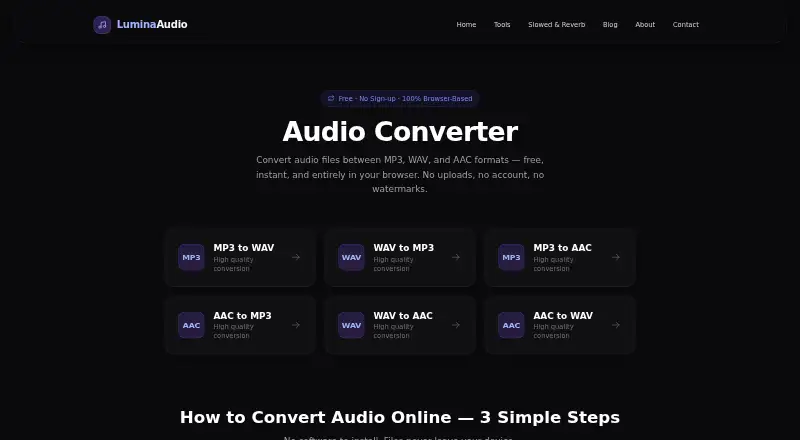
What LuminaAudio Audio Converter is
LuminaAudio Audio Converter is a free browser tool that converts audio between MP3, WAV, and AAC. It supports all six direct conversions among those formats, and M4A files can be supplied as AAC input. The FAQ also describes extracting audio from MP4, MOV, MKV, or WebM video and saving it in a selected format. Conversion runs through the Web Audio API in the browser; during normal use, files are not uploaded to LuminaAudio’s servers. WAV output is lossless PCM, while MP3 and AAC outputs are compressed. The page says the six audio conversion paths need no sign-up, add no watermarks, and have no hidden limits. The tool runs in modern Chrome, Firefox, Safari, and Edge on Windows, macOS, Linux, Android, and iOS. LuminaAudio names TikTok creators, music producers, lo-fi enthusiasts, and people who want to reimagine music as its intended audience. The company says it uses Google Analytics, which may process visit, approximate location, device and browser, referral, and general usage information.
Who it suits
It suits people who need to convert among MP3, WAV, and AAC or extract audio from supported video formats in a browser. LuminaAudio identifies creators, producers, lo-fi enthusiasts, and people reimagining music as its audience.
What it does well
- All six audio conversion paths are free
- No sign-up or watermarks
- Audio stays in browser during normal use
- Accepts M4A as AAC input
- Runs on desktop and mobile platforms
What to know first
- Requires a modern supported browser
- MP3 and AAC output are compressed
- Availability is not guaranteed uninterrupted
Plans
| Plan | Billed and limits | Price |
|---|---|---|
| Free | All six conversion paths · no sign-up · no watermarks · no stated limits | Free |
As luminaaudio.com lists them, read 9 Oct 2026. The maker's own page has the final word.
Getting started
- Open the LuminaAudio Audio Converter website in a modern Chrome, Firefox, Safari, or Edge browser.
- Select an audio or supported video file.
- Choose the desired output format.
- Run the conversion and save the resulting file.
LuminaAudio Audio Converter is a browser-based tool for converting audio among MP3, WAV and AAC, with audio extraction from several video formats. It suits creators and listeners who want a free, no-sign-up conversion without sending files to the service’s servers during normal use. Its format coverage is focused, so it is a strong fit for straightforward conversions rather than a broad audio workflow.
Overview
The tool handles all six conversion paths among MP3, WAV and AAC. M4A files are accepted as AAC input, and it can extract audio from MP4, MOV, MKV and WebM files into a selected output format. That combination covers common format changes and video-to-audio extraction without requiring an account.
Processing runs in the browser through the Web Audio API, and files are not uploaded to LuminaAudio’s servers during normal use. WAV output is lossless PCM; MP3 and AAC are compressed. That makes WAV the appropriate choice when preserving audio data matters, while the compressed formats are the practical options when smaller files are preferable.
Key features
- Six direct conversions: MP3, WAV and AAC can each be converted to either of the other two. The defined format set is useful for common conversions but does not cover a wider range of audio formats.
- M4A input: M4A files are accepted as AAC input, extending the source options without adding another output format.
- Video audio extraction: MP4, MOV, MKV and WebM files can be converted to audio in the selected format, a useful shortcut for creators repurposing video sound.
- Browser-side processing: Normal conversion does not upload audio to LuminaAudio’s servers. This is a meaningful privacy advantage for file handling, though the site uses Google Analytics, which may process visit, device, approximate location, referral and usage data.
Pricing
The Free plan costs nothing. It includes all six conversion paths, requires no sign-up, adds no watermark and has no stated limits. There is no free trial because the service is free. For a single user who needs only these conversions, there is no paid tier to weigh against the free offer; its trade-off is the narrowly defined format set rather than a stated quota or feature gate.
Platforms
The converter runs in modern Chrome, Firefox, Safari and Edge on Windows, macOS, Linux, Android and iOS. That gives it broad device reach without a separate desktop installation, provided the user has a supported browser.
Who it's for
LuminaAudio names TikTok creators, music producers, lo-fi enthusiasts and people who want to reimagine music as its intended audience. It is most compelling for those users when a project calls for a simple MP3, WAV or AAC conversion or extraction from a supported video. People who need formats beyond that set or prefer a desktop application should consider another tool.
Email support covers technical issues, feature requests, partnerships, press, general questions, copyright and privacy requests; most emails receive a reply within one business day. The service aims to remain available but does not guarantee uninterrupted access and may change or discontinue it without notice.
Pros and cons
- Pro: All six conversions are free, with no sign-up, watermark or stated limit, so occasional use does not require an account or subscription.
- Pro: Browser processing avoids server uploads during normal use, while WAV provides a lossless PCM output option.
- Pro: Video extraction and M4A input add useful source flexibility around the three core audio formats.
- Con: Output is limited to MP3, WAV and AAC, making the tool less suitable for workflows that require other audio formats.
- Con: The service depends on a modern browser and its continued availability; LuminaAudio does not promise uninterrupted access.
Alternatives
Audio Converter Software is the directory’s broader category for comparing conversion tools. Choose among individual alternatives based on the workflow and platform you need:
- Red Panda Compress Audio Converter is another free, cross-platform option; its stated allowance includes unlimited use, no watermark or signup, and file-size caps of 8GB on desktop and 2GB on mobile.
- FFmpeg is a free option for Linux, macOS, Windows and self-hosted environments, distributed as source code; optional GPL components change license obligations.
- CUERipper is a free choice for Linux or Windows, included in the CUETools package as a Windows download.
- fre:ac is a free, open-source desktop option for Linux, macOS and Windows, with no adware.
- Free YouTube to MP3 Converter is a better fit for batch YouTube downloads on Android, macOS or Windows; its free version has no daily batch-download limit and offers most options and formats.
- Lacuna is a lyric-generation alternative rather than a direct audio converter.
- MediaHuman Audio Converter is a free desktop conversion option for macOS, Windows and Linux.
- MediaHuman YouTube to MP3 Converter is a free desktop app for YouTube-to-MP3 workflows on Linux, macOS and Windows; TurboBoost is paid while other options and features are free.
Verdict
Choose LuminaAudio Audio Converter if you want no-cost, no-sign-up conversion among MP3, WAV and AAC, or need to extract audio from a supported video format in a browser. Its normal local processing and lossless WAV output are clear advantages. Look elsewhere if your work needs a broader format range, a desktop-first tool or guaranteed uninterrupted availability.
Verdict
LuminaAudio Audio Converter covers direct conversions among three audio formats and can also extract audio from listed video formats. Its browser-based processing avoids server uploads during normal use, while WAV is the lossless output option.
Questions
How much does the converter cost?
The listed Free plan costs nothing. All six audio conversion paths are free.
Do I need to sign up or start a trial?
No sign-up is required, and there is no free trial.
Which formats can it convert?
It converts between MP3, WAV, and AAC. M4A is accepted as AAC input; MP4, MOV, MKV, and WebM can be used for audio extraction.
Does conversion upload my audio?
During normal use, conversion runs in the browser with the Web Audio API and files are not uploaded to LuminaAudio’s servers.
Which devices and browsers does it support?
It runs in modern Chrome, Firefox, Safari, and Edge on Windows, macOS, Linux, Android, and iOS.
Does it add watermarks or impose stated limits?
The page says conversions add no watermarks and have no hidden limits.
Facts from LuminaAudio Audio Converter's own pages
- Access
- The page says all six conversion paths are free, require no sign-up, add no watermarks, and have no hidden limits. · luminaaudio.com, 9 Oct 2026
- Analytics
- LuminaAudio says it uses Google Analytics, which may process page visits, approximate location, device and browser information, referral source, and general usage activity. · luminaaudio.com, 9 Oct 2026
- Availability
- The terms say LuminaAudio aims to remain available but does not guarantee uninterrupted access and may modify or discontinue the service at any time without notice. · luminaaudio.com, 9 Oct 2026
- Conversion paths
- Supports MP3 to WAV, MP3 to AAC, WAV to MP3, WAV to AAC, AAC to MP3, and AAC to WAV. · luminaaudio.com, 9 Oct 2026
- Intended users
- LuminaAudio describes its audience as TikTok creators, music producers, lo-fi enthusiasts, and people who want to reimagine music. · luminaaudio.com, 9 Oct 2026
- Local processing
- Conversion uses the Web Audio API in the browser, and audio files are not uploaded to LuminaAudio’s servers during normal use. · luminaaudio.com, 9 Oct 2026
- M4A input
- M4A files are accepted as AAC input. · luminaaudio.com, 9 Oct 2026
- Output
- WAV output is written as lossless PCM, while MP3 and AAC are compressed formats. · luminaaudio.com, 9 Oct 2026
- Purpose
- Converts audio between MP3, WAV, and AAC formats. · luminaaudio.com, 9 Oct 2026
- Support
- The contact page lists email support for technical issues, feature requests, partnerships, press, general questions, copyright, and privacy requests, and says most emails receive a reply within one business day. · luminaaudio.com, 9 Oct 2026
- Supported environments
- The tool runs in modern Chrome, Firefox, Safari, and Edge browsers on Windows, macOS, Linux, Android, and iOS. · luminaaudio.com, 9 Oct 2026
- Video audio
- The FAQ says it can extract audio from MP4, MOV, MKV, or WebM files and save it in the selected format. · luminaaudio.com, 9 Oct 2026
Where LuminaAudio Audio Converter stands on Freedom251
- Audio converters#2 of 7
- Audio Converter Software#12 of 36