Freedom251 › Audio Converter Software
CUERipper
What CUERipper is
CUERipper extracts audio from CDs and is included in the CUETools package. It is a free program for Linux and Windows, described by its maker as an open-source alternative to EAC. You can save a disc as one image or as separate track files, choosing lossy or lossless output. Supported formats include WAV, FLAC, APE, lossyWAV, ALAC, TTA, and WavPack. Metadata searches can use MusicBrainz, Discogs, and freeDB; AccurateRip and CTDB are available for verification. Extraction modes include Burst, Secure, and Paranoid. Secure and Paranoid can retry sections when read results differ or the drive reports C2 errors, and Test & Copy checks tracks before extraction. Other options include EAC-style logs, M3U playlists, album-art searches, and preserving hidden audio from the first track pregap. The download is an archive that can be unpacked without setup, and portable use is possible by removing a profile file. Windows requires Microsoft .NET Framework 4.x. External encoder programs are not included and must be obtained separately.
Who it suits
CUERipper suits people who want to extract CD audio to single-image or separate-track files and choose lossless or lossy output. It is also relevant to users who need metadata lookup, verification, or retry options during ripping.
What it does well
- Free and included in the CUETools package
- Supports multiple lossless and lossy formats
- Offers Secure and Paranoid retry modes
- Can preserve hidden track one audio
What to know first
- Windows requires Microsoft .NET Framework 4.x
- External encoder programs must be downloaded separately
- FFmpeg plugin use requires additional DLL files
Limits
The program is free. Windows use requires Microsoft .NET Framework 4.x, external encoder executables are separate downloads, and the FFmpeg plugin requires additional DLL files.
Plans
| Plan | Billed and limits | Price |
|---|---|---|
| CUERipper | Included in the CUETools package · Windows download | Free |
As cue.tools lists them, read 3 Oct 2026. The maker's own page has the final word.
Getting started
- Download CUETools from the CUETools download page; CUERipper is included in the package.
- Unpack the archive; the download can be used without setup.
- On Windows, use Microsoft .NET Framework 4.x; the maker says Windows 8, 10, or 11 should include it.
- Choose an output format and whether to save the disc as one image or separate tracks.
- Select metadata and extraction options, then use Burst, Secure, Paranoid, or Test & Copy as needed.
- For portable use, remove the user_profiles_enabled file and run the package from a USB stick.
CUERipper is a CD-ripping tool for listeners who want control over extraction and verification without taking on a larger configuration burden. It is best suited to people building a local music library from discs; it is not a general-purpose cloud converter.
Overview
Included in the CUETools package, CUERipper is an open-source alternative to EAC. Its balance is appealing: fewer configuration options make it somewhat easier to use, while selectable extraction modes, metadata lookup and rip checks give careful archivists useful control. EAC may suit users who want more configuration depth.
Output can be a single disc image or separate track files, with lossy and lossless choices. Supported formats include WAV, FLAC, APE, lossyWAV, ALAC, TTA and WavPack. That breadth makes it practical for different library and playback preferences, though external encoder executables must be obtained separately.
Key features
MusicBrainz and freeDB provide disc metadata, and searches can also use Discogs. Fast, Default and Extensive search modes offer a choice between a quicker lookup and a broader one. Album-art search can be turned off, limited to the selected metadata, or expanded to CDTOC-associated art and fuzzy search; thumbnail and full-size searches are available, and art can be embedded when the output format permits.
AccurateRip and CTDB support verification. Test & Copy checks all tracks before extraction and records Test CRC values in an EAC-style log, making it useful for readers who want a check alongside the rip. Burst, Secure and Paranoid modes provide increasing read-error handling: Secure retries affected sections up to 30 more times, while Paranoid retries up to 61 more times when results differ or a drive reports C2 errors. The additional retries offer more persistence, at the cost of potentially longer extraction.
Other options include detecting track indexes, creating M3U playlists and EAC-style logs, and preserving Hidden Track One Audio from the first track pregap as a separate track 00 file in tracks mode. These details matter to users preserving disc structure, not just the main tracks.
The download is an archive that can be unpacked without setup. Removing the user_profiles_enabled file lets settings save in the install folder for USB-stick use. CTDB submission logs include contributor IP addresses and CD drive models, which the database uses to screen submissions; users concerned about that data should account for it before submitting.
Pricing
CUERipper is free: the CUERipper plan costs nothing and is included in the CUETools package. There is no paid tier to unlock, and no free trial is offered. The trade-off is that users need to supply external encoder executables themselves.
Platforms
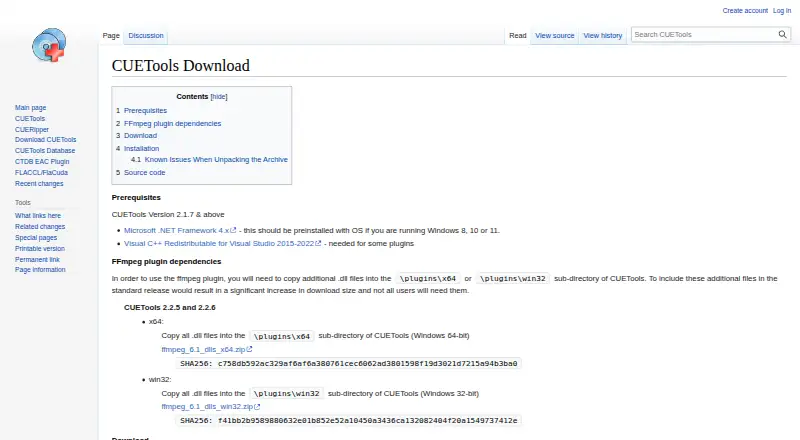
CUERipper is available for Linux and Windows. The download page provides a Windows release and lists Microsoft .NET Framework 4.x as a prerequisite; it says Windows 8, 10 and 11 should include it. Using the FFmpeg plugin also requires additional DLL files copied into its x64 or win32 plugin directory.
Who it's for
Choose CUERipper if you want a free desktop tool for extracting CDs, checking results and choosing between image or track output. Its retry modes, metadata options and preservation of hidden audio make it particularly relevant to careful disc archiving. Look elsewhere if you need cloud conversion, want external encoders bundled, or need the broader configuration EAC offers.
Pros and cons
- Pros: Free extraction with lossy and lossless output, multiple file formats and image-or-track choices suits varied music-library workflows.
- Pros: AccurateRip, CTDB and Test & Copy provide verification options beyond a straightforward rip.
- Pros: Retry modes, track-index detection and hidden-audio preservation give archivists meaningful control over disc-specific details.
- Cons: External encoder executables are separate downloads, adding setup work for users who need them.
- Cons: Windows users need .NET Framework 4.x, and FFmpeg plugin users must add DLL files themselves.
- Cons: Its smaller set of configuration options will not suit users seeking EAC-level tuning.
Alternatives
For a broader range of audio-conversion choices, browse Audio Converter Software.
- fre:ac is a free, open-source option with no adware for readers who want an alternative audio converter across Linux, macOS and Windows.
- CDex is a free, GPL-licensed CD-ripping and audio-conversion option for Windows users.
- Red Panda Compress Audio Converter suits users who want conversion across mobile, desktop and web platforms, with unlimited free use and no daily quota.
- Switch Audio File Converter offers a free, non-commercial version for Android, macOS and Windows; choose it if that platform mix fits your needs.
- Audio Converter by 123apps is a web option for users comfortable with the free plan's 70-files-per-day limit, 4 GB maximum file size and ads.
- AVS Audio Converter is a Windows alternative whose free version adds a voice logo to output audio.
- FreeConvert Audio Converter is another option for users seeking an audio converter across web and desktop platforms.
- Lacuna is an alternative for readers seeking a lyric-generation tool.
Verdict
CUERipper is a strong fit for Windows or Linux users who want a free, capable CD-ripping workflow with verification and choices over output and error handling. Its strongest reason to choose it is that combination without a paid plan; look elsewhere if bundled encoders or extensive configuration matter more.
Verdict
CUERipper provides multiple extraction modes, format choices, and disc metadata and verification options at no cost. Windows users need the listed .NET prerequisite, and external encoders are not bundled.
Questions
Is CUERipper free?
Yes. CUERipper is included in the CUETools package, and its listed plan is free.
Which operating systems does it support?
The listed platforms are Linux and Windows. The download page provides a Windows release and lists Microsoft .NET Framework 4.x as a prerequisite; it says Windows 8, 10, or 11 should include it.
What audio formats can it produce?
Supported formats include WAV, FLAC, APE, lossyWAV, ALAC, TTA, and WavPack. Users can choose lossy or lossless output.
Which disc databases and verification services does it support?
Metadata searches can use MusicBrainz, Discogs, and freeDB. AccurateRip and CTDB are also supported.
Are encoder programs included?
External encoder executables are not included and must be downloaded separately. Using the FFmpeg plugin also requires additional DLL files.
Can CUERipper be used portably?
Yes. The download page says it can run from a USB stick after removing the user_profiles_enabled file.
Facts from CUERipper's own pages
- Album art
- Album art search can be disabled, limited to the selected metadata, or expanded to CDTOC-associated art and fuzzy search. · cue.tools, 2 Oct 2026
- Cover art
- CUERipper can search for album art, embed it when the output format permits, and choose thumbnail or full-size image searches. · cue.tools, 3 Oct 2026
- Disc databases
- It supports MusicBrainz and freeDB metadata databases, plus AccurateRip and CTDB. · cue.tools, 2 Oct 2026
- Ease of use
- The maker says it has fewer configuration options than EAC and is somewhat easier to use. · cue.tools, 3 Oct 2026
- External encoders
- External encoder executables are not included and must be downloaded separately by the user. · cue.tools, 2 Oct 2026
- Extraction modes
- It can rip to a single image or to separate track files, with selectable lossless or lossy output. · cue.tools, 3 Oct 2026
- Extraction output
- Users can choose lossy or lossless output and extract a disc as one image or as separate track files. · cue.tools, 2 Oct 2026
- Gap and hidden audio
- Options include detecting track indexes and preserving Hidden Track One Audio from the first track pregap. · cue.tools, 3 Oct 2026
- Included software
- CUERipper is included in the CUETools package. · cue.tools, 2 Oct 2026
- Known issues
- The maker says known issues are tracked on GitHub and the Hydrogenaudio forum. · cue.tools, 2 Oct 2026
- Known issues and support
- The maker directs users to GitHub and the Hydrogenaudio forum for known issues and discussion. · cue.tools, 3 Oct 2026
- Logs and playlists
- Options include EAC-style extraction logs and creation of M3U playlists. · cue.tools, 2 Oct 2026
- Metadata and verification
- It supports MusicBrainz and freeDB metadata, plus AccurateRip and CTDB. · cue.tools, 3 Oct 2026
- Metadata search
- Metadata search can use MusicBrainz, Discogs and freeDB, with Fast, Default and Extensive search modes. · cue.tools, 2 Oct 2026
- Optional codec dependency
- Using the FFmpeg plugin requires additional DLL files to be copied into its x64 or win32 plugin directory. · cue.tools, 3 Oct 2026
- Paranoid extraction
- Paranoid mode retries sections up to 61 more times when read results differ or the drive reports C2 errors. · cue.tools, 2 Oct 2026
- Platform and prerequisites
- The download page provides a Windows release and lists Microsoft .NET Framework 4.x as a prerequisite; it also notes that Windows 8, 10 or 11 should include it. · cue.tools, 2 Oct 2026
- Platform requirement
- The download page lists Microsoft .NET Framework 4.x as a prerequisite and says it should be preinstalled on Windows 8, 10, or 11. · cue.tools, 3 Oct 2026
- Portability
- The download is an archive that can be unpacked without setup, and removing user_profiles_enabled makes settings save in the install folder for portable use. · cue.tools, 3 Oct 2026
- Portable use
- The download page says CUERipper can run portably from a USB stick by removing the user_profiles_enabled file. · cue.tools, 2 Oct 2026
- Privacy detail
- CTDB submission logs include contributor IP addresses and CD drive models, which the database page says are used to screen submissions. · cue.tools, 3 Oct 2026
- Purpose
- CUERipper extracts digital audio from CDs and is described as an open-source alternative to EAC. · cue.tools, 3 Oct 2026
- Read-error handling
- Burst, Secure, and Paranoid extraction modes use progressively more retries when results differ or the drive reports C2 errors. · cue.tools, 3 Oct 2026
- Rip checks
- Test & Copy tests all tracks before extraction and adds Test CRC values to the EAC-style log. · cue.tools, 3 Oct 2026
Where CUERipper stands on Freedom251
- Audio Converter Software#9 of 36