Freedom251 › Audio Converter Software

Audio Converter by 123apps
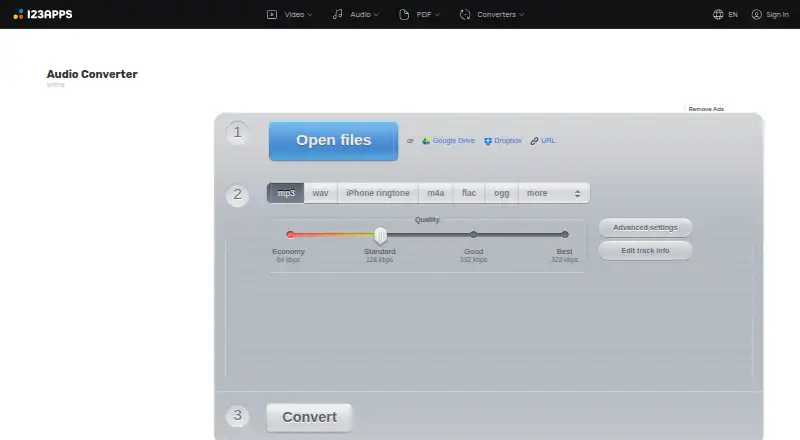
What Audio Converter by 123apps is
Audio Converter by 123apps is a web app for converting audio files without installing software. It supports more than 300 formats, including video formats, and can export MP3, WAV, M4A, FLAC, OGG, AMR, MP2 and M4R. It can also extract audio from a video and convert several files at once, saving the results in a ZIP archive. For individual tracks, users can adjust quality, bitrate, frequency and channel count, reverse playback, add a fade-in or remove a voice. Tag editing covers track name, artist, album, year and genre for MP3, OGG, FLAC and WAV files. Uploads can come from Google Drive or Dropbox. The privacy policy says processing is automated without human supervision and files are deleted no later than 12 hours after use. The free plan includes ads, allows 70 files per day and limits files to 4 GB. Paid plans list unlimited files, a 10 GB maximum file size, no ads and faster speed; the monthly plan is billed at ¥690 per month and the yearly plan at ¥6,487 once a year.
Who it suits
It suits people who need to convert, adjust or tag audio files in a browser, including users who want to extract audio from video or process multiple files together. The free plan has daily file and file-size limits.
What it does well
- Supports more than 300 formats.
- Can extract audio from video files.
- Converts multiple files into a ZIP archive.
- Edits tags on four listed formats.
- Accepts uploads from Google Drive or Dropbox.
What to know first
- Free use includes ads.
- Free use is limited to 70 files per day.
- Free files are limited to 4 GB.
- No CD ripping.
Limits
The free plan permits 70 files per day and a maximum file size of 4 GB, and includes ads. Paid plans list unlimited files and a 10 GB maximum file size, with no ads and faster speed.
Plans
| Plan | Billed and limits | Price |
|---|---|---|
| Free | 70 files per day · 4 GB maximum file size · ads | Free |
| Premium monthly | ¥690 per month · Unlimited files · 10 GB maximum file size · no ads · faster speed | On request |
| Premium yearly | ¥6,487 once a year · Unlimited files · 10 GB maximum file size · no ads · faster speed | On request |
As online-audio-converter.com lists them, read 30 Sept 2026. The maker's own page has the final word.
Getting started
- Open https://online-audio-converter.com/ in a web browser.
- Upload audio or video files, including from Google Drive or Dropbox.
- Choose an output format and adjust audio settings or tags as needed.
- Convert the files and save the results, optionally as a ZIP archive.
- Use the free plan or choose a paid plan for unlimited files and a 10 GB maximum file size.
Verdict
Audio Converter combines format conversion with track adjustments, tag editing and batch processing. Check the free limits against your file sizes and daily volume before choosing a plan.
Questions
Is Audio Converter by 123apps free?
Yes. Its free plan costs nothing and includes ads, up to 70 files per day and a 4 GB maximum file size.
What do paid plans cost?
The pricing note says paid plans start from €6/mo. The listed monthly plan is billed ¥690 per month, and the yearly plan is billed ¥6,487 once a year.
Which platforms does it support?
It is available on the web.
Can it convert video files?
It supports video formats and can extract an audio track from a video file.
Can it process several files at once?
Yes. It can convert multiple files simultaneously and save the results in a ZIP archive.
How does it handle uploaded files?
The service says processing is automated without human supervision, it does not monitor or access uploaded data, and files are deleted no later than 12 hours after use.
Facts from Audio Converter by 123apps's own pages
- Audio settings
- Users can adjust quality, bitrate, frequency and channel count, reverse playback, add fade-in, or remove a voice from an audio track. · online-audio-converter.com, 30 Sept 2026
- Batch processing
- The app can convert multiple files simultaneously and save them in a ZIP archive. · online-audio-converter.com, 30 Sept 2026
- Cloud integrations
- The privacy policy says users can upload data from Google Drive or Dropbox. · online-audio-converter.com, 30 Sept 2026
- Data handling
- The privacy policy says file processing is automated without human supervision and that the service does not monitor or access uploaded data. · online-audio-converter.com, 30 Sept 2026
- File retention
- The privacy policy says files are automatically deleted from servers no later than 12 hours after use is completed. · online-audio-converter.com, 30 Sept 2026
- Formats
- The converter supports over 300 file formats, including video formats, and converts to MP3, WAV, M4A, FLAC, OGG, AMR, MP2 and M4R. · online-audio-converter.com, 30 Sept 2026
- Limits
- The pricing page says free use has limits on file size and daily operations; its listed free allowance is 70 files per day and 4 GB maximum file size. · online-audio-converter.com, 30 Sept 2026
- Maker portfolio
- 123apps describes its site as offering online video, audio, PDF and file-conversion tools. · 123apps.com, 30 Sept 2026
- Purpose
- Audio Converter is a free online app that converts audio files without requiring installation. · online-audio-converter.com, 30 Sept 2026
- Security
- The privacy policy says the site uses SSL encryption and endeavors to maintain physical, procedural and technical security for collected information. · online-audio-converter.com, 30 Sept 2026
- Support
- The site invites users to ask questions, report bugs or suggest features through its contact form and lists [email protected] for contact. · online-audio-converter.com, 30 Sept 2026
- Tags
- Users can edit track name, artist, album, year and genre tags for MP3, OGG, FLAC and WAV files. · online-audio-converter.com, 30 Sept 2026
- Video audio extraction
- The app can extract an audio track from a video file. · online-audio-converter.com, 30 Sept 2026
Where Audio Converter by 123apps stands on Freedom251
- Audio Converter Software#6 of 36
- Audio converters#4 of 7