Freedom251 › Audio CD Ripping Software
fre:ac
What fre:ac is
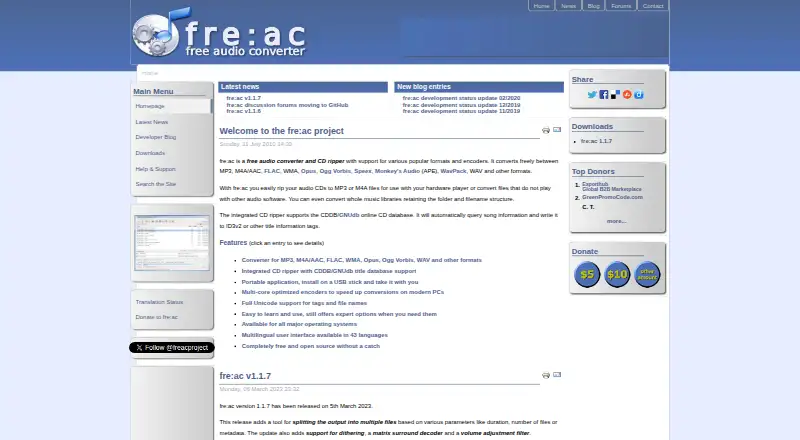
fre:ac is a free audio converter and CD ripper for Windows, macOS, and Linux. It converts between formats including MP3, M4A/AAC, FLAC, WMA, Opus, Ogg Vorbis, Speex, Monkey’s Audio, WavPack, and WAV, and can process whole music libraries while preserving their folder and filename structure. Its CD ripper converts discs into supported formats and can retrieve artist and title details from freedb-compatible databases, then write them into tags. The software supports Unicode filenames and tags, including Japanese, Cyrillic, Arabic, and Indian scripts. Its integrated MP3, M4A/AAC, Opus, and Speex encoders use multicore CPUs. fre:ac can also run from a USB stick or external drive with its configuration stored there. The maker lists FreeBSD and Haiku as supported systems as well, and says the interface is available in 43 languages. Gracenote CDDB is not supported because of licensing issues.
Who it suits
fre:ac suits people converting audio collections, ripping CDs, or working with multiple formats and language scripts. Its portable configuration option may suit users who want to keep the application and settings on an external drive.
What it does well
- Free audio conversion across many listed formats
- Converts entire libraries while keeping folder structure
- CD ripping includes online metadata lookup
- Supports Unicode tags and filenames
- Portable use from USB or external drives
What to know first
- Gracenote CDDB support is unavailable
- No cloud conversion
Plans
| Plan | Billed and limits | Price |
|---|---|---|
| fre:ac | Free and open source · no adware | Free |
As freac.org lists them, read 29 Sept 2026. The maker's own page has the final word.
Getting started
- Visit https://www.freac.org/.
- Choose a package for Windows, macOS, or Linux.
- Install the application, or use a USB stick or external drive for portable use.
- Convert audio files or a music library, or use the integrated CD ripper.
- For CD metadata lookup, configure a freedb-compatible database.
Overview
fre:ac is a free, open-source desktop audio converter for people who want to manage music files and rip CDs in one application. It is particularly well suited to large or multilingual collections, though its desktop focus and lack of cloud conversion make it a poor fit for browser-based workflows.
It brings batch file conversion, library processing and CD importing together without charging for the software. The main trade-off is that CD metadata lookup depends on freedb-compatible databases rather than Gracenote.
Key features
fre:ac converts between MP3, M4A/AAC, FLAC, WMA, Opus, Ogg Vorbis, Speex, Monkey’s Audio (APE), WavPack and WAV, with support for other formats as well. Batch conversion and quality controls make it useful when changing many files at once, while whole-library conversion can retain existing folder and filename structures. That preservation is valuable for collections organized around a directory hierarchy, but fre:ac is not a cloud converter.
The integrated CD ripper turns audio discs into the same formats available for regular conversion. It can query freedb-compatible databases, including CDDB/GNUdb, for artist and track-title information and write that metadata to ID3v2 or other title tags. The limitation matters for users whose ripping workflow relies on Gracenote: fre:ac does not support Gracenote CDDB because of licensing issues.
Metadata editing and Unicode support make the software practical for collections with varied naming conventions. Tags and filenames can use scripts such as Japanese, Cyrillic, Arabic and Indian scripts. Multicore processing is supported by the built-in MP3, M4A/AAC, Opus and Speex encoders, but it does not extend to every format.
Portable use is another useful option: fre:ac can run from a USB stick or external drive and keep its configuration files there. The interface is available in 43 languages, and users can translate it with the included smooth Translator utility. The maker offers Windows installers and ZIP packages, macOS disk images, and Linux Snap, Flatpak and AppImage packages. Supported operating systems also include FreeBSD and Haiku.
The privacy policy says the software does not collect personal information. It describes data transfers for querying or submitting CD metadata to an online database, which users can configure. Questions and ideas go to GitHub Discussions; issues can be reported through GitHub or by email.
Pricing
fre:ac costs nothing. The free and open-source plan has no adware, and the maker offers no separate trial because the software is free. It includes the core conversion, batch processing, CD ripping, metadata editing and quality controls, with no paid tier or free-plan cap stated.
This is a straightforward choice for anyone who wants a desktop converter without a subscription or usage limit. There is no cloud-conversion option, however, so the free price does not make it suitable for people who need to process audio in a browser or online service.
Platforms
The main desktop platforms are Windows, macOS and Linux. The maker also supports FreeBSD and Haiku. Package choices include Windows installers and ZIP archives, macOS disk images, and Snap, Flatpak and AppImage builds for Linux. The portable option can keep the program and its configuration on removable storage.
Who it's for
fre:ac is a strong fit for people converting large music collections, ripping audio CDs, or maintaining libraries with distinctive folder structures and non-Latin filenames. Its wide format support and portable mode also suit users who want a desktop tool they can carry between machines. Look elsewhere if your priority is cloud conversion or CD metadata from Gracenote.
Pros and cons
- Pro: Converts a broad range of common and less common audio formats, with batch processing and quality controls for collection-wide work.
- Pro: Can convert whole libraries while keeping their folder and filename structure, reducing disruption to an existing collection.
- Pro: CD ripping, metadata editing, Unicode tags and portable use cover several practical library-management needs in one free application.
- Con: CD lookup relies on freedb-compatible databases; Gracenote CDDB is unavailable, which rules out that metadata source for disc imports.
- Con: There is no cloud conversion, so it is not the right tool for a browser-only workflow.
Alternatives
Audio Converter Software is the broader category directory for comparing tools. For a free alternative with desktop and mobile options as well as web access, Red Panda Compress Audio Converter offers unlimited use, no watermark or signup, and no daily quota, with file-size limits of 8GB on desktop and 2GB on mobile.
CUERipper is another free option for Linux and Windows, included in the CUETools package. If the job is specifically downloading audio from YouTube, Free YouTube to MP3 Converter is the more targeted choice and has no daily limit on batch downloads.
Lacuna is an alternative to consider for lyric generation. For free desktop audio conversion on Linux, macOS or Windows, MediaHuman Audio Converter is another option.
Switch Audio File Converter may suit non-commercial users who want its standard features in a free version that does not expire; its paid Plus plan requires a license. For occasional browser-based conversions, Audio Converter by 123apps works on the web but caps free use at 70 files a day and 4 GB per file, with ads. AVS Audio Converter is a Windows alternative whose free version adds a voice logo to output audio and reserves some features for the full version.
Verdict
Choose fre:ac if you want a free desktop tool that can convert or rip audio while preserving a library’s structure, with broad format support and Unicode filenames. Its best reasons to choose it are the combination of collection-scale workflows, CD ripping and portable use without adware. Look elsewhere if Gracenote lookup or cloud conversion is essential to your workflow.
Verdict
fre:ac combines broad audio conversion with CD ripping, library conversion, and metadata lookup. Its support for portable use and Unicode filenames adds useful flexibility for varied music collections.
Questions
How much does fre:ac cost?
fre:ac is free and open source, with no adware.
Which operating systems does it support?
The maker lists Windows, macOS, Linux, FreeBSD, and Haiku. Packages are listed for Windows, macOS, and Linux.
Which audio formats can fre:ac convert?
Listed formats include MP3, M4A/AAC, FLAC, WMA, Opus, Ogg Vorbis, Speex, Monkey’s Audio, WavPack, and WAV.
Can it rip CDs and retrieve track details?
Yes. The integrated ripper converts audio CDs to supported formats and can query CDDB/GNUdb-compatible databases for artist and title information. Gracenote CDDB support is unavailable due to licensing issues.
Is fre:ac open source?
Yes. The fre:ac plan is listed as free and open source, with no adware.
Does fre:ac collect personal information?
The privacy policy says the software does not collect personal information. Querying or submitting CD metadata can involve transfers to a configurable online database.
Facts from fre:ac's own pages
- Audio conversion
- fre:ac converts between MP3, M4A/AAC, FLAC, WMA, Opus, Ogg Vorbis, Speex, Monkey’s Audio, WavPack, WAV and other formats. · freac.org, 29 Sept 2026
- CD database limit
- fre:ac supports freedb-compatible databases; its FAQ says Gracenote CDDB support is unavailable due to licensing issues. · freac.org, 29 Sept 2026
- CD ripping
- Its integrated CD ripper converts audio CDs to files in the formats supported for regular audio conversion. · freac.org, 29 Sept 2026
- Distribution
- The maker offers Windows installers and ZIP packages, macOS disk images, and Linux Snap, Flatpak and AppImage packages. · freac.org, 29 Sept 2026
- Languages
- The user interface is available in 43 languages, and the maker says it can be translated using the included smooth Translator utility. · freac.org, 29 Sept 2026
- Library conversion
- fre:ac can convert whole music libraries while retaining their folder and filename structure. · freac.org, 29 Sept 2026
- Metadata lookup
- The CD ripper can query the CDDB/GNUdb online database for artist and title information and write it to ID3v2 or other title tags. · freac.org, 29 Sept 2026
- Multicore encoding
- The integrated MP3, M4A/AAC, Opus and Speex encoders use multicore CPUs. · freac.org, 29 Sept 2026
- Portable use
- The application can be installed on a USB stick or external drive and store its configuration files there. · freac.org, 29 Sept 2026
- Privacy
- The privacy policy says the software does not collect personal information and describes data transfers for querying or submitting CD metadata to a configurable online database. · freac.org, 29 Sept 2026
- Support
- The maker directs users to its GitHub Discussions area for questions and ideas, and lists issue reporting by GitHub issue tracker or email. · freac.org, 29 Sept 2026
- Supported systems
- The maker lists Windows, macOS, Linux, FreeBSD and Haiku as supported operating systems. · freac.org, 29 Sept 2026
- Unicode
- fre:ac supports Unicode tags and filenames, including scripts such as Japanese, Cyrillic, Arabic and Indian scripts. · freac.org, 29 Sept 2026
Where fre:ac stands on Freedom251
- Audio CD Ripping Software#4 of 29
- Audio Converter Software#10 of 36