Freedom251 › Course Authoring Software

Lumi Education
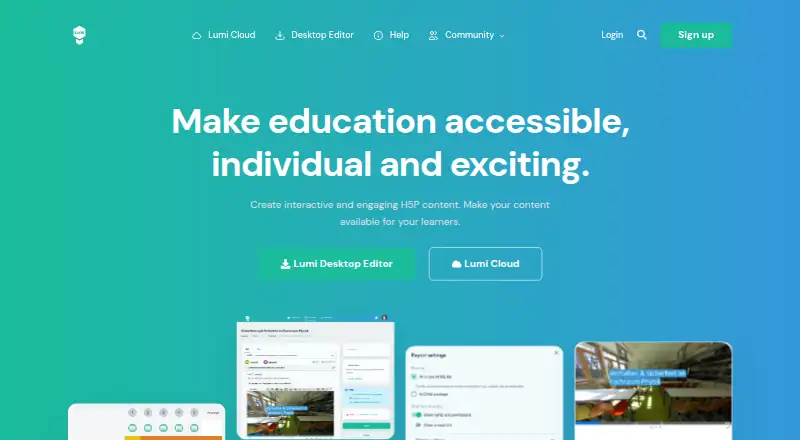
What Lumi Education is
Lumi Education lets educators create, edit, host, and share interactive H5P learning content. H5P content can include quizzes, interactive videos, presentations, and games. Educators can distribute it by direct link, an embedded widget, or QR code, and export it as HTML, SCORM, or H5P files. Lumi says H5P content can integrate with platforms including Moodle, WordPress, and Drupal.
Lumi includes a free, open-source desktop editor for Windows, macOS, and Linux. It can create, edit, and preview H5P content offline. Lumi Cloud deployments collect learner interactions and answers, which are stored individually within each deployment. The platform is hosted in the EU, with core application data stored in databases in Frankfurt, Germany. Lumi describes safeguards aligned with GDPR, including data minimization, privacy by design, encrypted connections, restricted production access, updates, and monitoring. For schools, it provides a Data Processing Agreement, Technical and Organizational Measures, a subprocessor list, and hosting information.
The free plan allows unlimited content, with a 15 MB upload limit per file and HTML, SCORM, and H5P export. Lumi Pro raises the per-file upload limit to 500 MB and includes individual feedback. Pro costs $10 a month or $100 a year. Lumi’s export support currently covers SCORM 1.2, and timeline components cannot be exported as HTML.
Who it suits
Lumi suits educators who create interactive lessons, quizzes, videos, presentations, or games and want to share them through links, embeds, or QR codes. Its free desktop editor is a fit for people working on Windows, macOS, or Linux who need to create and preview H5P content offline; Lumi Cloud is relevant when collecting individual learner responses.
What it does well
- The free plan allows unlimited content.
- The desktop editor is open source and works offline.
- Content can be shared by link, embed, or QR code.
- Exports include HTML, SCORM, and H5P formats.
- Desktop editing is available on Windows, macOS, and Linux.
- Schools can request data processing and hosting documentation.
What to know first
- Free plan uploads are limited to 15 MB per file.
- Lumi currently supports SCORM 1.2 export only.
- Timeline components cannot be exported as HTML.
- Lumi Cloud users cannot install their own H5P libraries.
Limits
Lumi Free has a 15 MB upload limit per file. Lumi Pro raises that limit to 500 MB and includes individual feedback; the free plan does not list individual feedback.
Plans
| Plan | Billed and limits | Price |
|---|---|---|
| Lumi Free | Unlimited contents · 15 MB upload limit per file · HTML, SCORM, H5P export | Free |
| Lumi Pro (monthly) | Monthly · 500 MB upload limit per file · Individual feedback · Supports development and maintenance of Lumi Cloud and Lumi Desktop | $10 a month |
| Lumi Pro (yearly) | Yearly · 500 MB upload limit per file · Individual feedback · Supports development and maintenance of Lumi Cloud and Lumi Desktop | $100 a year |
As lumi.education lists them, read 8 Oct 2026. The maker's own page has the final word.
Getting started
- Visit the Lumi Education website.
- Choose the free desktop editor for Windows, macOS, or Linux, or use Lumi’s web platform.
- Create or edit H5P content, and preview it in the desktop editor if working offline.
- Share content by direct link, embedded widget, or QR code, or export it as HTML, SCORM, or H5P.
- Choose Lumi Free or Lumi Pro if the listed upload limits and individual feedback fit your needs.
Overview
Lumi Education is an H5P authoring and sharing platform for educators who want to build interactive learning materials and distribute them online or through an LMS. Its free desktop editor also makes it a strong fit for creating and previewing content offline across Windows, macOS, and Linux. The trade-off is that cloud users cannot add their own H5P libraries, and exports have specific SCORM and HTML limits.
Key features
Authoring and distribution
Lumi supports H5P activities such as quizzes, interactive videos, presentations, and games. Authors can share finished content by direct link, embedded widget, or QR code, or export it as HTML, SCORM, or H5P files. H5P content can also integrate with platforms including Moodle, WordPress, and Drupal, giving educators several ways to fit materials into existing courses.
The free, open-source desktop editor can create, edit, and preview H5P content offline on Windows, macOS, and Linux. That is useful for authors who need to work without a reliable connection; the cloud service, by contrast, provides hosting and individual response collection. Lumi records learners’ interactions and answers separately within each deployment, which can help instructors review responses rather than relying only on a finished activity.
Practical limits
SCORM export is limited to version 1.2, so Lumi is not a good fit when a course requires a newer SCORM version. Timeline components cannot be exported as HTML, which narrows the usefulness of HTML output for those activities. In Lumi Cloud, users cannot install their own H5P libraries because of security risks; teams needing a missing content type must contact Lumi rather than add it themselves.
Privacy and support
Lumi says its platform is hosted in the EU, with core application data stored in databases in Frankfurt, Germany. Its stated safeguards include data minimization, privacy by design, encrypted connections, restricted production access, updates, and monitoring. Schools can obtain a Data Processing Agreement, Technical and Organizational Measures, a subprocessor list, and hosting information. Help articles, feature requests, and bug reports are available through Lumi’s support resources.
Pricing
Lumi uses a freemium model. Lumi Free costs nothing and allows unlimited contents, with a 15 MB upload limit per file and HTML, SCORM, and H5P export. It is a practical starting point for individuals or small projects with modest file sizes, but the per-file cap may constrain larger media.
Lumi Pro raises the upload limit to 500 MB per file and adds individual feedback, while supporting development and maintenance of Lumi Cloud and Lumi Desktop. The monthly plan costs $10 a month, billed monthly. The yearly plan costs $100 a year, billed yearly, making it the lower-cost choice for users prepared to pay annually. Both paid plans suit educators who need larger uploads or individual learner responses; the free plan does not include those paid-plan benefits.
Platforms
Lumi is available on Linux, macOS, Windows, and the web. The desktop editor’s offline authoring and preview work specifically on Windows, macOS, and Linux; Lumi Cloud provides the web-based route for hosting and response collection.
Who it's for
Lumi is best for educators and course authors building H5P activities who want flexible sharing, LMS integration, and a choice between offline desktop authoring and cloud delivery. It is especially suitable when collecting individual learner responses matters or when school teams need EU hosting and supporting privacy documentation. Choose another tool if your workflow depends on custom H5P libraries in the cloud, SCORM beyond 1.2, or HTML exports of timeline components.
Pros and cons
Pros
- Offline desktop authoring: The free, open-source editor can create, edit, and preview H5P content without a connection on three desktop operating systems.
- Flexible distribution: Direct links, embeds, QR codes, and exports let educators use content in different course setups.
- Individual feedback on Pro: Deployments can store learner interactions and answers individually, supporting response review.
- School-oriented privacy documentation: EU hosting, Frankfurt data storage, and documents such as a DPA and subprocessor list address common institutional needs.
Cons
- SCORM stops at 1.2: Teams requiring a later SCORM version need another export workflow or product.
- Some HTML output is unavailable: Timeline components cannot be exported as HTML.
- No custom cloud libraries: Lumi Cloud users cannot install their own H5P libraries, limiting control over content types.
- Free uploads are capped at 15 MB per file: Larger files require Pro, which allows up to 500 MB per file.
Alternatives
Course Authoring Software is a broader category to explore when Lumi’s H5P-focused workflow is not the right match.
Choose Adapt Learning if you want a free, open-source e-learning authoring tool and framework across web, desktop, and mobile platforms. ProProfs Training Maker is another freemium option; its free plan supports up to 10 learners and includes all features. Consider Xerte if free, open-source authoring suits you and you can install it on a web server; commercial hosting and support are separate.
eXeLearning is free and open source, with online or desktop use, so it is an option for authors seeking a different free authoring tool. BranchTrack, Mindsmith, Open eLearning, and ActivePresenter are also alternatives to compare.
Verdict
Lumi Education is a compelling choice for educators who want to author and distribute interactive H5P materials, especially when offline desktop editing or individual learner response collection is important. Its free plan makes it accessible, while Pro adds larger uploads and individual feedback. Look elsewhere if your work depends on SCORM versions beyond 1.2, HTML export of timeline components, or installing custom H5P libraries in Lumi Cloud.
Verdict
Choose Lumi if you need to author and distribute interactive H5P learning materials, especially with its offline desktop editor or its individual learner response collection. Look elsewhere if your work depends on SCORM versions beyond 1.2, HTML export of timeline components, or installing custom H5P libraries in Lumi Cloud.
Questions
Does Lumi have a free plan?
Yes. Lumi Free costs nothing, allows unlimited content, and includes HTML, SCORM, and H5P export.
How much does Lumi Pro cost?
Lumi Pro is $10 a month when billed monthly, or $100 a year when billed yearly.
Which platforms does Lumi support?
The desktop editor works on Windows, macOS, and Linux, and Lumi also lists web access.
Is Lumi open source?
Lumi’s free desktop editor is open source.
Can Lumi content work with an LMS?
Lumi says H5P content can integrate with platforms including Moodle, WordPress, and Drupal.
What export formats are available?
Lumi lists HTML, SCORM, and H5P exports. Its help page says SCORM 1.2 is currently supported, and timeline components cannot be exported as HTML.
Facts from Lumi Education's own pages
- Content types
- H5P supports activities including quizzes, interactive videos, presentations, and games. · lumi.education, 8 Oct 2026
- Data hosting
- Lumi says its platform is hosted in the EU and that core application data is stored in databases in Frankfurt, Germany. · help.lumi.education, 8 Oct 2026
- Desktop editor
- The free, open-source desktop editor can create, edit, and preview H5P content offline on Windows, macOS, and Linux. · lumi.education, 8 Oct 2026
- Export limit
- Lumi’s help page says only SCORM 1.2 is currently supported and that timeline components cannot be exported as HTML. · feedback.lumi.education, 8 Oct 2026
- Exports
- Lumi exports content as HTML, SCORM, or H5P files. · lumi.education, 8 Oct 2026
- Headquarters
- Ohrum, Germany · lumi.education, 28 Sept 2026
- Learner responses
- Lumi deployments collect learners’ interactions and answers, stored individually within each deployment. · help.lumi.education, 8 Oct 2026
- Library limit
- Users cannot install their own H5P libraries in Lumi Cloud because of security risks; the page says to contact Lumi about missing content types. · feedback.lumi.education, 8 Oct 2026
- LMS compatibility
- Lumi says H5P content can integrate with platforms including Moodle, WordPress, and Drupal. · lumi.education, 8 Oct 2026
- Privacy and security
- Lumi describes GDPR-aligned safeguards including data minimization, privacy by design, encrypted connections, restricted production access, updates, and monitoring. · help.lumi.education, 8 Oct 2026
- Product
- Lumi lets educators create, edit, host, and share interactive H5P learning content. · lumi.education, 8 Oct 2026
- School documentation
- Lumi provides schools with a Data Processing Agreement, Technical and Organizational Measures, a subprocessor list, and hosting information. · help.lumi.education, 8 Oct 2026
- Sharing
- Lumi content can be shared by direct link, embedded widget, or QR code. · help.lumi.education, 8 Oct 2026
- Support
- Lumi provides help articles and accepts feature requests and bug reports through its support resources. · help.lumi.education, 8 Oct 2026
Where Lumi Education stands on Freedom251
- Course Authoring Software#8 of 28