Freedom251 › Course Authoring Software

Cforj Course Forge Studio
What Cforj Course Forge Studio is
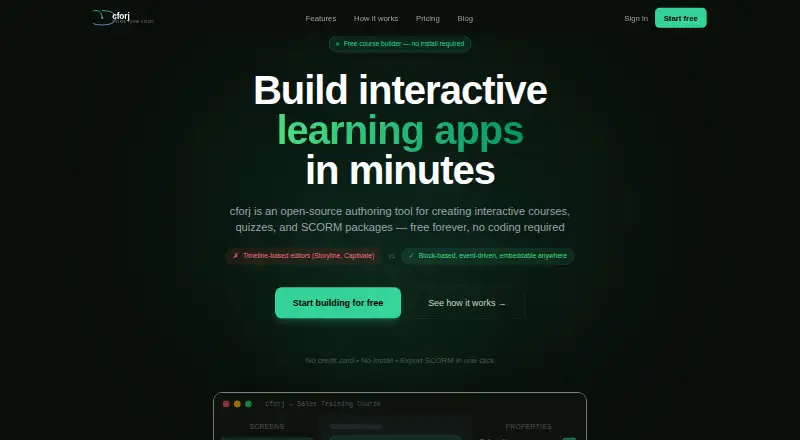
Cforj Course Forge Studio is an open-source authoring tool for creating interactive courses, quizzes and SCORM packages without coding. Its block editor includes text, images, video, quizzes, flashcards, branching scenarios, drag-and-drop activities, hotspots, dialog trainers and screen simulations. Courses can be exported as SCORM 1.2, SCORM 2004, xAPI or plain HTML, then published to the web or shared by link or iframe. The site says iframe embeds can be used on Tilda, Wix, WordPress, Webflow or any HTML page. The browser workflow requires no installation or account, and courses can be previewed on iPad and mobile devices. The free plan includes unlimited courses, listed blocks and exports, but retains cforj branding. Pro costs $30 a month and adds AI course generation from a text description, analytics, collaboration and 50-version history. Enterprise uses a custom annual contract and includes self-hosting, SSO / SAML, unlimited history and an on-premise AI option. The core player, editor and SCORM exporter use the AGPL-3.0 license.
Who it suits
Cforj suits solo instructors and learning and development teams creating interactive courses without coding. It also offers a self-hosted Enterprise option for organizations needing SSO / SAML or an on-premise AI option.
What it does well
- Block editor supports varied interactive course content
- Exports SCORM 1.2, SCORM 2004, xAPI and HTML
- Browser workflow needs no installation or account
- Free plan includes unlimited courses
- Core components use the AGPL-3.0 license
What to know first
- Free plan retains cforj branding
- Pro costs $30 a month
- Enterprise pricing uses a custom annual contract
- Course remixing is listed as coming soon
Limits
The Free plan includes cforj branding. Pro includes version history for 50 versions; Enterprise includes unlimited version history.
Plans
| Plan | Billed and limits | Price |
|---|---|---|
| Free | Free forever · Unlimited courses · All 10+ block types · SCORM 1.2, 2004, and xAPI export · HTML export · Publish to web · Share link and iframe embed · cforj branding | Free |
| Pro | Auto-renews monthly. Cancel anytime. · AI course generation · Analytics dashboard · Remove cforj branding · Team collaboration · 50-version history · Priority support | $30 a month |
| Enterprise | Custom annual contract · Self-hosted deployment · SSO / SAML · Custom domain and branding · Unlimited version history · SLA and dedicated support · On-premise AI option | On request |
As cforj.studio lists them, read 8 Oct 2026. The maker's own page has the final word.
Getting started
- Open https://cforj.studio/ in a browser.
- Use the listed browser workflow without an account or installation.
- Create a course with the block-based editor.
- Preview the course on a device, including iPad or mobile.
- Publish to the web, share a link, embed an iframe, or export a supported format.
- Choose Pro or Enterprise for their listed additional features.
Verdict
Cforj provides a browser-based way to build and publish interactive courses, with multiple export formats and a free plan. Pro adds AI generation and team features, while self-hosting and SSO / SAML are listed under Enterprise.
Questions
Is Cforj free?
Yes. The Free plan costs nothing, and Pro costs $30 a month. Enterprise is offered under a custom annual contract.
What can I export?
Courses can be exported as SCORM 1.2, SCORM 2004, xAPI, or plain HTML.
Can I use Cforj without installing it or creating an account?
The listed browser workflow works without installation or an account.
Is Cforj open source?
The core player, editor, and SCORM exporter are licensed under AGPL-3.0. They can be forked, extended, and self-hosted.
Which plans include AI course generation?
Pro includes AI course generation from a plain-text description. Enterprise lists an on-premise AI option.
Can I embed a course on my website?
Courses can be embedded with an iframe on Tilda, Wix, WordPress, Webflow, or any HTML page.
Facts from Cforj Course Forge Studio's own pages
- AI
- Pro includes AI course generation that builds course structure, screens, blocks, and quizzes from a plain-text description. · cforj.studio, 8 Oct 2026
- Audience
- The maker describes the product as scaling from solo instructors to L&D teams. · cforj.studio, 8 Oct 2026
- Browser use
- The site says cforj works in a browser, requires no install, and needs no account to use the listed browser workflow. · cforj.studio, 8 Oct 2026
- Coming soon
- The maker labels course remixing as coming soon. · cforj.studio, 8 Oct 2026
- Editor
- Its block-based editor supports text, images, video, quizzes, flashcards, branching scenarios, drag and drop, hotspots, dialog trainers, and screen simulations. · cforj.studio, 8 Oct 2026
- Embedding
- The site says courses can be embedded with an iframe on Tilda, Wix, WordPress, Webflow, or any HTML page. · cforj.studio, 8 Oct 2026
- Enterprise security
- The Enterprise plan is described as self-hosted and secure, and lists SSO / SAML and an on-premise AI option. · cforj.studio, 8 Oct 2026
- Exports
- Courses can be exported as SCORM 1.2, SCORM 2004, xAPI, or plain HTML. · cforj.studio, 8 Oct 2026
- Integrations
- A maker blog post describes integrations for WordPress, Framer, Moodle, and Firefox, including a Firefox extension. · blog.cforj.studio, 8 Oct 2026
- Mobile preview
- The site lists iPad and mobile support and says courses can be previewed on any device. · cforj.studio, 8 Oct 2026
- Purpose
- Cforj is an open-source authoring tool for creating interactive courses, quizzes, and SCORM packages without coding. · cforj.studio, 8 Oct 2026
- Source license
- The core player, editor, and SCORM exporter are licensed under AGPL-3.0, and the site says users can fork, extend, and self-host them. · cforj.studio, 8 Oct 2026
- Version history
- Pro includes version history for 50 versions, while Enterprise includes unlimited version history. · cforj.studio, 8 Oct 2026
Where Cforj Course Forge Studio stands on Freedom251
- Course Authoring Software#6 of 28