Freedom251 › Interactive Lesson Makers

eXeLearning
What eXeLearning is
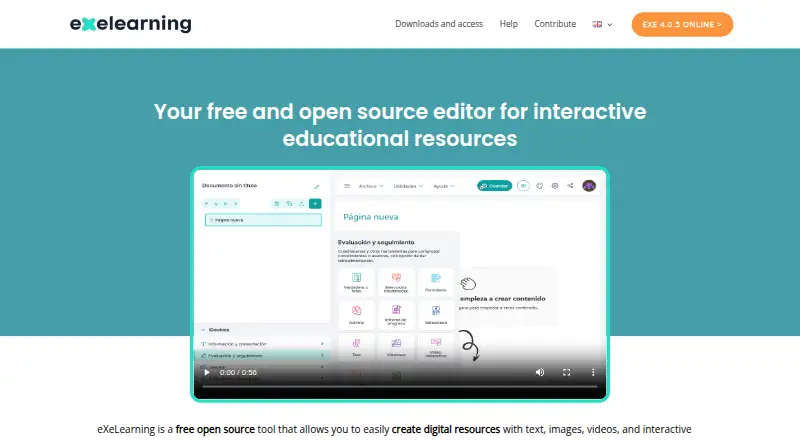
eXeLearning is a free, open-source editor for creating interactive educational resources with text, images, video, and activities. Teachers and other creators can build materials without programming knowledge, then export them in formats such as SCORM, HTML, and EPUB for publishing or sharing. It can be used online, and official desktop installers are available for Linux, Windows, and macOS. For server use, eXeLearning CLOUD supports cloud storage and simultaneous editing of a project by multiple users. Official plugins connect the tool with Moodle SCORM, Moodle Web, WordPress, and Omeka-S; the Moodle SCORM plugin supports tracking and grade collection. The editor includes assessment building and responsive output. Version 4.0 brought accessibility improvements, while version 4.0.1 improved ZIP extraction, authentication, and API-based access control. The software is licensed under the GNU Affero General Public License 3. There is no Android or iOS editing version, but eXeReader can display materials on mobile devices.
Who it suits
eXeLearning suits teachers and creators preparing interactive educational materials without programming. Its CLOUD option is relevant to teams that need to edit a project together.
What it does well
- Create learning materials without programming knowledge.
- Exports include SCORM, HTML, and EPUB.
- Desktop installers cover Linux, Windows, and macOS.
- CLOUD supports simultaneous project editing.
- Plugins connect with Moodle, WordPress, and Omeka-S.
What to know first
- There is no Android or iOS editing version.
- Mobile devices can view materials through eXeReader only.
Limits
The editor has no Android or iOS version for editing. eXeReader can be used to view materials on mobile devices.
Plans
| Plan | Billed and limits | Price |
|---|---|---|
| eXeLearning | free and open source · online or desktop use | Free |
As exelearning.net lists them, read 1 Oct 2026. The maker's own page has the final word.
Getting started
- Visit https://exelearning.net/en/
- Choose online use or an official desktop installer for Linux, Windows, or macOS
- Create educational materials using text, images, videos, or activities
- Export the content as SCORM, HTML, or EPUB
- For simultaneous editing and cloud storage, install eXeLearning CLOUD on a server
Overview
eXeLearning is an open-source editor for making interactive educational resources, aimed especially at teachers and creators who want to build materials themselves. Its appeal is a no-cost path from authoring to several export formats; it is less suited to anyone who needs to edit content on a phone or expects a full learner-management platform.
Key features
Resources can combine text, images, video and activities, with assessment building and no programming requirement. That keeps the focus on creating lessons rather than coding them, while responsive output helps materials adapt to different screen sizes. Accessibility improvements introduced in version 4.0 also support authors trying to make materials more inclusive.
SCORM, HTML and EPUB exports give authors options for sharing or publishing content. Official plugins connect eXeLearning with Moodle SCORM, Moodle Web, WordPress and Omeka-S. The Moodle SCORM plugin supports tracking and grade collection, which makes it the more relevant route for Moodle users who need assessment results recorded there.
For group work, eXeLearning CLOUD can be installed on a server and provides cloud storage and simultaneous real-time editing by multiple users. That makes shared authoring possible, but the server-based setup is a different proposition from simply using the desktop editor. Version 4.0.1 improved ZIP extraction, user authentication and API-based access control.
Pricing
The eXeLearning plan costs nothing. It is free and open source, with online or desktop use, so there is no paid tier to weigh against a capped entry plan. The GNU Affero General Public License 3 is relevant to organizations that need to account for open-source licensing.
Official installers are provided for Linux, Windows and macOS, and the editor can also be used online. The cloud version adds simultaneous collaboration and storage when installed on a server; mobile devices can view materials with eXeReader, but there is no Android or iOS editing app. Support includes a manual, guides, tutorials and FAQs, with community contact through Telegram or email.
Platforms
Linux, macOS, Windows, web and self-hosted use cover individual desktop work as well as online and server-based workflows. That range is a strength for education teams with different deployment needs, though phone and tablet users are limited to viewing rather than editing.
Who it's for
eXeLearning suits educators and content creators who need a free tool to assemble interactive learning materials and export them for use elsewhere. It is particularly compelling for Moodle workflows that benefit from SCORM tracking and grade collection, or for teams prepared to install the cloud version on a server. It is a weaker fit for mobile-first authoring or for organizations seeking a managed course platform rather than an authoring editor.
Pros and cons
- Pro: Free, open-source authoring across desktop and online use avoids a subscription barrier for individual creators.
- Pro: SCORM, HTML and EPUB exports plus official publishing plugins offer several routes to distribute content.
- Pro: Cloud-based simultaneous editing gives multiple users a way to work on the same project.
- Con: Editing is not available on Android or iOS, limiting authors who work primarily on mobile devices.
- Con: The collaborative cloud option requires server installation, adding setup considerations for teams.
Alternatives
Adapt Learning is another free, open-source authoring tool and framework; it is worth considering when its Android and iOS platform support matters. Xerte is also free and open source, but requires installation on a web server, with commercial hosting and support separate.
ProProfs Training Maker offers a free plan capped at 10 learners, with all features, making it an option when a defined learner allowance is acceptable. Lumi Education has unlimited content on its free plan, with a 15 MB per-file upload limit and HTML, SCORM and H5P export, so it may suit authors who want H5P output.
Open eLearning is free software under GNU GPL v3.0+ and has a paid Premium Member plan at $39.99 a year. ActivePresenter has a free edition for trial and non-commercial use, with watermarks on outputs using non-free features. BranchTrack and Mindsmith are also alternatives.
Browse Course Authoring Software or Interactive Lesson Makers for more options.
Verdict
Choose eXeLearning if you want a genuinely free authoring tool with useful export choices, desktop and online access, and an option for real-time team editing. Look elsewhere if mobile authoring is essential or if you need a course platform rather than a content editor.
Verdict
eXeLearning offers free authoring across desktop and online use, with export formats and plugins for publishing and learning platforms. Mobile access is for viewing materials, not editing.
Questions
Is eXeLearning free?
Yes. It is free and open source, with online or desktop use listed as free.
Which operating systems have desktop installers?
Official desktop installers are provided for Linux, Windows, and macOS.
Can multiple people edit a project together?
Yes. eXeLearning CLOUD allows multiple users to edit the same project simultaneously in real time.
What formats can I export?
Export formats include SCORM, HTML, and EPUB.
Is eXeLearning open source?
Yes. It is distributed under the GNU Affero General Public License 3.
Can I edit eXeLearning materials on a phone?
There is no Android or iOS editing version. eXeReader can display materials on mobile devices.
Facts from eXeLearning's own pages
- Accessibility
- eXeLearning 4.0 introduced accessibility improvements and enhancements to create more inclusive materials. · exelearning.net, 1 Oct 2026
- Authoring
- The tool lets teachers and creators develop interactive educational materials without programming knowledge. · exelearning.net, 1 Oct 2026
- Collaboration
- The cloud version allows multiple users to edit the same project simultaneously in real time. · exelearning.net, 1 Oct 2026
- Desktop platforms
- Official installers are provided for Linux, Windows and macOS. · exelearning.net, 1 Oct 2026
- Export formats
- Content can be exported in formats including SCORM, HTML and EPUB for publishing or sharing. · exelearning.net, 1 Oct 2026
- Governance
- The project is coordinated by CEDEC-INTEF under Spain’s Ministry of Education, Vocational Training and Sports with regional education administrations. · exelearning.net, 1 Oct 2026
- Integrations
- Official plugins integrate eXeLearning with Moodle SCORM, Moodle Web, WordPress and Omeka-S. · exelearning.net, 1 Oct 2026
- License
- eXeLearning is distributed under the GNU Affero General Public License 3. · exelearning.net, 1 Oct 2026
- Mobile limitation
- There is no Android or iOS version for editing; eXeReader can view materials on mobile devices. · exelearning.net, 1 Oct 2026
- Moodle tracking
- The Moodle SCORM plugin supports tracking and grade collection. · exelearning.net, 1 Oct 2026
- Online and server use
- eXeLearning can be used online, while eXeLearning CLOUD can be installed on a server for collaborative editing and cloud storage. · exelearning.net, 1 Oct 2026
- Purpose
- eXeLearning is a free open-source editor for creating interactive educational resources with text, images, videos and activities. · exelearning.net, 1 Oct 2026
- Security
- Version 4.0.1 improved ZIP extraction, user authentication and API-based access control. · exelearning.net, 1 Oct 2026
- Support
- Users can consult the manual, guides, tutorials and FAQs, and contact the community through Telegram or [email protected]. · exelearning.net, 1 Oct 2026
Where eXeLearning stands on Freedom251
- Interactive Lesson Makers#5 of 31
- Course Authoring Software#7 of 28