Freedom251 › Emulation Frontends
Lakka
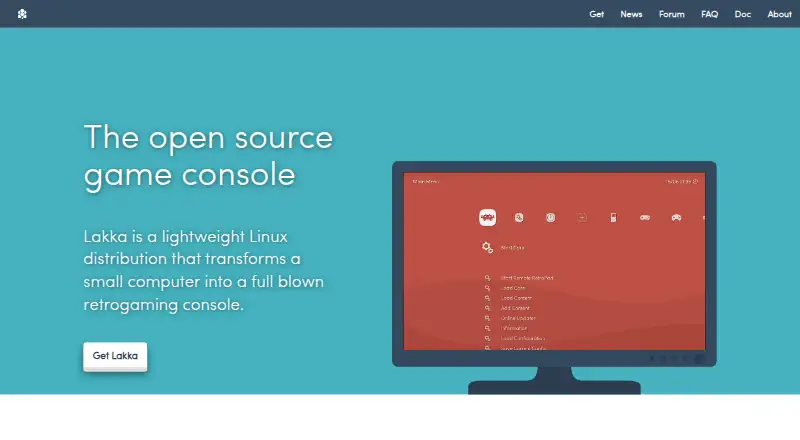
What Lakka is
Lakka is a lightweight Linux distribution that turns a small computer into a retrogaming console. Based on LibreELEC and RetroArch, it uses RetroArch as its graphical interface, with unified emulator configuration and joypad autoconfiguration. Listed features include automatic controller recognition, rewinding, netplay, and shaders. Official builds target Raspberry Pi, Allwinner, iMX6, Amlogic, and 32-bit and 64-bit PC systems. Installation uses USB images specific to the target hardware, and the installation guide covers GNU/Linux, Windows, and MacOS. The PC build is intended for dedicated hardware; virtualization, dual boot, and CD or DVD installation are unsupported. Users must supply their own ROMs, and the documentation also covers BIOS files. Netplay requires the same ROM on both sides, and cores without savestate support cannot use it. The project says development is ongoing, so bugs, missing features, or unsupported hardware may occur. Lakka is free and community-driven; required hardware is not included.
Who it suits
Lakka suits people who want to turn compatible dedicated hardware into a retrogaming console. Users need to provide their own ROMs and choose an image for their target hardware.
What it does well
- Includes rewinding, netplay, and shaders.
- Recognizes common USB joypads automatically.
- Supports multiple hardware targets.
- Offers unified emulator configuration.
- The operating system can be updated or downgraded with one download.
What to know first
- Required hardware is not included.
- Users must provide their own ROMs.
- PC builds do not support virtualization or dual boot.
- Hardware compatibility is not guaranteed.
Limits
Lakka is free, but the required hardware is not included and users must supply their own ROMs. On PC, installation is limited to USB images for dedicated hardware; virtualization, dual boot, and CD or DVD installation are unsupported.
Plans
| Plan | Billed and limits | Price |
|---|---|---|
| Lakka OS | hardware not included · user obtains required hardware | Free |
As lakka.tv lists them, read 1 Oct 2026. The maker's own page has the final word.
Getting started
- Choose the Lakka image for the target hardware.
- Use the installation tutorial for GNU/Linux, Windows, or MacOS to prepare installation.
- Install the image from USB on the supported hardware.
- Connect a common USB joypad, which the hardware documentation says is preconfigured.
- Provide your own ROMs and consult Lakka’s documentation for ROMs and BIOS files.
Lakka is a free Linux operating system that turns compatible small computers into dedicated retro-gaming consoles. It is best for people who can reserve supported hardware for gaming and supply their own game files. Its unified RetroArch interface makes that focused setup coherent, but it is not a flexible way to add emulation to an everyday PC.
Overview
Built on LibreELEC, RetroArch and the libretro ecosystem, Lakka is a complete operating system rather than a standalone emulator. RetroArch also serves as its graphical interface, bringing emulator configuration and joypad setup into one environment. That consistency suits a console-style installation, but the dedicated-hardware approach means Lakka is a poor fit for anyone who needs virtualization, dual boot or a general-purpose PC alongside gaming.
Common USB joypads are preconfigured to work when plugged in. Rewinding, save states, shaders and cheat support add useful options for individual play; netplay supports games with up to five players. Online play has constraints: everyone needs the same ROM, and cores without savestate support cannot use netplay. Users must provide their own ROMs, and BIOS files are handled separately.
Key features
- Unified RetroArch configuration: Because RetroArch is built into the interface, emulator settings and joypad autoconfiguration share a common layer. That is useful for a dedicated console setup, rather than a collection of individually managed emulator applications.
- Retro-gaming tools: Rewind, save states, shaders and cheats give players several ways to adjust or manage play. Netplay extends the system to multiplayer, but its ROM and savestate requirements narrow which setups can use it.
- Whole-system updates: Lakka can be updated or downgraded with a single download. Its LibreELEC-based filesystem is read-only and 300 MB, including when accessed with root privileges, which supports a tightly controlled appliance-style system.
Pricing
Lakka OS costs nothing. The software is free, but hardware is not included: users need to obtain a compatible device. There is no free trial because the plan is free. This suits people who already have supported hardware or are prepared to dedicate a device; the software price does not remove the cost of acquiring that hardware.
Platforms
Official builds target Raspberry Pi, Allwinner, iMX6, Amlogic and 32-bit and 64-bit PC systems, with additional supported platforms including Cubieboard, Banana Pi, Cubox-i, Hummingboard, UDOO and Odroid. Lakka supplies USB images specific to the target hardware, and its installation tutorial covers GNU/Linux, Windows and macOS. Compatibility is not guaranteed. The PC build is intended for real dedicated hardware: it does not support virtualization or dual boot, and installation from CD or DVD is unsupported.
Who it's for
Lakka is a sensible choice for retro-gaming enthusiasts who want a small, dedicated machine with a console-style interface and unified controller configuration. It is less suitable for people who want to keep using their PC normally, rely on a virtual machine, or expect game files to be bundled. The project is community-driven and still under heavy development, so bugs, missing features and unsupported hardware remain possible. Support comes through the community forum, IRC, Discord and GitHub bug tracker.
Pros and cons
- Pros: RetroArch handles the interface, emulator configuration and joypad autoconfiguration together, making the system purpose-built for console-style use.
- Pros: Common USB joypads are preconfigured, and features such as rewinding, save states, shaders and cheats cover useful play options.
- Pros: The entire operating system can be updated or downgraded with one download, and its read-only filesystem is designed to resist changes even with root access.
- Cons: Users must supply ROMs, and netplay requires matching ROMs on both ends as well as a core with savestate support.
- Cons: The PC build rules out virtualization and dual boot, while hardware compatibility is not guaranteed.
- Cons: Ongoing heavy development brings the possibility of bugs, missing features and unsupported hardware.
Alternatives
RetroArch is also free and open source, and is the closer alternative for readers seeking the RetroArch project across Android, iOS, Linux, macOS, web and Windows rather than Lakka's dedicated operating-system approach.
BlastEm is a free option for readers looking for software available on Linux, macOS, web and Windows. ClownMDEmu is another free alternative, with Linux, macOS, self-hosted, web and Windows platforms.
MAME is a free alternative for readers seeking software on Android, Linux, macOS or Windows; ROMs and copyrighted software are generally not included. ares is a free, open-source multi-system emulator for Linux, macOS and Windows.
EmulatorJS is a free, ad-free open-source project for Android, iOS, self-hosted and web use. Genesis Plus GX is a free option for Linux and Windows, with source code under a specific non-commercial license and a standalone GameCube/Wii build. higan is free software for Linux, macOS and Windows, offered with no warranty.
For more choices, browse Emulation Frontends or Sega Genesis Emulators.
Verdict
Choose Lakka if you want a free, console-focused system for supported hardware and value having RetroArch configuration and controller setup in one interface. Look elsewhere if you need a virtualized or dual-boot PC, want a general-purpose machine, or need game files included.
Verdict
Lakka combines a console-style interface with RetroArch-based emulator configuration on supported hardware. Its dedicated-hardware limits, ROM requirement, and ongoing development are important to consider before installing it.
Questions
How much does Lakka cost?
Lakka is free. Hardware is not included, and users obtain the required hardware separately.
Which systems can run Lakka?
Official builds target Raspberry Pi, Allwinner, iMX6, Amlogic, and 32-bit and 64-bit PCs. Listed hardware also includes Cubieboard, Banana Pi, Cubox-i, Hummingboard, UDOO, and Odroid.
Is Lakka open source?
Lakka is a community-driven open-source project. Its bundled emulators are protected by a non-commercial license, and the name and logo are registered trademarks.
Does Lakka include game files?
Users must provide their own ROMs. Lakka documentation separately covers ROMs and BIOS files.
Can I use netplay with every game core?
Netplay requires the same ROM on both sides. Cores without savestate support do not support netplay.
Can I install Lakka in a virtual machine or alongside another operating system?
No. The PC build does not support virtualization or dual boot and is intended for dedicated hardware.
Facts from Lakka's own pages
- Architecture
- Lakka is based on LibreELEC and supports development boards, embedded or mobile systems, tiny PCs, and 32-bit and 64-bit PCs. · lakka.tv, 1 Oct 2026
- Controller support
- Common USB joypads are preconfigured and work automatically when plugged in, according to the hardware support documentation. · lakka.tv, 30 Sept 2026
- Core integration
- Lakka's graphical interface is directly coded in RetroArch, providing unified emulator configuration and RetroArch joypad autoconfiguration. · lakka.tv, 1 Oct 2026
- Development status
- Lakka is still under heavy development, with possible bugs, missing features and unsupported hardware. · lakka.tv, 30 Sept 2026
- Emulation base
- Lakka is built on RetroArch and can emulate a wide variety of systems. · lakka.tv, 1 Oct 2026
- Features
- Features include automatic joypad recognition, rewinding, netplay, shaders, savestates, and wireless joypad support. · lakka.tv, 1 Oct 2026
- Game files
- Users must provide their own ROMs, and Lakka documentation separately covers ROMs and BIOS files. · lakka.tv, 30 Sept 2026
- Installation
- Lakka provides USB images and says the image is specific to the target hardware. · lakka.tv, 30 Sept 2026
- Installation environments
- The installation tutorial provides instructions for GNU/Linux, Windows, and MacOS. · lakka.tv, 1 Oct 2026
- Licensing
- Lakka is community-driven open source, while its bundled emulators are protected by a non-commercial license and the name and logo are registered trademarks. · lakka.tv, 30 Sept 2026
- Maker status
- Lakka states that it is not a company and does not sell hardware. · lakka.tv, 1 Oct 2026
- Multiplayer limit
- Lakka supports games with up to five players. · lakka.tv, 1 Oct 2026
- Netplay
- Netplay requires the same ROM on both sides, and cores without savestate support do not support netplay. · lakka.tv, 30 Sept 2026
- Notable limits
- PC images are USB images; CD or DVD installation, virtualization, and dual boot are unsupported, and hardware compatibility is not guaranteed. · lakka.tv, 1 Oct 2026
- PC limitation
- The PC build does not support virtualization or dual boot and is intended for real dedicated hardware. · lakka.tv, 30 Sept 2026
- Privacy
- The Lakka website says it uses no cookies, does not track browsing and does not provide navigation information to third-party analytics. · lakka.tv, 30 Sept 2026
- Project model
- Lakka is a community-driven open-source project with contributors including coders, designers, gamers, testers, and documentation writers. · lakka.tv, 1 Oct 2026
- Purpose
- Lakka is a lightweight Linux distribution that transforms a small computer into a retrogaming console. · lakka.tv, 30 Sept 2026
- RetroArch integration
- Lakka uses RetroArch directly as its graphical interface and provides unified emulator configuration and RetroArch autoconfiguration for joypads. · lakka.tv, 30 Sept 2026
- Security design
- Its LibreELEC-based filesystem is a 300 MB read-only filesystem that cannot be broken even with root access. · lakka.tv, 1 Oct 2026
- Support
- Users can get help through the documentation, FAQ, forums, IRC, Discord, and the GitHub bug tracker. · lakka.tv, 1 Oct 2026
- Supported hardware
- Officially supported computers include 32-bit and 64-bit PCs, Raspberry Pi 0 through 3, Cubieboard, Banana Pi, Cubox-i, Hummingboard, UDOO Quad, Odroid, and WeTek Play. · lakka.tv, 1 Oct 2026
- Updates
- The whole operating system can be updated or downgraded with a single download. · lakka.tv, 1 Oct 2026
- What it does
- Lakka is a lightweight Linux distribution that transforms a small computer into a game console. · lakka.tv, 1 Oct 2026
Where Lakka stands on Freedom251
- Emulation Frontends#7 of 25
- Sega Genesis Emulators#10 of 29