Freedom251 › TurboGrafx-16 Emulators
higan
What higan is
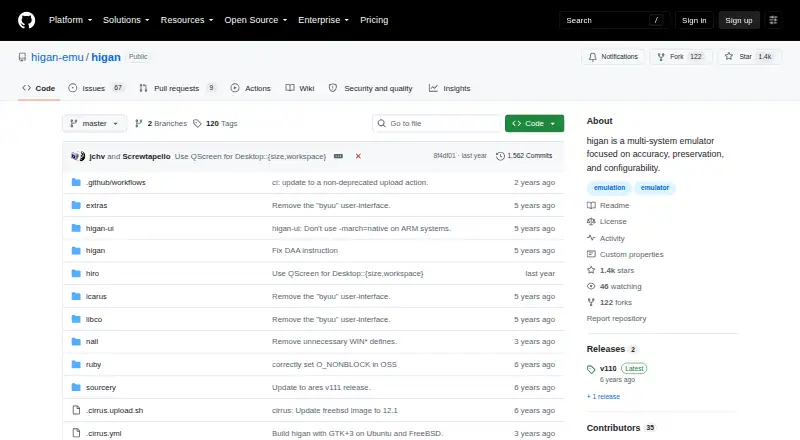
higan is a free, standalone emulator for multiple game systems, with a stated focus on accuracy, preservation, and configurability. Its supported systems include Famicom, Super Famicom, Game Boy, Game Boy Color, Game Boy Advance, Mega Drive, PC Engine, MSX, ColecoVision, Neo Geo Pocket, and WonderSwan. Official releases are available through the project's GitHub releases page. Automated nightly builds are also listed for Windows, macOS, Ubuntu Linux, and FreeBSD, but those builds are untested. The distribution includes icarus, a game library importer, as well as the libco, nall, ruby, and hiro components. The project was originally developed by Near. higan is free software under the GNU General Public License version 3 or a later version, whose terms state that the software comes without warranty. The project links to a discussion forum and Discord chat for community support. Its listed platforms include Linux, macOS, and Windows.
Who it suits
higan may suit people seeking a standalone emulator for one of its supported systems, particularly those interested in configurability and preservation. It is available for Linux, macOS, and Windows.
What it does well
- Supports a broad range of named game systems.
- Official releases are available from GitHub.
- Includes icarus, a game library importer.
- Discussion forum and Discord links are provided.
What to know first
- Nightly builds are untested.
- The license provides no warranty.
Limits
The free software license states that the program is provided without warranty. Automated nightly builds are untested.
Plans
| Plan | Billed and limits | Price |
|---|---|---|
| Free software | No warranty | Free |
As github.com lists them, read 1 Oct 2026. The maker's own page has the final word.
Getting started
- Open the higan GitHub project website.
- Choose an official release from the GitHub releases page, or select a nightly build for a listed operating system.
- Use a supported desktop platform: Linux, macOS, or Windows.
- For nightly builds, note that Ubuntu Linux and FreeBSD are also listed as supported desktop systems.
higan is a standalone, multi-system emulator for desktop users who put accurate preservation and configuration ahead of convenience features. It is best suited to collectors with libraries spanning several classic consoles and handhelds. Choose it when one focused, free package should cover many systems; choose elsewhere if you require mobile support, tested nightly software or warranty protection.
Overview
Originally developed by Near, higan is built around accuracy and readable code. Its scope runs from the Famicom and Super Famicom to handhelds and consoles including Game Boy Advance, Mega Drive, PC Engine, MSX, ColecoVision, Neo Geo Pocket and WonderSwan. That breadth makes it a sensible central emulator for a varied retro collection rather than a specialist for one machine.
The distribution also contains icarus, a game-library importer, plus the libco, nall, ruby and hiro components. This gives the package a wider toolkit than an emulator executable alone; the importer is particularly relevant if you want a library-oriented workflow. higan is free software under the GNU General Public License version 3 or later, with no warranty.
Key features
Wide system coverage
Famicom, Super Famicom, Game Boy, Game Boy Color, Game Boy Advance, Mega Drive, PC Engine, MSX, ColecoVision, Neo Geo Pocket and WonderSwan are all supported. One installation can therefore serve home-console and handheld collections across multiple generations. If your priority is a single platform, a dedicated emulator may be a more focused choice; for mixed libraries, this range is higan's main practical strength.
Accuracy and preservation focus
The project's stated emphasis on accuracy, preservation and configurability will appeal to users who care about faithful behavior and long-term access to older software. Readable code also signals a maintainability goal, though the available product information does not establish performance or compatibility for individual games.
Release channels and community
Official releases are published through the project's GitHub releases page. Automated nightly builds are offered for each supported operating system, but they are untested, so they are better for users who want the newest changes and can accept instability than for a dependable everyday setup. A discussion forum and Discord chat provide community avenues when you need project guidance.
Pricing
| Plan | Price | What it includes |
|---|---|---|
| Free software | free | Standalone higan under GPL-3.0-or-later terms; no warranty |
There are no paid tiers, seat limits or trial period to weigh. The free plan is the only choice and fits anyone comfortable obtaining and running free software. Its important trade-off is legal rather than financial: the license disclaims warranty, so users needing vendor-backed assurances should look elsewhere.
Platforms
higan supports Windows, macOS and Linux. Official desktop coverage is supplemented by nightly builds listed for Windows, macOS, Ubuntu Linux and FreeBSD. It is a standalone desktop emulator, not a mobile or browser product, so Android, iOS and web users need another option.
Who it's for
Choose higan if you maintain a cross-platform retro collection and value accuracy, preservation and configurability in one desktop application. It is also a fit for technically comfortable users who can decide between official releases and untested nightly builds, and for those who want icarus to help import a game library.
It is a poor match for mobile-first play, a browser-based setup, or anyone who expects warranty coverage or only tested software. Users interested in one console alone may also prefer a narrower emulator with a more specialized scope.
Pros and cons
Pros
- Broad coverage: one standalone package handles eleven named classic systems across consoles and handhelds.
- Preservation-oriented design: accuracy, readable code and configurability are the project's central priorities.
- Useful bundled tools: icarus adds a game-library importing workflow, alongside the project's supporting components.
- Free on major desktops: Windows, macOS and Linux support costs 0.00 USD, with FreeBSD listed for nightly builds.
Cons
- Nightly risk: automated builds are untested, making them unsuitable when reliability matters more than recency.
- No warranty: GPL licensing supplies no warranty or commercial assurance.
- No mobile or web edition: users on Android, iOS or browsers need a different emulator.
Alternatives
RetroArch is the stronger alternative when you need Android, iOS or web support in addition to desktop platforms; it is also free and open source.
webЯcade suits users who want a free, open-source emulator experience that includes browser and mobile platforms.
MAME is the better pick for its particular arcade-emulation focus and Android availability; it is GPL-2.0-or-later and does not generally include ROMs or copyrighted software.
ares is another free, open-source multi-system emulator for Linux, macOS and Windows.
ClassicBoy Pro fits Android and Windows users seeking a freemium option with on-screen buttons and gamepad mapping.
Manic EMU targets iOS and macOS users, with free limits such as three save states and fast-forward up to 2×.
Provenance is a freemium iOS and macOS choice with all emulation features free when sideloaded or built from source.
BizHawk is a free MIT-licensed emulator for Windows and Unix releases.
For narrower system choices, see TurboGrafx-16 Emulators, SNES Emulators, Sega Genesis Emulators, Sega CD Emulators and Game Gear Emulators; for other broad packages, browse Multi-System Emulators.
Verdict
higan is a strong choice for desktop collectors who want broad classic-system coverage in a free, preservation-minded standalone emulator. Its decisive advantages are range and configurability; its decisive drawbacks are untested nightly builds, no warranty and no mobile or web support. Pick it for a mixed desktop library, and look elsewhere when platform reach or guaranteed stability is the priority.
Verdict
higan offers a free standalone emulator with support for many systems and a focus on accuracy, preservation, and configurability. Users choosing a nightly build should note that it is untested, and the license provides no warranty.
Questions
How much does higan cost?
The listed Free software plan costs nothing.
Which systems does higan emulate?
Supported systems include Famicom, Super Famicom, Game Boy, Game Boy Color, Game Boy Advance, Mega Drive, PC Engine, MSX, ColecoVision, Neo Geo Pocket, and WonderSwan.
Which platforms are supported?
The listed platforms are Windows, macOS, Ubuntu Linux, and FreeBSD. Linux, macOS, and Windows are also listed as supported platforms.
Where can I get higan?
Official releases are available from the project's GitHub releases page. Automated nightly builds are listed for each supported operating system and are untested.
Is higan open source?
It is free software under the GNU General Public License version 3 or any later version.
What else comes in the distribution?
It includes icarus, a game library importer, along with libco, nall, ruby, and hiro.
Facts from higan's own pages
- Community support
- The project links to a discussion forum and a Discord chat. · github.com, 1 Oct 2026
- Core components
- The distribution includes libco, nall, ruby and hiro alongside higan and icarus. · github.com, 1 Oct 2026
- Founded
- 2004 · github.com, 28 Sept 2026
- Game library tool
- The distribution includes icarus, described as a game library importer for higan. · github.com, 1 Oct 2026
- License
- The program is free software under the GNU General Public License version 3 or any later version. · github.com, 1 Oct 2026
- Nightly builds
- Automated, untested builds are available for each supported operating system. · github.com, 1 Oct 2026
- Official releases
- Official releases are available from the GitHub releases page. · github.com, 1 Oct 2026
- Original developer
- The project was originally developed by Near. · github.com, 1 Oct 2026
- Product type
- higan is a multi-system emulator focused on accuracy and code readability. · github.com, 1 Oct 2026
- Project focus
- The higan-emu organization describes higan as a multi-system emulator focused on accuracy, preservation and configurability. · github.com, 1 Oct 2026
- Supported desktop systems
- Nightly builds are listed for Windows, macOS, Ubuntu Linux and FreeBSD. · github.com, 1 Oct 2026
- Supported systems
- It emulates systems including Famicom, Super Famicom, Game Boy, Game Boy Color, Game Boy Advance, Mega Drive, PC Engine, MSX, ColecoVision, Neo Geo Pocket and WonderSwan. · github.com, 1 Oct 2026
- Warranty
- The license states that the software is provided without warranty. · github.com, 1 Oct 2026
Where higan stands on Freedom251
- TurboGrafx-16 Emulators#7 of 33
- SNES Emulators#10 of 30
- Sega Genesis Emulators#13 of 29
- Game Gear Emulators#14 of 31
- Sega CD Emulators#9 of 19
- Multi-System Emulators#27 of 54