Freedom251 › Cloud Development Environments

Kloudlite
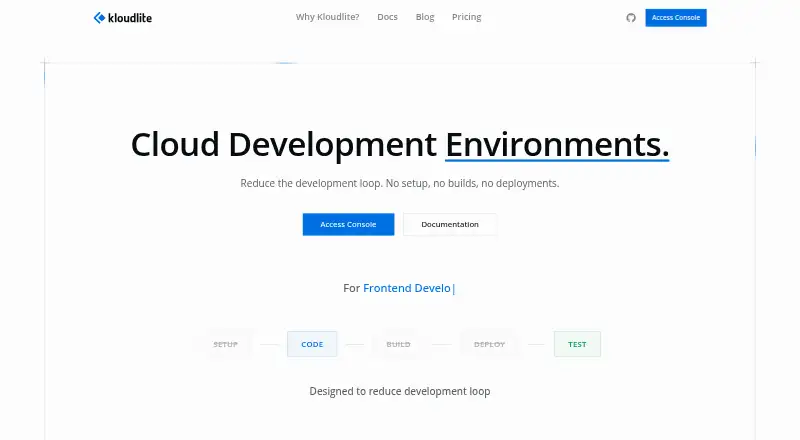
What Kloudlite is
Kloudlite is a cloud development environment platform that links workspaces with the application services developers need to test code changes without waiting for builds or deployments. An environment is an isolated namespace for dependencies such as databases, caches and message queues. Workspaces are development containers holding a codebase, packages and an IDE; they can connect to environments and reach services by name. Listed capabilities include forking workspaces and environments, switching environments, service intercepts, Nix-based package management, and snapshots. Users can access workspaces through VS Code, Cursor, JetBrains, Antigravity, Zed or a web terminal. Supported AI coding tools include Claude Code, Gemini CLI, OpenCode and Codex CLI. The BYOC setup lets users choose AWS, GCP or Azure and a deployment region. Kloudlite offers cloud and self-hosted options. Its self-hosted Free plan is billed at $0 forever and includes unlimited workspaces and environments. Cloud pricing includes a $29.00 per month Control Plane base fee, while Tier 1 is $29.00 per month per user. The company says its controllers, CRDs, CLI and workspace images are open source under MIT.
Who it suits
Kloudlite suits development teams that want workspaces connected to isolated application dependencies, with cloud or self-hosted deployment options. Its listed IDE and AI-tool choices may suit teams using those tools.
What it does well
- Self-hosted free plan includes unlimited workspaces and environments
- Connects workspaces to services by name
- Supports AWS, GCP and Azure BYOC
- Lists several IDE and AI coding tool options
- Open-source components are MIT-licensed
What to know first
- Cloud Control Plane has a $29.00 monthly base fee
- Cloud Tier 1 is $29.00 per user per month
- Enterprise self-hosted pricing is custom
Limits
The self-hosted Free plan lists unlimited workspaces and environments with all core features. Cloud Tier 1 includes 8 vCPUs, 16GB RAM, 160 hours per month, and 100GB storage; extra hours cost $0.18 per hour. Higher cloud tiers list their own hours, compute, storage, and extra-hour charges.
Plans
| Plan | Billed and limits | Price |
|---|---|---|
| Free (Self-Hosted) | forever · AWS, Azure, or GCP deployment · unlimited workspaces · unlimited environments · all core features · community support | Free |
| Cloud Tier 1 | per user monthly · 8 vCPUs · 16GB RAM · 160 hours/month · 100GB storage · 15-minute suspend · extra hours $0.18/hour | $29 a month |
| Tier 1 (Cloud) | $29/user/mo · 8 vCPUs · 16GB RAM · 160 hrs/mo · 100GB storage · 15 min suspend · Extra hours $0.18/hr | $29 a month |
| Control Plane (Cloud) | $29/mo base fee · Dashboard · User management · Billing | $29 a month |
| Control Plane | monthly · dashboard · user management · billing | $29 a month |
| Cloud Tier 2 | per user monthly · 12 vCPUs · 32GB RAM · 160 hours/month · 200GB storage · 30-minute suspend · extra hours $0.30/hour | $49 a month |
| Tier 2 (Cloud) | $49/user/mo · 12 vCPUs · 32GB RAM · 160 hrs/mo · 200GB storage · 30 min suspend · Extra hours $0.30/hr | $49 a month |
| Cloud Tier 3 | per user monthly · 16 vCPUs · 64GB RAM · 160 hours/month · 500GB storage · 1-hour suspend · extra hours $0.55/hour | $89 a month |
The first 8 of 10 plans, as kloudlite.io lists them, read 15 Oct 2026. The maker's own page has the final word. Every plan
Getting started
- Visit the Kloudlite website.
- Choose self-hosted Free, a cloud plan, or contact the company about a cloud trial.
- For BYOC installation, choose AWS, GCP, or Azure and a deployment region.
- Create a workspace with a codebase, packages, and IDE.
- Connect the workspace to an environment to access its services by name.
Kloudlite is built for teams that need reproducible development environments tied to real application services. It is especially suitable for Kubernetes-oriented organizations and developers working with databases, queues, and microservices. The choice is compelling for self-hosters; cloud customers need to budget for resource quotas and overage charges.
Overview
Kloudlite splits a development setup into two connected parts. A workspace is a development container holding the codebase, packages, and IDE. An environment is an isolated namespace for dependencies such as databases, caches, message queues, and other microservices. Workspaces connect to those environments and address services by name, so developers can exercise service-dependent code without waiting for a build or deployment.
Its Kubernetes-native architecture uses custom resource definitions, controllers, Nix package management, and service-mesh integration. Controllers, CRDs, the CLI, and workspace images are released under the MIT license. Each workmachine receives a generated SSH key pair, with authorized keys configurable for workspace access. That combination will appeal to infrastructure teams comfortable operating Kubernetes; it is a heavier foundation than a simple hosted code editor requires.
Key features
Forking environments and workspaces supports parallel experiments, while switching helps move between setups. Snapshots preserve environment or workspace states for repeatable handoffs and recovery. Service intercepts are useful when a developer needs to work on one component while interacting with the rest of an application.
Nix-based package management provides a defined way to assemble workspace dependencies. IDE access spans VS Code, Cursor, JetBrains, Antigravity, Zed, and a web terminal, and the platform supports devcontainer configuration, persistent storage, multiple version-control hosts, and GPU workspaces. AI-ready workspaces can use Claude Code, Gemini CLI, OpenCode, or Codex CLI. These integrations make Kloudlite more adaptable than a single-editor environment, though teams must still operate or pay for the underlying platform.
For cloud deployments, the BYOC flow lets an organization select AWS, GCP, or Azure and choose a region. That is useful for keeping compute in a preferred provider or location, while retaining Kloudlite's control-plane model.
Pricing
The free self-hosted plan is unusually broad: $0 forever on AWS, Azure, or GCP, with unlimited workspaces, unlimited environments, and all core features. Community support is the trade-off, and the organization supplies the infrastructure and operational work. It is the natural starting point for individuals and teams able to run Kubernetes themselves.
Cloud billing separates a control plane from per-user compute tiers. The Control Plane costs $29 per month and includes the dashboard, user management, and billing. Each user then selects a resource tier:
| Plan | Price | Included resources | Overage and suspension |
|---|---|---|---|
| Tier 1 | $29/user/mo | 8 vCPUs, 16GB RAM, 160 hours/month, 100GB storage | 15-minute suspend; extra hours $0.18/hour |
| Tier 2 | $49/user/mo | 12 vCPUs, 32GB RAM, 160 hours/month, 200GB storage | 30-minute suspend; extra hours $0.30/hour |
| Tier 3 | $89/user/mo | 16 vCPUs, 64GB RAM, 160 hours/month, 500GB storage | 1-hour suspend; extra hours $0.55/hour |
Tier 1 fits lighter projects, while Tier 2 and Tier 3 buy more CPU, memory, and storage for larger services or GPU-oriented workspaces. All three cap included runtime at 160 hours, so teams running continuously should account for overages. Cloud customers can request a trial, but its duration is arranged with the company. Enterprise self-hosting has custom pricing and adds on-premise deployment, organization management, SSO and advanced authentication, dedicated support, and an SLA.
Platforms
Kloudlite supports API, Linux, macOS, Windows, web access, and self-hosted deployment. IDE choices include desktop tools and a web terminal, giving teams flexibility across local and browser workflows.
Who it's for
Choose Kloudlite when development depends on a network of services and you want isolated, repeatable environments connected to containerized workspaces. It suits platform teams, backend developers, and organizations already invested in Kubernetes or a public-cloud account. The free self-hosted plan is attractive for teams with operations capacity. A developer seeking only a lightweight editor for a standalone project will likely find the environment model unnecessary.
Pros and cons
Pros
- Unlimited workspaces and environments at $0 on the self-hosted plan.
- Service-aware environments cover databases, queues, caches, and microservices rather than code editing alone.
- Open-source controllers, CRDs, CLI, and workspace images under the MIT license.
- Broad IDE, AI-tool, cloud-provider, GPU, and persistent-storage support.
Cons
- Cloud plans combine a $29 monthly control-plane fee with per-user charges.
- Cloud tiers include 160 hours per month; extra usage is billed hourly.
- Self-hosting requires responsibility for the Kubernetes-based platform and provides community support on the free plan.
Alternatives
GitHub Codespaces is a better fit when you want a familiar hosted development service with usage-based 2-core and 4-core compute pricing and broad client support.
Replit suits quick, browser-first projects; its free Starter plan limits usage to one live project and one background task at a time.
RunCode.io is an option for paid plans centered on parallel workspaces with a 30-minute inactivity timeout.
PaizaCloud Cloud IDE offers a free single-server option with a 24-hour lifetime and up to four hours of continuous browser-open runtime.
Coder is worth choosing for free self-hosted workspaces and up to five active Coder Agents on its Community plan.
Daytona provides a freemium alternative with a pay-as-you-go plan that includes 5 GiB of storage before storage charges.
Okteto is a paid platform with a free Starter tier for five seats.
AWS Cloud9 is preferable when you want an AWS-hosted IDE with no additional Cloud9 charge and separate billing for AWS resources.
For a wider comparison, see Cloud Development Environments.
Verdict
Kloudlite is a strong choice for service-heavy development teams that want isolated environments, workspace flexibility, and a Kubernetes-native operating model. Its free self-hosted edition is the main reason to choose it, while managed users should accept the control-plane fee, 160-hour quotas, and overage rates. Look elsewhere if you need a simpler editor or a cloud plan without infrastructure management and metered runtime.
Verdict
Kloudlite provides isolated environments and connected development workspaces, with options for self-hosting or cloud use. The free self-hosted plan and paid cloud tiers have distinct pricing and support arrangements.
Questions
Does Kloudlite have a free plan?
Yes. Free (Self-Hosted) is billed at $0 forever and includes unlimited workspaces, unlimited environments, all core features, and community support.
What do the cloud plans cost?
Control Plane (Cloud) has a $29.00 per month base fee. Tier 1 is $29.00 per month per user, Tier 2 is $49.00 per month per user, and Tier 3 is $89.00 per month per user.
Is there a free trial?
The pricing page says cloud customers can contact the company for a trial period; its duration is not given in these facts.
Which platforms and IDEs are supported?
Listed platforms are API, Linux, macOS, self-hosted, web, and Windows. IDE access options include VS Code, Cursor, JetBrains, Antigravity, Zed, and a web terminal.
Is Kloudlite open source?
The company says its controllers, CRDs, CLI, and workspace images are open source under the MIT license.
What is included in the cloud workspace tiers?
Tier 1 includes 8 vCPUs, 16GB RAM, 160 hours per month, 100GB storage, and a 15-minute suspend setting. Tier 2 and Tier 3 list higher allowances and different extra-hour charges.
Facts from Kloudlite's own pages
- Access methods
- Workspaces can be accessed through IDE connections, SSH, or a web terminal. · kloudlite.io, 15 Oct 2026
- AI integrations
- The home page lists Claude Code, Gemini CLI, OpenCode, and Codex CLI as supported AI tools. · kloudlite.io, 15 Oct 2026
- AI tools
- The site lists Claude Code, Gemini CLI, OpenCode, and Codex CLI as supported AI coding tools for AI-ready workspaces. · kloudlite.io, 3 Oct 2026
- API and SDK extensibility
- The repository contains an API server, CLI, Kubernetes controllers, CRDs, and an MCP server for Claude, Codex, and OpenCode control. · github.com, 15 Oct 2026
- Architecture
- Kloudlite uses a Kubernetes-native architecture with custom resource definitions, controllers, Nix package management, and service-mesh integration. · kloudlite.io, 3 Oct 2026
- Cloud providers
- The BYOC installation flow lets users choose AWS, GCP, or Azure and select a deployment region. · kloudlite.io, 3 Oct 2026
- Company LinkedIn profile
- LinkedIn lists Kloudlite as a privately held Bangalore computer and network security company founded in 2023 with 2–10 employees. · in.linkedin.com, 15 Oct 2026
- Docker support
- The workspace documentation says Docker-in-Docker is available for building and running containers locally. · kloudlite.io, 15 Oct 2026
- Documentation depth
- Documentation includes installation, architecture, workmachines, environments, workspace concepts, CLI reference, environment connections, service intercepts, and packages. · kloudlite.io, 15 Oct 2026
- Environment forking
- The product can fork complete environments containing services and configuration. · kloudlite.io, 15 Oct 2026
- Environment model
- Environments are isolated namespaces for application dependencies such as databases, caches, message queues, and other microservices. · kloudlite.io, 3 Oct 2026
- Environment switching
- Users can switch workspace context between environments without rebuilding. · kloudlite.io, 15 Oct 2026
- Extension requirement
- The VS Code extension requires VS Code 1.80 or newer, a running Kloudlite platform, SSH access to the jump host, and a valid connection token. · marketplace.visualstudio.com, 15 Oct 2026
- Features
- The site lists environment and workspace forking, environment switching, service intercepts, Nix-based package management, and environment and workspace snapshots. · kloudlite.io, 3 Oct 2026
- Founded
- 2023 · kloudlite.io, 28 Sept 2026
- Funding
- Dealroom lists a $500,000 seed round in April 2023 from Capital 2B and Shastra VC. · app.dealroom.co, 15 Oct 2026
- Headquarters
- The contact page lists headquarters at 415, Floor 4, Shaft-1, Tower-B, VRR Fortuna, Carmelaram, Janatha Colony, Bangalore, Karnataka, India - 560035. · kloudlite.io, 3 Oct 2026
- Headquarters address
- Kloudlite publishes its headquarters at VRR Fortuna, Carmelaram, Bangalore, Karnataka, India. · kloudlite.io, 15 Oct 2026
- IDE access
- The site lists VS Code, Cursor, JetBrains, Antigravity, Zed, and a web terminal as IDE access options. · kloudlite.io, 3 Oct 2026
- IDE integrations
- The home page lists VS Code, Cursor, JetBrains, Antigravity, Zed, and a web terminal as access options. · kloudlite.io, 15 Oct 2026
- Investor listing
- Shastra VC lists Kloudlite as a seed-stage Dev Tools investment backed with Capital 2B as co-investor. · shastra.vc, 15 Oct 2026
- Legal name
- Inc42 identifies the legal entity as Kloudlite Labs Private Limited. · inc42.com, 15 Oct 2026
- License
- The public GitHub repository is marked AGPL-3.0. · github.com, 15 Oct 2026
- Limit: GPU support
- GPU-enabled workspaces are listed as coming soon rather than as a released capability. · kloudlite.io, 15 Oct 2026
Where Kloudlite stands on Freedom251
- Cloud Development Environments#3 of 27