Freedom251 › Cloud Development Environments

Daytona
by Daytona
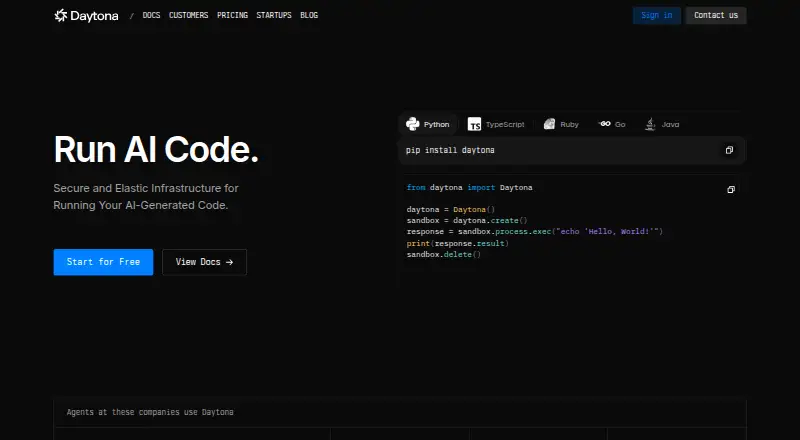
What Daytona is
Daytona provides an isolated runtime for executing AI-generated code and agent workflows. Its homepage states that sandbox creation takes under 90ms, and its programmatic controls include process execution, file-system operations, Git integration and built-in language-server support. SDK examples or interfaces are shown for Python, TypeScript, Ruby, Go and Java. Listed uses include AI evaluations, code interpreters, coding agents and data analysis. The CLI supports macOS, Linux and Windows; MCP server documentation lists Claude, Cursor and Windsurf as supported agents. Network controls include IPv4 CIDR and domain allow lists, blocking all outbound traffic, and chained outbound proxies. Organization-scoped secrets are encrypted at rest and injected as opaque placeholders, with plaintext substituted only for allowed HTTPS hosts. Daytona offers free and usage-based options. The usage-based plan lists charges per second for compute, memory, storage and Windows, with the first 5 GiB of storage free and $200 in free compute included. Enterprise pricing is available by contacting sales; its listed features include larger limits, SSO, audit logs and BYOC.
Who it suits
Daytona suits developers and teams running AI-generated code, agent workflows, evaluations or data-analysis tasks. It offers hosted and self-hosted options, with CLI support on macOS, Linux and Windows.
What it does well
- Execution controls cover processes, files and Git.
- SDK interfaces are shown for five languages.
- Network rules can block all outbound traffic.
- First 5 GiB of storage is free.
What to know first
- VPN connections require Tier 3 or higher.
- Enterprise pricing requires contacting sales.
- GPU rates vary by model and preemptible or on-demand use.
Limits
The Start-ups plan provides up to $50k in credits. The usage-based plan includes $200 in free compute and the first 5 GiB of storage free; usage rates apply beyond included amounts. VPN connectivity requires Tier 3 or higher.
Plans
| Plan | Billed and limits | Price |
|---|---|---|
| Pay-as-you-go | 5 GiB storage free before storage charges | On request |
| Free compute credit | included for new signups · $200 compute credit | Free |
| Start-ups | Credits · Up to $50k in credits for free | Free |
| Storage | per GiB per hour after first 5 free GiB; billing calculated per second · disk storage · pay-as-you-go | Free |
| Memory | per GiB per hour; billing calculated per second · RAM · pay-as-you-go | $0.02 a month |
| Compute vCPU | per hour; billing calculated per second · vCPU compute · pay-as-you-go | $0.05 a month |
| Windows compute | per vCPU per hour; billing calculated per second · Windows sandbox surcharge | $0.09 a month |
| Enterprise | contact sales · custom resources · custom limits | On request |
The first 8 of 9 plans, as daytona.io lists them, read 22 Sept 2026. The maker's own page has the final word. Every plan
Getting started
- Open the Daytona website
- Choose a free credits plan or a usage-based option
- Use the CLI on macOS, Linux, or Windows, or choose another supported environment
- Connect a supported AI agent through the MCP server documentation, if applicable
- Configure a sandbox and use the execution APIs for your workflow
Overview
Daytona is a runtime for executing AI-generated code and agent workflows in isolated sandboxes. It suits teams building code execution into AI products or developer tools. Its APIs, network controls and broad integration options are compelling; usage-based costs and tier-gated VPN access call for careful planning.
Key features
Daytona says it creates sandboxes in under 90 milliseconds, a useful target for interactive agent workflows and other workloads that need quick execution. Isolated runtimes are designed to contain generated code, with AI evaluations, code interpreters, coding agents and data analysis among its stated use cases. Speed and isolation address important execution needs, but neither removes the need to manage runtime charges.
Execution APIs support process execution, filesystem operations and Git integration, with built-in language-server protocol support. SDK examples cover Python, TypeScript, Ruby, Go and Java. The CLI supports macOS, Linux and Windows, while the MCP server documentation names Claude, Cursor and Windsurf. This range gives teams several integration paths; it is most useful when those interfaces fit an existing stack.
Network controls include IPv4 CIDR and domain allow lists, the option to block all outbound traffic, and chained outbound proxies. Organization-scoped secrets are encrypted at rest; sandboxes receive opaque placeholders, with plaintext substituted only for allowed HTTPS hosts. These controls help teams restrict what sandboxed code can reach and how secrets are exposed. VPN connections support Tailscale, OpenVPN and Netbird, but require Tier 3 or higher, which makes them a tier-dependent option rather than a baseline capability.
Daytona supports Dockerfile workspace configuration, multiple VCS hosts, prebuilds, persistent storage, GPU workspaces, JetBrains support and self-hosting. Its Trust Center lists GDPR, HIPAA, SOC 2, ISO/IEC 27001, SOC 2 Type 1 and SOC 2 Type 2 compliance materials. Support may be provided through email, Slack, in-app chat, video support or community forums.
Pricing
Daytona uses a freemium model with free access and a free trial. The Start-ups plan is free, billed in credits, with up to $50k in credits at no charge. That can suit startups seeking credits for early use, though credit-based access is not the same as a fixed allowance of ongoing compute.
Pay-as-you-go pricing is usage-based and billed per second. Rates are vCPU $0.0504/h, Memory $0.0162/h, Storage $0.000108/h and Windows $0.0858/vCPU/h. The first 5 GiB of storage is free, and $200 in free compute is included; GPU rates vary by model and preemptible or on-demand use. A separate Pay-as-you-go plan also identifies 5 GiB of free storage before storage charges. These terms make the entry cost approachable, but variable compute, memory, storage and GPU use can make costs harder to forecast than a fixed subscription.
Enterprise pricing is custom pricing and includes larger limits, SSO, audit logs and BYOC. It is the better fit for organizations that need those controls and capacity; smaller teams that do not need them can start with credits or usage-based access. The published plans do not state seat limits or a trial length.
Platforms
Daytona lists API, Linux, macOS, self-hosted, web and Windows support. The cross-platform CLI and self-hosting option suit teams that need different development environments, while API access is central to programmatic execution.
Who it's for
Daytona is a strong fit for teams building AI agents, code interpreters or evaluation pipelines that need isolated execution, API control and configurable outbound access. Its SDK range, persistent storage and prebuilds also suit teams connecting sandboxes to established development workflows. It is less suited to buyers who need a predictable flat price or VPN connectivity below Tier 3.
Pros and cons
- Pros: Fast sandbox creation and isolated execution target responsive, safer AI-code workflows.
- Pros: Process, filesystem and Git APIs, five SDK languages and named agent integrations give teams multiple integration routes.
- Pros: Network rules and constrained secret injection provide practical controls for limiting sandbox access.
- Cons: Usage-based compute, memory, storage and variable GPU rates require cost monitoring.
- Cons: VPN connections require Tier 3 or higher, so teams cannot assume they are included at entry levels.
Alternatives
E2B is worth considering for teams that prioritize an Apache-2.0-licensed runtime they can self-host; its Hobby plan includes a $100 one-time usage credit. Choose Daytona instead when its named SDKs, MCP integrations or network controls better match the workflow.
Docker Desktop may suit developers who want a familiar container-focused tool with a free Docker Personal plan for one user, one Scout-enabled repository, 100 Docker Hub pulls per hour and one private repository. Daytona is the closer fit when the goal is an API-controlled runtime for AI-generated code.
Northflank is an option for teams whose needs center on always-on compute, with its free Sandbox plan including two services, one database and two cron jobs. Choose Daytona when isolated AI-code execution and its execution APIs are the priority.
microsandbox offers a free plan with five vCPU-hours, 20 memory GiB-hours, 20 disk GiB-hours and up to three sandboxes, each capped at one vCPU and 512 MiB memory. It may fit tightly bounded sandbox use; Daytona offers a broader set of named APIs, SDKs and network controls.
ANY.RUN has a free Community plan and supports Android, API, iOS, Linux, macOS, web and Windows. crun is a free Linux and self-hosted OCI container runtime. Sandboxie Plus is a Windows option with a free personal-use plan. Firejail is a free Linux desktop-focused project for readers seeking a community tool.
For more options, browse Sandbox Software, Cloud Development Environments or Coding Playgrounds.
Verdict
Choose Daytona if you are building AI workflows that need isolated, fast code execution, programmatic control and configurable network restrictions. Its main advantage is the combination of execution APIs, integrations and security controls; its main drawback is that usage-based charges need active budgeting and VPN access is tier-gated. Teams seeking predictable fixed pricing or entry-level VPN connectivity should look elsewhere.
Verdict
Daytona combines isolated code execution with APIs, language SDKs and configurable network controls. Its usage-based pricing lists compute and storage rates, while enterprise pricing and VPN access have additional conditions.
Questions
Is Daytona free?
Daytona lists a Start-ups plan at no cost with up to $50k in credits. Its usage-based plan includes $200 in free compute and 5 GiB of storage before storage charges.
What does the usage-based plan cost?
Rates are $0.0504 per vCPU per hour, $0.0162 per hour for memory, $0.000108 per hour for storage, and $0.0858 per vCPU per hour for Windows. GPU rates vary by model and by preemptible or on-demand use.
Which platforms does Daytona support?
Listed platforms are API, Linux, macOS, self-hosted, web, and Windows. CLI installation documentation covers macOS, Linux, and Windows.
Which AI agents are supported?
The MCP server documentation lists Claude, Cursor, and Windsurf.
Does Daytona offer a self-hosted option?
Yes. Daytona lists self-hosted as a supported platform and option.
What is included with the Enterprise plan?
The Enterprise plan is priced through sales and lists larger limits, SSO, audit logs, and BYOC.
Facts from Daytona's own pages
- Agent integration
- The MCP server documentation lists Claude, Cursor, and Windsurf as supported AI agents. · daytona.io, 1 Oct 2026
- AI use cases
- Daytona lists AI evaluations, code interpreter workloads, coding agents, and data analysis as use cases. · daytona.io, 1 Oct 2026
- CLI platforms
- The Daytona CLI installation documentation supports macOS, Linux, and Windows. · daytona.io, 1 Oct 2026
- Code execution
- The platform runs commands and code with real-time output streaming and configurable execution controls. · daytona.io, 14 Oct 2026
- Company founding
- Daytona's own about page says the company was founded in 2023. · daytona.io, 14 Oct 2026
- Company headquarters
- Crunchbase lists Daytona's headquarters in New York, New York, United States. · crunchbase.com, 14 Oct 2026
- Company legal name
- Crunchbase lists the legal name as Daytona Platforms Inc. · crunchbase.com, 14 Oct 2026
- Company size
- LinkedIn lists Daytona as a privately held software-development company with 11–50 employees. · linkedin.com, 14 Oct 2026
- Compliance
- Daytona's Trust Center lists GDPR, HIPAA, SOC 2, ISO/IEC 27001, SOC 2 Type 1, and SOC 2 Type 2 compliance materials. · trust.daytona.io, 1 Oct 2026
- Documentation depth
- The official docs cover platform concepts, sandbox classes, agent tools, human tools, webhooks, security, observability, deployments, SDK references and CLI usage. · daytona.io, 14 Oct 2026
- Documentation license
- The public documentation repository states that its documentation website is covered by Apache License 2.0 while the product is distributed under commercial terms. · github.com, 14 Oct 2026
- Execution APIs
- Its programmatic control includes process execution, file-system operations, Git integration, and built-in LSP support. · daytona.io, 1 Oct 2026
- Filesystem API
- Daytona exposes programmatic filesystem CRUD operations with granular permissions. · daytona.io, 14 Oct 2026
- Founded
- 2023 · daytona.io, 28 Sept 2026
- Funding
- Ry Walker Research reports a $24 million Series A in February 2026 led by FirstMark, with Datadog and Figma Ventures participating. · rywalker.com, 14 Oct 2026
- Git integration
- Native Git operations and credential handling are built into the sandbox tooling. · daytona.io, 14 Oct 2026
- GPU capability
- GPU sandboxes support NVIDIA and AMD accelerators, with up to eight GPUs for a sandbox. · daytona.io, 14 Oct 2026
- Headquarters
- New York, New York, United States · daytona.io, 28 Sept 2026
- Isolation
- Daytona describes separated and isolated runtime protection for executing AI-generated code. · daytona.io, 1 Oct 2026
- Limit: enterprise access
- Softwr reports that SSO, audit logs and BYOC require contacting sales rather than being self-serve. · softwr.com, 14 Oct 2026
- Limit: G2 differentiation
- One G2 reviewer said Daytona did not provide enough differentiation from competing products. · g2.com, 14 Oct 2026
- Limit: pricing predictability
- An independent Softwr review says usage-only pricing without a flat monthly plan can make steady-workload costs harder to predict. · softwr.com, 14 Oct 2026
- Limits model
- Organizations are assigned verification-based tiers with compute pools, per-sandbox limits and API rate limits. · daytona.io, 14 Oct 2026
- LSP support
- Built-in language-server support provides completion and real-time code analysis. · daytona.io, 14 Oct 2026
Where Daytona stands on Freedom251
- Cloud Development Environments#5 of 27
- Coding Playgrounds#28 of 138
- Sandbox Software#6 of 26