Freedom251 › Cloud Development Environments

Binder
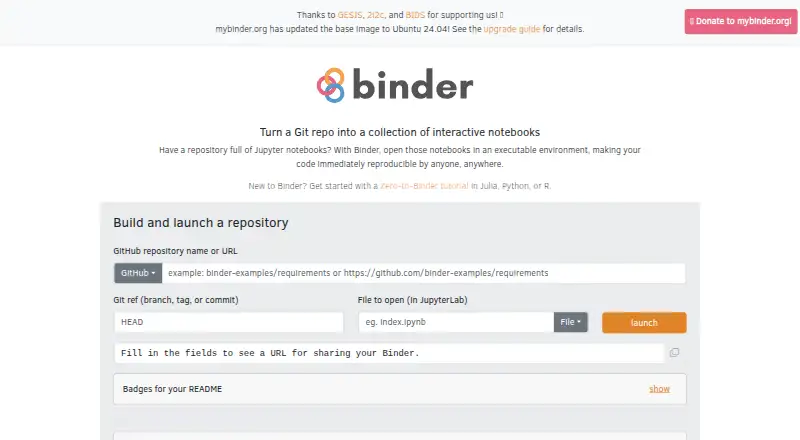
What Binder is
Binder provides shareable, interactive computing environments that people can launch from publicly available code repositories. BinderHub builds an environment image for a repository and runs a Binder service, allowing users to work in a browser session. The documented repository sources include GitHub, GitLab, and GitHub Gist. JupyterLab is the default interface, with the classic notebook interface also available. Examples cover Python, R, Julia, and Octave, along with browser sessions for RStudio, Shiny apps, Voilà dashboards, and Bokeh apps.
The mybinder.org public service is free and requires no login. A session is guaranteed at least 1 GB of RAM and may receive up to 2 GB. Sessions shut down after more than 10 minutes of inactivity; they aim to last up to six hours, or one CPU-hour for computationally intensive sessions, without a guarantee that they remain available that long. Session contents are temporary and destroyed after logout or inactivity, and Binder offers no persistent storage. The stated maximum is 100 simultaneous sessions for a repository. Binder can also be self-hosted. The public service is intended for interactive, ephemeral coding, not as a backend for for-profit products.
Who it suits
Binder suits people who want to share or explore reproducible computing environments from public repositories using a browser. It is a fit for temporary work in the documented notebook, language, and app environments, rather than work that needs persistent session files.
What it does well
- Free public service with no login required.
- Launches repositories from GitHub, GitLab, or GitHub Gist.
- JupyterLab is the default, with the classic notebook also available.
- Examples include Python, R, Julia, and Octave.
- Supports self-hosting as well as the public service.
What to know first
- Session contents are destroyed after logout or inactivity.
- No persistent storage is provided.
- Sessions shut down after more than 10 minutes of inactivity.
- A repository is limited to 100 simultaneous sessions.
Limits
The free public service provides at least 1 GB RAM and may provide up to 2 GB. Sessions aim for up to six hours or one CPU-hour for intensive sessions, shut down after more than 10 minutes of inactivity, and have no persistent storage; the repository concurrency maximum is 100 sessions.
Plans
| Plan | Billed and limits | Price |
|---|---|---|
| mybinder.org public service | 1–2 GB RAM · sessions aim for up to 6 hours or 1 CPU-hour · 100 concurrent users per repository · no persistent storage | Free |
As mybinder.org lists them, read 8 Oct 2026. The maker's own page has the final word.
Getting started
- Open https://mybinder.org/.
- Choose a publicly available repository from GitHub, GitLab, or GitHub Gist.
- Launch the environment and use its browser session.
- For a self-managed service, use Binder's self-hosted option.
Verdict
Choose Binder to share interactive, temporary computing sessions from public repositories, with several notebook and browser app interfaces available. Look elsewhere if sessions must retain files or reliably stay active beyond the stated session aims.
Questions
How much does Binder cost?
The mybinder.org public service is free: free.
Which platforms does Binder support?
Binder is available on the web and can be self-hosted. Its public service launches repositories from GitHub, GitLab, or GitHub Gist.
Which interfaces and environments are available?
JupyterLab is the default, and the classic notebook interface is also available. Examples cover Python, R, Julia, Octave, RStudio, Shiny, Voilà, and Bokeh.
Does Binder keep session files?
No. Binder has no persistent storage, and session contents are destroyed after logout or inactivity.
Do users need to sign in?
The public mybinder.org service requires no login.
Can Binder be used as a for-profit product backend?
The project asks that mybinder.org not be used as the backend for for-profit products.
Facts from Binder's own pages
- Free plan
- Yes · mybinder.readthedocs.io, 22 Sept 2026
- How it works
- BinderHub dynamically builds user environment images and runs a Binder service. · mybinder.readthedocs.io, 8 Oct 2026
- Intended users
- The project describes mybinder.org as a free public service for interactive and ephemeral coding and asks that it not be used as the backend for for-profit products. · mybinder.readthedocs.io, 8 Oct 2026
- Notebook interface
- JupyterLab is the default Binder interface, and the classic notebook interface is also available. · mybinder.readthedocs.io, 8 Oct 2026
- Other interfaces
- Binder examples show running RStudio, Shiny apps, Voilà dashboards, and Bokeh apps in browser sessions. · mybinder.readthedocs.io, 8 Oct 2026
- Persistence
- Binder does not offer persistent storage, and session contents are destroyed when a user logs off or becomes inactive. · mybinder.readthedocs.io, 8 Oct 2026
- Privacy
- The project says it requires no login, retains IP address logs for 30 days for abuse detection, and publishes an archive of launches without user IP addresses. · mybinder.readthedocs.io, 8 Oct 2026
- Purpose
- The Binder Project provides sharable, interactive, reproducible computing environments. · mybinder.readthedocs.io, 8 Oct 2026
- Repository concurrency
- The stated maximum is 100 simultaneous sessions for a given repository, with quota increases considered for qualifying events but not guaranteed. · mybinder.readthedocs.io, 8 Oct 2026
- Repository sources
- Binder documentation describes launching publicly available repositories from GitHub, GitLab, or a GitHub Gist. · mybinder.readthedocs.io, 8 Oct 2026
- Resource limits
- Users are guaranteed at least 1 GB RAM, may receive up to 2 GB, and sessions are shut down after more than 10 minutes of inactivity. · mybinder.readthedocs.io, 8 Oct 2026
- Security safeguards
- The service limits outgoing bandwidth per session to approximately 1 Mbit, applies anti-cryptomining safeguards, and uses resource limits to reduce abuse. · mybinder.readthedocs.io, 8 Oct 2026
- Session limits
- The project aims for up to six hours per session or one CPU-hour for computationally intensive sessions, without guaranteeing sessions remain running beyond that. · mybinder.readthedocs.io, 8 Oct 2026
- Supported environments
- Examples and documentation cover Python, R, Julia, and Octave environments. · mybinder.readthedocs.io, 8 Oct 2026
- Support model
- The public service is supported by donations, cloud credits, volunteers, and in-kind contributions. · mybinder.readthedocs.io, 8 Oct 2026
Where Binder stands on Freedom251
- Cloud Development Environments#7 of 27
- Coding Playgrounds#60 of 138