Freedom251 › Time tracking apps

Kimai
by Kimai
What Kimai is
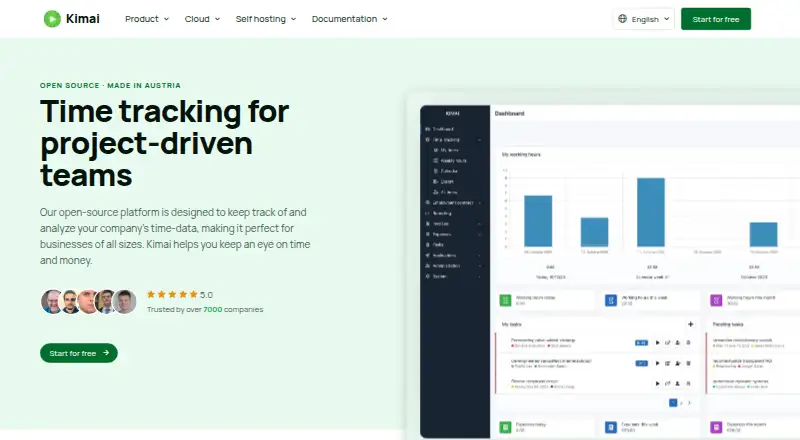
Kimai is open-source time-tracking software for recording project work and billable hours. It supports timesheets and approvals, and provides data export for recorded time. The service is available on the web, Windows, macOS, iOS and Android, with mobile apps for iOS and Android. It does not have a desktop app or offline tracking. Kimai is made by Kimai, a maker founded in 2018 and headquartered in Vienna, Austria.
There is no free plan. A 30-day trial is available, and paid pricing starts at €2.99/user/mo (annual). Standard costs €2.99 per month with annual billing and includes project time tracking, billable hours, invoicing, data export, audit logs and email support. Professional costs €3.99 per month with annual billing. It adds a working hour account, expense tracking, task management, a customer portal, downloadable daily backups and SAML single sign-on. Both listed plans state a 20% saving compared with monthly billing.
Who it suits
Kimai suits individuals or teams that need to record project time, track billable hours and submit timesheets for approval. It may also fit teams that need exports, invoicing or, on Professional, expense tracking and task management.
What it does well
- Tracks project time and billable hours.
- Supports timesheet approvals.
- Data export is available.
- Mobile apps are available for iOS and Android.
- Professional includes expense tracking and task management.
What to know first
- There is no free plan.
- Offline tracking is unavailable.
- There is no desktop app.
- Professional costs €3.99 per month with annual billing.
Limits
There is no free plan. The lowest listed paid plan is Standard at €2.99 per month with annual billing; the 30-day trial is available before choosing paid service.
Plans
| Plan | Billed and limits | Price |
|---|---|---|
| Standard | Annual billing; 20% saving compared with monthly billing · Project time tracking · Billable hours · Invoicing · Data export · Audit logs · Email support | €2.99 a month |
| Professional | Annual billing; 20% saving compared with monthly billing · Working hour account · Expense tracking · Task management · Customer Portal · Daily backups for download · SAML single sign-on | €3.99 a month |
As kimai.org lists them, read 20 Sept 2026. The maker's own page has the final word.
Getting started
- Visit the Kimai website.
- Start the 30-day trial.
- Choose Standard or Professional based on the listed features.
- Use Kimai on the web, Windows, macOS, iOS or Android.
Verdict
Choose Kimai if your timekeeping needs center on projects, billable hours, approvals and export, with a 30-day trial to start. Look elsewhere if you need offline tracking or a desktop app, or if a free plan is essential.
Questions
Does Kimai have a free plan?
No. Kimai offers a 30-day trial and paid plans.
How much does Kimai cost?
Standard is €2.99 per month with annual billing. Professional is €3.99 per month with annual billing; both state a 20% saving compared with monthly billing.
Which platforms does Kimai support?
Kimai is available on the web, Windows, macOS, iOS and Android. Mobile apps are available, but there is no desktop app.
Is Kimai open source?
Yes. Kimai is described as open source.
What does Professional add?
Professional adds a working hour account, expense tracking, task management, a customer portal, downloadable daily backups and SAML single sign-on.
Facts from Kimai's own pages
- Billable time
- Yes · kimai.org, 20 Sept 2026
- Data export
- Yes · kimai.org, 20 Sept 2026
- Desktop app
- No · kimai.org, 20 Sept 2026
- Founded
- 2018 · kimai.org, 28 Sept 2026
- Free plan
- No · kimai.org, 20 Sept 2026
- Headquarters
- Vienna, Austria · kimai.org, 28 Sept 2026
- Mobile apps
- both · kimai.org, 20 Sept 2026
- Offline tracking
- No · kimai.org, 20 Sept 2026
- Project tracking
- Yes · kimai.org, 20 Sept 2026
- Timesheet approvals
- Yes · kimai.org, 20 Sept 2026
Where Kimai stands on Freedom251
- Time tracking apps#56 of 78
- Time and Expense Software#21 of 27
- Time Tracking Software#61 of 77
- Timesheet Management Software#23 of 29
- Employee Time Tracking Software#44 of 52