Freedom251 › Invoice OCR Software
invoice2data
What invoice2data is
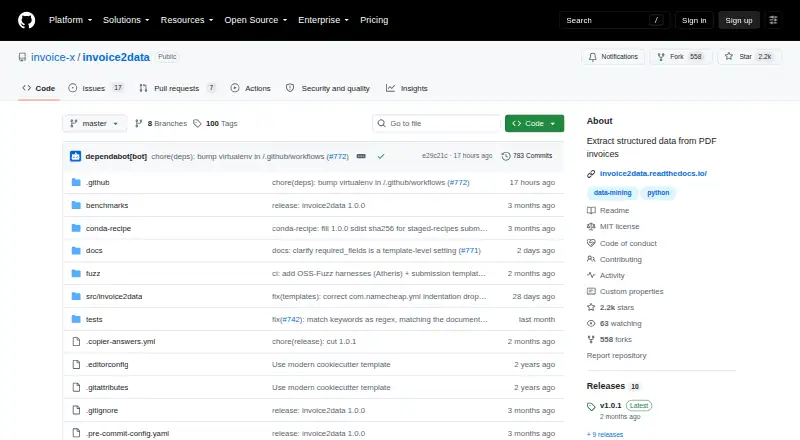
invoice2data is a free, open-source command-line tool and Python library for extracting structured information from PDF invoices for accounting workflows. It reads PDF text using selectable backends such as pdfium, pdftotext, pdfminer, pdfplumber, and OCR tools, then matches it against YAML or JSON templates. Templates can specify custom fields and multiple regular expressions for each field. The command-line tool can export extracted results as CSV, JSON, or XML, and rename PDF files based on their contents. Optional plugins support invoice line-item and table matching, including an opt-in Camelot plugin for advanced table parsing. Optional AI features can draft templates from sample documents or extract fields when templates do not match. AI does not run unless a provider is configured; the default mock has no network access. Listed AI providers include OpenAI, DeepSeek, Mistral, Gemini, and Ollama, which can run locally. The project also describes docTR and PaddleOCR as local OCR options. It is licensed under the MIT License, with pip and conda installation routes. Its README names an Odoo OCA module as a user, but defers canonical schemas for non-invoice documents such as waybills and purchase orders.
Who it suits
invoice2data suits developers or accounting workflows that need to extract fields from PDF invoices using configurable templates. Its command-line and Python library forms, local OCR options, and optional AI features offer several ways to build an extraction workflow.
What it does well
- Exports results as CSV, JSON, or XML.
- Templates can define custom fields and multiple regexes.
- Optional plugins support line-item and table matching.
- AI is inactive until a provider is configured.
- Local OCR backends keep data on the user's machine.
What to know first
- Canonical schemas for non-invoice documents are deferred.
- No paid support plan is described on the pages reviewed.
- The GitHub security page says no SECURITY.md policy is set up.
Plans
| Plan | Billed and limits | Price |
|---|---|---|
| invoice2data | No paid tiers or usage limits stated on the pages reviewed | Free |
As github.com lists them, read 4 Oct 2026. The maker's own page has the final word.
Getting started
- Visit the invoice2data project website.
- Install the package with pip or conda.
- Use the default pdfium path, which needs no system libraries on Windows, macOS, or Linux.
- Create or use YAML or JSON templates to match invoice text to fields.
- Choose command-line output as CSV, JSON, or XML.
Overview
invoice2data is a command-line tool and Python library for extracting structured data from PDF invoices. It suits developers and accounting teams prepared to configure an open-source workflow. Its flexibility and local-processing options are compelling, but it is not a ready-made invoice service or a general-purpose document extractor.
Key features
Text extraction can use selectable backends including pdfium, pdftotext, pdfminer and pdfplumber, alongside OCR tools. YAML or JSON templates specify custom fields and can apply multiple regular expressions to each field. That control helps teams adapt extraction to their invoice formats, but they must create and maintain the matching rules themselves.
The command-line tool exports results as CSV, JSON or XML and can rename PDFs based on their contents. Optional plugins support line-item and table extraction, including an opt-in Camelot plugin for advanced table parsing. These capabilities can suit accounting processes that need more than invoice headers, though they add components to select and configure.
Optional AI features can draft templates from sample documents or try to extract fields when templates do not match. The AI layer lists OpenAI, DeepSeek, Mistral, Gemini and Ollama. AI does not run unless a provider is configured; the default is a mock without network access, and Ollama can run locally. The docTR and PaddleOCR OCR backends are also described as local, keeping documents on the user's machine.
Installation is available through pip and conda. The default pdfium path requires no system libraries on Windows, macOS or Linux, which lowers one setup hurdle across those platforms. The README lists an Odoo OCA module as a user of the tool, a practical point for teams working with that ecosystem.
Pricing
invoice2data costs nothing, with no paid tiers or usage limits stated on the pages reviewed. The MIT License permits use, modification, distribution, sublicensing and sale, subject to its conditions. That makes it attractive for organizations able to own their setup, but the repository invites issues and pull requests rather than describing a paid support plan.
Platforms
The project supports Linux, macOS and Windows, and is self-hosted. Its command-line and Python-library form favors users who can integrate software into their own environment rather than buyers looking for a hosted interface.
Who it's for
Choose invoice2data if you need invoice-specific PDF extraction, want control over fields and matching logic, and can configure and maintain the workflow. Its local OCR options and ability to avoid network use for AI are useful when documents should remain on-machine. Look elsewhere if you need canonical extraction schemas for waybills, delivery notes or purchase orders: those non-invoice document types are deferred.
Pros and cons
- Pros: Free under the MIT License, with no stated usage limits; configurable templates and multiple text-extraction backends give technical teams control over invoice fields.
- Pros: Optional line-item, table, OCR and AI features broaden extraction choices, while local OCR and Ollama support on-machine processing.
- Cons: Template-based extraction places configuration and ongoing rule maintenance on the user.
- Cons: Its documented scope centers on invoices, and no paid support plan is described.
- Cons: The repository has no SECURITY.md policy set up and publishes no security advisories; organizations should account for that when evaluating their security process.
Alternatives
For a managed invoice OCR API with a published paid entry plan, consider Veryfi Invoices OCR API: its Starter plan is $500 a month, with a $500/mo minimum commitment and per-invoice charges. Choose it over invoice2data when that API model better fits your workflow and budget.
Invofox may suit teams wanting a broader range of pre-trained document models: its free plan includes 500 pages and models for invoices, receipts, utility bills, tickets and payslips, plus a REST API and community support.
Nanonets Invoice OCR is another option if you want an API and cloud-oriented integrations: its free start includes $50 in credits, followed by $100/month for 100 credits.
If a browser-based email parsing workflow and a small monthly allowance fit better, Parseur offers a free plan with up to 20 pages/month, one user and 90-day document retention.
ABBYY FlexiCapture for Invoices is a paid alternative with pricing by demo and contact.
Webdocs for AP is a paid alternative with pricing by quote.
DocuClipper Invoice Approval may fit buyers seeking invoice approval alongside extraction: its Starter plan costs $20 a month billed annually and includes 60 pages/month, unlimited users and API access.
ChronoScan AP Invoice Processing is a Windows alternative with a one-time perpetual-license option.
Browse more options in Invoice Processing Software or Invoice OCR Software.
Verdict
invoice2data is a strong fit for technical teams that want free, self-hosted invoice extraction they can shape around their own fields and processing choices. Its configurable templates and local-processing options are the main reasons to choose it. Seek another product if you need a managed service, paid support, or structured extraction for document types beyond invoices.
Verdict
invoice2data combines template-based invoice extraction with optional table, OCR, and AI features. It is free under the MIT License, but its documented scope centers on invoices rather than other document types.
Questions
Is invoice2data free?
Yes. The listed plan is free, and the project is open source under the MIT License.
Which operating systems does it support?
The listed platforms are Linux, macOS, Windows, and self-hosted use.
Can it extract invoice line items?
Yes. Optional plugins support matching invoice line items and tables; Camelot is an opt-in option for advanced table parsing.
Does it use AI or OCR?
OCR tools are among its selectable text extraction backends. Optional AI can draft templates or attempt field extraction when templates do not match; it runs only after a provider is configured.
Can AI or OCR run locally?
Ollama is listed as an AI provider that can run locally. The installation guide describes docTR and PaddleOCR as local OCR backends.
What license does it use?
The repository publishes it under the MIT License, which permits use, modification, distribution, sublicensing, and sale subject to the license conditions.
Facts from invoice2data's own pages
- AI options
- Optional AI features can draft templates from sample documents or extract fields as a fallback when templates do not match. · invoice2data.readthedocs.io, 4 Oct 2026
- AI providers
- The opt-in AI layer lists OpenAI, DeepSeek, Mistral, Gemini, and Ollama providers; Ollama can run locally without sending data off the machine. · invoice2data.readthedocs.io, 4 Oct 2026
- Extraction
- It extracts PDF text through selectable backends including pdfium, pdftotext, pdfminer, pdfplumber, and OCR tools. · github.com, 4 Oct 2026
- Installation
- The docs provide pip and conda installation, and state the default pdfium path needs no system libraries on Windows, macOS, or Linux. · invoice2data.readthedocs.io, 4 Oct 2026
- Integration
- The project README lists an Odoo OCA module as a user of invoice2data. · github.com, 4 Oct 2026
- Known scope limit
- The README says canonical schemas for non-invoice documents such as waybills, delivery notes, and purchase orders are deferred. · github.com, 4 Oct 2026
- License
- The repository publishes invoice2data under the MIT License, which permits use, modification, distribution, sublicensing, and sale subject to its conditions. · github.com, 4 Oct 2026
- OCR privacy
- The installation guide describes docTR and PaddleOCR as local OCR backends that keep data on the user's machine. · invoice2data.readthedocs.io, 4 Oct 2026
- Outputs
- The command-line tool can write extracted results as CSV, JSON, or XML and can rename PDF files to match their contents. · github.com, 4 Oct 2026
- Privacy behavior
- The default AI provider is a mock with no network access, and the docs say no AI runs unless a provider is configured. · invoice2data.readthedocs.io, 4 Oct 2026
- Purpose
- invoice2data is a command-line tool and Python library that extracts structured information from PDF invoices for accounting workflows. · github.com, 4 Oct 2026
- Security
- The repository's GitHub security page says no SECURITY.md policy is set up and no security advisories are published. · github.com, 4 Oct 2026
- Support
- The repository invites issues and pull requests, and links to a contributor guide; it does not describe a paid support plan on the pages reviewed. · github.com, 4 Oct 2026
- Table extraction
- Optional plugins support matching invoice line items and tables, including an opt-in Camelot plugin for advanced table parsing. · github.com, 4 Oct 2026
- Templates
- It matches extracted text against YAML or JSON templates that can define custom fields and multiple regexes per field. · github.com, 4 Oct 2026
Where invoice2data stands on Freedom251
- Invoice OCR Software#2 of 25
- Invoice Processing Software#3 of 30