Freedom251 › Invoice Approval Software

DocuClipper Invoice Approval
What DocuClipper Invoice Approval is
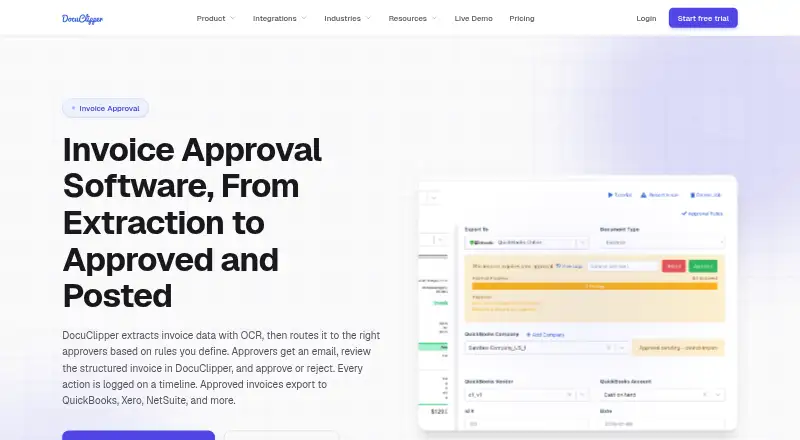
DocuClipper Invoice Approval extracts invoice data with OCR, routes invoices to approvers using rules, records approval actions, and posts approved invoices to accounting systems. Rules can use amount, vendor, customer, GL account, expense category, or description and memo fields, with either all-approver or any-approver logic. Before routing, it can match invoices to purchase orders, validate invoice math, and detect duplicate invoice numbers. The invoice timeline records submissions, requirements, votes, users, timestamps, rules, and comments. Integrations include QuickBooks Online and Desktop, Xero, Sage, Quicken, Google Drive, Dropbox, Box, OneDrive, email forwarding, and an API. The web application works in modern browsers on Windows, macOS, Linux, and ChromeOS; iOS and Android apps support document capture and upload. DocuClipper approves and posts invoices but does not issue cards or pay vendors, so payment must be made through a bank or bill-pay tool. There is no free plan. The Starter plan costs $20 a month billed annually, and a 14-day trial is listed.
Who it suits
DocuClipper Invoice Approval suits finance teams and operators who need invoice extraction, approval routing, and accounting-system posting. The maker also lists accountants, bookkeepers, lenders, underwriters, forensic accountants, and investigators among its users.
What it does well
- OCR extracts invoice data for approval workflows.
- Rules support all-approver or any-approver logic.
- Checks purchase orders, invoice math, and duplicates.
- Records approval activity on an invoice timeline.
- Integrates with QuickBooks, Xero, Sage, and others.
What to know first
- No free plan is available.
- Starter costs $20 a month billed annually.
- Does not pay vendors or issue cards.
Limits
Starter costs $20 a month billed annually and includes 60 pages per month. Free, trial, or lapsed unpaid accounts automatically delete jobs older than 30 days.
Plans
| Plan | Billed and limits | Price |
|---|---|---|
| Business | $111/month billed annually; 640 pages/month · Everything in Starter · Financial analysis · Dedicated processing queue · Team management · Phone and premium support | $111 a month |
| Starter | $20/month billed annually; 60 pages/month · Unlimited users · API access · QuickBooks, Xero, Excel/CSV · Email and chat support | $20 a month |
| Enterprise | $360/month billed annually; 2,000 pages/month · Everything in Business · SSO · Audit logs · IP allowlisting · SLA guarantee · White-glove onboarding | $360 a month |
As docuclipper.com lists them, read 14 Oct 2026. The maker's own page has the final word.
Getting started
- Visit the DocuClipper Invoice Approval website.
- Start the 14-day trial or choose a paid plan.
- Use the web application in a modern browser, or install the iOS or Android app to capture and upload documents.
- Connect an accounting or document source, such as QuickBooks, Xero, cloud storage, email forwarding, or the API.
- Set approval rules and route invoices for review.
Verdict
DocuClipper Invoice Approval covers extraction, rule-based routing, validation, and posting to accounting systems. It does not handle vendor payment, and its listed Starter price is billed annually.
Questions
Is there a free plan?
No. DocuClipper Invoice Approval has a 14-day trial, and Starter costs $20 a month billed annually.
What does Starter include?
Starter includes 60 pages per month, unlimited users, API access, and email and chat support.
Which platforms does it support?
The web application works in modern browsers on Windows, macOS, Linux, and ChromeOS. iOS and Android apps are available for capturing and uploading documents.
Which accounting integrations are supported?
DocuClipper supports QuickBooks Online and Desktop, Xero, Sage, and Quicken. It also supports Google Drive, Dropbox, Box, OneDrive, email forwarding, and an API.
Does DocuClipper pay invoices?
No. It approves and posts invoices, but it does not issue cards or pay vendors. Payment must happen through a bank or bill-pay tool.
What happens to jobs on unpaid accounts?
On free, trial, or lapsed unpaid accounts, jobs older than 30 days are automatically deleted.
Facts from DocuClipper Invoice Approval's own pages
- Accounting integrations
- Approved invoices can be posted or exported to QuickBooks Online, QuickBooks Desktop, Xero, NetSuite, Sage and Excel/CSV. · docuclipper.com, 14 Oct 2026
- API
- The product provides a REST Agent API using personal access tokens, presigned uploads, extraction jobs and JSON result endpoints. · docuclipper.com, 14 Oct 2026
- Approval notifications
- Assigned approvers receive transactional email containing invoice details and a review link. · docuclipper.com, 14 Oct 2026
- Approval routing
- Approval rules can route invoices using amount, vendor, customer, GL account, expense category and description fields. · docuclipper.com, 14 Oct 2026
- Approval rules
- Rules can use amount, vendor, customer, GL account, expense category, and description or memo fields, with all-approver or any-approver logic. · docuclipper.com, 30 Sept 2026
- Audit timeline
- Submission, required-approval and voting events record the user, timestamp and related rule on the invoice timeline. · docuclipper.com, 14 Oct 2026
- Audit trail
- Approval submissions, requirements, votes, users, timestamps, rules, and comments are recorded on the invoice timeline. · docuclipper.com, 30 Sept 2026
- Bulk approval
- Approvers can clear multiple invoices at once with bulk approval. · docuclipper.com, 14 Oct 2026
- Company facts
- LinkedIn lists DocuClipper as privately held, founded in 2019, headquartered in Los Angeles, California, with 11–50 employees. · linkedin.com, 14 Oct 2026
- Crunchbase company record
- Crunchbase lists DocuClipper as an active private software company and shows no publicly readable funding amount because its funding fields are obfuscated. · crunchbase.com, 14 Oct 2026
- Data use
- DocuClipper states that customer documents are not used to train AI models and are not sold or shared with third parties. · docuclipper.com, 30 Sept 2026
- Desktop installation
- There is no dedicated desktop download; users may install the web app as a Chrome or Edge Progressive Web App. · docuclipper.com, 14 Oct 2026
- Documentation
- The help center lists 13 getting-started articles, 13 invoice-and-receipt articles, 21 integration articles, 8 automation articles and troubleshooting content. · docuclipper.com, 14 Oct 2026
- Encryption
- The service states that data uses TLS 1.2 or later in transit and AES-256 encryption at rest in Amazon S3. · docuclipper.com, 14 Oct 2026
- Integrations
- DocuClipper supports QuickBooks Online and Desktop, Xero, Sage, Quicken, Google Drive, Dropbox, Box, OneDrive, email forwarding, and an API. · docuclipper.com, 30 Sept 2026
- Invoice OCR
- Invoice OCR captures vendor, invoice number, dates, totals, tax and line-item data from PDFs and scans. · docuclipper.com, 14 Oct 2026
- Invoice workflow
- DocuClipper extracts invoice data with OCR, routes invoices to rule-based approvers, records approval actions, and posts approved invoices to accounting systems. · docuclipper.com, 30 Sept 2026
- Legal owner
- The official security page identifies Grand Plans LLC as the owner of DocuClipper. · docuclipper.com, 14 Oct 2026
- Limit: batch processing
- Several Capterra reviewers say processing multiple invoices or statements together can be cumbersome or unavailable. · capterra.com, 14 Oct 2026
- Limit: billing complaints
- Trustpilot complaints repeatedly allege unexpected annual charges, continued billing after cancellation and difficulty obtaining refunds. · trustpilot.com, 14 Oct 2026
- Limit: statement errors
- Reviewers report occasional missing items, reversed transaction signs or difficulty with smaller-bank statement layouts, requiring checking and rework. · capterra.com, 14 Oct 2026
- Mobile apps
- DocuClipper provides iOS and Android apps for capturing and uploading documents, with the same account and projects as the web application. · docuclipper.com, 30 Sept 2026
- Multi-approver logic
- Rules support multiple approvers with either all-approvers-required or any-one-approver logic. · docuclipper.com, 14 Oct 2026
- Notable news
- The official product-update log says an end-to-end Accounts Payable Suite with approval rules, aging reports, duplicate detection and two-way PO matching was released in Q2 2026. · docuclipper.com, 14 Oct 2026
Where DocuClipper Invoice Approval stands on Freedom251
- Invoice Approval Software#9 of 37