Freedom251 › AI 3D Model Generators
InstantMesh
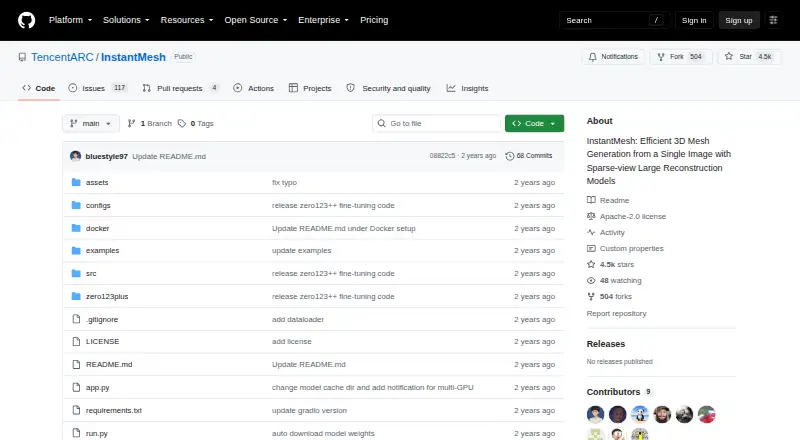
What InstantMesh is
InstantMesh is a free framework for generating a 3D mesh from a single image, using the LRM/Instant3D architecture. The TencentARC project can run locally on Linux or in a self-hosted setup. Users can launch a local Gradio demo with `python app.py` or generate meshes from the command line with `run.py`. The default output is an OBJ mesh with vertex colors; an alternate option adds a texture map and takes longer. InstantMesh uses rembg to separate the foreground object, a step that can be skipped when the input already has an alpha mask. The project provides four sparse-view reconstruction model variants and a customized Zero123++ UNet for white-background image generation. It also includes training code for sparse-view reconstruction and Zero123++ fine-tuning. The makers recommend Python 3.10 or later, PyTorch 2.1.0 or later, and CUDA 12.1 or later; the demo can use two GPUs to reduce memory use. Docker deployment is documented. The repository is licensed under Apache License 2.0, and community implementations are acknowledged for ComfyUI, Replicate and Google Colab demos. The makers say they cannot provide the training dataset because of its size.
Who it suits
InstantMesh suits developers and researchers who can run a local Linux or self-hosted workflow and want to generate 3D meshes from images. Its training code may also suit users working with sparse-view reconstruction or Zero123++ fine-tuning.
What it does well
- Generates a 3D mesh from a single image.
- Offers both Gradio demo and command-line workflows.
- Default OBJ export includes vertex colors.
- Includes training code for reconstruction and fine-tuning.
What to know first
- Local installation requires Python, PyTorch, CUDA and a compatible GPU.
- Training dataset is not provided.
- Texture-map export takes longer than the default export.
Plans
| Plan | Billed and limits | Price |
|---|---|---|
| InstantMesh | Apache-2.0 licensed implementation · local installation requires Python, PyTorch, CUDA, and a compatible GPU | Free |
As github.com lists them, read 8 Oct 2026. The maker's own page has the final word.
Getting started
- Open the TencentARC InstantMesh repository at https://github.com/TencentARC/InstantMesh.
- Prepare a Linux or self-hosted environment with a compatible GPU.
- Install Python 3.10 or later, PyTorch 2.1.0 or later, and CUDA 12.1 or later.
- Run the local demo with `python app.py`, or use `run.py` for command-line mesh generation.
- Use Docker if you prefer the documented container deployment route.
InstantMesh is a free, Apache-2.0-licensed project that turns one image into a 3D mesh on your own Linux system. It suits developers, technical artists and researchers who can manage a CUDA/PyTorch environment and want a local, scriptable image-to-3D pipeline. Its strongest case is controllable self-hosting; its main drawback is the demanding setup and hardware requirement.
Overview
InstantMesh uses a feed-forward framework built around the LRM and Instant3D architecture to reconstruct a 3D object from a single picture. TencentARC publishes the implementation as a 2024 project, with a local Gradio interface, command-line tooling and training code. This is a developer-oriented package rather than a hosted creation service: you install it, supply the dependencies and run the generation locally.
The repository also includes a customized Zero123++ UNet for producing white-background images. Four sparse-view reconstruction model variants give practitioners room to choose among the supplied approaches, although the project does not present them as consumer-facing plan tiers.
Key features
Local and command-line generation
Start the Gradio demo with python app.py for an interactive local workflow, or use run.py to generate meshes from the command line. The split matters in practice: the demo is useful for visual iteration, while scripting is better suited to repeatable pipelines and batch jobs.
Mesh output and image preparation
The default export is an OBJ mesh with vertex colors. An optional texture-map export can produce a textured result but takes longer, so it is better reserved for cases where texture detail matters more than turnaround time. InstantMesh uses rembg to isolate the foreground object; images that already contain an alpha mask can skip that step. The listed capabilities include image-to-3D conversion, face restoration and batch processing, but not text-to-3D.
Deployment and training
Docker instructions provide another local deployment route, and the project includes training code for both sparse-view reconstruction and Zero123++ fine-tuning. That is valuable for teams extending the models or studying the pipeline. The training dataset is not supplied because of its size, which limits a fully reproducible training setup. Community implementations for ComfyUI, Replicate and Google Colab can help integrate the project into other workflows, but they are not the core distribution.
Pricing
InstantMesh — free includes the Apache-2.0-licensed implementation. There is no paid tier or free trial, and no seat or usage quota is stated. “Free” does not mean zero operational cost: local installation requires Python, PyTorch, CUDA and a compatible GPU, along with the storage and maintenance that self-hosting entails.
Platforms
InstantMesh targets Linux and self-hosted deployment. The makers recommend Python 3.10 or later, PyTorch 2.1.0 or later and CUDA 12.1 or later. The demo can use two GPUs to reduce memory pressure, making multi-GPU hardware useful for users who cannot fit the workload comfortably on one card. Docker is documented for deployment, but the project does not offer a hosted web application or native mobile clients.
Who it's for
Choose InstantMesh if you need local image-to-mesh generation, command-line automation, an Apache-licensed codebase or access to reconstruction and fine-tuning code. It is a sensible foundation for technical artists, researchers and engineers building an internal pipeline.
Look elsewhere if you want a browser-first service, text-to-3D generation, turnkey installation or hardware supplied by the vendor. The dependency stack and compatible-GPU requirement make this a poor fit for casual users and teams without Linux/CUDA expertise.
Pros and cons
Pros
- Free and permissively licensed: the Apache-2.0 implementation can be installed and adapted without a subscription tier.
- Two practical workflows: a local Gradio demo supports interactive use, while run.py supports scripted generation.
- Useful output choice: OBJ with vertex colors is the default, with an optional, slower texture-map export.
- Extensible research base: four reconstruction variants, Zero123++ customization and training code support experimentation.
- Pipeline-friendly processing: foreground segmentation can be skipped for alpha-masked inputs, and batch processing is supported.
Cons
- Hardware-heavy setup: current Python, PyTorch and CUDA versions plus a compatible GPU are required; two GPUs may be needed to ease memory use.
- Linux/self-hosting only: users seeking managed access or mainstream desktop and mobile apps will need another product.
- No text-to-3D: generation starts from an image, so it does not cover text-led concept workflows.
- Incomplete training reproducibility: the training dataset is not provided, limiting end-to-end retraining.
- Texture export costs time: the higher-detail option takes longer than the vertex-color default.
Alternatives
For a broader directory of image-to-3D tools, see AI 3D Model Generators. If your goal is restoration rather than mesh creation, AI Image Restoration Software is the more relevant category.
Cutout.Pro is a freemium, cross-platform option with Android, iOS, Linux, macOS, web and Windows access; pick it instead when you need a broader hosted platform rather than a Linux self-hosted mesh codebase.
ImageColorizer offers a free plan with 50 credits per month and single processing, plus a 6.90 USD monthly Starter plan; choose it for AI photo features and restoration instead of 3D reconstruction.
PicWish Old Photo Restoration provides free previews and limited non-HD downloads, with a paid Pro plan; it is the better fit for restoring old photos.
insMind AI Photo Restoration has a free restoration option and paid monthly, yearly or one-time plans; choose it for photo restoration across Android, iOS and web.
Pixelcut is a freemium Android, iOS, API and web tool with limited background removal and upscale on its free plan; select it for lightweight image editing rather than local 3D generation.
Hotpot AI Photo Restorer allows two free images daily and offers a premium unlimited tier; it suits hosted restoration workflows.
LetsEnhance starts with 10 free credits and supports API access; choose it for image enhancement and upscaling.
Memento AI offers free standard restoration saves and a 36.99 USD annual Pro plan; it is aimed at Apple-device photo restoration.
Verdict
InstantMesh is the right choice for technically capable users who want free, local and scriptable image-to-3D mesh generation with code they can inspect and extend. Choose it for the Apache-licensed workflow, model variants and training hooks. Look elsewhere if you lack a compatible Linux/CUDA GPU, need text-to-3D or prefer a managed application with no environment setup.
Verdict
InstantMesh provides local image-to-mesh generation with a demo, command-line workflow and training code. Running it requires the recommended software stack and compatible GPU hardware, and the training dataset is unavailable.
Questions
Is InstantMesh free?
Yes. The InstantMesh implementation is listed as free and uses the Apache License 2.0.
What does InstantMesh export?
Its default export is an OBJ mesh with vertex colors. An alternate option exports a mesh with a texture map and takes longer.
What platforms does it support?
InstantMesh is listed for Linux and self-hosted use. The repository documents local and Docker deployment.
What does local installation require?
The makers recommend Python 3.10 or later, PyTorch 2.1.0 or later, and CUDA 12.1 or later. A compatible GPU is required.
Can InstantMesh generate 3D from text?
No. It is listed for image-to-3D, not text-to-3D.
Who publishes InstantMesh?
The repository is published by TencentARC.
Facts from InstantMesh's own pages
- Command-line use
- The `run.py` script generates 3D meshes from images via the command line. · github.com, 8 Oct 2026
- Dataset limitation
- The makers state that they cannot provide the training dataset because of its size. · github.com, 8 Oct 2026
- Deployment
- The README documents running the demo locally or with Docker. · github.com, 8 Oct 2026
- Founded
- 2024 · github.com, 28 Sept 2026
- Hardware and dependencies
- The makers recommend Python 3.10 or later, PyTorch 2.1.0 or later, and CUDA 12.1 or later; the demo can use two GPUs to save memory. · github.com, 8 Oct 2026
- Image processing
- The project uses rembg to segment the foreground object and supports skipping that step when the input image already has an alpha mask. · github.com, 8 Oct 2026
- Integration
- The README acknowledges community implementations for ComfyUI, Replicate, and Google Colab demos. · github.com, 8 Oct 2026
- License
- The repository includes an Apache License 2.0. · github.com, 8 Oct 2026
- Local demo
- The repository provides a local Gradio demo that can be started with `python app.py`. · github.com, 8 Oct 2026
- Maker
- The repository is published by TencentARC; the pages opened do not state its headquarters or founding year. · github.com, 8 Oct 2026
- Mesh output
- The default export is an `.obj` mesh with vertex colors; an option exports a mesh with a texture map and takes longer. · github.com, 8 Oct 2026
- Model variants
- The project provides four sparse-view reconstruction model variants and a customized Zero123++ UNet for white-background image generation. · github.com, 8 Oct 2026
- Purpose
- InstantMesh is a feed-forward framework for generating a 3D mesh from a single image using the LRM/Instant3D architecture. · github.com, 8 Oct 2026
- Training
- The repository includes training code for sparse-view reconstruction models and Zero123++ fine-tuning. · github.com, 8 Oct 2026
Where InstantMesh stands on Freedom251
- AI 3D Model Generators#8 of 24