Freedom251 › AI Background Removers

Pixelcut
What Pixelcut is
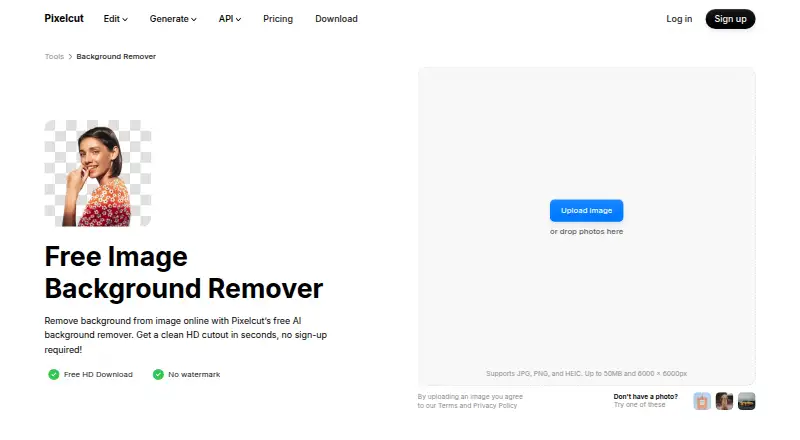
Pixelcut is an AI photo and video editor for product photography, with tools for background removal, image upscaling, expansion, retouching, product shots, ads, and video. Its web background remover accepts JPG, PNG, and HEIC images up to 50 MB and 6000 × 6000 pixels. It offers free HD downloads without a watermark or sign-up. The editor can upscale images up to 16×, generate shadows, use generative fill for retouching, and batch edit hundreds of files; bulk background removal can process up to 10,000 images in one batch and export a ZIP. Pixelcut is available on web, Android, and iOS, and also offers API access. The API processes images for 5 credits per image, shown as $0.05 per image, with PNG or JPEG inputs and transparent PNG, alpha-mask, or ZIP outputs. The free plan includes limited background removal and upscaling, with exports without a watermark. Pixelcut describes sellers, creators, and brands as users, including for e-commerce catalogs and social content.
Who it suits
Pixelcut suits sellers, creators, and brands handling product photos, e-commerce catalogs, ads, or social content. Its API and batch tools may suit image-processing workflows that handle multiple files.
What it does well
- Free HD downloads without watermark or sign-up.
- Bulk background removal handles up to 10,000 images.
- Upscales images up to 16×.
- Available on web, Android, and iOS.
- Commercial use is supported.
What to know first
- Free plan limits background removal and upscaling.
- API background removal costs $0.05 per image.
- Web uploads are limited to 50 MB and 6000 × 6000 pixels.
Plans
| Plan | Billed and limits | Price |
|---|---|---|
| Free | per month, billed yearly · Limited background removal · Limited upscale · Free export without watermark | Free |
| Pro | billed yearly; page shows $10 and $8 · 600 AI credits monthly · All AI models · Unlimited background removal and upscale · 3-person team · 1,000 batch exports/month · Commercial license | $8 a month |
| Business | billed yearly; page shows $30 and $24 · 3,600 AI credits monthly · All AI models · Unlimited background removal and upscale · 10-person team · 2,000 batch exports/month · Commercial license | $24 a month |
| API credits | flat monthly rate; $0.01 per credit · 1,000 credits · Background removal 5 credits/operation · Upscaler 10 credits/operation · Generate Background 10 credits/operation · Try-On 10 credits/operation · Outpaint 10 credits/operation | $10 a month |
| API Enterprise | Volume pricing for more than 1 million credits per month | On request |
As pixelcut.ai lists them, read 15 Oct 2026. The maker's own page has the final word.
Pixelcut is an AI photo and video editor centered on product imagery. It suits sellers, creators, and brands preparing product photos, catalogs, ads, or social content. Its case is strongest when background editing needs to scale across batches or an API; occasional edits can start with its free remover.
Overview
Pixelcut brings background removal and replacement together with image cleanup, product-shot tools, and video editing. It runs on the web, iOS, and Android, with API access for image-processing workflows. Commercial use is supported, making it relevant to business imagery as well as personal creative work.
Key features
Product image editing
Pixelcut can remove or replace backgrounds, upscale images by up to 16×, expand image canvases, retouch with generative fill, and generate shadows. That combination is useful for building consistent product imagery and adapting it to different placements. The online remover accepts JPG, PNG, and HEIC files up to 50 MB and 6000 × 6000 pixels, a meaningful constraint for larger originals.
Batch processing and API
Pixelcut says its editor can batch-edit hundreds of files, while its background-removal workflow supports up to 10,000 images in a batch with ZIP export. That is a substantial option for catalog work, though monthly batch-export allowances on paid plans are lower than that one-time batch ceiling. The API costs 5 credits per image, shown as $0.05 per image, and accepts PNG or JPEG input. Outputs include transparent PNG, alpha masks, or a ZIP combining foreground and alpha mask. Claude and ComfyUI are also named as integration options.
Privacy and support
Pixelcut says API images are deleted immediately after processing, are not retained or used for model training, and requests are encrypted in transit. Saved project images are encrypted and stored securely, with access limited to the user unless sharing is explicitly allowed. Support is by email, with replies usually within one business day; the help center covers the web, iOS, and Android apps.
Pricing
The Free plan costs nothing and includes limited background removal, limited upscaling, and watermark-free exports. The online background remover separately offers free HD downloads without a watermark or sign-up, so it is an appealing way to handle occasional cutouts without taking on a subscription. The broader free plan’s limited editing allowances make it less suitable for recurring production.
Pro includes 600 AI credits monthly, three team members, and 1,000 batch exports monthly. Business raises those allowances to 3,600 monthly credits, 10 team members, and 2,000 batch exports monthly. Both plans use custom pricing. Pro fits smaller teams needing recurring batch work, while Business offers more capacity and seats for a larger operation; neither quota should be confused with the background-removal tool’s 10,000-image batch maximum. Pixelcut subscriptions can be canceled at any time.
The API’s stated rate of $0.05 per image offers a direct usage-based route for automated background removal. Pixelcut is freemium, and the paid plans’ prices are custom pricing, so teams comparing a fixed subscription budget should weigh their required credits, seats, and monthly export volume before choosing.
Platforms
Pixelcut is available on web, iOS, and Android, and offers API access. That spread supports both mobile editing and integration into image-processing workflows.
Who it's for
Pixelcut is a strong fit for sellers and brands that repeatedly prepare catalog images, especially when background changes, retouching, or bulk cutouts are part of the job. Creators making ads or social content can also use its image and video tools. Readers who only need a few background removals have a clear free starting point; those needing predictable high-volume costs should compare the custom-priced subscriptions and API usage against their workload.
Pros and cons
- Pro: Free HD background removal with no watermark or sign-up makes occasional cutouts easy to access.
- Pro: Batch removal supports up to 10,000 images with ZIP export, which can reduce repetitive catalog work.
- Pro: API processing has a stated per-image rate and several output choices, including alpha masks.
- Con: The Free plan limits background removal and upscaling, restricting ongoing use of the broader editor.
- Con: Pro and Business have custom pricing, and their monthly batch-export caps are 1,000 and 2,000 respectively.
- Con: Web uploads are capped at 50 MB and 6000 × 6000 pixels.
Alternatives
For a wider comparison of tools by task, see AI Product Photography Generators, AI Image Expanders, AI Background Removers, AI Cartoon Generators, AI Background Generators, and Video Background Removal Software.
Choose Wink AI Video Generator if you want a freemium tool available across web, desktop, and mobile platforms; its free exports are watermarked and its AI generations are limited by credits. Photoroom is another freemium option, with Pro offering 8,000 monthly AI credits, 1,000 exports, and up to 50 seats. Artboard may suit buyers who want stated monthly prices and commercial licensing: its Pro plan is $24 a month, with 500 credits and HD and 4K exports. Claid offers API and web access with a free trial, so it is worth considering if a trial-based start matters. GreenOnion AI has a $19 a month Creator plan with 60 credits and product-listing assets. Mokker AI provides a free plan with 20 photos once and full access to its studio and templates. Morzai is a freemium web and extension option with a free welcome gift of 2,000 credits, though its free plan limits several capabilities and restricts commercial use to learning. Omi uses an annual license with monthly or annual payment and pricing dependent on Digital Twin SKU count and add-ons.
Verdict
Choose Pixelcut if you need product-image cleanup that can move from free individual cutouts to bulk processing or API integration. Its combination of editing tools, generous batch ceiling, and transparent API rate is compelling for catalog workflows. Look elsewhere if a published subscription price is essential or if the free plan’s limited editing capacity will not cover regular production.
Verdict
Pixelcut combines product-image editing with video tools, plus batch processing and API access. Its free background remover and paid API pricing are stated, while the Pro and Business plan prices are not listed.
Facts from Pixelcut's own pages
- AI actors
- AI Actors are described as maintaining character and brand understanding across generated images and videos. · pixelcut.ai, 15 Oct 2026
- AI shadows
- Pixelcut includes AI-generated shadows intended to create realistic product imagery. · pixelcut.ai, 15 Oct 2026
- API access
- Yes · pixelcut.ai, 23 Sept 2026
- API availability
- Pixelcut offers developer API access through developer.pixelcut.ai for integrating its tools into external workflows. · help.pixelcut.ai, 15 Oct 2026
- API commercial use
- Pixelcut permits commercial API use but prohibits using the API to create training data for users’ own models. · pixelcut.ai, 15 Oct 2026
- API image rights
- The API page says customers retain copyright in images processed through the API. · pixelcut.ai, 15 Oct 2026
- API integration
- The background-removal API costs 5 credits per image, shown as $0.05 per image, and supports PNG or JPEG inputs with transparent PNG, alpha-mask, or ZIP outputs. · pixelcut.ai, 30 Sept 2026
- API operations
- The public API lists background removal, image upscaling, generated backgrounds, try-on and outpaint operations. · pixelcut.ai, 15 Oct 2026
- Background generation
- After cutout, users can choose AI-generated photorealistic scenes or search millions of backdrops. · pixelcut.ai, 15 Oct 2026
- Background removal
- The web remover accepts JPG, PNG and HEIC files up to 50MB and 6000×6000 pixels, with no sign-up required. · pixelcut.ai, 15 Oct 2026
- Background removal controls
- Automatic subject detection can be refined with a manual brush, and results can be downloaded as transparent PNGs. · pixelcut.ai, 15 Oct 2026
- Batch background removal
- The background-remover page says bulk processing can handle up to 10,000 images in one batch and export them as a ZIP. · pixelcut.ai, 30 Sept 2026
- Batch editing
- The product page says batch editing can process edits across hundreds of files, while the background-remover page describes batches up to 10,000 images. · pixelcut.ai, 15 Oct 2026
- Batch processing
- Yes · pixelcut.ai, 23 Sept 2026
- Cancellation
- Pixelcut says subscriptions can be canceled at any time. · pixelcut.ai, 30 Sept 2026
- Commercial use
- Yes · pixelcut.ai, 23 Sept 2026
- Company facts
- Pixelcut’s own About page names Pixelcut Inc., founded in 2020 by Dominique Yahyavi and Prasanth Veerina, headquartered in Oakland, California. · pixelcut.ai, 15 Oct 2026
- Company size
- LinkedIn’s Pixa profile lists the company as privately held, founded in 2020, with 11–50 employees. · linkedin.com, 15 Oct 2026
- Conflicting company listing
- A separate LinkedIn page named PixelCut describes a 2012-founded Bratislava company with 2–10 employees and PaintCode as its first product. · linkedin.com, 15 Oct 2026
- Developer documentation
- Pixelcut says its developer documentation covers authentication, every endpoint, credits and a published OpenAPI specification. · pixelcut.ai, 15 Oct 2026
- Editing features
- Pixelcut says its AI can remove backgrounds, upscale images up to 16×, expand images, retouch with generative fill, generate shadows, and batch edit hundreds of files. · pixelcut.ai, 30 Sept 2026
- Expand tool
- Its proprietary Expand feature extends images beyond the original frame edges. · pixelcut.ai, 15 Oct 2026
- Export formats
- PNG; API additionally supports JPEG input,alpha mask,and foreground-plus-alpha-mask ZIP output · pixelcut.ai, 23 Sept 2026
- Free background removal
- The online background remover offers free HD downloads without a watermark or sign-up. · pixelcut.ai, 30 Sept 2026
Where Pixelcut stands on Freedom251
- AI Background Removers#4 of 94
- Background removers#4 of 70
- AI Mascot Generators#7 of 40
- Photo editors#27 of 97
- Video Background Removal Software#7 of 24
- Video Intro Maker Software#9 of 30
- AI Product Photography Generators#8 of 26
- AI Image Expanders#8 of 26
- AI Image Restoration Software#11 of 30
- Image Background Removal Software#11 of 28
- Green Screen Software#12 of 30
- AI Cartoon Generators#11 of 26
- Image Upscaling Software#43 of 99
- AI Background Generators#11 of 23
- AI Photo Editors#47 of 97
- AI Object Removal Tools#12 of 24