Freedom251 › AI Product Photography Generators

Mokker AI
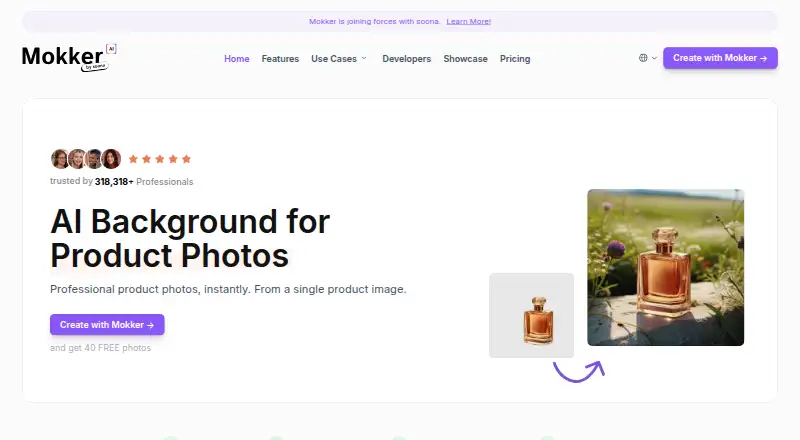
What Mokker AI is
Mokker AI creates product photography from a single product image. Users upload a product photo, choose a template, and receive an AI-generated image; the homepage promotes more than 100 adjustable templates. Reference photos can guide the style, and users can control image colors or replace a product in a photo they have taken. The Resize feature creates assets in formats ranging from website banners to stories. The site presents the images for websites and online shops, social media, and print-ready marketing materials. The Free plan costs nothing and includes 20 photos once, full studio access, and all templates. Starter costs $13 a month billed annually, with 500 photos per month, high-quality export, and custom prompts. Team costs $29 a month billed annually and includes unlimited photos and a three-seat team account. Organization costs $83.25 a month billed annually per user, starting from five seats. API integration is listed as coming soon, with early access available by sign-up.
Who it suits
Mokker AI suits individuals or teams creating product images for online shops, social media, or print materials. The listed plans address single-person businesses, small teams, and organizations starting from five seats.
What it does well
- Promotes more than 100 adjustable templates.
- Reference photos can guide image style.
- Users can control image colors.
- Resize creates assets from banners to stories.
What to know first
- Free plan includes 20 photos once.
- API integration is listed as coming soon.
- Organization starts from five seats.
Limits
The Free plan includes 20 photos once, with full studio access and all templates. The cheapest paid plan, Starter, includes 500 photos per month and is billed annually at $13 a month.
Plans
| Plan | Billed and limits | Price |
|---|---|---|
| Free | 20 photos once · Full access to studio · All templates | Free |
| Starter | Annual pricing (save up to 35%) · 500 Photos / month · High Quality export · Custom Prompts | $13 a month |
| Team | Annual pricing (save up to 35%) · Per user · Unlimited Photos · Teams Account (3 Seats) · Includes Starter | $29 a month |
| Organization | Annual pricing (save up to 35%) · Per user · Starting from 5 seats · Includes Team · Custom AI Model (coming soon) · Priority Support | $83.25 a month |
As mokker.ai lists them, read 3 Oct 2026. The maker's own page has the final word.
Getting started
- Open the Mokker AI website in a web browser.
- Upload a product photo.
- Choose a template and adjust it as needed.
- Optionally upload reference photos to guide the style.
- Select the Free plan or a paid plan for the desired photo allowance.
Mokker AI turns a single product photo into AI-generated product imagery, with templates and controls for shaping the result. It suits online sellers and small businesses that need product visuals for shops, social media, or print; its one-time free quota makes it easy to try, while annual billing on paid plans deserves a close look.
Overview
The workflow is direct: upload a product photo, choose a template, and receive generated product photography. Mokker promotes more than 100 adjustable templates, plus reference-photo moodboards that guide the style. That gives users several ways to steer an image without requiring a full photo shoot, though the output still depends on the source image and the chosen direction.
Its scope goes beyond backgrounds. Users can replace a product in a photo they have taken to maintain consistency across shots, control image colors for brand alignment, and resize creative assets for formats from website banners to stories. The product is aimed at imagery for online shops, social media, and print-ready marketing materials.
Key features
Style and scene controls
Templates provide a ready-made starting point, while uploaded reference photos let users communicate a preferred visual style. Color controls add another practical way to keep generated images closer to a brand palette. These are useful options for sellers producing a consistent set of product assets; they are less compelling if the goal is simply to remove a background with no need for styled scenes.
Asset preparation
Product replacement is designed to preserve consistency across product shots, and Resize adapts creative assets to different formats. Together, they address common follow-up tasks after image generation rather than stopping at a single scene. Mokker also describes an API for background replacements and upscales, but API integration is coming soon, with early access sign-up offered rather than a currently available integration.
Pricing
| Plan | Price and terms | What it includes |
|---|---|---|
| Free | free | 20 photos once, full studio access, and all templates |
| Starter | $13 a month, billed annually (save up to 35%) | 500 photos per month, high-quality export, and custom prompts |
| Team | $29 a month, billed annually (save up to 35%) | Per user, unlimited photos, a three-seat team account, and Starter features |
| Organization | $83.25 a month, billed annually (save up to 35%) | Per user, starting from five seats, Team features, custom AI model coming soon, and priority support |
The Free plan offers broad access to the studio and templates, but its 20-photo allowance is a one-time quota, not a recurring monthly supply. Starter is the straightforward fit for a solo business that can work within 500 photos monthly; it adds high-quality export and custom prompts, but requires annual billing. Team raises the quota to unlimited and includes three seats, making it the better fit for a small team that needs shared access. Organization is positioned for organizations starting at five seats and adds priority support; its custom AI model is still coming soon. All paid prices are annual-billing rates, so readers should factor in that commitment when comparing them.
Platforms
Mokker AI is available on the web. Its API is not yet integrated for general use.
Who it's for
Mokker is best suited to solo sellers and small teams that regularly need styled product images and multiple output formats. The one-time free quota is useful for a limited evaluation, while Starter’s monthly photo allowance provides a defined production budget. Organizations needing at least five seats can consider the larger plan, especially if priority support matters. Buyers who require a live API workflow should look elsewhere for now.
Pros and cons
- Pros: More than 100 adjustable templates, reference-photo moodboards, and color controls give users several concrete ways to direct image style.
- Pros: Product replacement and resizing address consistency and format needs beyond generating a single image.
- Pros: The Free plan includes the full studio and all templates, so users can explore the workflow before paying.
- Cons: Free use is capped at 20 photos once, limiting ongoing production without a paid plan.
- Cons: Paid plans use annual billing, including the entry-level Starter plan.
- Cons: The API is coming soon rather than ready for teams that need integration now.
Alternatives
Browse AI Product Photography Generators for a wider set of tools in this category, or AI Background Generators if background creation is the main requirement.
- Wink AI Video Generator is a freemium option available across Android, iOS, macOS, web, and Windows, with free credits for new users and limited AI generations.
- Pixelcut is worth considering for users who want a freemium tool spanning web, iOS, Android, and API, with limited free background removal and upscaling.
- Claid is a paid web and API option with a free trial that includes 50 credits and 50 API credits.
- Flair.ai offers a free tier with one custom model, five generated images, and one video generation, for users who want to try a broader image and video workflow.
- Morzai provides a free welcome gift of 2,000 credits and is available as a web app and extension.
- Pixora has a lifetime free tier with 100 generation credits (about two images), free presets, and commercial usage rights; its Pro plan is $9.90 a month.
- Product MakeImg offers 10 free signup credits, with image costs varying by resolution, for users seeking a credit-based product-image option.
- Tagshop AI has a free tier and a Starter plan at $29 a month, with 50 monthly credits and up to five videos per month.
Verdict
Mokker AI is a good fit for online sellers and small businesses that want to turn product photos into styled, reusable assets, especially when templates, brand color control, and resizing matter. Its free studio access lowers the barrier to trying that workflow, and the Team plan offers an unlimited-photo option for small groups. Choose another tool if you need an API today or cannot commit to annual billing on a paid plan.
Verdict
Mokker AI offers several ways to guide product-image style and prepare assets for different formats. Review the one-time Free plan limit, annual billing on paid plans, and the API status before choosing.
Questions
How much does Mokker AI cost?
The Free plan costs 0.00 USD. Paid plans start with Starter at $13 a month, billed annually; Team is $29 a month and Organization is $83.25 a month, both billed annually.
What does the Free plan include?
It includes 20 photos once, full access to the studio, and all templates.
Which platforms can I use it on?
Mokker AI is available on the web.
Who makes Mokker AI?
The operator is zerolens GmbH, headquartered in Vienna, Austria. Its imprint lists Mirko Vodegel and Nikolaus Redl.
Does Mokker AI have an API?
The API page describes background replacements and upscales, but says API integration is coming soon and invites users to sign up for early access.
What do Team and Organization include?
Team costs $29 a month with annual billing and includes unlimited photos and a three-seat account. Organization costs $83.25 a month with annual billing, is priced per user, starts from five seats, and includes Team and priority support; its custom AI model is marked as coming soon.
Facts from Mokker AI's own pages
- API
- The API page describes background replacements and upscales, but labels API integration as coming soon and invites users to sign up for early access. · mokker.ai, 3 Oct 2026
- Color control
- The site says users can control the colors of AI photos to create on-brand images. · mokker.ai, 3 Oct 2026
- Headquarters
- Vienna, Austria · mokker.ai, 28 Sept 2026
- Intended customers
- The pricing page describes Starter as suited to single-person businesses, Team to small teams, and Organization to organizations starting from five seats. · mokker.ai, 3 Oct 2026
- Maker
- The imprint identifies zerolens GmbH as the operator and lists Mirko Vodegel and Nikolaus Redl. · mokker.ai, 3 Oct 2026
- Moodboards
- Users can upload reference photos so the AI can try to understand their style and apply it to the output. · mokker.ai, 3 Oct 2026
- Privacy
- The privacy page names zerolens GmbH as controller and says personal-data processing follows the GDPR and applicable country-specific data-protection rules. · mokker.ai, 3 Oct 2026
- Product
- Mokker describes itself as an AI background tool for product photos that creates professional product photos from a single product image. · mokker.ai, 3 Oct 2026
- Product replace
- The site says users can replace the product in a photo they have taken to maintain consistency across product shots. · mokker.ai, 3 Oct 2026
- Resize
- The Resize feature is described as creating creative assets in formats ranging from website banners to stories. · mokker.ai, 3 Oct 2026
- Security
- The privacy page says zerolens has implemented technical and organizational measures to protect personal data, while noting that internet transmissions may have security gaps and absolute protection cannot be guaranteed. · mokker.ai, 3 Oct 2026
- Support
- The imprint directs users to the chat option at the bottom right for support requests. · mokker.ai, 3 Oct 2026
- Templates
- The homepage promotes 100+ templates and says templates can be adjusted. · mokker.ai, 3 Oct 2026
- Use cases
- The site presents product imagery for websites and online shops, social media, and print-ready marketing materials. · mokker.ai, 3 Oct 2026
- Workflow
- The site says users upload a product photo, choose a template, and receive AI-generated product photography. · mokker.ai, 3 Oct 2026
Where Mokker AI stands on Freedom251
- AI Product Photography Generators#12 of 26
- AI Background Generators#15 of 23