Freedom251 › AI Photoshoot Generators

Claid
by Claid
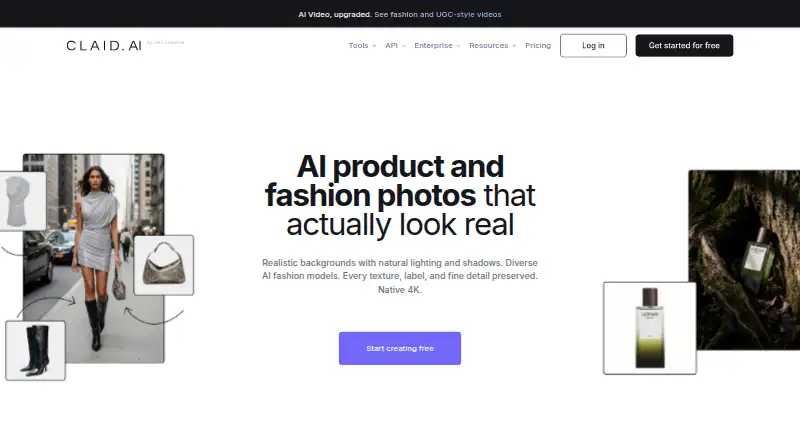
What Claid is
Claid is a product and fashion image suite for creating, improving, and editing photos and video through the web or an API. Its tools include AI Photoshoot, AI fashion models, background removal, image upscaling, light and color correction, and image-to-video. Claid says its AI is built for product photography and aims to retain details, logos, and branding when images are changed. The API handles image and video tasks such as adding AI backgrounds, editing images from text prompts, upscaling, and generative resizing. Batch processing is supported. Teams can connect AWS S3, Google Cloud Storage, or a web folder to process images from storage, and a Zapier integration can send edited or generated images to more than 6,000 apps. Claid serves marketplaces and ecommerce businesses; the company says its story began in 2017 as it addressed poor-quality product photos for ecommerce platforms. The free plan includes 50 credits for any operation and 50 API credits. Other options include Essentials and Pro with operation quotas and history periods, Business with advanced API workflows and dedicated support, and self-serve API credits. The standard API limit is 4 requests per second and 120 per minute; custom plans can have higher limits.
Who it suits
Claid suits marketplaces and ecommerce businesses that need to prepare product or fashion imagery in batches or through an API. It may also fit teams that want to process images from cloud storage or pass generated and edited images to apps through Zapier.
What it does well
- Includes AI Photoshoot, fashion models, background removal, and image-to-video.
- API supports image and video operations, including prompt-based editing.
- Batch processing is supported.
- Can process images from AWS S3, Google Cloud Storage, or a web folder.
- Zapier can send images to more than 6,000 apps.
- States GDPR and CCPA compliance and encryption at rest and in transit.
What to know first
- Free plan is limited to 50 credits and 50 API credits.
- Standard API limit is 4 requests per second and 120 per minute.
- Essentials and Pro list operation quotas and limited history periods.
- SOC 2 is in progress.
Limits
The free plan includes 50 credits for any operation and 50 API credits. Essentials includes 250 image upscales, 500 background removals, 125 AI Photoshoots, and one month of history; Pro includes 1,000 upscales, 2,000 background removals, 500 AI Photoshoots, and three months of history. The standard API limit is 4 requests per second and 120 per minute; higher limits are available on custom plans.
Plans
| Plan | Billed and limits | Price |
|---|---|---|
| Free trial | 50 credits · 50 API credits | On request |
| Essentials | monthly · 500 credits · up to 2K output · 500 background removals · 125 AI Photoshoots · 125 AI Fashion generations · 8 AI videos · 1 month history | $9 a month |
| Pro | monthly · 2,000 credits · premium tools · 2K/4K generation · 3x history preservation · uploads up to 64 MP · 33 AI videos | $35 a month |
| Free | free · 50 credits · standard tools · 50 API credits | Free |
| Self-serve API | one-time purchase for 1,000 credits · 20+ operations · workflow chaining · standard support | $59, paid once |
| Self-serve API credits | Credits are a one-time purchase; the price is not stated in the opened page. · 20+ standard image and video operations · Default limit 4 RPS / 120 RPM | On request |
| Business | custom/month · advanced API workflows · custom SLAs · dedicated support and onboarding · beta access | On request |
As claid.ai lists them, read 20 Sept 2026. The maker's own page has the final word.
Getting started
- Open claid.ai.
- Choose the free plan, which includes 50 credits and 50 API credits.
- Use the web platform or API.
- For API image processing, connect AWS S3, Google Cloud Storage, or a web folder if needed.
- Use the API documentation and standard support for self-serve API use.
Overview
Claid is an AI suite for creating and preparing product and fashion images, with a web app and API for image and video work. It suits ecommerce teams and marketplaces managing recurring catalog workflows. Its appeal is the range of product-focused tools and ways to move images through existing systems; its standard API request ceiling may be restrictive for busier pipelines.
Key features
Claid brings together AI Photoshoot, AI fashion models, background removal and replacement, upscaling, light and color correction, prompt-based editing, product scene templates, and image-to-video. That breadth can cover several stages of product image preparation in one suite. A team that needs only background removal or upscaling may find a broader toolkit unnecessary.
Claid says its AI is trained for product photography with the aim of preserving product details, logos, and branding. That focus is valuable for catalog work, where an edit that alters the item can make an otherwise polished image misleading. Batch processing also suits teams preparing sets of images, rather than handling every asset individually.
The API supports image and video operations such as AI backgrounds, natural-language edits, upscaling, and generative resizing. It can process images from AWS S3, Google Cloud Storage, or a web folder, and Claid’s Zapier integration can send edited or generated images to more than 6,000 apps. These connections make Claid a practical candidate for teams fitting image work into existing storage and application workflows.
Standard API access has a default limit of 4 requests per second and 120 per minute; higher limits are available on custom plans. That is a clear constraint for high-volume automation unless a custom arrangement is suitable. Claid states that it complies with GDPR and CCPA, encrypts data in transit and at rest, and does not use customer data for model training. SOC 2 is in progress.
Pricing
Claid has a free plan at no cost, with 50 credits for any operation, standard tools, and 50 API credits. It is a useful way to try the workflow, but the finite credits make it a starting allowance rather than an ongoing high-volume option.
Essentials and Pro offer monthly or yearly billing options, with custom pricing. Essentials includes 250 image upscales, 500 background removals, 125 AI Photoshoots, and one month of history. It fits smaller, defined workloads, but those operation quotas call for planning if the catalog is large or work is frequent. Pro raises the allowances to 1,000 upscales, 2,000 background removals, and 500 AI Photoshoots, with three months of history. That is the more suitable self-serve tier for sustained work, though the published quotas still bound usage.
Self-serve API credits are a one-time purchase with custom pricing. They cover more than 20 standard image and video operations and use the default 4 RPS / 120 RPM limit. Business has custom pricing and adds advanced API workflows, custom SLAs and setup, dedicated support and onboarding, and early access to beta tools and research. It is the relevant option for organizations that need tailored integration and service commitments. The API self-serve offering includes documentation and standard support; enterprise options include a dedicated integration team.
Platforms
Claid is available on web and through its API. The web option suits teams working directly with images; API access is better suited to integrating image operations into a product or automated workflow. Batch processing is supported.
Who it's for
Claid is strongest for marketplaces and ecommerce businesses that prepare product imagery repeatedly and need a mix of generation, editing, and automation. Small teams can start with the free credits, while larger operations can weigh the Essentials and Pro quotas against their catalog volume. Teams with advanced API needs or a requirement for dedicated onboarding should consider Business. It is less compelling for someone seeking just one basic image tool or whose automated workload exceeds standard API limits without a custom plan.
Pros and cons
- Pros: A broad set of product photography tools combines generation, cleanup, correction, and video in one suite.
- Pros: Batch processing, storage connections, and Zapier support suit repeatable workflows across existing systems.
- Pros: The free plan includes both operation credits and API credits, allowing a no-cost start.
- Cons: Essentials and Pro quotas cap the listed image operations, so teams need to match plan allowances to catalog volume.
- Cons: Standard API access is limited to 4 requests per second and 120 per minute, which may not fit high-throughput pipelines.
- Cons: The free allowance is 50 credits, and the trial is also 50 credits, limiting how much work can be sustained without a paid option.
Alternatives
For a narrower choice, browse AI Product Photography Generators for product image creation, AI Background Generators for background-focused tools, or AI Image Upscalers and Image Upscaling Software for upscaling options. The AI Photo Editors list is a broader place to compare editing tools.
Choose Wink AI Video Generator if you want a freemium tool available across Android, iOS, macOS, web, and Windows. Pixelcut is a freemium alternative with web, API, iOS, and Android access; its free tier includes limited background removal and upscaling, plus watermark-free export. Flair.ai offers a free tier with one custom model, five generated images, and one video generation, making it a narrower way to try product imagery generation.
Mokker AI offers a web-based free tier with 20 photos once, full studio access, and all templates. Morzai is a web and extension option with 2,000 welcome credits and limits on project history, batch workflows, and high-resolution export. Pixora has a free web tier with 100 generation credits, approximately two images, and commercial usage rights; its Pro plan is $9.90 a month. Product MakeImg offers a web-based free plan with 10 signup credits and credit costs that rise with output resolution. Tagshop AI is a freemium web and API option with a free tier and a Starter plan at $29 a month, including 50 credits per month and up to five videos per month.
Verdict
Claid is a strong fit for ecommerce and marketplace teams that need product-focused image generation and editing tied to batch or API workflows. Its breadth, storage connections, and integration options are the main reasons to choose it. Look elsewhere if you need a single-purpose tool, or if your operation volume cannot fit the published quotas and standard API limits without custom pricing.
Verdict
Choose Claid if your marketplace or ecommerce workflow needs product image generation and editing, batch processing, or API access. The free plan provides a way to start, while Essentials and Pro specify image-operation quotas and history periods. Teams with advanced API workflows, custom SLAs, or dedicated onboarding should consider the Business option; standard API request limits may also matter for high-volume processing.
Questions
Is Claid free?
Claid has a free plan at no cost. It includes 50 credits for any operation and 50 API credits.
What platforms does Claid support?
Claid is available on the web and through an API.
What can I do with the API?
The API supports image and video operations, including AI backgrounds, natural-language image editing, upscaling, and generative resizing. The standard request limit is 4 per second and 120 per minute.
Can Claid process stored images or connect to other apps?
Images can be processed from AWS S3, Google Cloud Storage, or a web folder. Its Zapier integration can send edited and generated images to more than 6,000 apps.
What do the Essentials and Pro plans include?
Essentials lists 250 image upscales, 500 background removals, 125 AI Photoshoots, and one month of history. Pro lists 1,000 upscales, 2,000 background removals, 500 AI Photoshoots, and three months of history.
What security measures does Claid state?
Claid states that it is GDPR and CCPA compliant, encrypts data at rest and in transit, and does not use customer data for model training. SOC 2 is in progress.
Facts from Claid's own pages
- AI editing
- AI Edit accepts natural-language instructions for image changes. · claid.ai, 15 Oct 2026
- AI Fashion
- The platform creates on-model fashion images from apparel photos. · claid.ai, 15 Oct 2026
- AI Photoshoot
- AI Photoshoot generates product scenes and product photography from source images. · claid.ai, 15 Oct 2026
- API
- The Claid API supports image and video operations, including AI backgrounds, natural-language image editing, upscaling, and generative resizing. · claid.ai, 3 Oct 2026
- API access
- Yes · claid.ai, 20 Sept 2026
- API authentication
- The REST API uses HTTPS requests with a bearer API key in the Authorization header. · docs.claid.ai, 15 Oct 2026
- API documentation
- Public documentation covers quick start material, guides, image operations, storage management and API references. · docs.claid.ai, 15 Oct 2026
- API limits
- The default API request limit is 4 requests per second and 120 requests per minute; higher limits require custom plans. · claid.ai, 15 Oct 2026
- API operations
- The API exposes more than 20 image and video operations and supports chaining several operations in one request. · claid.ai, 15 Oct 2026
- Background generation
- AI Backgrounds place products into generated scenes and templates. · claid.ai, 15 Oct 2026
- Background removal
- Background removal and blur are available as web and API operations. · claid.ai, 15 Oct 2026
- Batch processing
- Yes · claid.ai, 20 Sept 2026
- Company founded
- The company says its story began in 2017 while solving low-quality ecommerce product photos. · claid.ai, 15 Oct 2026
- Company headquarters
- Crunchbase lists Claid as a private company headquartered in San Francisco, California, United States. · crunchbase.com, 15 Oct 2026
- Company history
- Claid’s about page says its story began in 2017 while addressing low-quality product photos for ecommerce platforms. · claid.ai, 3 Oct 2026
- Company legal name
- Crunchbase lists the legal entity as Let's Enhance, Inc. · crunchbase.com, 15 Oct 2026
- Company size
- The official about page says the team has more than 25 people across 15 countries and speaks more than 10 languages. · claid.ai, 15 Oct 2026
- Founded
- 2017 · claid.ai, 28 Sept 2026
- Image tools
- Its tools include AI Photoshoot, AI fashion models, background removal, image upscaling, light and color correction, and image-to-video. · claid.ai, 3 Oct 2026
- Integrations
- The Zapier integration connects Claid workflows with services such as Shopify, Google Drive, WordPress and Slack, across Zapier's app ecosystem. · claid.ai, 15 Oct 2026
- Intended users
- Claid says it serves marketplaces and ecommerce businesses, and its about page describes a goal of automating image preparation for digital platforms. · claid.ai, 3 Oct 2026
- Limit: free tier
- An independent Leapscope review describes the free tier as a one-time batch of 50 credits and says paid pricing was not shown on the product page it checked. · leapscopeai.com, 15 Oct 2026
- Limit: G2 learning curve
- The G2 reviewer said users unfamiliar with AI may need more information about available filters to use the product effectively. · g2.com, 15 Oct 2026
- Limit: open-source status
- The public product and API pages describe hosted web and API services and do not state an open-source licence or self-hosting option. · docs.claid.ai, 15 Oct 2026
Where Claid stands on Freedom251
- AI Photoshoot Generators#1 of 25
- AI Product Photography Generators#2 of 26
- AI Background Generators#3 of 23
- AI Image Upscalers#6 of 28
- AI Photo Editors#26 of 97
- Image Upscaling Software#32 of 99
- Photo editors#50 of 97