Freedom251 › Screenshot Annotation Software
Hivly Screenshot Annotator
What Hivly Screenshot Annotator is
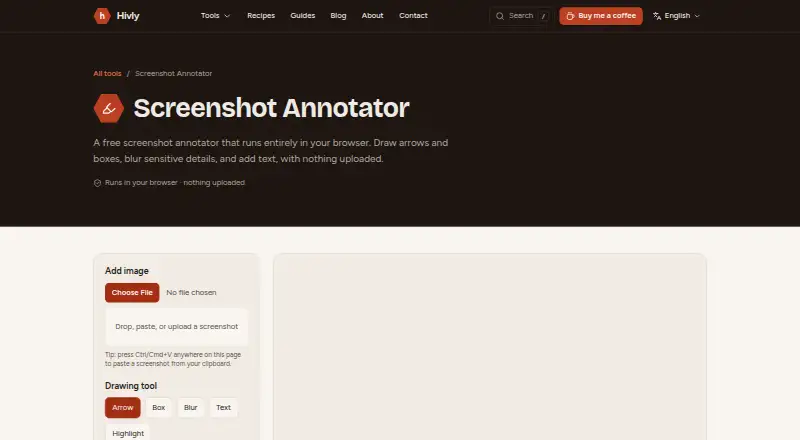
Hivly Screenshot Annotator is a free browser tool for marking up screenshots before sharing them or adding them to a report. You can bring in an image by dragging it onto the page, selecting a file, or pasting from the clipboard. Annotation tools include arrows, boxes, blur, text, and highlights for pointing out bugs, settings, or private details. Redaction tools are included, and the finished image can be downloaded as a PNG. The tool runs in a browser with nothing to install. Hivly says images are processed on your device and are not uploaded, stored, or seen by the operator. The Free plan costs nothing, requires no account, and has no trial or locked features. Hivly also says it uses aggregated analytics and may use cookies for analytics and advertising. The maker is based in Dubai, UAE, and was founded in 2020. Support messages are read by a real person who usually replies within a couple of working days.
Who it suits
It suits anyone who needs to explain issues, settings, or sensitive details in a screenshot before sharing it. It is also useful when local processing and no installation are priorities.
What it does well
- Arrows, boxes, blur, text, and highlights are included
- Images can be pasted, dragged, or selected
- Exports annotated images as PNG files
- Processing stays on the user’s device
- No account or installation is required
What to know first
- PNG is the listed export format
- The tool runs in a web browser
- Analytics and advertising cookies may be used
Plans
| Plan | Billed and limits | Price |
|---|---|---|
| Free | Free to use · no account · no trial · no upload | Free |
As hivly.net lists them, read 11 Oct 2026. The maker's own page has the final word.
Verdict
Hivly Screenshot Annotator offers straightforward screenshot markup with local processing and no account requirement. It is a focused option when PNG output and browser access meet your needs.
Facts from Hivly Screenshot Annotator's own pages
- Audience
- The page describes marking up screenshots to point out bugs, settings, or private details before sharing or filing them in a report. · hivly.net, 11 Oct 2026
- Export
- The annotated result can be downloaded as a PNG. · hivly.net, 11 Oct 2026
- Export formats
- PNG · hivly.net, 24 Sept 2026
- Founded
- 2020 · hivly.net, 19 Oct 2026
- Free access
- Hivly says its tools are free, with no account, trial, or locked features. · hivly.net, 11 Oct 2026
- Free plan
- Yes · hivly.net, 24 Sept 2026
- Headquarters
- Dubai, UAE · hivly.net, 19 Oct 2026
- Input
- You can add an image by dragging it in, choosing a file, or pasting from the clipboard. · hivly.net, 11 Oct 2026
- Integrations
- The product page describes file and clipboard input and PNG export; it does not name third-party integrations. · hivly.net, 11 Oct 2026
- Local processing
- The page says images are processed on your device and are never uploaded or sent anywhere. · hivly.net, 11 Oct 2026
- Maker
- Hivly is made and maintained by CodingEagles, which describes itself as a senior software studio building production web applications for businesses. · hivly.net, 11 Oct 2026
- No installation
- The tool runs in a browser and requires nothing to install. · hivly.net, 11 Oct 2026
- Privacy details
- Hivly says it uses aggregated analytics and may use cookies for analytics and advertising. · hivly.net, 11 Oct 2026
- Privacy policy
- Hivly says tool files are processed on the user's device and are not uploaded, stored, or seen by the operator. · hivly.net, 11 Oct 2026
- Purpose
- The browser tool marks up screenshots with arrows, boxes, blur, text, and highlights. · hivly.net, 11 Oct 2026
- Redaction tools
- Yes · hivly.net, 24 Sept 2026
- Support
- Hivly says a real person reads contact messages and usually replies within a couple of working days. · hivly.net, 11 Oct 2026
Where Hivly Screenshot Annotator stands on Freedom251
- Screenshot Annotation Software#62 of 76