Freedom251 › T-Shirt Design Software
Screenhance Apparel Mockup Generator
Visit Screenhance Apparel Mockup Generator Alternatives Pricing
What Screenhance Apparel Mockup Generator is
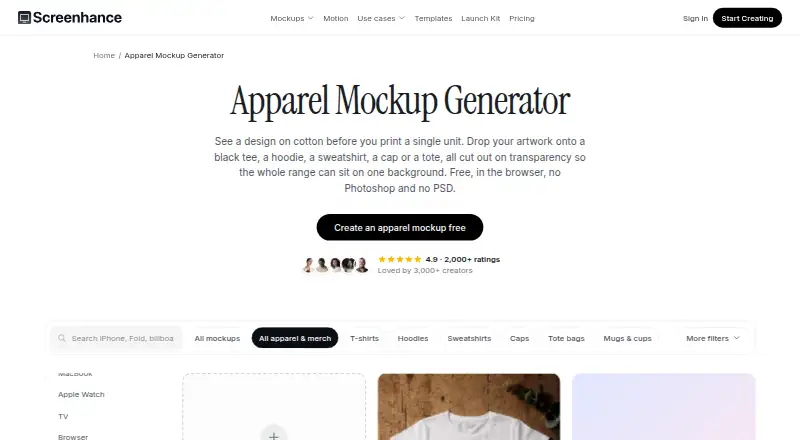
Screenhance Apparel Mockup Generator is a browser-based tool for previewing raster artwork on apparel before printing. It offers single-garment scenes featuring a black T-shirt, hoodie, sweatshirt or cap, plus Tee and cap and Tote and tee combinations. The compositor warps artwork to fit a garment’s print area and applies fabric color and luminance to retain the appearance of folds and light. Garments are cut out on transparent backgrounds, which users can place over a chosen backdrop. The page recommends transparent PNG artwork, though JPG also works, with a long edge of at least 2000 px in sRGB. The Free plan allows three monthly exports as watermarked 1x PNGs. Pro costs $12 per month or $99 per year, with unlimited exports in several image and video formats, up to 3x resolution, and clean MP4 demo-video export. Teams costs $24 per month or $199 per year and adds three editor seats, shared projects and assets, Brand Kit, and private review links. A one-time Launch Pass costs $6 and provides 10 image exports over seven days.
Who it suits
It suits apparel labels, streetwear makers, and teams preparing merch drops, company swag, event kits, or identity pitches. Teams needing shared projects and review links can consider the Teams plan.
What it does well
- Apparel scenes include single garments and two-garment compositions.
- Artwork is adapted to garment folds, light, and fabric color.
- Transparent cutouts can be placed over chosen backgrounds.
- Figma design guidance is available in the Help Centre.
- Uploaded images are not used to train AI models.
What to know first
- Free exports are limited to three per month.
- Free exports are watermarked 1x PNGs.
- The Launch Pass provides exports for seven days only.
Limits
Free includes three exports per month, at 1x resolution as watermarked PNG files, plus five-minute screen recordings. Launch Pass includes 10 image exports over seven days. Pro supports unlimited exports, while Teams includes three editor seats; extra editors cost $8/month each.
Plans
| Plan | Billed and limits | Price |
|---|---|---|
| Pro | $12/month or $99/year · Unlimited exports · PNG, WebP, JPEG, GIF, WebM · up to 3x resolution · no watermarks · 45-minute recordings · 1 GB video saves · clean MP4 export | $12 a month |
| Teams | $24/month or $199/year · 3 editor seats · shared projects, assets and Brand Kit · private review links · extra editors $8/month each | $24 a month |
| Free | $0/month · 3 exports per month · PNG only · 1x resolution · watermarked outputs · screen recordings up to 5 minutes | Free |
| Launch Pass | $6 one-time · 10 watermark-free image exports · all image formats and resolutions · valid for 7 days · video remains watermarked | $6, paid once |
As screenhance.com lists them, read 4 Oct 2026. The maker's own page has the final word.
Getting started
- Open the Apparel Mockup Generator in a browser.
- Prepare transparent PNG artwork, or use a JPG; the page suggests at least 2000 px on the long edge in sRGB.
- Choose an apparel scene and place the artwork in its print area.
- Select the Free plan, Launch Pass, Pro or Teams based on export and collaboration needs.
- Export the mockup in a format supported by the selected plan.
Screenhance Apparel Mockup Generator is a browser-based tool for previewing raster artwork on apparel before printing. It suits independent labels and teams assembling merchandise or identity pitches. Its focus is convincing garment previews, rather than a complete apparel-design workflow.
Overview
The compositor warps artwork into a garment’s print area and applies the fabric’s color and luminance, helping the design follow folds and lighting instead of looking like a flat overlay. Transparent garment cutouts can be placed over a chosen background, a useful touch for tailoring a merch proposal or presentation image.
Scenes include a black T-shirt, hoodie, sweatshirt and cap, plus Tee and cap and Tote and tee pairings. This covers several common apparel presentations, but the set is focused rather than evidence of a broad garment catalog. Screenhance recommends transparent PNG artwork, accepts JPG, and suggests an sRGB image at least 2000 px on its long edge.
Key features
- Fabric-aware placement: Warping and luminance adjustments help artwork fit the garment’s print area and retain fabric appearance. That makes Screenhance a better fit for visual previews than a basic image overlay.
- Transparent cutouts: Isolated garments can sit against a chosen background, giving users more control over the scene around a design.
- Multiple export formats on Pro: Pro supports PNG, WebP, JPEG, GIF and WebM, and includes clean MP4 demo-video export. The range is useful for different presentation needs, but users who need clean or higher-resolution image files must move beyond Free.
- Figma guidance: The Help Centre has a guide for using Figma designs in Screenhance, a practical bridge for users preparing artwork there.
- Image privacy: Uploaded images are processed to create mockups, are not used to train AI models and are not shared with third parties. They may be stored temporarily, and users can delete their content through account settings.
Pricing
Screenhance is freemium, with plans billed in USD. The free tier is useful for occasional previews, but its export cap and watermarks make it unsuitable for a steady production routine.
| Plan | Price and terms | What it includes |
|---|---|---|
| Free | free; resets monthly | Three exports per month, 1x resolution and five-minute screen recordings. Image exports are watermarked PNG files. |
| Launch Pass | $6 a month; no subscription or auto-renewal | Ten image exports for seven days. Its short, finite allowance suits a one-off project better than ongoing use. |
| Pro | $12 a month, or $99/year | Unlimited exports, PNG, WebP, JPEG, GIF and WebM, up to 3x resolution, no watermarks, 45-minute recordings, 1 GB of video saves and clean MP4 export. This is the practical choice for regular solo use or finished presentation assets. |
| Teams | $24 a month, or $199/year | Three editor seats, shared projects, assets and Brand Kit, private review links, roles, invites and workspace ownership. Extra editors cost $8/month each. Its collaboration features suit teams reviewing work together; the seat allowance matters for larger groups. |
Platforms
Screenhance is available on the web and as an extension. The browser-based approach suits users who want to prepare apparel previews without making the mockup workflow a standalone desktop application.
Who it's for
The apparel focus fits small labels and streetwear projects, bundled merchandise drops, company swag and event kits, and identity or rebrand pitches. It is strongest when the job is showing artwork on apparel. Someone seeking a broader design tool or a large customizable garment selection should compare alternatives before committing.
Pros and cons
Pros
- Artwork follows fabric: The compositor’s warping and luminance treatment gives apparel previews more visual context than a flat placement.
- Background flexibility: Transparent garment cutouts can be used over a chosen backdrop, helpful for presentations and merchandise concepts.
- Useful Pro deliverables: Multiple image and video formats, higher resolution and watermark-free exports support more polished sharing.
- Team review features: Shared assets, Brand Kit and private review links give the Teams plan a clear collaborative purpose.
Cons
- Free exports are constrained: Three monthly exports at 1x resolution, with watermarked PNG output, are limiting for repeated client or product work.
- Launch Pass is brief: Ten image exports last seven days, so it is a poor substitute for an ongoing subscription when work recurs.
- Teams starts with three editors: Larger groups pay $8/month for each additional editor.
- Garment choice is focused: The named apparel scenes cover common items and pairings, but do not establish a wide-ranging catalog.
Alternatives
Choose ClozDesign if a web-based apparel workflow built around projects and previews is more important than exporting directly on a free plan: its free tier allows three projects and 20 MB of image storage, while exports require Pro.
Kittl is another freemium web option. MockupFit offers a web and API route with unlimited garment designs, live previews and mockup downloads on its free plan, plus Printful export. For an iOS option, consider w3D.
YupTees is a free web option with no signup required. Printonator is a free online T-shirt designer that accepts JPG and PNG uploads up to 10 MB. YouWear.ai gives new accounts five free credits for generations or edits, with physical products costing extra.
Pick Mock It if you want a broader mockup library: its Standard plan advertises 5,000+ mockups and unlimited creation and downloads, with a seven-day free trial before $11.99/month.
For broader category browsing, see T-Shirt Design Software, AI Mockup Generators and Screenshot Annotation Software.
Verdict
Screenhance is a good fit for labels and teams that need apparel concepts to look integrated with fabric, especially when transparent cutouts and presentation-ready exports matter. Its main reason to choose it is the fabric-aware placement; its main reason to look elsewhere is the narrow free export allowance, with watermarked 1x PNGs. Use Free for occasional checks, Launch Pass for a short burst of work, and Pro or Teams when export volume or collaboration justifies the cost.
Verdict
Screenhance focuses on apparel previews, with garment scenes and fabric-aware artwork placement. Check the export limits and plan terms against the number and format of files you need.
Questions
Is there a free plan?
Yes. Free resets monthly and includes three exports per month as watermarked 1x PNG files.
How much do the plans cost?
Launch Pass costs $6.00 USD for a one-time purchase. Pro is $12/month or $99/year, and Teams is $24/month or $199/year.
What does the Launch Pass include?
It includes 10 image exports for seven days and does not auto-renew.
Which export formats does Pro support?
Pro supports PNG, WebP, JPEG, GIF and WebM, along with clean MP4 demo-video export.
Can teams collaborate?
Yes. Teams includes three editor seats, shared projects, assets and Brand Kit, private review links, roles, invites and workspace ownership.
How are uploaded images handled?
They are processed to create mockups, are not used to train AI models and are not shared with third parties. They may be stored temporarily, and users can delete content through account settings.
Facts from Screenhance Apparel Mockup Generator's own pages
- Artwork guidance
- The page recommends transparent PNG artwork, says JPG also works, and suggests at least 2000 px on the long edge in sRGB. · screenhance.com, 4 Oct 2026
- Data handling
- The policy says uploaded images may be temporarily stored and users can delete their content through account settings. · screenhance.com, 4 Oct 2026
- Formats
- Pro supports PNG, WebP, JPEG, GIF and WebM exports, while clean MP4 demo-video export is also included. · screenhance.com, 4 Oct 2026
- Free export limit
- The free plan allows three exports per month and image exports are 1x watermarked PNG files. · screenhance.com, 4 Oct 2026
- Free plan
- Yes · screenhance.com, 20 Sept 2026
- Garments
- Apparel scenes include a black T-shirt, hoodie, sweatshirt and cap, as well as two-garment Tee and cap and Tote and tee compositions. · screenhance.com, 4 Oct 2026
- Integration
- The Help Centre lists a guide for using Figma designs in Screenhance. · screenhance.com, 4 Oct 2026
- Intended users
- The apparel page describes use cases including bundled merch drops, company swag and event kits, small labels and streetwear, and identity or rebrand pitches. · screenhance.com, 4 Oct 2026
- Mockup rendering
- The compositor warps artwork into the garment print area and applies garment luminance and fabric color to preserve folds, light and fabric appearance. · screenhance.com, 4 Oct 2026
- Purpose
- The browser-based generator places artwork on apparel mockups so users can preview designs before printing. · screenhance.com, 4 Oct 2026
- Support
- The Help Centre directs users to email [email protected] for support. · screenhance.com, 4 Oct 2026
- Team collaboration
- The Teams plan includes shared projects, assets and Brand Kit, private review links, roles, invites and workspace ownership. · screenhance.com, 4 Oct 2026
- Transparent cutouts
- The apparel garments are isolated on transparency so users can place them over a chosen background. · screenhance.com, 4 Oct 2026
- Uploaded image privacy
- The privacy policy says uploaded images are processed to create mockups, are not used to train AI models, and are not shared with third parties. · screenhance.com, 4 Oct 2026
Where Screenhance Apparel Mockup Generator stands on Freedom251
- T-Shirt Design Software#5 of 23
- AI Mockup Generators#23 of 31
- Screenshot Annotation Software#59 of 76