Freedom251 › T-Shirt Design Software
Printonator
What Printonator is
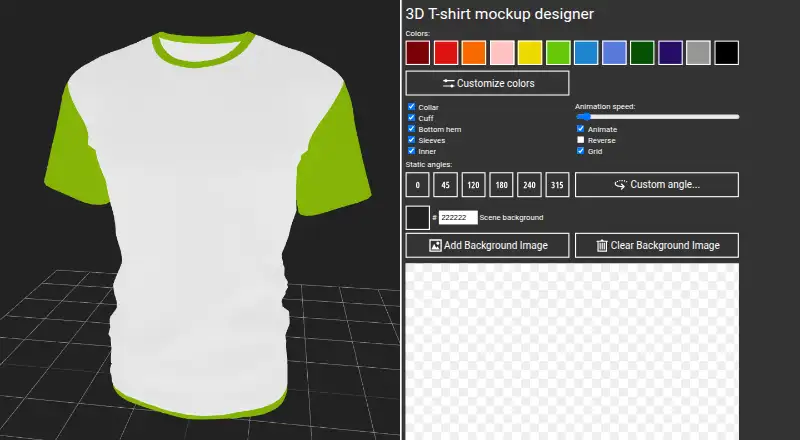
Printonator is a web-based T-shirt design tool with a 3D garment preview. Its editor lets you upload JPG or PNG images up to 10 MB, add colored text, and move, rotate, or scale design elements. You can adjust colors for the collar, sleeves, bottom hem, cuff, inner area, and print area. Garment choices include men's and women's T-shirts, long-sleeve shirts, and men's and women's all-over-print T-shirts. Printonator describes the editor as suitable for sublimation, heat transfer, DTG, screen printing, and DTF printing. Export options include a PNG mockup, a PNG snapshot of the 3D scene, and a WEBM recording. The design format is raster, and print-ready export is available. The plan is free. Registered users may use site features for personal, non-commercial purposes. The homepage also links to 3D Mugs and Cups at mug3d.com and 3D T-Shirts.
Who it suits
It suits people who want to arrange artwork on a T-shirt mockup in a web editor. Its listed garment options and print methods may also fit users preparing designs for different apparel formats and printing processes.
What it does well
- 3D preview with PNG mockup and scene exports
- Supports colored text and image uploads
- Offers several T-shirt styles and garment color controls
- WEBM video recording is available
- Free plan at no cost
What to know first
- Image uploads are limited to 10 MB
- Uploads support JPG and PNG only
- Registered-user features are for personal, non-commercial use
Limits
Image uploads are limited to 10 MB and accept JPG and PNG formats. Registered users may use site features for personal, non-commercial purposes.
Plans
| Plan | Billed and limits | Price |
|---|---|---|
| Free online T-shirt designer | Free online designer; max image size 10 MB · JPG and PNG uploads | Free |
As printonator.com lists them, read 5 Oct 2026. The maker's own page has the final word.
Getting started
- Open https://printonator.com/ in a web browser.
- Choose a garment from the men's or women's T-shirts, long-sleeve shirts, or all-over-print options.
- Upload a JPG or PNG image up to 10 MB, or add colored text.
- Move, rotate, or scale design objects and adjust garment area colors.
- Download a PNG mockup or 3D scene snapshot, or record a WEBM video.
Printonator is a browser-based T-shirt designer that places raster artwork on three-dimensional garment mockups. It is best suited to hobbyists, students, and designers preparing personal visual concepts who want several garment styles and export formats without a subscription.
Overview
The editor combines image uploads and colored text with controls for moving, rotating, and scaling objects. Its 3D preview gives a more useful sense of how artwork sits on a shirt than a flat template alone. You can also recolor the collar, sleeves, bottom hem, cuff, inner area, and print area, making it possible to present a coordinated garment rather than only a changed graphic.
Garment choices cover men's and women's T-shirts, long-sleeve shirts, and men's and women's all-over-print T-shirts. Printonator describes the editor as suitable for sublimation, heat transfer, DTG, screen printing, and DTF workflows. That range is helpful for concept development, but the output remains raster artwork and mockup imagery rather than a specialized production package.
Key features
Artwork and garment controls
JPG and PNG uploads are accepted up to 10 MB. The cap is manageable for ordinary web graphics but can force larger source files to be resized before use. Colored text and object transforms cover the essential placement work, while the separate garment-part color controls help when a design depends on contrast between the print and the shirt construction.
Exports
You can download a PNG mockup, save a PNG snapshot of the 3D scene, or record the scene as a WEBM video. PNG files are practical for listings, presentations, and approvals; WEBM is useful when a rotating or otherwise moving presentation communicates the design better than a still image. These are visual exports, so users needing a different production format should plan an additional workflow.
Use terms and privacy
Registered users may use the site features for personal, non-commercial purposes. That condition is decisive: Printonator is a poor choice for selling client work, commercial apparel, or business production unless you have separate permission. Its privacy policy says processing can include email, messages, device and browser information, IP address, cookies, access times, and requested page addresses. It describes organizational and technical safeguards and includes customer and technical support among processing purposes. The listed contact is [email protected].
Pricing
Printonator has one free plan: Free online T-shirt designer costs free. It includes the online designer, a maximum image size of 10 MB, and JPG and PNG uploads. There are no paid tiers, seat charges, renewal dates, or trial period to compare. The meaningful trade-offs are the upload ceiling and the personal, non-commercial usage term rather than a feature paywall.
Platforms
Printonator runs on the web, so it is accessible through a browser rather than as a listed desktop or mobile application. The homepage also links to related 3D Mugs and Cups and 3D T-Shirts services, which may be useful if your project extends beyond the garment options in this editor.
Who it's for
Choose Printonator for personal shirt concepts, classroom work, hobby projects, and quick mockup presentations where a 3D view and multiple garment colors matter. It also fits users who need a free way to export still images or a short scene recording. Look elsewhere for commercial apparel, large source artwork, or workflows that require business-use rights and production-oriented file handling.
Pros and cons
- Pro: The free plan includes both 3D mockup and scene-capture PNG exports, giving you separate presentation options.
- Pro: Collar, sleeve, hem, cuff, inner, and print-area colors provide more garment control than a single print-color setting.
- Pro: Support for several shirt cuts and all-over-print variants broadens concept coverage.
- Con: JPG and PNG uploads stop at 10 MB, which may require compressing or resizing detailed artwork.
- Con: Registered-user terms restrict use to personal, non-commercial purposes, excluding ordinary client and retail work.
- Con: Raster PNG and WEBM exports may not replace a dedicated production or vector-design workflow.
Alternatives
For a wider comparison, see T-Shirt Design Software. ClozDesign is the better fit when you need project storage and commercial-style export access: its free tier allows three projects and 20 MB of storage, while exports require Pro. Choose Kittl if a broader web design platform and a paid annual Pro option are more important than a single-purpose mockup editor. MockupFit suits users who want unlimited garment designs, live previews, mockup downloads, and Printful export on its free plan, with API access also available. Screenhance Apparel Mockup Generator is preferable for browser-extension use and limited monthly exports, including short screen recordings. w3D is the alternative when an iOS app is required. YupTees is another web option advertised as fully free with no signup. YouWear.ai is aimed at generation and editing through free account credits rather than manual garment composition. Mock It is the stronger choice for a large mockup library, unlimited creation and downloads, and a seven-day trial before its paid monthly plan.
Verdict
Printonator is a sensible pick for personal, non-commercial garment mockups when you want 3D presentation, detailed garment-part coloring, and multiple free export types. The main reason to look elsewhere is equally clear: its 10 MB upload limit and personal-use restriction make it unsuitable for commercial apparel work or larger production assets.
Verdict
Printonator covers core garment mockup work, including object transforms, color adjustments, and several export types. Check the upload limit and non-commercial use terms before choosing it for a project.
Questions
How much does Printonator cost?
The free online designer plan is free.
Which platforms can I use it on?
Printonator is available on the web.
What file types and image sizes can I upload?
Image uploads support JPG and PNG files up to 10 MB.
What can I export?
Users can download a PNG mockup or a PNG snapshot of the 3D scene, and record a WEBM video. Print-ready export is available.
What garments and printing methods does it support?
The garment choices include men's and women's T-shirts, long-sleeve shirts, and men's and women's all-over-print T-shirts. The editor is described as suitable for sublimation, heat transfer, DTG, screen printing, and DTF printing.
What are the terms for registered users?
The terms state that registered users may use site features for personal, non-commercial purposes.
Facts from Printonator's own pages
- Contact
- The homepage lists [email protected] as its email contact. · printonator.com, 5 Oct 2026
- Design tools
- The editor lets users upload images, add colored text, and move, rotate, and scale objects. · printonator.com, 5 Oct 2026
- Exports
- Users can download a PNG mockup, capture a PNG snapshot of the 3D scene, and record a video in WEBM format. · printonator.com, 5 Oct 2026
- Garment colors
- Users can change the collar, sleeves, bottom hem, cuff, inner, and print area colors. · printonator.com, 5 Oct 2026
- Garment options
- The page offers men's and women's T-shirts, long-sleeve shirts, and men's and women's all-over-print T-shirts. · printonator.com, 5 Oct 2026
- Integrations
- The homepage links to 3D Mugs and Cups at mug3d.com and 3D T-Shirts. · printonator.com, 5 Oct 2026
- Printing methods
- The editor is described as suitable for sublimation, heat transfer, DTG, screen printing, and DTF printing. · printonator.com, 5 Oct 2026
- Privacy data
- The privacy policy says data may include email, user-submitted messages, device and browser details, IP address, cookies, access times, and requested page addresses. · printonator.com, 5 Oct 2026
- Privacy security
- The privacy policy says the site takes organizational and technical measures to protect personal information from unauthorized or accidental access and other illegal actions. · printonator.com, 5 Oct 2026
- Product
- Printonator is a free online T-shirt designer with a 3D mockup preview. · printonator.com, 5 Oct 2026
- Support
- The privacy policy lists customer and technical support for problems using the site among its purposes for processing personal data. · printonator.com, 5 Oct 2026
- Terms of use
- The terms state that registered users may use site features for personal non-commercial purposes. · printonator.com, 5 Oct 2026
- Upload limit
- Image uploads are limited to 10 MB and support JPG and PNG formats. · printonator.com, 5 Oct 2026
Where Printonator stands on Freedom251
- T-Shirt Design Software#7 of 23