Freedom251 › T-Shirt Design Software
w3D
What w3D is
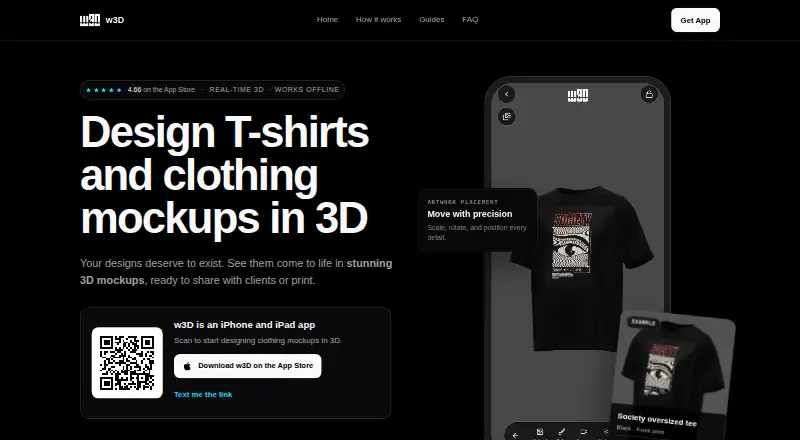
w3D is an iOS app for creating and presenting 3D clothing mockups. Its catalog includes T-shirts, hoodies, caps, pants, polo shirts, and other clothing models. Add artwork, then move, scale, or rotate it on a garment; adjust the garment color, camera, lighting, and background to shape the scene. The site shows PNG, MP4, and GLB export options and places Blender, Unity, Godot, and Unreal Engine in its export workflow. The app is intended for T-shirt designers, clothing brands, and mockup creators. It works offline, and its privacy policy says designs and mockups stay on the device rather than being uploaded to w3D servers. Anonymous usage analytics may be collected, and third-party analytics or crash-reporting services may be used. The app requires iOS 15.0 or later and lists iPhone compatibility. w3D is a presentation tool, not a print-ready export option; users should check production requirements with their manufacturer. The free download offers in-app purchases. Premium access costs $7.99 a month, $79.99 a year, or $99.99, paid once for either listed lifetime plan.
Who it suits
w3D suits T-shirt designers, clothing brands, and mockup creators who want to build clothing presentations on an iPhone. It may also suit people who need to work offline or keep mockups stored locally.
What it does well
- Catalog includes several garment types.
- Artwork can be moved, scaled, and rotated.
- Adjustable color, camera, lighting, and background.
- Works fully offline.
- Free download with in-app purchases.
What to know first
- Requires iOS 15.0 or later.
- No print-ready export.
- Third-party analytics or crash reporting may be used.
Plans
| Plan | Billed and limits | Price |
|---|---|---|
| Free | Free download; in-app purchases available | Free |
| w3D Pro - Monthly Premium Access | Premium access | $7.99 a month |
| w3D Pro - Yearly Premium Access | Premium access | $79.99 a year |
| w3D Pro - Lifetime Premium | Lifetime premium access | $99.99, paid once |
| w3D Pro - Lifetime Access | Lifetime access | $99.99, paid once |
As w3d.io lists them, read 4 Oct 2026. The maker's own page has the final word.
Getting started
- Open the w3D website or find the app through its App Store listing.
- Use an iPhone running iOS 15.0 or later.
- Download the app for free.
- Choose whether to use the free download or an available premium purchase.
w3D is an iOS app for creating 3D apparel mockups. It is best for designers and clothing brands who want to compose garment visuals on a phone, including offline; look elsewhere when print-ready files are the priority.
Overview
w3D brings a clothing-model catalog and presentation controls together in a mobile workflow. Users can upload artwork, position it on a garment, and adjust the scene around it. That makes the app useful for exploring and presenting apparel concepts, but not a substitute for preparing production files: users should confirm manufacturing requirements with their manufacturer.
The app works fully offline, and designs and mockups are stored locally rather than uploaded to w3D servers. Anonymous usage analytics may be collected, and third-party analytics or crash-reporting services may be used. Contact details submitted to support are used to answer the request.
Key features
Garment and artwork controls
The catalog includes T-shirts, hoodies, caps, pants, polo shirts, and other clothing models. Artwork can be moved, scaled, and rotated on a garment, while garment color, camera, lighting, and background can be adjusted. That mix is suited to building a visual presentation of a design; it does not establish print-ready output, which w3D does not offer.
Export and workflow
The site shows PNG, MP4, and GLB export options, and depicts Blender, Unity, Godot, and Unreal Engine alongside its export workflow. Those options give creators several formats to consider for visual assets and downstream work. They should not be mistaken for manufacturing specifications: w3D is described as a visual design and presentation tool, and production requirements need to be checked with the manufacturer.
Pricing
w3D is freemium. The Free plan costs nothing and is a free download, with in-app purchases available. It is the sensible starting point for users who want to assess the app before paying; the published plan information does not describe a trial period or free-plan quota.
Premium access is offered at $7.99 a month or $79.99 a year. The monthly option suits users who want premium access without committing to a year; the annual option costs less than twelve monthly payments at the stated prices, but requires an annual purchase. Both are described as premium access, without separate feature breakdowns.
Two one-time options are also shown: w3D Pro - Lifetime Premium at $99.99, paid once and w3D Pro - Lifetime Access at $99.99, paid once. Both are presented as lifetime access, so they may suit someone planning sustained use rather than recurring payments; their names do not establish different feature sets. No seat limits or usage quotas are given for the paid plans.
Platforms
w3D is an iOS mobile app and requires iOS 15.0 or later. The App Store listing specifies iPhone compatibility. Its offline operation is useful when a network connection is unavailable, while the phone-only platform is a constraint for teams whose design work depends on a desktop or web workspace.
Who it's for
The strongest fit is a T-shirt designer, clothing brand, or mockup creator who wants to place artwork on a range of garment models and control how the result is presented. Offline operation and local storage are useful for private or on-the-go concept work. It is a weaker fit for users who need print-ready exports, manufacturing files, or a non-iOS workflow.
Pros and cons
- Pros: A varied garment catalog, editable artwork placement, and scene controls support more than a flat design preview.
- Pros: Offline use and local storage keep designs on the device rather than uploading them to w3D servers.
- Pros: PNG, MP4, and GLB export options cover several visual-output formats.
- Cons: Print-ready export is not offered, so manufacturing needs must be handled separately.
- Cons: The app requires iOS 15.0 or later and is listed for iPhone, limiting its platform reach.
- Cons: Anonymous analytics may be collected, and third-party analytics or crash-reporting services may be used despite local design storage.
Alternatives
For a wider set of options, browse T-Shirt Design Software.
- ClozDesign is a web-based freemium option; choose it if browser access matters and its free tier of three projects and 20 MB image storage is sufficient, noting that exports require Pro.
- Kittl is a web-based freemium option with a free tier of five projects and 100 one-time AI tokens; consider it if those project and token limits suit your work.
- MockupFit offers web and API access, unlimited garment designs, live previews, mockup downloads, and Printful export on its free plan; choose it if those capabilities better match your workflow.
- Screenhance Apparel Mockup Generator is a web and extension option whose free plan provides three exports per month at 1x resolution and five-minute screen recordings; consider it if those limits fit your needs.
- YupTees is a free web option with no signup required.
- Printonator is a free online T-shirt designer; choose it if a web-based designer with JPG and PNG uploads up to 10 MB is a better fit.
- YouWear.ai is a web-based freemium option with five free credits per new account, where one credit covers one generation or edit; physical products cost extra.
- Mock It offers a web-based Standard plan with a seven-day free trial, then $11.99 a month; consider it if you want to evaluate its mockup offering through that trial.
Verdict
Choose w3D if you want an iPhone-based, offline way to position apparel artwork and build a polished visual presentation across several garment types. Its combination of scene controls, local storage, and multiple export options serves mockup work well. Look elsewhere if you need print-ready output, manufacturing preparation, or a desktop and web workflow.
Verdict
w3D brings garment mockup creation and scene controls to an offline iOS app, with several export options shown. It is designed for visual presentation, so users should confirm manufacturing requirements separately.
Questions
How much does w3D cost?
The Free plan costs nothing, with in-app purchases available. Premium plans cost $7.99 a month, $79.99 a year, or $99.99, paid once for either of two lifetime options.
Does w3D work offline?
Yes. The app works fully offline.
Which devices can run w3D?
The app requires iOS 15.0 or later and lists iPhone compatibility.
What export formats does w3D offer?
The site shows PNG, MP4, and GLB export options.
Does w3D provide print-ready exports?
No. w3D is described as a visual design and presentation tool, and users should confirm production requirements with their manufacturer.
Where are designs and mockups stored?
They are stored locally and are not uploaded to w3D servers. Anonymous usage analytics may be collected, and third-party analytics or crash-reporting services may be used.
Facts from w3D's own pages
- Analytics
- The privacy policy says anonymous usage analytics may be collected and third-party analytics or crash-reporting services may be used. · w3d.io, 4 Oct 2026
- Artwork editing
- Users can upload artwork and move, scale, and rotate it on a garment. · w3d.io, 4 Oct 2026
- Export formats
- The site shows PNG, MP4, and GLB export options. · w3d.io, 4 Oct 2026
- Garment catalog
- The mobile catalog includes T-shirts, hoodies, caps, pants, polo shirts, and other clothing models. · w3d.io, 4 Oct 2026
- Intended users
- The site describes the product for T-shirt designers, clothing brands, and mockup creators. · w3d.io, 4 Oct 2026
- Offline use
- The App Store description says the app works fully offline. · apps.apple.com, 4 Oct 2026
- Privacy
- The privacy policy says designs and mockups are stored locally and are not uploaded to w3D servers. · w3d.io, 4 Oct 2026
- Production limit
- The site describes w3D as a visual design and presentation tool and says users should confirm production requirements with their manufacturer. · w3d.io, 4 Oct 2026
- Purpose
- w3D is a mobile app for designing and presenting 3D clothing mockups. · w3d.io, 4 Oct 2026
- Scene controls
- Users can adjust garment color, camera, lighting, and background. · w3d.io, 4 Oct 2026
- Support
- The site provides a support link and says contact details submitted to support are used to respond to the request. · w3d.io, 4 Oct 2026
- Supported device requirement
- The App Store listing says the app requires iOS 15.0 or later and lists iPhone compatibility. · apps.apple.com, 4 Oct 2026
- Workflow compatibility
- The site depicts Blender, Unity, Godot, and Unreal Engine alongside its export workflow. · w3d.io, 4 Oct 2026
Where w3D stands on Freedom251
- T-Shirt Design Software#11 of 23