Freedom251 › Screenshot Annotation Software
FavTray
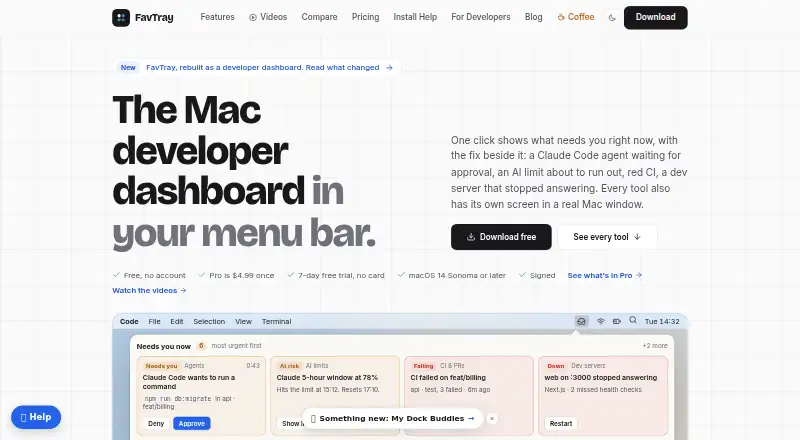
What FavTray is
FavTray is a Mac developer dashboard that places a cockpit in the menu bar and opens separate screens for its tools. The cockpit ranks urgent items such as agent approvals, AI limits, failing CI, and stopped development servers, with actions on each card. Tools cover coding-agent sessions, AI usage, GitHub, development servers, system monitoring, local work, AI spend, and disk space. Local Work shows dirty or unpushed checkouts and does not push changes. Flow AI can use a local model or a user-supplied OpenAI, Anthropic, DeepSeek, or LM Studio key. Listed integrations include VS Code, Terminal, iTerm, Claude Code, GitHub Copilot, Xcode, JetBrains IDEs, AWS CLI, gcloud CLI, Docker, Zoom, Slack, and Microsoft Teams. Module data is read locally, while AI spend comes from Mac logs. The signed app supports macOS 14 Sonoma or later.
Who it suits
FavTray is aimed at Mac developers who want a menu-bar view of coding tools, repositories, servers, system status, and AI usage. It suits users on macOS 14 Sonoma or later using the listed integrations.
What it does well
- Menu-bar cockpit ranks urgent developer work
- Shows dirty or unpushed checkouts
- Supports local or user-provided AI models
- Lists broad developer-tool compatibility
- Free plan and trial options
What to know first
- Mac-only platform
- Requires macOS 14 Sonoma or later
- Free plan excludes screenshot annotation
- Paid pricing includes 4.99 USD options
Plans
| Plan | Billed and limits | Price |
|---|---|---|
| Lifetime | 1 Mac · Pay once · 1 Mac | $4.99, paid once |
| Free | $0; free, no account · macOS 14 Sonoma or later · free tools and developer cockpit | Free |
| Pro | $4.99 once · 7-day free trial · no card · macOS 14 Sonoma or later | $4.99, paid once |
As favtray.com lists them, read 24 Sept 2026. The maker's own page has the final word.
Verdict
FavTray brings many developer signals into one Mac dashboard while keeping module data local according to its site. Check the macOS requirement and plan details, especially which tools are included in the free tier.
Facts from FavTray's own pages
- AI providers
- Flow AI can use a local model or the user's own OpenAI, Anthropic, DeepSeek, or LM Studio key. · favtray.com, 7 Oct 2026
- Browser extension
- No · favtray.com, 24 Sept 2026
- Data handling
- The site says module data is read locally, and AI spend comes from logs on the Mac. · favtray.com, 7 Oct 2026
- Developer cockpit
- The cockpit ranks urgent items such as agent approvals, AI limits, failing CI, and stopped dev servers, with actions on the cards. · favtray.com, 7 Oct 2026
- Developer integrations
- The developer page lists compatibility with VS Code, Terminal/iTerm, Claude Code, GitHub Copilot, Xcode, JetBrains IDEs, AWS CLI, gcloud CLI, Docker, Zoom, Slack, and Microsoft Teams. · favtray.com, 7 Oct 2026
- Free plan
- Yes · favtray.com, 24 Sept 2026
- Local work
- The Local Work module shows dirty or unpushed checkouts and does not push anything. · favtray.com, 7 Oct 2026
- Maker
- The homepage identifies Akash Sai as the builder of FavTray. · favtray.com, 7 Oct 2026
- Redaction tools
- No · favtray.com, 24 Sept 2026
- Signature
- The homepage says the app is signed and supports macOS 14 Sonoma or later. · favtray.com, 7 Oct 2026
- Support
- The site says support usually replies by email within 24 hours. · favtray.com, 7 Oct 2026
- Team collaboration
- No · favtray.com, 24 Sept 2026
- Tool set
- The site describes tools for coding-agent sessions, AI usage, GitHub, dev servers, system monitoring, local work, AI spend, and disk space. · favtray.com, 7 Oct 2026
- What it does
- FavTray is a Mac developer dashboard in the menu bar, with separate screens for its tools in a Mac window. · favtray.com, 7 Oct 2026
Where FavTray stands on Freedom251
- Screenshot Annotation Software#58 of 76