Freedom251 › Invoice Approval Software

hh2 AP Routing & Approval
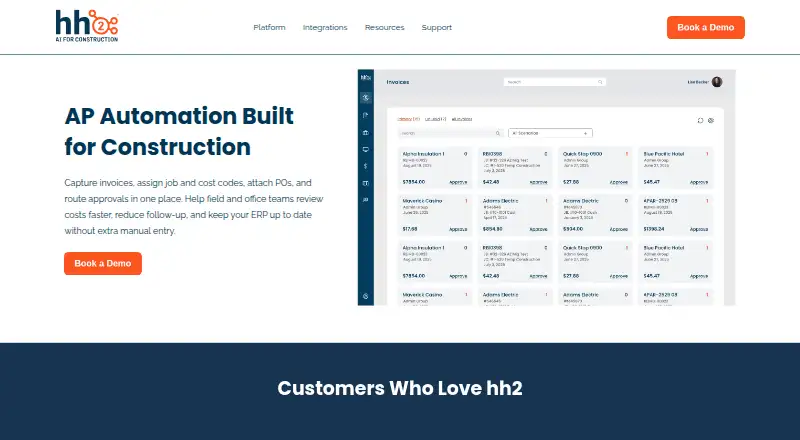
What hh2 AP Routing & Approval is
hh2 AP Routing & Approval helps construction teams capture invoices, assign job and cost codes, attach purchase orders, and manage approvals. Its OCR extracts invoice details, while digital submissions support invoices and receipts. Teams can route invoices according to job, vendor, amount, approver, or other rules, then use thresholds, sequential or parallel reviews, and escalations to shape approval paths. Approved invoice, coding, and payment information syncs to the ERP. Users can follow invoice status in real time and review timestamped approval and audit histories. Processes can span multiple divisions or companies. Mobile users can securely review and approve invoices; hh2 lists iOS 13.4 or later and Android 9.0 or later, and says offline app features are limited until network access returns. Listed integrations include Sage Intacct, Sage 300, Sage 100, Spectrum, Foundation, Vista, QuickBooks Desktop, and QuickBooks Online. The product page directs prospective customers to book a demo; pricing is on request. hh2 says onboarding, training, and ongoing customer service are included, with most contractors live within weeks.
Who it suits
The product is aimed at general contractors, heavy civil and industrial firms, and specialty subcontractors. It may fit teams that need invoice approvals tied to job and cost codes, ERP syncing, and mobile review.
What it does well
- Routes invoices using configurable rules and escalations.
- OCR extracts invoice information.
- Supports sequential and parallel approvals.
- Tracks status and timestamped audit history.
- Includes onboarding, training, and ongoing customer service.
What to know first
- Pricing is available only on request.
- Offline mobile features are limited until network returns.
- Mobile use requires iOS 13.4+ or Android 9.0+.
Getting started
- Open the hh2 AP Routing & Approval website.
- Book a demo to discuss the product and request pricing.
- Use the guided onboarding and training included by hh2.
- Choose web, Android, or iOS access for the team.
- Connect an applicable listed ERP integration.
hh2 AP Routing & Approval is accounts payable software built for construction businesses processing invoices against jobs and costs. It is best suited to contractors who need controlled approvals and an ERP handoff; the trade-off is custom pricing and limited offline mobile functionality.
Overview
Designed around contractor finance workflows, hh2 combines invoice capture, job and cost coding, purchase-order attachments, and approval routing. Support for multiple divisions or companies makes it relevant to businesses running AP across entities. hh2 says it was founded in 2004 to bridge communication between construction field and office teams.
The strongest case for hh2 is the connection between invoice review and construction-specific coding: teams can keep project and cost context attached as invoices move through approvals and into the ERP. Buyers looking for a general-purpose invoice tool without those construction workflows may not need that specialization.
Key features
Capture, coding, and ERP handoff
Digital invoice and receipt submissions feed OCR that extracts invoice data. Reviewers can assign job and cost codes and attach purchase orders or supporting documents. After approval, invoice, coding, and payment data sync to the ERP, reducing repeated entry between review and accounting. The integrations directory includes Sage Intacct, Sage 300, Sage 100, Spectrum, Foundation, Vista, QuickBooks Desktop, and QuickBooks Online.
Approvals and auditability
Routing can be based on job, vendor, amount, approver, or other rules. Thresholds, sequential or parallel reviews, and escalations let teams shape the path to their approval practices. Invoice comments support discussion within the process, while real-time status and timestamped approval and audit histories make progress and actions traceable. hh2 says data is encrypted and protected by secure logins and role-based access.
Mobile review and implementation
Users can review and approve invoices securely on mobile devices. The mobile apps require iOS 13.4 or later or Android 9.0 or later; offline app features are limited until a network connection returns, so teams working without reliable connectivity should weigh that constraint. hh2 says onboarding, training, and ongoing customer service are included, and most contractors are live within weeks.
Pricing
hh2 uses a paid model with custom pricing; prospective customers are directed to book a demo. That means buyers need a sales conversation to assess cost, rather than comparing a published plan price or choosing a self-serve tier. No seat, invoice-volume, trial, or renewal terms are stated.
Platforms
hh2 AP Routing & Approval is available on web, iOS, and Android. Mobile use requires iOS 13.4 or later or Android 9.0 or later, and offline features are limited until connectivity is restored.
Who it's for
The product page names general contractors, heavy civil, industrial, and specialty subcontractors as customers who benefit. Its job-based coding, purchase-order attachments, multi-entity support, and ERP sync are most relevant to contractor AP teams handling project-linked invoices across structured approval chains. Organizations prioritizing offline mobile workflows or transparent upfront pricing should consider other options.
Pros and cons
- Pros: Routing by job, vendor, amount, and approver, with thresholds, parallel or sequential reviews, and escalations, supports complex contractor approval paths.
- Pros: Job and cost coding, purchase-order attachments, OCR, and ERP synchronization keep invoice processing tied to construction accounting workflows.
- Pros: Real-time tracking and timestamped audit history give teams visibility into status and approval actions.
- Cons: Custom pricing requires a demo conversation before buyers can evaluate cost against their needs.
- Cons: Offline mobile features are limited until a network connection is restored, a drawback for teams needing uninterrupted field access.
Alternatives
Invoice Approval Software is a category guide for comparing invoice approval tools. Consider Hili Billing if a free web plan is a priority: its Starter plan costs nothing, while Pro is $29 a month. Keelstar offers free web and API tools, including one-time browser results without an account; it is a different fit from hh2's construction AP workflow. Nanonets Approval Routing Agent has a free Starter plan with $50 in credits to start, then $100/month for 100 credits, and supports up to three users; choose it if that API-oriented, credit-based entry model fits better.
TREX Grow has a free-forever web plan with unlimited users and products, invoices, Malaysia e-Invoice submission, catalog, and RFQ tools; it may suit buyers seeking that broader free offering. Vic.ai APSuite is a paid alternative with an AP Module priced at $25,000 a year on a 12-month contract. Document Logistix AP Approval Workflow has modular licensing and pricing that varies by deployment and requirements. DOKKA offers paid AP and Close products with pricing available by demo. Xtract is another paid option with a free trial.
Verdict
Choose hh2 AP Routing & Approval if your construction business needs job-aware invoice coding, configurable approvals, audit trails, and a handoff to supported ERP systems. Its construction focus and included onboarding make it a strong fit for contractor AP teams, but custom pricing and limited offline mobile capability are real reasons to look elsewhere.
Verdict
hh2 AP Routing & Approval brings invoice capture, coding, ERP sync, and approval tracking into a construction-focused workflow. Prospective customers need to request pricing and check the listed mobile requirements.
Questions
How is the product priced?
Pricing is on request. The product page directs prospective customers to book a demo.
Which platforms does it support?
It is available on Android, iOS, and web. hh2 lists iOS 13.4 or later and Android 9.0 or later for mobile use.
Which ERP systems are listed as integrations?
The integrations directory lists Sage Intacct, Sage 300, Sage 100, Spectrum, Foundation, Vista, QuickBooks Desktop, and QuickBooks Online.
Can invoices be approved on mobile devices?
Yes. Users can review and approve invoices from a mobile device. Offline app features are limited until a network connection is restored.
What onboarding and support are included?
hh2 says onboarding, training, and ongoing customer service are included. It says most contractors are live within weeks.
Which construction businesses is it intended for?
The product page names general contractors, heavy civil, industrial, and specialty subcontractors.
Facts from hh2 AP Routing & Approval's own pages
- Approval workflows
- Approval paths can use thresholds, sequential or parallel reviews, and escalations. · hh2.com, 2 Oct 2026
- Audit trail
- Each invoice action is timestamped and tracked for compliance. · hh2.com, 3 Oct 2026
- Capture and OCR
- Invoices can be captured digitally, and the product’s OCR extracts invoice data automatically. · hh2.com, 3 Oct 2026
- Company history
- hh2 says it was officially founded in 2004 to bridge the communication gap between construction field and office teams. · hh2.com, 3 Oct 2026
- ERP sync
- Approved invoices, coding, and payment data sync to the ERP to reduce manual entry. · hh2.com, 3 Oct 2026
- Founded
- 2004 · hh2.com, 23 Sept 2026
- Headquarters
- Kaysville, Utah, United States · hh2.com, 23 Sept 2026
- Integrations
- The integrations page lists Sage 300, Sage 100, Sage Intacct, Viewpoint Vista, Viewpoint Spectrum, Foundation, Acumatica, CMiC, QuickBooks Desktop, and QuickBooks Online. · hh2.com, 3 Oct 2026
- Intended customers
- The product page identifies general contractors, heavy civil, industrial, and specialty subcontractors as contractor types that benefit. · hh2.com, 3 Oct 2026
- Invoice coding
- Users can assign job and cost codes during review and attach purchase orders and supporting documents. · hh2.com, 3 Oct 2026
- Invoice tools
- The product uses OCR to extract invoice data and supports digital invoice and receipt submissions. · hh2.com, 2 Oct 2026
- Mobile approvals
- Field managers can review and approve invoices securely from a mobile device. · hh2.com, 3 Oct 2026
- Multiple entities
- AP processes can be managed across multiple divisions or companies. · hh2.com, 3 Oct 2026
- Platform requirements
- hh2 lists iOS 13.4 or later and Android 9.0 or later for mobile use, and says offline app features are limited until a network connection is restored. · hh2.com, 3 Oct 2026
- Platforms
- hh2 specifies mobile support for iOS 13.4 or later and Android 9.0 or later, and browser access via current Edge, Chrome, or Safari. · hh2.com, 2 Oct 2026
- Pricing availability
- The product page directs prospective customers to book a demo and does not state a price. · hh2.com, 2 Oct 2026
- Purpose
- hh2 AP Automation captures invoices, assigns job and cost codes, attaches purchase orders, and routes approvals for construction teams. · hh2.com, 3 Oct 2026
- Routing
- Invoices can be routed by job, vendor, amount, or approver, with sequential and parallel approvals and escalations. · hh2.com, 3 Oct 2026
- Routing rules
- Invoices can be routed to approvers by job, vendor, amount, or other rules. · hh2.com, 2 Oct 2026
- Security
- The product page says data is encrypted and protected with secure logins and role-based access. · hh2.com, 3 Oct 2026
- Setup and support
- hh2 says most contractors are live within weeks and receive guided onboarding, training, and ongoing customer service. · hh2.com, 2 Oct 2026
- Status and audit history
- Users can track invoice status in real time and view approvals and timestamped audit history. · hh2.com, 2 Oct 2026
- Support and onboarding
- The product page says onboarding, training, and ongoing customer service are included, and most contractors are live within weeks. · hh2.com, 3 Oct 2026
- Tracking
- The product tracks invoice status in real time and provides approval history and audit history. · hh2.com, 3 Oct 2026
Where hh2 AP Routing & Approval stands on Freedom251
- Invoice Approval Software#28 of 37