Freedom251 › Gym Waiver Software
Gymble
What Gymble is
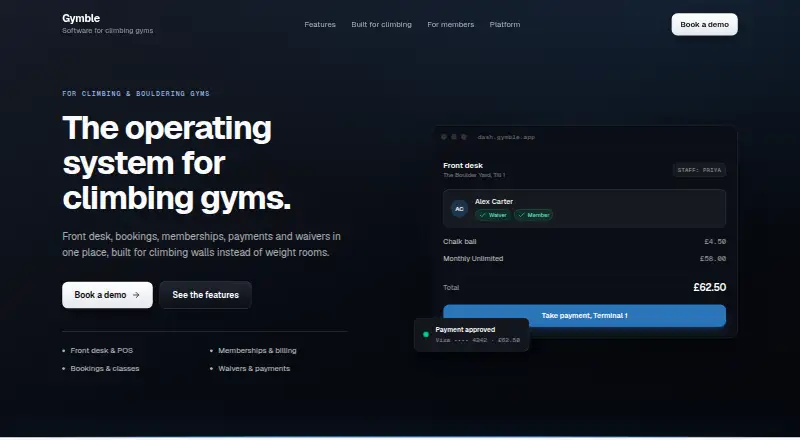
Gymble is web-based software for climbing and bouldering gyms, bringing front-desk sales, bookings, memberships, payments and waivers into one system. At check-in, staff can view a climber’s waiver, membership and induction status; dependants can be connected to a responsible adult. The till processes products and memberships together and supports product variants, live stock tracking, receipts, cash and Ryft terminals. Memberships can rebill automatically, retry failed payments and let members change plans or cards themselves. The booking calendar handles drop-ins, classes and one-to-one sessions, tracks attendance and offers day, week, month and year views. Members can book, manage plans, sign waivers, access PDF receipts and invoices, and use Apple or Google Wallet passes. Waivers support touchscreen and guardian signatures, prefilled details and an immutable, versioned audit trail. Payment options include terminals, online checkout, pay-by-link, Apple Pay, Google Pay, invoices, credit notes and full or partial refunds. Multiple venues, tills and terminals can sit under one organisation, with account details members can use across gyms. Staff controls include per-action permissions, step-up approval and audit trails. Gymble Ltd offers a 30-minute demo to discuss pricing and rollout.
Who it suits
Gymble suits climbing and bouldering gyms that need front-desk sales, bookings, memberships and waivers in a shared system. Its multi-venue support and member self-service features may fit operators serving several locations and their members.
What it does well
- Combines point of sale, bookings, memberships, payments and waivers.
- Shows waiver, membership and induction status at check-in.
- Supports automated membership rebilling and payment retries.
- Members can manage plans and cards themselves.
- Supports multiple venues under one organisation.
What to know first
- Pricing is provided on request.
- Access is through the web platform.
Plans
| Plan | Billed and limits | Price |
|---|---|---|
| Gymble subscription | Pricing provided on a demo · One subscription for every till, staff account and member | On request |
As getgymble.com lists them, read 4 Oct 2026. The maker's own page has the final word.
Getting started
- Visit the Gymble website.
- Arrange the 30-minute demo with the Gymble team.
- Discuss pricing and rollout during the demo.
Verdict
Choose Gymble if your climbing or bouldering gym needs climbing-specific check-in alongside sales, bookings and memberships. Its multi-venue setup and self-service member tools add useful breadth; gyms seeking published pricing or a non-web platform should look elsewhere.
Questions
How much does Gymble cost?
Gymble is paid, with pricing provided on request. The subscription is described as covering every till, staff account and member.
Which platforms does Gymble support?
Gymble is available on the web.
What payment options does it support?
Payment options include terminals, online checkout, pay-by-link, Apple Pay and Google Pay, as well as invoices, credit notes and full or partial refunds.
Can members manage their accounts?
Members can book sessions, manage plans, sign waivers, access PDF receipts and invoices, and use Apple or Google Wallet passes.
Who makes Gymble?
The site identifies Gymble Ltd as the maker.
Facts from Gymble's own pages
- Access controls
- Staff access includes per-action permissions, a role matrix, step-up approval for risky actions and audit trails. · getgymble.com, 4 Oct 2026
- Bookings
- The booking calendar supports drop-ins, classes and one-to-one sessions, with attendance tracking and day, week, month and year views. · getgymble.com, 4 Oct 2026
- Climbing-specific workflows
- Staff can see a climber’s waiver, membership and induction status at check-in, and dependants can be linked to a responsible adult. · getgymble.com, 4 Oct 2026
- Company
- The site identifies the maker as Gymble Ltd and says Gymble is a registered trademark in the UK. · getgymble.com, 4 Oct 2026
- Headquarters
- London, England, United Kingdom · getgymble.com, 28 Sept 2026
- Integrations
- The site names Ryft terminals and Apple Pay and Google Pay as supported payment options. · getgymble.com, 4 Oct 2026
- Member features
- Members can book sessions, manage plans, sign waivers, access PDF receipts and invoices, and use Apple or Google Wallet passes. · getgymble.com, 4 Oct 2026
- Memberships
- Membership plans and groups support automated rebilling, dunning, smart retries, and self-service plan and card changes. · getgymble.com, 4 Oct 2026
- Multi-venue support
- Gymble supports multiple venues, tills and terminals under one organisation, with account details that climbers can use across gyms. · getgymble.com, 4 Oct 2026
- Payments
- Gymble supports terminals, online checkout, pay-by-link, Apple Pay, Google Pay, invoices, credit notes and full or partial refunds. · getgymble.com, 4 Oct 2026
- Point of sale
- The till supports a single transaction for products and memberships, Ryft terminals, cash, receipts, product variants and live stock tracking. · getgymble.com, 4 Oct 2026
- Purpose
- Gymble combines front desk, bookings, memberships, payments and waivers for climbing and bouldering gyms. · getgymble.com, 4 Oct 2026
- Sales and support
- The maker offers a 30-minute demo, says it will discuss pricing and rollout, and provides a direct line to its team. · getgymble.com, 4 Oct 2026
- Security
- The site says payment card data is captured and tokenised by the payment provider, while staff and member sign-ins are separate and shared tills use PIN locks. · getgymble.com, 4 Oct 2026
- Waivers
- Waivers support touchscreen signatures, prefilled details, guardian signing and a versioned immutable audit trail. · getgymble.com, 4 Oct 2026
Where Gymble stands on Freedom251
- Gym Waiver Software#36 of 38