Freedom251 › Vector Graphics Software

Gusta Draw
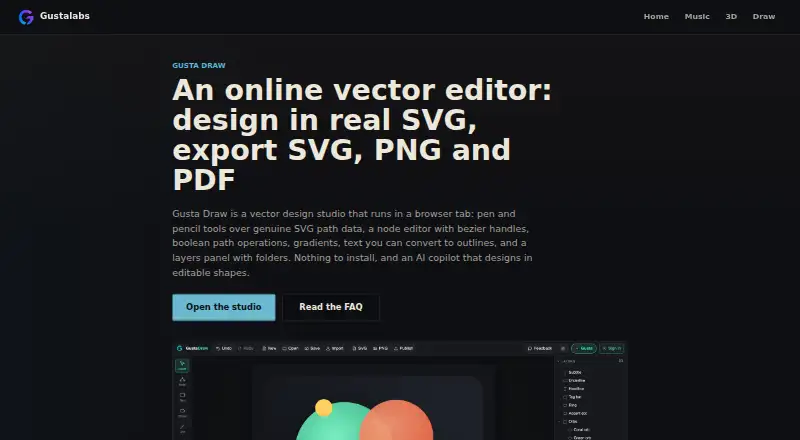
What Gusta Draw is
Gusta Draw is a browser-based vector editor for making graphics such as logos, posters, stickers, app icons, and cut files. Its drawing tools work with SVG paths and include selection, node editing, shapes, pen, pencil, polyline, text, and eyedropper tools. Folders and visibility or lock controls help organize designs, while path operations can unite, subtract, intersect, or exclude shapes. For color and finishing, it offers linear and radial gradients, blur, drop shadow, palettes, type pairings, and a seeded roughen effect. You can upload TTF or OTF fonts, turn text into outlines, and save embedded fonts with a document. It imports SVG and exports SVG, PNG, and PDF, as well as editable project files. Drawing and exports are free. Documents autosave in the browser, and editing, rendering, and export work on your machine after the page has loaded. The layout adapts to tablets and phones, with touch controls for the same editing functions.
Who it suits
It suits musicians, makers, and small shops looking for graphics or machine-cut designs without installing a design suite. It may also suit users who want to edit on a tablet or phone or need SVG, PNG, or PDF exports.
What it does well
- Free drawing tools and SVG, PNG, and PDF exports
- Includes node editing and path-combination operations
- Supports uploaded fonts and text outlines
- Editing and export work offline after initial page load
What to know first
- AI copilot requires an account and Gusta tokens
- Cloud saves and publishing require an internet connection
- No desktop app is listed
Limits
The Free plan includes all drawing tools, effects and SVG, PNG and PDF exports. AI copilot use requires an account and Gusta tokens; during open beta, tokens are granted because nothing is for sale.
Plans
| Plan | Billed and limits | Price |
|---|---|---|
| Free | All drawing tools, effects, starter designs and SVG/PNG/PDF exports free · AI uses granted tokens during open beta | Free |
As gustalabs.com lists them, read 14 Oct 2026. The maker's own page has the final word.
Getting started
- Open https://gustalabs.com/draw/ in a browser while connected to the internet.
- Use the free drawing tools and export options without a paid plan.
- Create an account and use granted Gusta tokens if you want the AI copilot.
- Connect to the internet for cloud saves or publishing to the Gusta asset library.
Gusta Draw is a browser-based vector editor for logos, posters, stickers, app icons and machine-cut artwork. It suits makers, musicians and small shops that want capable SVG work without installing a design suite. Its main advantage is a genuinely free drawing and export workflow that runs locally; connected extras and the initial page load impose practical limits.
The editor combines path construction, node-level refinement, layer management, effects, typography and common export formats in one workspace. Browser autosave protects the current document locally, while rendering, geometry calculations and export use the device rather than a remote service. That is a sensible setup for private or lightweight projects, although cloud collaboration and AI work are separate, connected features.
Overview
Gusta Draw imports SVG and exports SVG, PNG and PDF, while also saving editable .gustadraw.json project files. This covers handoff to cutting machines, print workflows and other design software better than an editor limited to a single image format. The maker positions it for users who need practical graphics rather than a complete desktop publishing or photo-editing environment.
Offline behavior is conditional. The page must load over the internet first; after that, editing, rendering and export continue in the browser. AI assistance, cloud saves and publishing still require a connection, so it is not a fully offline-first choice for travel or unreliable networks.
Key features
Selection, node editing, shape, pen, pencil, polyline, text and eyedropper tools support both freeform drawing and precise SVG-path correction. Folders, visibility switches and lock controls provide a workable structure for layered documents. Unite, subtract, intersect and exclude operations handle the shape combinations needed for icons, logos and cut files, reducing the need to move simple geometry work into another application.
Linear and radial gradients, blur, drop shadow, palettes, type pairings and a seeded roughen effect give designs more finish than flat fills alone. The seeded roughen treatment is useful when a repeatable hand-made texture is wanted, while gradients and shadows cover routine visual polish. These are focused effects rather than evidence of a full raster-effects studio.
Typography is unusually practical for a lightweight browser editor. TTF and OTF files can be uploaded, text can be converted to outlines, and embedded fonts can be saved with the document. That helps preserve lettering when a file moves to another machine or a cutting workflow.
The AI copilot creates and edits layered vector shapes through the editor’s tools. It requires an account and Gusta tokens; during open beta, tokens are granted because they are not sold. It may accelerate shape creation, but users who want an entirely local workflow can simply use the conventional tools.
On tablets and phones, the layout adapts and touch controls expose the same editing functions. A Gusta account adds cloud saves and publishing to a shared Gusta asset library used by Gusta Game and other Gusta apps. The maker says servers are in AWS Stockholm, traffic uses TLS and HSTS, and a content security policy blocks third-party scripts. Support is available through the in-app Feedback button or [email protected].
Pricing
Free — free. The plan includes all drawing tools, effects, starter designs and SVG, PNG and PDF exports. AI copilot use is covered by granted Gusta tokens during open beta. There are no paid tiers or renewal terms to weigh, making this a straightforward choice for occasional creators and small businesses that can work within browser storage.
The trade-off is service dependence rather than a subscription bill: cloud saves, publishing and AI need an account and an internet connection, while local documents remain in the browser.
Platforms
Gusta Draw runs on the web and supports Android and iOS through its touch-adaptive layout. There is no desktop application, so users seeking an installed Windows, macOS or Linux program should choose another editor. The browser model keeps the same project accessible across supported mobile and web devices, provided the page has loaded.
Who it's for
Choose Gusta Draw for logos, posters, stickers, app icons, SVG illustrations and machine-cut files when you want vector basics, typography controls and export without installing a suite. It is especially suitable for makers, musicians and small shops producing their own graphics. It is less suitable for teams that need guaranteed cloud-first collaboration, or for designers who require a dedicated desktop application.
Pros and cons
- Pros: The full drawing and export toolset is free, including SVG, PNG and PDF output.
- Pros: Local rendering, geometry and export keep routine work on the device.
- Pros: Font uploads, outline conversion and embedded-font saving help preserve typography across handoffs.
- Pros: Layer controls, Boolean path operations and mobile touch support cover common practical workflows.
- Cons: The page must load online before offline editing is possible.
- Cons: AI, cloud saves and publishing require both connectivity and an account.
- Cons: No desktop app is offered, limiting users who prefer installed software.
Alternatives
For a broader vector-software directory, browse Vector Graphics Software.
Pick Lunacy instead if you need Linux, macOS, Windows or self-hosted access, up to 10 cloud documents and 30 days of version history on its free plan.
Choose Dotgrid if an open-source application for Android, Linux, macOS or Windows is more important than browser delivery.
Drawtify is an alternative freemium design app with web, macOS and Windows versions and a free tier that limits uploads, exports, templates and design elements.
Graphite is a forever-free, open-source option for Linux, macOS, Windows and the web.
Choose Affinity for an installed macOS or Windows suite combining vector design, pixel photo editing, page layout and export tools.
Amadine suits iPhone and iPad users who want a fully operational free version, with exporting, printing and image tracing requiring purchase.
Inkscape is the established free, GPL-licensed open-source vector editor for Linux, macOS and Windows.
Linearity Curve is an iOS and macOS freemium alternative with monthly billing, lifetime credits and cloud storage on its free plan.
Verdict
Gusta Draw is a strong choice for makers, musicians and small shops that need free vector creation and dependable SVG, PNG and PDF exports without installing software. Its local processing and font controls make everyday design practical. Look elsewhere if you need a desktop app, permanent offline-first access, or cloud and AI features that work without an account and connection.
Verdict
Gusta Draw covers vector drawing, typography, path editing, and common export formats in a free browser editor. Keep in mind that offline use starts only after the page loads, and AI, cloud saves, and publishing need a connection.
Questions
How much does Gusta Draw cost?
The Free plan costs nothing. Drawing and exports are free.
Which platforms does it support?
Gusta Draw is available on web, Android and iOS. There is no desktop app.
What files can I import or export?
It imports SVG and exports SVG, PNG and PDF. Editable projects can be saved as .gustadraw.json files.
Can I use it offline?
After the page loads over the internet, editing, rendering and export work in the browser. AI, cloud saves and publishing need a connection.
Does the AI copilot cost extra?
The copilot requires an account and Gusta tokens. During open beta, tokens are granted and nothing is for sale.
Who makes Gusta Draw?
Gusta Draw is from Gusta Labs, which lists its headquarters in Sweden.
Facts from Gusta Draw's own pages
- Account requirement
- Drawing and exporting work without an account; accounts add AI, cloud saves and publishing. · gustalabs.com, 14 Oct 2026
- AI copilot
- Gusta uses the same editing commands as manual work to create layered, editable vector shapes from prompts. · gustalabs.com, 14 Oct 2026
- AI validation
- Before completion, the copilot checks items such as closed filled paths, canvas bounds, contrast, minimum millimetre stroke width and semantic layer names. · gustalabs.com, 14 Oct 2026
- API scope
- The security page identifies a Gusta Core API handling accounts, sessions, token wallets, cloud saves and the AI gateway. · gustalabs.com, 14 Oct 2026
- Arrangement
- Alignment, distribution, grids, anchor attachment, mirroring, snapping, zoom, pan and constrained rotation are included. · gustalabs.com, 14 Oct 2026
- Boolean geometry
- Unite, subtract, intersect and exclude operations run on an integer-grid geometry engine that handles holes and self-intersections. · gustalabs.com, 14 Oct 2026
- Color and effects
- It supports linear and radial gradients, blur, drop shadow, palettes, type pairings and a seeded roughen effect. · gustalabs.com, 8 Oct 2026
- Colour effects
- The product includes editable linear and radial gradients, blur, drop shadows, palettes, type pairings and a seeded roughen effect. · gustalabs.com, 14 Oct 2026
- Cross-product integration
- A shared Gusta account and token wallet cover Draw and the maker’s other browser apps, and published designs enter a shared asset library. · draw.gustalabs.com, 14 Oct 2026
- Drawing tools
- It includes selection, node editing, shape, pen, pencil, polyline, text and eyedropper tools for working with SVG paths. · gustalabs.com, 8 Oct 2026
- Editable project files
- The app saves editable .gustadraw.json files containing the design and fonts for later reopening. · gustalabs.com, 14 Oct 2026
- Exports
- Projects export to SVG, PNG and PDF, with PNG scaling or exact widths and PDF output using vector paths. · gustalabs.com, 14 Oct 2026
- Headquarters
- Sweden · gustalabs.com, 28 Sept 2026
- Import and export
- It supports SVG import and SVG, PNG and PDF export, as well as editable .gustadraw.json project files. · draw.gustalabs.com, 8 Oct 2026
- Integrations
- A Gusta account enables cloud saves and publishing designs to a shared Gusta asset library used by Gusta Game and other Gusta apps. · draw.gustalabs.com, 8 Oct 2026
- Intended users
- The maker describes the product for musicians, makers and small shops needing graphics or machine-cut designs without installing a design suite. · gustalabs.com, 8 Oct 2026
- Layers
- Layers support folders, visibility toggles, locking, inline renaming and drag reordering. · gustalabs.com, 14 Oct 2026
- Layers and geometry
- The editor has folders, visibility and lock controls, plus unite, subtract, intersect and exclude path operations. · gustalabs.com, 8 Oct 2026
- Local-first processing
- Rendering, geometry and export run on the user’s machine, while documents autosave in browser storage. · gustalabs.com, 14 Oct 2026
- Local storage
- The document autosaves in the browser, and rendering, geometry operations and export run on the user’s machine. · gustalabs.com, 8 Oct 2026
- Maker legal operator
- Terms identify Gustalabs as operated from Sweden by Daniel Gustafsson. · gustalabs.com, 14 Oct 2026
- Maker operation
- Gustalabs says it is built and operated from Sweden and that all servers are in the European Union. · gustalabs.com, 14 Oct 2026
- Mobile support
- The interface adapts to tablets and phones with a horizontal tool strip, bottom-sheet inspector and touch-sized controls. · gustalabs.com, 14 Oct 2026
- Node editing
- Node editing exposes path anchors and Bézier handles for reshaping curves. · gustalabs.com, 14 Oct 2026
Where Gusta Draw stands on Freedom251
- Vector Graphics Software#9 of 51