Freedom251 › Vector Graphics Software
Dotgrid
What Dotgrid is
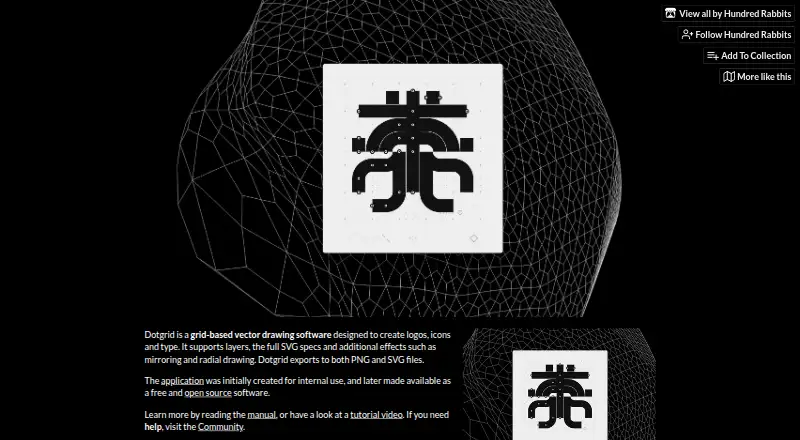
Dotgrid is grid-based vector drawing software for making logos, icons and type. It supports layers and the full SVG specification, with mirroring and radial drawing effects for creating and editing artwork. Finished work can be exported as PNG or SVG files. The guide documents controls for dragging segments, deleting vertices and using the keyboard to draw and edit. Dotgrid is described as free and open source, with its source code licensed under MIT. Images, text and other assets are licensed separately under BY-NC-SA 4.0. It is listed for Android, Linux, macOS and Windows and is also identified as a desktop app and downloadable tool. The product page links to a manual and tutorial video and directs users to its community for help. A separate Hundred Rabbits themes repository is linked. The maker describes itself as an artist collective documenting low-tech solutions for a more resilient future. Its plan is named “Name your own price” and is listed as free; there is no free trial.
Who it suits
Dotgrid suits people creating logos, icons or type with grid-based vector tools. Its listed platforms and export formats may be useful for artists who want PNG or SVG output.
What it does well
- Supports layers and the full SVG specification.
- Includes mirroring and radial drawing effects.
- Exports PNG and SVG files.
- Free and open source under an MIT source-code license.
- Available for Android, Linux, macOS and Windows.
What to know first
- No free trial is listed.
- Images, text and assets use a separate BY-NC-SA 4.0 license.
Plans
| Plan | Billed and limits | Price |
|---|---|---|
| Name your own price | Downloadable tool · Windows, macOS, Linux, Android | Free |
As hundredrabbits.itch.io lists them, read 9 Oct 2026. The maker's own page has the final word.
Getting started
- Open the Dotgrid product page.
- Choose the free “Name your own price” downloadable plan.
- Download Dotgrid for Android, Linux, macOS, or Windows.
- Use the linked manual or tutorial video to get started.
- Visit the product community for help if needed.
Dotgrid is a vector drawing app for making logos, icons and type, best suited to people who want grid-based drawing on desktop or Android without a software fee. It is a focused choice for vector marks, not an all-purpose design suite.
Overview
Dotgrid combines grid-based drawing with layers and support for the full SVG specification. Mirroring and radial effects are practical strengths for symmetrical or repeated forms; they matter less for work that does not use those shapes. Export to SVG preserves vector output, while PNG gives you a raster option.
The guide documents segment dragging, vertex deletion and keyboard controls for drawing and editing. These controls support direct path refinement, but point to a workflow centered on vector drawing rather than a broad range of design tasks. A manual and tutorial video offer learning resources, and a separate Hundred Rabbits themes repository provides themes.
Key features
- Layers and SVG: Layers help organize artwork, while full SVG specification support suits projects that need vector files.
- Mirroring and radial drawing: Useful for symmetrical logos, icons and repeated forms, but not a deciding advantage for other kinds of illustration.
- PNG and SVG export: Covers both raster and vector output.
- Editing controls: Segment dragging, vertex deletion and keyboard controls offer ways to adjust paths directly.
Pricing
Dotgrid is free. Its “Name your own price” plan costs nothing and includes the downloadable tool for Windows, macOS, Linux and Android. There is no free trial because the product is already free. That makes it an easy fit for individuals who need its focused drawing and export tools without a subscription; it is less compelling if the project calls for a wider design toolkit.
The application is open source under the MIT license, but its images, text and other assets use the BY-NC-SA 4.0 license. Those are separate terms, so the code license should not be taken as the license for the accompanying assets.
Platforms
Dotgrid runs on Android, Linux, macOS and Windows, including desktop systems. That spread makes it a practical option for users working across those platforms.
Who it's for
Dotgrid is best for people creating logos, icons or type who value grid-based vector drawing, symmetry effects and SVG output. Its narrow focus makes it a poor choice for someone seeking a broader design application. Help is directed through the product's community, and the repository lists Patreon support.
Pros and cons
- Pros: Free access across four platforms makes it accessible without a recurring software cost.
- Pros: Layers, full SVG support and SVG export suit vector-focused mark-making.
- Pros: Mirroring and radial effects directly support symmetrical and repeated designs.
- Cons: Its stated focus on logos, icons and type is narrow, so it is not the natural choice for broader design work.
- Cons: The code and included assets have different licenses, which users need to account for separately.
Alternatives
Browse Vector Graphics Software for more options. Choose Lunacy instead if its free plan's cloud-document and editor/exporter allowances, plus 30 days of version history, better suit your workflow. Drawtify may fit users who want web access and a free plan with limited templates and design elements, SD exports and a 40 MB image-upload limit.
Graphite is another free, open-source option, with Linux, macOS, web and Windows support. Affinity may suit someone looking for vector design, pixel photo editing, page layout and export tools in one free offering for macOS and Windows. For iPad or iPhone work, Amadine has a free version, though exporting, printing and image tracing require purchase.
Gusta Draw is free on Android, iOS and the web, with drawing tools, effects, starter designs and SVG, PNG and PDF exports. Inkscape is a free, GPL-licensed open-source vector editor for Linux, macOS and Windows. Linearity Curve is worth considering for iOS or macOS users comparing freemium vector tools.
Verdict
Choose Dotgrid if you want a free, cross-platform tool for grid-based logos, icons or type, especially when mirroring, radial effects and SVG output matter. Look elsewhere if your work needs a wider design toolkit or if the distinct licenses for the application and its assets do not fit your use.
Verdict
Dotgrid offers grid-based vector drawing, layer support and SVG-oriented editing at no listed cost. Note that the source-code license differs from the license for its images, text and other assets.
Questions
How much does Dotgrid cost?
The “Name your own price” plan is free.
Which platforms does Dotgrid support?
It is available for Android, Linux, macOS, and Windows.
Can Dotgrid export SVG files?
Yes. It exports both SVG and PNG files.
Is Dotgrid open source?
Yes. Its source code is licensed under MIT. Images, text, and other repository assets are licensed separately under BY-NC-SA 4.0.
Who makes Dotgrid?
It is made by Hundred Rabbits, which describes itself as an artist collective documenting low-tech solutions for a more resilient future.
Facts from Dotgrid's own pages
- Asset license
- The repository says images, text, and assets are licensed under BY-NC-SA 4.0. · github.com, 9 Oct 2026
- Documentation
- The product page links to a manual and a tutorial video. · hundredrabbits.itch.io, 9 Oct 2026
- Drawing effects
- It includes mirroring and radial drawing effects. · hundredrabbits.itch.io, 9 Oct 2026
- Editing controls
- The guide documents segment dragging, vertex deletion, and keyboard controls for drawing and editing. · github.com, 9 Oct 2026
- Export
- It exports to PNG and SVG files. · hundredrabbits.itch.io, 9 Oct 2026
- Layers and SVG
- It supports layers and the full SVG specification. · hundredrabbits.itch.io, 9 Oct 2026
- Maker
- Hundred Rabbits describes itself as an artist collective documenting low-tech solutions for a more resilient future. · hundredrabbits.itch.io, 9 Oct 2026
- Open source
- The application is described as free and open source, and its source code is licensed under MIT. · github.com, 9 Oct 2026
- Platforms
- The downloadable tool is listed for Windows, macOS, Linux, and Android. · hundredrabbits.itch.io, 9 Oct 2026
- Purpose
- Dotgrid is grid-based vector drawing software for creating logos, icons, and type. · hundredrabbits.itch.io, 9 Oct 2026
- Support
- The product page directs users to its community for help, and the repository lists Patreon support. · hundredrabbits.itch.io, 9 Oct 2026
- Themes
- The guide links to a separate Hundred Rabbits Themes repository for themes. · github.com, 9 Oct 2026
- Who it is for
- The maker describes the intended work as creating logos, icons, and type. · hundredrabbits.itch.io, 9 Oct 2026
Where Dotgrid stands on Freedom251
- Vector Graphics Software#3 of 51