Freedom251 › Meeting Recording Software
Geode
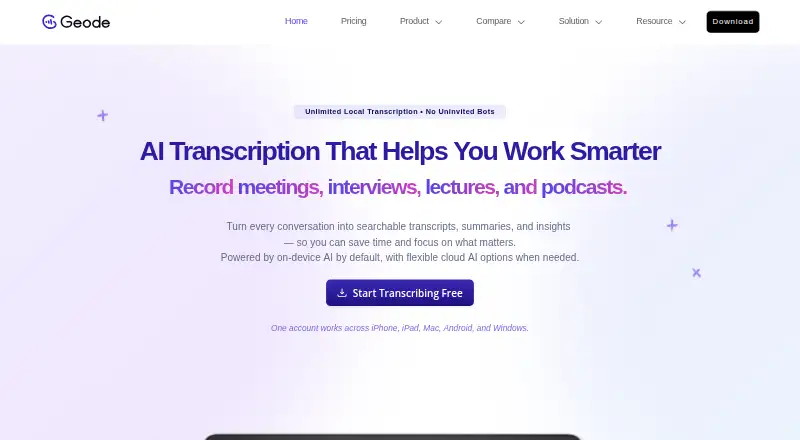
What Geode is
Geode records audio conversations, transcribes and summarizes them, and translates between languages, with on-device processing by default. Recording, transcription, and translation can work offline; Mac can also create on-device summaries offline. Transcription supports 90+ languages, alongside live translation. On Mac and Windows, the desktop app adds speaker separation, transcript review and editing, and higher-accuracy transcription. Geode can import audio and video files such as MP3, WAV, M4A, AAC, MP4, and MOV, up to three hours per file. It can be used with Zoom, Google Meet, Microsoft Teams, Webex, Slack, and Discord without meeting bots or direct integrations. One account works across iPhone, iPad, Mac, Android, and Windows, and recordings can move from mobile to desktop over local Wi-Fi. The free plan includes five hours of local transcription per month and, on Mac, ten local summaries per month. Pro costs $4.17 a year, billed annually at $49.99, or $8.99 /mo; a seven-day trial is available. Geode is the flagship product of Singapore-based OmniIntelliLink Pte. Ltd.
Who it suits
Geode suits professionals handling sensitive conversations, as well as consultants, researchers, journalists, interviewers, and language learners. It may also fit people who need offline transcription or translation across mobile and desktop devices.
What it does well
- On-device processing is the default.
- Recording, transcription, and translation can work offline.
- Transcription supports 90+ languages.
- One account works across mobile and desktop.
- Imports audio and video files up to three hours.
What to know first
- Free local transcription is limited to five hours monthly.
- Free Mac summaries are limited to ten monthly.
- OpenClaw workflow support is not yet available on Windows.
- Cloud transcription and summaries are optional, not default.
Limits
The free plan allows five hours of local transcription per month and 10 local summaries per month on Mac. Pro+ includes five hours of cloud transcription and 30 cloud summaries per month.
Plans
| Plan | Billed and limits | Price |
|---|---|---|
| Free | 5 hours local transcription/month · 10 local summaries/month on Mac · 90+ languages and live translation · Markdown editing | Free |
| Pro+ | Everything in Pro · 5 hours cloud transcription/month · 30 cloud summaries/month | $11.99 a month |
| Pro | billed annually at $49.99; or $8.99 /mo · Unlimited local transcription · Unlimited local summaries on Mac · One paid account across devices | $49.99 a year |
| Lifetime | Unlimited local transcription forever · Unlimited local summaries for Mac forever · One account across devices | $69.99, paid once |
As geodeclarity.com lists them, read 8 Oct 2026. The maker's own page has the final word.
Getting started
- Visit geodeclarity.com.
- Choose the free plan or a paid plan; a seven-day trial is available.
- Install Geode on Android, iOS, macOS, or Windows.
- Record a conversation or import an audio or video file.
- Use local Wi-Fi to send mobile recordings to desktop if needed.
Geode is a recording and language tool for people who need searchable notes from conversations without relying on cloud processing. It is especially suited to professionals, researchers, journalists, interviewers, and language learners who work across phones and computers. Its local-first, offline-capable workflow is the draw; limited free usage and basic sharing make it less compelling for heavier collaborative work.
Overview
Geode records audio and can transcribe, summarize, and translate conversations. Recording, on-device transcription, and translation can work offline; Mac users can also create on-device summaries without a connection. Recordings, transcripts, and summaries remain on-device by default, with cloud processing optional. That makes Geode a strong fit for sensitive conversations, though users who need cloud processing will have to accept Pro+ quotas.
It works alongside Zoom, Google Meet, Microsoft Teams, Webex, Slack, and Discord without meeting bots or direct integrations. This avoids putting a bot into a call, but it is not a native meeting-platform integration. Audio and video imports include MP3, WAV, M4A, AAC, MP4, and MOV, with individual files up to three hours. Basic sharing controls may constrain teams with more demanding collaboration needs.
Key features
Transcription, translation, and editing
Transcription supports more than 90 languages, and live translation broadens its usefulness for multilingual conversations. Transcript search helps locate material later. Desktop apps add speaker separation and transcript review and editing, while Mac and Windows offer higher-accuracy transcription. Markdown editing is included on Free, so users can work with transcripts without upgrading solely for that capability.
Cross-device workflow
One account works across iPhone, iPad, Mac, Android, and Windows, and mobile recordings can be sent to desktop over local Wi-Fi. That is useful for people who record on the move and refine transcripts later at a computer. OpenClaw workflow support is available on Mac, but not yet on Windows.
Pricing
Geode has a free plan, a 7-day trial, and paid plans. The Free plan costs nothing and allows five hours of local transcription per month and ten local summaries per month on Mac, alongside 90+ languages, live translation, and Markdown editing. It is a reasonable way to try the local workflow, but the monthly transcription and Mac summary caps limit sustained use.
Pro costs $4.17 a year (billed billed annually at $49.99; or $8.99 /mo). It includes unlimited local transcription, unlimited local summaries on Mac, and one paid account across devices. This is the clearest fit for an individual who wants regular local processing without Free's quotas; it does not include the cloud allowances of Pro+.
Pro+ costs $11.99 a month and includes everything in Pro, plus five hours of cloud transcription per month and 30 cloud summaries per month. The cloud quotas may suit occasional cloud processing, but they are finite. Lifetime costs $69.99, paid once and provides unlimited local transcription forever, unlimited local summaries for Mac forever, and one account across devices. It suits someone who expects long-term local use and prefers a one-time payment, but does not add Pro+'s cloud quotas.
Platforms
Geode is available on Android, iOS, macOS, and Windows. Its desktop apps provide speaker separation, transcript review and editing, and higher-accuracy transcription on Mac and Windows. One account spans mobile and desktop, with local Wi-Fi transfer from mobile to desktop.
Who it's for
Geode is well matched to consultants, researchers, journalists, interviewers, and other professionals handling sensitive conversations, especially when offline recording or local processing matters. Language learners may also value its multilingual transcription and live translation. It is a less natural choice for teams that depend on advanced sharing or direct meeting integrations, or for users who need large amounts of cloud transcription.
Pros and cons
- Local-first and offline-capable: recording, transcription, and translation can work offline, with offline summaries also available on Mac.
- Broad language support: transcription in 90+ languages and live translation suit multilingual work.
- Useful desktop workflow: speaker separation, transcript editing, and mobile-to-desktop transfer support follow-up work across devices.
- Free usage is capped: five monthly hours of local transcription and ten Mac summaries may be restrictive for frequent users.
- Cloud allowances are limited: Pro+ includes five hours of cloud transcription and 30 cloud summaries per month, not unlimited cloud processing.
- Basic sharing: users needing richer collaboration controls may be better served elsewhere.
Alternatives
For a wider comparison, see Meeting Recording Software.
- Bluedot is worth considering for a free plan with five lifetime meetings and apps across browser extension, desktop, and mobile, plus Slack, Notion, and Zapier.
- EchoPilot offers a free allowance of 300 meeting minutes in the first 30 days, then 120 every 30 days, with a 60-minute recording limit; consider it if that meeting-minute structure better fits your use.
- JotMe may suit users who want a free monthly allowance centered on live translation or real-time summaries, with 20 minutes and five AI credits.
- Notta is an alternative for users who want one free seat and 120 transcription minutes per month.
- Grain may fit users seeking bot-recorded meetings, with its free plan including one Notetaker seat and 20 bot-recorded meetings for personal email users.
- OpenWhispr is another free option, with 2,000 words per week of transcription and five hours of meeting recordings per month.
- Read AI offers a free plan with five meetings per month and support for 20+ languages.
- Vylo is another option to compare.
Verdict
Choose Geode if you want a multilingual recorder whose core transcription workflow can stay on-device and work offline across mobile and desktop. Its strongest reason to buy is local processing paired with capable desktop transcript tools; look elsewhere if you need substantial cloud quotas, richer sharing, or direct integrations with meeting platforms.
Verdict
Geode combines offline-capable recording and language tools with desktop transcript editing and cross-device workflows. Its free plan has monthly limits, and its listed Pro pricing includes both an annual billing option and a monthly price.
Questions
Is Geode free?
Yes. The free plan includes five hours of local transcription per month, 10 local summaries per month on Mac, and access to 90+ languages and live translation.
How much does Geode cost?
Pro costs $4.17 a month when billed annually at $49.99, or $8.99 per month. Pro+ is $11.99 a month, and Lifetime is a one-time $69.99 USD payment.
Which devices does Geode support?
Geode supports Android, iOS, macOS, and Windows. One account works across iPhone, iPad, Mac, Android, and Windows.
Can Geode work offline?
Recording, on-device transcription, and translation can work offline. On Mac, on-device summaries can also run offline.
Does Geode connect to meeting platforms?
It can be used with Zoom, Google Meet, Microsoft Teams, Webex, Slack, and Discord, without meeting bots or direct integrations.
Who makes Geode?
Geode is the flagship product of OmniIntelliLink Pte. Ltd., which describes itself as a Singapore-based technology company.
Facts from Geode's own pages
- Cross-device workflow
- One account works across iPhone, iPad, Mac, Android, and Windows, and recordings can be sent from mobile to desktop over local Wi-Fi. · geodeclarity.com, 8 Oct 2026
- Desktop features
- The desktop app offers speaker separation, transcript review and editing, and higher-accuracy transcription on Mac and Windows. · geodeclarity.com, 8 Oct 2026
- Headquarters
- Singapore · geodeclarity.com, 28 Sept 2026
- Imports
- Geode can import audio and video files, including MP3, WAV, M4A, AAC, MP4, and MOV; individual files can be up to 3 hours long. · geodeclarity.com, 8 Oct 2026
- Integrations
- Geode can be used with Zoom, Google Meet, Microsoft Teams, Webex, Slack, and Discord, without meeting bots or direct integrations. · geodeclarity.com, 8 Oct 2026
- Languages
- Geode supports transcription in 90+ languages and live translation. · geodeclarity.com, 8 Oct 2026
- Local and offline use
- Recording, on-device transcription, and translation can work offline; on Mac, on-device summaries can also run offline. · geodeclarity.com, 8 Oct 2026
- Maker
- Geode is the flagship product of OmniIntelliLink Pte. Ltd., which the About page describes as a Singapore-based technology company. · geodeclarity.com, 8 Oct 2026
- OpenClaw
- OpenClaw workflow support is available for Geode on Mac; Windows support is not available yet. · geodeclarity.com, 8 Oct 2026
- Privacy
- Geode says recordings, transcripts, and summaries stay on the device by default; cloud transcription and summaries are optional. · geodeclarity.com, 8 Oct 2026
- Purpose
- Geode records, transcribes, summarizes, and translates conversations, with on-device processing by default. · geodeclarity.com, 8 Oct 2026
- Support
- The FAQ says Discord is the fastest way to get an answer. · geodeclarity.com, 8 Oct 2026
- Who it serves
- Geode describes its users as professionals handling sensitive conversations, consultants, researchers, journalists, interviewers, and language learners. · geodeclarity.com, 8 Oct 2026
Where Geode stands on Freedom251
- Meeting Recording Software#6 of 34