Freedom251 › Meeting Recording Software
EchoPilot
What EchoPilot is
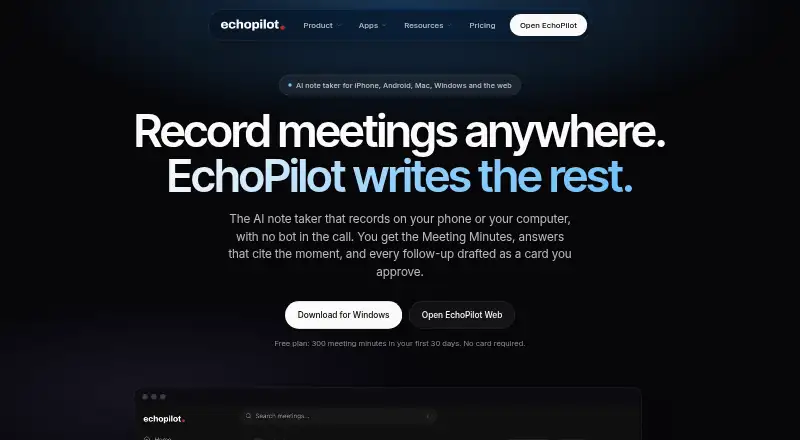
EchoPilot records meetings, lectures, and voice notes on a phone or computer, then organizes each recording into Meeting Minutes, a searchable transcript, answers, and action cards for review. It supports in-person meetings and online calls, and has Android, iOS, macOS, web, and Windows versions. Recordings are made on the user's device; desktop apps can capture the microphone and meeting audio playing on the computer. Meeting Minutes include a summary, timestamped notes, participants, key points, decisions, open questions, risks, action items, highlights, and the complete transcript. Users can search transcripts, play audio from a transcript line, and correct transcript text without changing the original recording. Ask answers questions about a single recording, a recurring series, or all recordings, and identifies the recording and timestamp behind each answer. It is read-only. Listed destinations include Todoist, Google Tasks and Calendar, Notion, Slack, Microsoft To Do, Outlook Calendar and Mail, Apple Reminders and Notes, and WhatsApp. Proposed actions require user approval before they are created or sent; Gmail and Google Chat are not supported destinations. The Free plan costs nothing and has monthly usage and retention limits. Pro costs $11.99 a month, billed monthly, and Company uses custom pricing.
Who it suits
EchoPilot suits students and people handling client meetings, interviews, lectures, in-person meetings, or online calls who want searchable transcripts and organized notes. Its integrations may suit users who want to review proposed follow-up actions before sending or creating them.
What it does well
- Records audio on the user's device without a meeting bot.
- Meeting Minutes combine notes, decisions, risks, actions, and transcript.
- Transcript search can play audio from the selected line.
- Ask answers questions across one recording, a series, or all recordings.
- Proposals require user approval before an action is created or sent.
- Available on Android, iOS, macOS, web, and Windows.
What to know first
- Free plan minutes and recording length are limited.
- Free plan keeps source audio and full transcripts for 90 days.
- Gmail and Google Chat are not supported destinations.
- EchoPilot makes no security certification claims.
Limits
The Free plan includes 300 meeting minutes in the first 30 days, then 120 every 30 days, with a 60-minute maximum per recording. It allows 20 Ask questions and 15 voice captures each month, and keeps source audio and full transcripts for 90 days.
Plans
| Plan | Billed and limits | Price |
|---|---|---|
| Free | 300 meeting minutes in first 30 days, then 120 every 30 days · 60 minutes per recording · 20 Ask questions and 15 voice captures a month · audio and full transcript kept for 90 days | Free |
| Pro | Billed monthly. Cancel anytime. · 1,800 meeting minutes every 30 days · 4 hours per meeting · unlimited Ask questions and voice captures, subject to fair use · audio and transcript kept while meeting is kept | $11.99 a month |
| Pro | $7.42 a month, billed yearly. Cancel anytime. · 1,800 meeting minutes every 30 days · 4 hours per meeting · unlimited Ask questions and voice captures, subject to fair use · audio and transcript kept while meeting is kept | $89 a year |
| Company | Custom pricing, sized to your team. · Everything in Pro for every member · shared workspace · access roles · invitations and member management · audit log | On request |
As echopilotapp.com lists them, read 7 Oct 2026. The maker's own page has the final word.
Getting started
- Visit the EchoPilot website.
- Choose the Free plan or review Pro at $11.99 a month.
- Use EchoPilot on Android, iOS, macOS, web, or Windows.
- Record a meeting, lecture, or voice note on a phone or computer.
- Review Meeting Minutes and search or play the transcript.
- Connect a listed destination and approve any proposed action before it is created or sent.
EchoPilot is a phone and computer recorder for meetings, lectures and voice notes. It is best for people who want to revisit conversations through searchable transcripts, structured minutes and timestamp-linked answers without adding a meeting bot. Its breadth is useful, but Free has tight usage caps and follow-up destinations omit Gmail and Google Chat.
Overview
EchoPilot records audio on the user’s device; its desktop apps capture both the microphone and meeting audio playing on the computer. That makes it suitable for in-person conversations as well as online calls, without a bot joining the meeting. Meeting Minutes gather a summary, timestamped notes, participants, key points, decisions, open questions, risks, action items, highlights and the full transcript. The result is more useful for reviewing decisions and follow-ups than a transcript alone.
Users can search transcripts, play audio from a transcript line and correct text while preserving the original recording and transcript. Ask answers questions about a single recording, a recurring series or all recordings, and links each answer to its recording and timestamp. It is read-only, so it helps retrieve context rather than edit records or complete tasks.
Key features
Capture and review
Recording without a meeting bot is a clear advantage for people who prefer device-based capture. Search, linked playback and preserved originals make transcript review more accountable: users can check a passage against its audio instead of treating corrected text as the only record. The 240-minute recording limit allows longer sessions than the Free plan’s 60-minute cap, but Pro’s four-hour per-meeting allowance is the practical ceiling for a single recording.
Questions and follow-up
Ask’s scope across one meeting, a series or the full recording collection makes it useful for finding information that is difficult to locate by title or date. Showing the timestamp behind an answer gives readers a way to verify it. Integrations include Todoist, Google Tasks and Calendar, Notion, Slack, Microsoft To Do, Outlook Calendar and Mail, Apple Reminders and Notes, WhatsApp and others. Actions require approval before they are created or sent, which keeps a person in control. Gmail and Google Chat are not supported destinations, a meaningful gap for workflows centered on either service.
Privacy and security
EchoPilot says traffic uses HTTPS, integration credentials are encrypted at rest, and production access follows least-privilege controls. It also says it does not sell user data, use content for advertising or train generalized machine-learning models on user content. The company makes no security certification claims, so organizations that require a particular certification should look elsewhere.
Pricing
The Free plan costs nothing. It includes 300 meeting minutes in the first 30 days, then 120 every 30 days; recordings can be up to 60 minutes. Users get 20 Ask questions and 15 voice captures a month, while source audio and full transcripts are kept for 90 days. This is a useful way to try the workflow or cover occasional short recordings, but the recurring minutes and question allowance will constrain regular use.
Pro costs $11.99 a month, billed monthly, and can be cancelled anytime. It raises the allowance to 1,800 meeting minutes every 30 days and four hours per meeting, with unlimited Ask questions and voice captures subject to fair use. Audio and transcripts remain while the meeting is kept. Pro suits people who record regularly or need longer sessions and durable records; it does not remove the monthly recording-minute quota.
Company has custom pricing sized to the team. It includes everything in Pro for every member, plus a shared workspace, access roles, invitations and member management, and an audit log. Those controls make it the relevant tier for teams that need shared access and governance; solo users do not get those features as a reason to pay for a team plan. There is no free trial.
Platforms
EchoPilot is available on Android, iOS, macOS, web and Windows. This range supports people moving between phones and computers, with desktop capture specifically covering microphone input and computer audio.
Who it's for
Students reviewing lectures, people handling client meetings or interviews, and anyone recording in-person meetings or online calls can use EchoPilot to turn audio into searchable reference material. It is a stronger fit for people who need to find decisions, risks and actions later than for those who only want a basic recording. Teams needing shared workspaces and access roles should consider Company; users dependent on Gmail or Google Chat actions, or organizations requiring a stated security certification, should consider another product.
Pros and cons
- Pros: Bot-free device recording covers online calls and in-person conversations, without a meeting participant joining the call.
- Pros: Search, transcript-line playback and timestamp-backed answers help users verify and recover specific context.
- Pros: Minutes combine decisions, risks and action items with the full transcript, giving follow-up more structure than a transcript alone.
- Pros: Pro retains audio and transcripts while meetings are kept, unlike Free’s 90-day retention.
- Cons: Free drops to 120 minutes every 30 days after its initial 300-minute period and caps recordings at 60 minutes.
- Cons: Pro still has a 1,800-minute monthly quota, and its unlimited questions and voice captures are subject to fair use.
- Cons: Gmail and Google Chat are not integration destinations, limiting automated follow-up for users centered on those services.
- Cons: The company makes no security certification claims, which may rule it out for organizations with certification requirements.
Alternatives
Bluedot is another freemium option with a free plan and free trial; its free plan includes five lifetime meetings, so it may suit someone who wants to try a small number of recordings across its browser extension and desktop and mobile apps.
JotMe has a free plan and trial, with its free allowance focused on 20 monthly live-translation or real-time-summary minutes and five AI credits. Choose it instead if those specific live features are the priority.
Notta offers a free plan with one seat and 120 transcription minutes per month. It is worth considering for a solo user whose needs fit that monthly transcription allowance.
Geode is another freemium option with a free plan and free trial.
Grain offers a free plan with one notetaker seat, 45-minute meetings and 20 bot-recorded meetings for personal email users. It may suit someone whose requirements fit that bot-recorded meeting allowance.
OpenWhispr has an always-free plan with 2,000 words a week of transcription and five hours of meeting recordings a month. It is a possible fit for users prioritizing those free transcription and recording allowances.
Read AI has a free plan allowing five meetings per month and supporting more than 20 languages. Its free tier may suit someone whose meeting volume and language needs fit those limits.
Vylo offers a free plan priced at ₹0, with unlimited meeting recording, AI summaries and action items, searchable transcripts, and full transcript and summary retention for 30 days. Consider it if those free-plan features and INR pricing are a better fit.
For a broader comparison, see Meeting Recording Software.
Verdict
EchoPilot is a strong choice for students and professionals who want bot-free recording plus minutes, searchable transcripts and answers they can trace back to a moment in the audio. Pro’s larger quota and retention suit regular use, while Free is better for occasional, shorter sessions. Look elsewhere if Gmail or Google Chat follow-up is essential, or if your organization requires a stated security certification.
Verdict
Choose EchoPilot if you want recordings turned into searchable transcripts, structured minutes, and reviewable answers across phone and computer platforms. The Free plan has limited minutes, recording length, questions, and retention; Pro costs $11.99 a month, and team features use custom pricing.
Questions
Is EchoPilot free?
Yes. The Free plan costs nothing. Pro costs $11.99 a month, billed monthly, and Company pricing is custom.
How much recording time does the Free plan include?
It includes 300 meeting minutes in the first 30 days, then 120 every 30 days. Each recording can be up to 60 minutes.
Which devices and platforms can I use?
EchoPilot lists Android, iOS, macOS, web, and Windows.
Does EchoPilot require a meeting bot?
No. It records on the user's phone or computer; desktop apps capture the microphone and meeting audio playing on the computer.
Which apps can EchoPilot send actions to?
Listed destinations include Todoist, Google Tasks and Calendar, Notion, Slack, Microsoft To Do, Outlook Calendar and Mail, Apple Reminders and Notes, and WhatsApp. Gmail and Google Chat are not supported destinations.
How long does EchoPilot keep recordings and transcripts?
The Free plan keeps source audio and full transcripts for 90 days. Pro keeps them for as long as the meeting is retained.
Facts from EchoPilot's own pages
- Ask
- Ask answers questions about one recording, a recurring series or all recordings, and shows the recording and timestamp behind each answer; it is read-only. · echopilotapp.com, 7 Oct 2026
- Compliance
- EchoPilot states that it makes no security certification claims. · echopilotapp.com, 7 Oct 2026
- Data use
- EchoPilot says it does not sell user data, does not use content for advertising, and does not use user content to train generalized machine-learning models. · echopilotapp.com, 7 Oct 2026
- Integration limit
- Gmail and Google Chat are not supported destinations. · echopilotapp.com, 7 Oct 2026
- Integrations
- The listed destinations include Todoist, Google Tasks and Calendar, Notion, Slack, Microsoft To Do, Outlook Calendar and Mail, Apple Reminders and Notes, WhatsApp, and others; actions require user approval before creation or sending. · echopilotapp.com, 7 Oct 2026
- Minutes
- Meeting Minutes include a summary, timestamped notes, participants, key points, decisions, open questions and risks, action items, highlights and the full transcript. · echopilotapp.com, 7 Oct 2026
- Product
- EchoPilot records meetings, lectures and voice notes on a phone or computer without a meeting bot, then creates Meeting Minutes, a searchable transcript, answers and reviewable action cards. · echopilotapp.com, 7 Oct 2026
- Recording
- Recordings are made on the user's device, and the desktop apps capture the microphone and meeting audio playing on the computer. · echopilotapp.com, 7 Oct 2026
- Retention
- The Free plan keeps source audio and full transcripts for 90 days, while Pro keeps them for as long as the meeting is retained. · echopilotapp.com, 7 Oct 2026
- Security
- EchoPilot says app traffic uses HTTPS, integration credentials are encrypted at rest, and production access follows least-privilege controls. · echopilotapp.com, 7 Oct 2026
- Support
- The About page lists [email protected] and says the team responds within five business days. · echopilotapp.com, 7 Oct 2026
- Transcript
- Users can search the transcript and play the audio from a transcript line, while transcript corrections preserve the original recording and text. · echopilotapp.com, 7 Oct 2026
- Users
- The maker describes the product for students, client meetings, interviews, lectures, in-person meetings and online calls. · echopilotapp.com, 7 Oct 2026
Where EchoPilot stands on Freedom251
- Meeting Recording Software#2 of 34