Freedom251 › Real-Time Translation Software
JotMe
What JotMe is
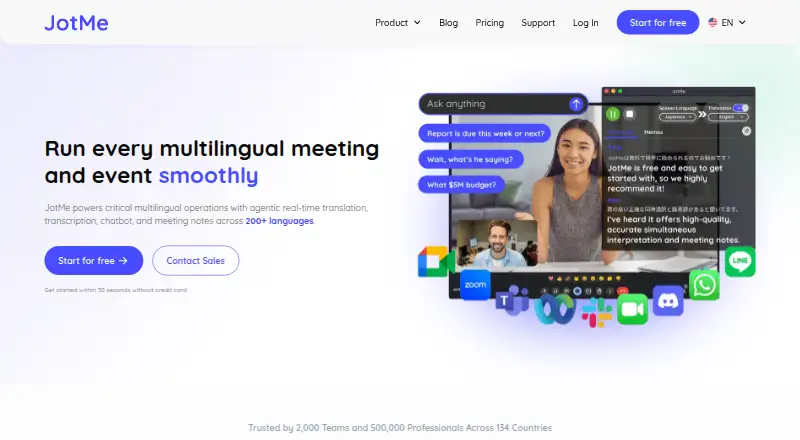
JotMe brings real-time translation, transcription, chatbot features, and meeting notes to multilingual meetings and events across 200+ languages. It describes use with Zoom, Google Meet, Microsoft Teams, Webex, and in-person meetings, and says no bot joins the call. For Zoom, it captures audio on the user’s computer without adding a bot or requiring other participants to install anything. Its live translation uses AI agents to interpret speech intent and meaning as conversations develop. JotMe creates speaker-labeled transcripts live or from uploaded audio and video, then generates notes and summaries in participants’ languages. Memos let users add context. Live captions and voice translation can be shared by link, QR code, or on-camera subtitles without recipients installing an app. Apps are available for Mac, Windows, iPhone, and Android, plus a Chrome extension for Google Meet. The free plan includes monthly usage allowances; Pro starts at $10/user/mo (annual). JotMe says data is encrypted in transit and at rest, and recordings and transcripts are not used to train its AI models or sold to third parties.
Who it suits
JotMe suits people who need translation, transcripts, or notes for multilingual meetings and events. It also fits teams that want shared captions without asking recipients to install an app.
What it does well
- Supports meetings in 200+ languages
- Creates speaker-labeled transcripts live or from uploads
- Shares captions by link or QR code
- Offers desktop, mobile, and Chrome extension apps
What to know first
- Free plan allows 20 monthly live-translation or summary minutes
- Free plan allows 50 monthly transcription minutes
- SOC 2 Type II audit is in progress
Limits
The free plan includes 20 monthly live-translation or real-time-summary minutes, 5 AI credits, 50 monthly transcription minutes, access to the last 5 recordings, and 5 custom terms. Pro starts at $10 per user/month with annual billing and includes 200 monthly live-translation or summary minutes, 20 AI credits, and 500 desktop/file transcription minutes.
Plans
| Plan | Billed and limits | Price |
|---|---|---|
| Free | Per user/month, billed annually · 20 monthly live-translation or real-time-summary minutes · 5 AI credits · 50 monthly transcription minutes · last 5 recordings · 5 custom terms | Free |
| Pro | Per user/month (save 50%), $120 billed annually · 200 monthly live-translation or summary minutes · 20 AI credits · unlimited Google Meet Chrome-extension transcription · 500 desktop/file transcription minutes · 300k AI text-translation tokens · last 20 recordings | $120 a year |
| Premium | Per user/month (save 50%), $180 billed annually · 500 monthly live-translation or summary minutes · 50 AI credits · 2,000 desktop/file transcription minutes · 700k AI text-translation tokens · 50 custom vocabulary · unlimited recordings · priority support | $180 a year |
| Pro | Per user/month, billed monthly · 200 monthly live-translation or summary minutes · 20 AI credits · unlimited Google Meet Chrome-extension transcription · 500 desktop/file transcription minutes · 300k AI text-translation tokens · last 20 recordings | $20 a month |
| Teams | Starting price · Flexible scaling · centralized billing · admin dashboard | $30 a year |
| Premium | Per user/month, billed monthly · 500 monthly live-translation or summary minutes · 50 AI credits · 2,000 desktop/file transcription minutes · 700k AI text-translation tokens · 50 custom vocabulary · unlimited recordings · priority support | $30 a month |
| Teams | Starting price · Flexible scaling · centralized billing · admin dashboard | $60 a month |
| Enterprise | Custom · For fast-growing global businesses and large enterprises | On request |
As jotme.io lists them, read 7 Oct 2026. The maker's own page has the final word.
Getting started
- Visit jotme.io.
- Choose the platform you want: web, Mac, Windows, iPhone, Android, or the Chrome extension for Google Meet.
- Start with the free plan or choose a paid plan.
- For Zoom, JotMe says it captures audio on your computer without adding a bot to the call.
JotMe is a multilingual meeting and event tool built around live translation, transcripts, and meeting notes. It is best suited to groups that need to include participants who speak different languages, especially when guests should not need to install an app. Its breadth of language support and caption-sharing options stands out, but frequent users will likely need a paid plan.
Overview
JotMe brings together real-time translation, transcription, notes, and chatbot features for multilingual conversations. Its live translation is designed to interpret speech intent and meaning as a discussion evolves, rather than treating each spoken phrase in isolation. That makes it a stronger fit for following a live exchange than for users who only need a record of what was said.
Key features
Translation, transcripts, and notes
The service supports more than 200 languages. It can create speaker-labeled transcripts live or from uploaded audio and video, and users can search transcripts later. Meeting notes and summaries can be generated in participants’ languages, with memos available to add context. These features make JotMe useful both during a multilingual meeting and when participants need a written record afterward.
Live captions and voice translation can be shared by link, QR code, or subtitles on camera without requiring recipients to install an app. That is a practical advantage for events and meetings with guests who may not want to download another tool. JotMe describes use with Zoom, Google Meet, Microsoft Teams, Webex, and in-person meetings. Its homepage says no bot joins calls; for Zoom, it says audio is captured on the user’s computer.
Security and data
JotMe says it is GDPR compliant, encrypts data in transit and at rest, and does not use recordings or transcripts to train its AI models or sell them to third parties. It says customers retain ownership of their data. Its SOC 2 Type II audit is in progress, so teams that require a completed audit may prefer to wait.
Pricing
JotMe has a free plan and paid plans starting at $10/user/mo with annual billing. A free trial is available. The free tier is suitable for occasional use, but its monthly translation and transcription allowances are limited.
- Free: free, billed per user/month annually. Includes 20 monthly live-translation or real-time-summary minutes, 5 AI credits, 50 monthly transcription minutes, the last 5 recordings, and 5 custom terms. This is a way to try the core workflow, but the minute limits are likely to constrain recurring meetings.
- Pro: $10 a year per user/month, billed at $120 annually and marked as saving 50%. Includes 200 monthly live-translation or summary minutes, 20 AI credits, unlimited Google Meet Chrome-extension transcription, 500 desktop/file transcription minutes, 300k AI text-translation tokens, and the last 20 recordings. It suits individual users who need a meaningful increase over Free, though the monthly live-translation allowance still has a ceiling.
- Premium: $15 a year per user/month, billed at $180 annually and marked as saving 50%. Includes 500 monthly live-translation or summary minutes, 50 AI credits, 2,000 desktop/file transcription minutes, 700k AI text-translation tokens, 50 custom vocabulary terms, unlimited recordings, and priority support. This is the better fit for heavier individual use, with more generous minutes and no recording-count cap.
- Teams: Starting at $30 monthly with annual billing, or $60 monthly. It includes flexible scaling, centralized billing, and an admin dashboard, making it the option for organizations that need shared administration rather than individual subscriptions.
- Enterprise: Custom pricing for fast-growing global businesses and large enterprises.
Plan allowances differ substantially: Free keeps only five recordings and offers 20 monthly live-translation or summary minutes, while Pro raises those limits but retains a 20-recording cap. Premium removes the recording cap and increases the monthly allowance. Users choosing a paid tier should weigh those caps against how often they need live translation and how much audio or file transcription they process.
Platforms
JotMe offers Android and iPhone apps, Mac and Windows desktop apps, a web version, and a Chrome extension for Google Meet. Its stated meeting coverage across Zoom, Google Meet, Microsoft Teams, Webex, and in-person use gives it several ways to fit different meeting settings.
Who it's for
JotMe is a good choice for multilingual teams, event organizers, and individuals who want participants to follow captions without installing software. It also suits users who need translated notes alongside searchable, speaker-labeled transcripts. It is less compelling for people whose main requirement is high-volume transcription at no cost, since the free plan allows 50 transcription minutes monthly.
Pros and cons
- Pros: Support for more than 200 languages and translation that aims to account for conversational intent make it suited to cross-language discussions.
- Pros: Link, QR code, and on-camera subtitle sharing let guests follow along without installing an app.
- Pros: Live or uploaded-file transcription, searchable transcripts, and multilingual notes cover both the meeting and its follow-up.
- Cons: Free users get only 20 monthly live-translation or summary minutes and 50 transcription minutes, limiting sustained use.
- Cons: Pro still caps retained recordings at 20; unlimited recordings require Premium.
- Cons: The SOC 2 Type II audit is in progress, which may not meet organizations that require a completed audit.
Alternatives
For a broader set of meeting-recording options, browse Meeting Recording Software.
- Bluedot is worth considering if a free meeting-recording option with a Chrome extension and desktop and mobile apps is the priority; its free plan allows 5 meetings for a lifetime.
- Notta may suit users who want a free plan with 120 transcription minutes per month and one seat.
- Grain is an alternative for those who want a free notetaker seat with 45-minute meetings and 20 bot-recorded meetings for personal email users.
- OpenWhispr may fit users who want an always-free option with 2,000 words per week of transcription and five hours of meeting recordings per month.
- Read AI is an alternative with a free plan capped at five meetings per month and support for more than 20 languages.
- Avoma is another option for teams comparing meeting software.
- Fathom may suit users who prioritize unlimited recordings and transcriptions on a free plan, with bot or bot-free capture.
- MeetGeek is another option for people comparing meeting transcription software.
Verdict
Choose JotMe if multilingual meetings are central to your work and you want translation, transcripts, translated notes, and guest-friendly caption sharing in one service. Its main advantage is that participants can follow along without installing an app; its main drawback is that the free allowances are narrow and heavier use requires a paid tier. Look elsewhere if your priority is generous free transcription rather than live multilingual support.
Verdict
JotMe combines translation, transcription, and meeting notes with several ways to share live captions. Review the free plan’s monthly allowances and recording limits before choosing a plan.
Questions
Is JotMe free?
Yes. Its Free plan costs nothing/month when billed annually.
How much does Pro cost?
Pro is listed at $10 per user/month with annual billing, or $120 billed annually.
Which platforms does JotMe support?
Its listed platforms are Android, iOS, macOS, Windows, web, and extension. The maker offers a Chrome extension for Google Meet.
Which meeting platforms can I use it with?
JotMe describes use with Zoom, Google Meet, Microsoft Teams, Webex, and in-person meetings.
Does JotMe add a bot to meetings?
JotMe says no bot joins the call. For Zoom, it captures audio on the user’s computer.
What does JotMe say about customer data?
JotMe says data is encrypted in transit and at rest, recordings and transcripts are not used to train its AI models or sold to third parties, and customers retain ownership.
Facts from JotMe's own pages
- Contextual translation
- Its live-translation feature uses AI agents to interpret speech intent and meaning as conversations evolve. · jotme.io, 7 Oct 2026
- Data use
- JotMe says recordings and transcripts are not used to train its AI models or sold to third parties, and customers retain ownership of their data. · jotme.io, 7 Oct 2026
- Downloads
- The maker offers desktop apps for Mac and Windows, mobile apps for iPhone and Android, and a Chrome extension for Google Meet. · jotme.io, 7 Oct 2026
- Meeting notes
- It generates meeting notes and summaries in participants’ languages and supports memos for added context. · jotme.io, 7 Oct 2026
- Meeting platforms
- JotMe describes use with Zoom, Google Meet, Microsoft Teams, Webex, and in-person meetings; its homepage says no bot joins the call. · jotme.io, 7 Oct 2026
- No-bot operation
- For Zoom meetings, JotMe says it captures audio on the user's computer and does not add a bot or require participants to install anything. · jotme.io, 7 Oct 2026
- Purpose
- JotMe provides real-time translation, transcription, chatbot features, and meeting notes for multilingual meetings and events across 200+ languages. · jotme.io, 7 Oct 2026
- Security
- JotMe says it is GDPR compliant, its SOC 2 Type II audit is in progress, and data is encrypted in transit and at rest. · jotme.io, 7 Oct 2026
- Sharing
- Users can share live captions and voice translation by link, QR code, or on-camera subtitles without requiring recipients to install an app. · jotme.io, 7 Oct 2026
- Support
- Premium includes priority customer support. · jotme.io, 7 Oct 2026
- Teams plan
- The Teams plan includes centralized billing and an admin dashboard and is listed with a starting price of $60 monthly or $30 with annual billing. · jotme.io, 7 Oct 2026
- Transcription
- JotMe creates speaker-labeled transcripts live or from uploaded audio and video files. · jotme.io, 7 Oct 2026
Where JotMe stands on Freedom251
- Real-Time Translation Software#1 of 13
- Meeting Recording Software#9 of 34