Freedom251 › File Viewer Software

Geeqie
What Geeqie is
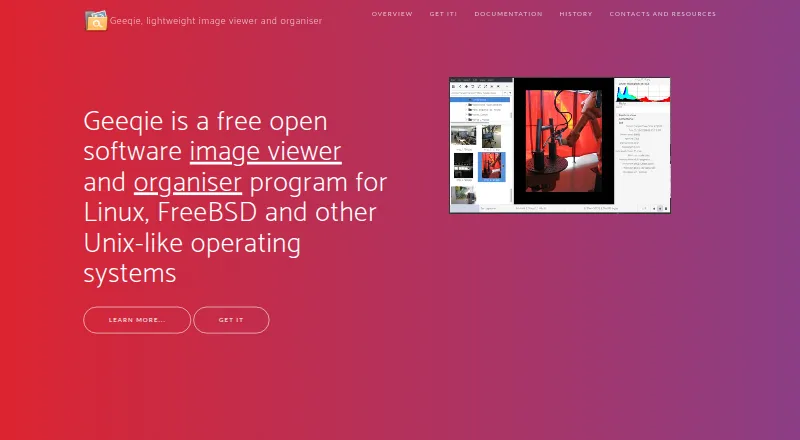
Geeqie is a free image viewer and organiser for Linux, FreeBSD and other Unix-like systems, with supported platforms also listed as macOS and Windows. It can show images as thumbnails, in separate windows or full screen; users can point it to a folder rather than importing an image library. File tools cover copying, moving, renaming and deleting. Search can use date, size or image similarity, while the duplicate finder compares criteria such as dimensions or checksums. Geeqie can browse and edit Exif, IPTC and XMP metadata, and add XMP keywords for searching. Documented formats include JPEG, PNG, GIF, TIFF, RAW variants and SVG, as well as images inside ZIP and TAR archives. It can show video thumbnails and previews, with playback delegated to a defined external program. The app includes slideshows, remote controls through command-line scripts or an infrared device, and configurable plugins for external programs such as Gimp. The project directs users to a mailing list and GitHub for bug reporting.
Who it suits
Geeqie suits people who want a folder-based image viewer and organiser with metadata editing, duplicate finding and broad documented format support. It is also suited to workflows that use external editors or programs.
What it does well
- No image import is required
- Search includes image similarity
- Supports Exif, IPTC and XMP metadata
- Displays images in ZIP and TAR archives
What to know first
- Video playback uses a defined external program
- Support is directed to a mailing list and GitHub bug reporting
Plans
| Plan | Billed and limits | Price |
|---|---|---|
| Geeqie | Free open software · GPLv2 | Free |
As geeqie.org lists them, read 29 Sept 2026. The maker's own page has the final word.
Getting started
- Visit the Geeqie website.
- Use a supported platform: Linux, macOS, or Windows.
- Point Geeqie at a folder to display its contents.
Overview
Geeqie is a folder-first image viewer and organizer for people who want to work directly with image files rather than import them into a separate library. It is strongest for users who need viewing, file cleanup, metadata handling, and duplicate checks in one free tool. Its main trade-off is that video playback is handed to an external program.
Images can be browsed as thumbnails, in multiple windows, or full screen, with a slideshow for presenting them. Geeqie follows the history of GqView, which began in 1998 before taking the Geeqie name in 2007. Readers comparing browsing tools can also see our Photo Viewer Software and File Viewer Software lists.
Key features
Browse and organize files
Geeqie opens a folder without requiring an import step, a practical fit for people who already keep images in their own directory structure. Copy, move, rename, and delete functions make basic cleanup part of the same workflow. The documented formats include JPEG, PNG, GIF, TIFF, RAW variants, and SVG; Geeqie can also display images stored in ZIP and TAR archives.
The slideshow can be controlled remotely through command-line scripts or an infrared device. Video clips can be previewed and shown as thumbnails, but playback requires a defined external program. That makes Geeqie less suitable for anyone expecting a self-contained video viewer.
Find, compare, and inspect
Search by file date, file size, or image similarity gives users several ways to narrow a large folder. The duplicate finder can compare images by dimensions or checksum, helping identify repeated files without relying on visual inspection alone. Side-by-side comparison and contact sheets add useful ways to review groups of images.
Geeqie supports browsing and editing Exif, IPTC, and XMP metadata, and XMP keywords can be added for later searches. Color management and RAW support broaden its usefulness for image collections that include camera files. Configurable plugins can call external programs such as Gimp, and images can be opened in an external editor; this flexibility is useful, though it depends on configuring and using other software.
Pricing
Geeqie is free open software under GPLv2, with a listed price of $0. There is no free trial because the software is already free. Its free plan is the product, rather than a limited tier: the published plan does not impose a user cap or paid upgrade requirement.
Platforms
Geeqie is listed for Linux, macOS, and Windows. Its stated purpose is image viewing and organization on Linux, FreeBSD, and other Unix-like systems, so readers on macOS or Windows should weigh the listed support against that Unix-oriented focus. The project directs users to a mailing list and GitHub for bug reporting.
Who it's for
Geeqie is a good fit for people who manage images as files and folders, especially those who want metadata tools, duplicate finding, and configurable external-editor workflows without paying for the application. It is a less natural choice for users who want playback built into their image viewer or prefer an imported, catalog-based workflow.
Pros and cons
- Pros: Opens folders without importing images, preserving a direct file-based workflow.
- Pros: Combines file operations, metadata editing, similarity search, and duplicate checks, reducing the need to switch tools for routine collection cleanup.
- Pros: Supports RAW variants, archive-contained images, side-by-side comparison, contact sheets, and color management.
- Cons: Video playback is delegated to an external program, so it is not an all-in-one image and video viewer.
- Cons: Plugins and external editors provide flexibility but require separate programs and configuration.
- Cons: Its stated Unix-like focus may make it a less obvious fit for users seeking a viewer designed primarily around macOS or Windows.
Alternatives
ImageGlass is another free-plan option with a trial and support for Linux, macOS, and Windows; its Classic plan is free under GPLv3. Choose it if that alternative better suits your platform and licensing needs.
XnConvert offers a free plan for private, educational, and nonprofit use, and a company license for 100 or more licenses at 6.50 EUR. It is worth considering if those use terms or its company licensing model fit better.
nomacs is free for private and commercial use under GNU GPL v3 and supports Linux, macOS, and Windows. It may suit readers looking for a cross-platform free alternative with explicit commercial-use terms.
Pineapple Pictures is a freemium image viewer with a free MIT-licensed plan; a paid itch.io purchase offers experimental additional image-format support. Consider it if that format-support option is more relevant to your needs.
ApolloOne is a macOS-only freemium option. Its free version is indefinite, with a purchase reminder after 14 days; the 1-Year Standard Subscription costs $14.99 a year. It is a more focused alternative for Mac users willing to consider a subscription.
FastStone Image Viewer is a Windows-only freemium alternative, with free personal and educational use and a commercial lifetime license at $34.95 a month. Choose it if Windows-only support and its stated licensing options suit your use.
GNOME Remote Desktop is a free Linux and self-hosted tool with RDP and VNC backends; not all operating modes work with both backends.
Gwenview is a free image viewer for Linux.
Verdict
Choose Geeqie if you want a free, folder-based viewer that also handles file organization, metadata, searching, and duplicate checks. Look elsewhere if built-in video playback or a catalog-centered workflow is essential to how you manage images.
Verdict
Geeqie offers folder-based viewing and file organization alongside metadata, search and duplicate tools. Its use of external programs for video playback may matter to users who want that function built in.
Questions
How much does Geeqie cost?
The Geeqie plan is listed as free under GPLv2. The pricing model is free.
Is there a free trial?
No. Geeqie is listed with no free trial.
Which platforms are supported?
Supported platforms are Linux, macOS, and Windows. Its stated purpose also describes Linux, FreeBSD, and other Unix-like systems.
Is Geeqie open source?
Yes. The plan is described as free open software under GPLv2.
Can it view RAW images and metadata?
RAW image support and a metadata viewer are listed. Geeqie supports browsing and editing Exif, IPTC, and XMP metadata.
Facts from Geeqie's own pages
- Duplicates
- The duplicate finder can compare image files using parameters such as image dimensions or checksum. · geeqie.org, 29 Sept 2026
- External tools
- Geeqie can call external programs such as Gimp through configurable plugins and can open images with an external editor. · geeqie.org, 29 Sept 2026
- File management
- Geeqie provides copy, move, rename, and delete functions for images. · geeqie.org, 29 Sept 2026
- Formats
- The documented formats include JPEG, PNG, GIF, TIFF, RAW variants, and SVG; images in ZIP and TAR archives can also be displayed. · geeqie.org, 29 Sept 2026
- Founded
- 2007 · geeqie.org, 23 Sept 2026
- History
- Geeqie is the successor to GqView, which was first released in 1998; GqView was renamed Geeqie in 2007. · geeqie.org, 29 Sept 2026
- Importing
- Geeqie does not require importing images; users can point it at a folder to display its contents. · geeqie.org, 29 Sept 2026
- Metadata and tagging
- Geeqie supports browsing and editing Exif, IPTC, and XMP metadata, and adding XMP keywords for search. · geeqie.org, 29 Sept 2026
- Platforms
- The site lists GNU/Linux, FreeBSD, NetBSD, OpenBSD, and macOS availability, and says Geeqie can be run on Windows 11. · geeqie.org, 29 Sept 2026
- Presentations
- Geeqie includes a slideshow and can be remotely controlled through command line scripts or an infrared device. · geeqie.org, 29 Sept 2026
- Purpose
- Geeqie is an image viewer and organiser for Linux, FreeBSD, and other Unix-like operating systems. · geeqie.org, 29 Sept 2026
- Search
- Search methods include file date, file size, and image similarity. · geeqie.org, 29 Sept 2026
- Support
- The project site directs users to a mailing list and GitHub bug reporting. · geeqie.org, 29 Sept 2026
- Video previews
- Geeqie can display previews and thumbnails of video clips, which can be run with a defined external program. · geeqie.org, 29 Sept 2026
- Viewing
- Images can be viewed as thumbnails, in multiple windows, or full screen. · geeqie.org, 29 Sept 2026
Where Geeqie stands on Freedom251
- File Viewer Software#2 of 31
- Photo Viewer Software#3 of 34