Freedom251 › Game Playtime Trackers
Game Time Manager
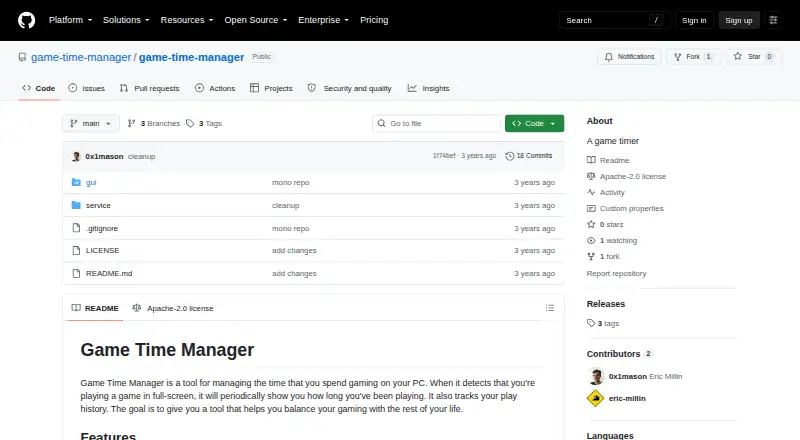
What Game Time Manager is
Game Time Manager is a free Windows app that tracks PC gaming time, with the stated aim of helping users balance gaming with the rest of life. When it detects a full-screen game, it periodically shows an overlay indicating how long the session has lasted. By default, the overlay appears for 10 seconds every 10 minutes. The app also records play history, including what was played and when. Users can configure the overlay and change settings in config.toml without restarting. The maker describes the app as compatible with most PC games. Once installed, it runs in the background and starts when the user logs in. Installation involves downloading a release, unzipping it and running install.ps1 with PowerShell. The repository is published under the Apache License 2.0. The listed releases are pre-release alpha versions, with v0.0.1-alpha.3 the newest shown. Play-over-time metrics and game-specific rules appear as planned items rather than current features. The listed plan is free and notes testing on Windows 10 and 11.
Who it suits
It suits Windows PC players who want a periodic reminder of session length and a record of their play history. It may appeal to users comfortable installing an app from a release archive with PowerShell.
What it does well
- Free and open source under Apache License 2.0.
- Shows session length during detected full-screen games.
- Records which games were played and when.
- Overlay settings can change without restarting.
What to know first
- Windows PC only.
- Listed releases are pre-release alpha versions.
- Installation requires running a PowerShell script.
- Play-over-time metrics and game-specific rules are not current features.
Limits
The free plan is for Windows PC. Play-over-time metrics and game-specific rules are listed as TODO items.
Plans
| Plan | Billed and limits | Price |
|---|---|---|
| Free and open source | Windows only · tested on Windows 10 and 11 | Free |
| Free | Windows only · tested on Windows 10 and 11 · core timer and overlay | Free |
As github.com lists them, read 4 Oct 2026. The maker's own page has the final word.
Getting started
- Open the project website.
- Download a release.
- Unzip the downloaded release.
- Run install.ps1 with PowerShell.
Overview
Game Time Manager is a free Windows desktop app that tracks gaming sessions and shows play-time reminders over full-screen games. It suits PC players who want an automatic nudge and a record of what they played, without a paid plan. Its narrow focus and alpha-stage releases make it a better fit for early adopters than anyone seeking mature analytics.
Key features
The overlay appears periodically while a full-screen game is detected, showing how long the current session has lasted. Its default is a 10-second reminder every 10 minutes. That regular prompt can help players keep gaming time in view, though it is not a substitute for the richer play-over-time metrics the project lists as future work.
Game Time Manager also records play history, so users can look back at what they played and when. The overlay is configurable, and changes in config.toml take effect without restarting the app. The maker says it works with most PC games, but does not promise universal compatibility.
After installation, the app runs in the background and starts when the user logs in. The project is published under the Apache License 2.0. Its releases are pre-release alpha versions, with v0.0.1-alpha.3 the newest shown, so users should expect an early-stage product. Play-over-time metrics and game-specific rules remain TODO items.
Pricing
Free and open source: free. The plan covers Windows PC use, with automatic tracking and no stated seat or usage cap. There is no free trial because the app is free. This is a straightforward choice for a single Windows user who wants the current overlay and history features; it does not include the planned metrics or game-specific rules.
Platforms
Game Time Manager is a Windows-only desktop app, described for Windows 10 and 11. It runs in the background and starts at login. It is not a fit for players who need a mobile, web, macOS, or Linux version.
Who it's for
Choose it if you play on Windows, want automatic session tracking, and value a recurring on-screen reminder more than advanced reports. The free price and open-source license lower the barrier to trying it, while configurable overlay settings offer some control over how it behaves. Look elsewhere if you need established releases, detailed time analytics, or a setup that avoids PowerShell.
Pros and cons
- Pros: Automatic tracking combines an in-game time reminder with a record of what was played and when.
- Pros: The free, Apache-licensed Windows app has configurable overlay settings that can be changed without restarting.
- Cons: The releases are alpha-stage, which may not suit players who want a mature, dependable tool.
- Cons: Play-over-time metrics and game-specific rules are still planned, limiting its current value for players seeking detailed analysis or per-game controls.
- Cons: Installation requires running a PowerShell script, and the app is Windows-only.
Alternatives
Browse Game Playtime Trackers to compare tools in the category. Actually Played is another free option for Linux, macOS, and Windows; its free plan is a client-side Minecraft mod with no dependencies, so choose it if that narrower approach fits your needs.
PlayTracker suits gamers who want a broader platform mix, including Android, iOS, web, and Windows, and are open to a freemium service with a €12 a month Indie plan. Arknights: Endfield Playtime Tracker is a free choice for users specifically tracking that game's playtime on web or Windows.
GamePal is an iOS alternative with a free download and a Platinum option for premium features. GamingGaiden is another free Windows option. Outplayed is a freemium Windows alternative with Core hosting for three months and Premium that includes unlimited hosting, ad removal, layout customization, and enhanced fullscreen mode.
PlayCounter is a free Windows option whose desktop client is MIT-licensed, while its production API, database migrations, and deployment code are maintained privately. RoTracker is a free web alternative focused on Roblox activity, including multi-account tracking, playtime analytics, game history, real-time updates, and streak tracking.
Verdict
Game Time Manager is a sensible choice for Windows players who want a free, automatic session reminder and play history in a configurable overlay. Its main reason to choose it is that focused combination without a subscription; its main reason to look elsewhere is its alpha-stage maturity and the absence of the planned analytics and game-specific rules.
Verdict
Game Time Manager offers a simple overlay and play history for Windows gaming sessions, with configurable reminders. Its releases are alpha-stage, and planned tracking features are not yet listed as available.
Questions
How much does Game Time Manager cost?
The listed plan is free at 0.00 USD.
Which platforms does it support?
It supports Windows PC; the plan notes testing on Windows 10 and 11.
Is Game Time Manager open source?
The repository is published under the Apache License 2.0.
How does it track play time?
It detects full-screen games, periodically displays session duration, and records what was played and when.
How do I install it?
Download a release, unzip it, and run install.ps1 with PowerShell.
Are play-over-time metrics and game-specific rules included?
They are listed as TODO items.
Facts from Game Time Manager's own pages
- Acknowledged dependency
- The README credits the hroverlay project as an inspiration for the implementation. · github.com, 15 Oct 2026
- Apache permissions
- The Apache 2.0 licence permits royalty-free reproduction, modification, sublicensing, and distribution subject to its conditions. · apache.org, 15 Oct 2026
- Apache warranty limitation
- The Apache 2.0 licence provides the software without warranty and limits contributor liability. · apache.org, 15 Oct 2026
- API and SDKs
- The maker pages opened do not describe a public API, SDK, plugin system, or integration endpoints. · github.com, 15 Oct 2026
- Background operation
- After installation, the program runs in the background and starts when the user logs in. · github.com, 15 Oct 2026
- Configuration
- Settings are held in config.toml and changes are picked up without restarting the application. · github.com, 15 Oct 2026
- Copyright
- The repository licence file identifies Eric Millin as copyright holder for 2023. · github.com, 15 Oct 2026
- Default interval
- By default, the play-time overlay appears for 10 seconds every 10 minutes. · github.com, 4 Oct 2026
- Default timing
- The default overlay remains visible for 10 seconds every 10 minutes. · github.com, 15 Oct 2026
- Dependency characteristics
- The credited hroverlay project describes itself as a Windows-only proof of concept that renders heart-rate data in an overlay window. · github.com, 15 Oct 2026
- Developer language
- GitHub identifies Rust as the repository's main language. · github.com, 15 Oct 2026
- Documentation
- The repository exposes a README and licence file but no separate help center or API reference. · github.com, 15 Oct 2026
- Fullscreen detection
- The program detects when a game is running in fullscreen mode. · github.com, 15 Oct 2026
- Game compatibility
- The project says it works with most PC games. · github.com, 15 Oct 2026
- Installation
- Installation requires downloading a release, unzipping it, and running install.ps1 with PowerShell. · github.com, 15 Oct 2026
- Integrations
- The README does not name integrations with game launchers, cloud services, or other products. · github.com, 15 Oct 2026
- Issue tracker
- The repository navigation shows zero open issues. · github.com, 15 Oct 2026
- Licence
- The repository is distributed under the Apache License 2.0. · github.com, 15 Oct 2026
- Limit: alpha maturity
- The available releases are marked pre-release alpha versions. · github.com, 15 Oct 2026
- Limit: missing metrics
- Metrics for analyzing play over time are listed as a TODO item. · github.com, 15 Oct 2026
- Limit: no game-specific rules
- Game-specific rules are listed as unfinished functionality. · github.com, 15 Oct 2026
- Limit: Windows only
- The documented platform scope excludes macOS, Linux, web, mobile, and browser extensions. · github.com, 15 Oct 2026
- Maker identity
- The public project is hosted by the game-time-manager GitHub organization, with Eric Millin named in the copyright notice and 0x1mason shown as release publisher. · github.com, 15 Oct 2026
- Notable news: alpha.1
- The first listed release, v0.0.1-alpha.1, was published on March 5 by 0x1mason. · github.com, 15 Oct 2026
Where Game Time Manager stands on Freedom251
- Game Playtime Trackers#1 of 20