Freedom251 › Game Playtime Trackers
PlayCounter
What PlayCounter is
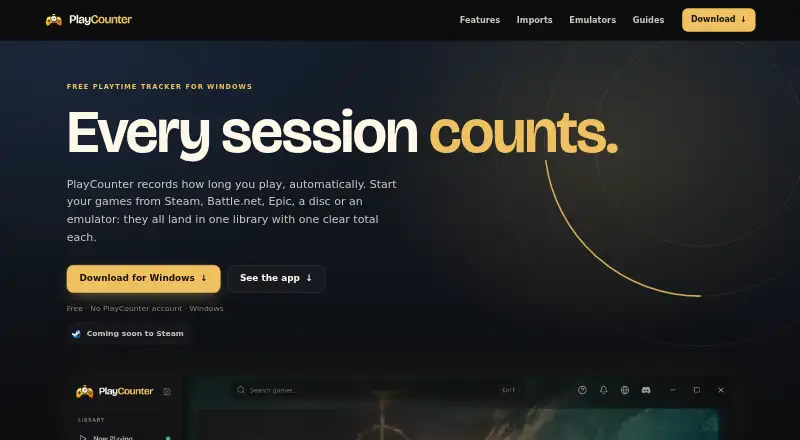
PlayCounter is a free Windows desktop app that automatically records playtime for recognized PC games in one library, regardless of launcher. A live timer shows an active session, and the app saves it when the recognized game closes. The library displays covers, total hours, and session counts; history records dates, session lengths, streaks, and playtime summaries. Users can mark milestones, keep notes, and maintain separate playthroughs for each game. Listed sources include Steam, Epic, Battle.net, Xbox app, GOG, EA app, Ubisoft Connect, Riot Client, itch.io, disc installs, and standalone executables. Imports from Steam, Xbox, and Epic can include the playtime those services report; Battle.net import supplies a game list but not playtime. Session data and notes stay on the user’s PC, and the desktop app needs no account. It can run offline, but automatic matching, cover images, and update checks need a server connection. The app sends a pseudonymous installation identifier at startup and about hourly, along with process identifiers for online game matching. The public installer does not support macOS, Linux, or console live tracking.
Who it suits
PlayCounter suits Windows PC players who want automatic session tracking across multiple launchers without creating an account. It may also work for users who want local session history and notes.
What it does well
- Free Windows desktop app
- Tracks recognized games across many launchers
- Stores sessions and notes on the user's PC
- No account required
- Supports offline use
What to know first
- Public installer is for Windows only
- Offline mode lacks automatic matching and covers
- Battle.net import does not provide playtime
- Sends identifiers for online game matching
Limits
The free plan is a Windows app. Offline use leaves automatic game matching, cover images and update checks unavailable; Battle.net imports provide a game list without playtime.
Plans
| Plan | Billed and limits | Price |
|---|---|---|
| Free | Windows app · no subscription · no PlayCounter account | Free |
As playcounter.app lists them, read 2 Oct 2026. The maker's own page has the final word.
Getting started
- Open the PlayCounter website and download the public Windows installer.
- Install and open the desktop app; no account is required.
- Launch a recognized game from a supported source to start a live session timer.
- Quit the game to save the session in your library and history.
- Import available Steam, Xbox or Epic playtime, or a Battle.net game list.
- Use the guides or Discord community linked on the site for help.
Verdict
PlayCounter combines automatic tracking across supported PC game sources with local session history and no account requirement. Its public installer is Windows-only, and some matching features need a server connection.
Questions
How much does PlayCounter cost?
The Free plan costs nothing and has no subscription.
Does PlayCounter require an account?
No. The desktop app requires no account.
Which platforms does it support?
The public installer is for Windows. The site says macOS, Linux and console live tracking are not supported by that installer.
Which game sources are supported?
Listed sources include Steam, Epic, Battle.net, the Xbox app, GOG, EA app, Ubisoft Connect, Riot Client, itch.io, disc installs and standalone executables.
Does it work offline?
Yes, but automatic game matching, cover images and update checks are unavailable without a server connection.
Is PlayCounter open source?
The desktop client is available under the MIT license. The production API, database migrations and deployment code are maintained privately.
Facts from PlayCounter's own pages
- Achievements and journal
- It offers playtime milestones and lets users keep notes and separate playthroughs for each game. · playcounter.app, 2 Oct 2026
- Data storage
- Recorded sessions, notes and history stay on the user's PC, and the desktop app requires no account. · playcounter.app, 2 Oct 2026
- Emulators
- The site lists dedicated per-game detection for DOSBox, Dolphin, PCSX2 and mGBA, with some matches requiring review. · playcounter.app, 2 Oct 2026
- Imports
- Steam, Xbox and Epic imports can bring in the playtime those services report; Battle.net import provides a game list but no playtime. · playcounter.app, 2 Oct 2026
- Library and history
- The library shows game covers, total hours and sessions, while history includes session dates, lengths, streaks and playtime summaries. · playcounter.app, 2 Oct 2026
- Maker
- The privacy policy identifies Philipp Pradzinski as the controller and lists an address in Schwerte, Germany. · playcounter.app, 2 Oct 2026
- Offline use
- The app can be used offline, but automatic game matching, cover images and update checks are unavailable without a server connection. · playcounter.app, 2 Oct 2026
- Online data
- The app sends a pseudonymous installation identifier at startup and about hourly, and sends process identifiers for online game matching. · playcounter.app, 2 Oct 2026
- Open source
- The desktop client is available under the MIT license, while the current production API, database migrations and deployment code are maintained privately. · playcounter.app, 2 Oct 2026
- Platform availability
- The public installer is for Windows; the site says macOS, Linux and console live tracking are not supported by the public installer. · playcounter.app, 2 Oct 2026
- Purpose
- PlayCounter automatically records playtime for recognized PC games in one library, regardless of launcher. · playcounter.app, 2 Oct 2026
- Session tracking
- It shows a live session timer and saves a session when you quit a recognized game. · playcounter.app, 2 Oct 2026
- Support
- The site links to step-by-step guides and a Discord community. · playcounter.app, 2 Oct 2026
- Supported sources
- The site lists Steam, Epic Games, Battle.net, Xbox app, GOG, EA app, Ubisoft Connect, Riot Client, itch.io, disc installs and standalone executables. · playcounter.app, 2 Oct 2026
Where PlayCounter stands on Freedom251
- Game Playtime Trackers#9 of 20