Freedom251 › AI Spreadsheet Tools

Formula Foundry
What Formula Foundry is
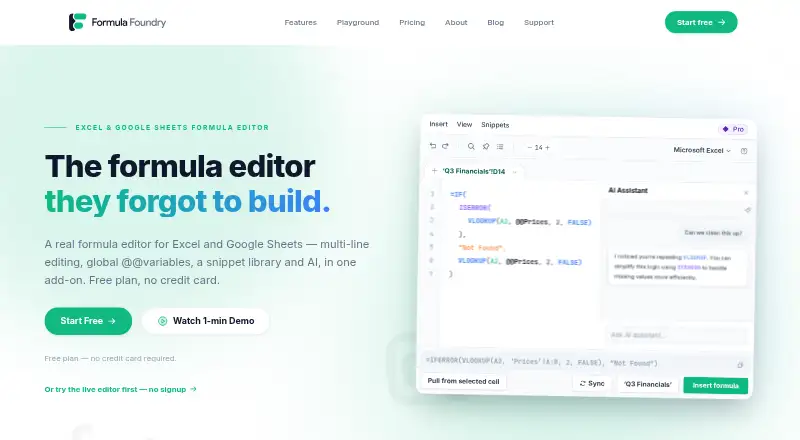
Formula Foundry is a spreadsheet add-on with a formula editor for Microsoft Excel and Google Sheets. Its editor supports multiline authoring, syntax highlighting, structured formatting, indentation, autocomplete, find and replace, dark mode, and adjustable font size. A visual builder lets users assemble formulas step by step, check a live preview and validate arguments, with nested groups and drag-and-drop editing. The AI assistant can generate, explain, or debug formulas from natural-language requests, using formula context the user explicitly supplies. Compatibility mode converts many Excel-specific functions to Google Sheets equivalents and flags formulas that cannot transfer. Users can define workbook variables and save, search, and insert reusable snippets; team snippet sharing is available on Business. The maker says editing runs in the spreadsheet client and does not send formulas, cell values, or other workbook content to its servers. AI is off by default and receives only the cell, selection, or formula referenced for a request. Formula Foundry works on the web inside both spreadsheet platforms. A Free plan is available, Pro starts at $15/user/mo billed annually, Business is $24/user/mo billed annually, and Enterprise uses custom pricing. The maker identifies analysts, including finance, data, and revenue teams, as intended users.
Who it suits
Formula Foundry suits analysts who build or maintain formulas in Excel or Google Sheets, particularly people working in finance, data, or revenue teams. Its visual builder, compatibility mode, and reusable snippets may also suit users who move formulas between the two spreadsheet platforms.
What it does well
- Visual builder includes live preview and argument validation.
- Editor provides autocomplete, formatting, find and replace, and dark mode.
- Compatibility mode converts many Excel functions for Google Sheets.
- Free plan includes about 20 AI generations per month.
- Editing does not transmit workbook content to the maker's servers, according to the maker.
What to know first
- Free plan is limited to one editor tab and one seat.
- Free plan includes three personal snippets and three custom variables.
- Business is required for shared team snippets.
- Enterprise pricing is by custom quote.
Limits
The Free plan provides one editor tab, one seat, three personal snippets, three custom variables, and about 20 AI generations per month. Pro costs $15 a month billed annually and is limited to one seat; Business costs $24 a month billed annually per seat.
Plans
| Plan | Billed and limits | Price |
|---|---|---|
| Free | Free forever · AI assistant (~20 generations / mo) · 1 editor tab · 3 personal snippets · 3 custom @@variables · 1 seat | Free |
| Pro | Billed annually · Extended AI usage · Unlimited editor tabs, personal snippets, and custom @@variables · Fix and debug formulas · Excel ⇄ Sheets conversion (Beta) · 1 seat | $15 a month |
| Business | Billed annually; per seat · Extended AI usage · Unlimited editor tabs, personal and shared team snippets, and custom @@variables · Domain-based invites · Custom SSO (SAML, OIDC) · Priority support | $24 a month |
| Enterprise | Custom quote; volume pricing · SSO · Admin controls · Custom onboarding and training · Dedicated support · SLA | On request |
As formulafoundry.io lists them, read 7 Oct 2026. The maker's own page has the final word.
Getting started
- Visit the Formula Foundry website.
- Use the web add-on with Microsoft Excel or Google Sheets.
- Choose the Free plan or a paid plan; Pro and Business are billed annually.
- Use the editor or visual builder to create formulas.
Verdict
Choose Formula Foundry if you want formula authoring and building tools inside Excel or Google Sheets, including conversion support between them. The Free plan may suit an individual within its tab, seat, snippet, variable, and AI quotas; consider Pro or Business for expanded use, or look elsewhere if third-party SOC 2 or ISO 27001 audits are a requirement.
Questions
Is Formula Foundry free?
Yes. Its Free plan is free forever and includes about 20 AI generations per month, one editor tab, one seat, three personal snippets, and three custom variables.
How much do the paid plans cost?
Pro costs $15 a month when billed annually for one seat. Business costs $24 a month when billed annually per seat. Enterprise pricing is by custom quote.
Which spreadsheet platforms does it support?
Formula Foundry works inside Microsoft Excel and Google Sheets. Compatibility mode converts many Excel-specific functions to Google Sheets equivalents and flags formulas that cannot transfer.
Does it have a free trial?
No. A Free plan is available instead.
What does Business include?
Business includes shared team snippets, domain-based invites, custom SSO using SAML or OIDC, and priority support, as well as expanded editor tabs and variables.
Who founded Formula Foundry?
Its About page names Will, Yurii, and Toom as founders involved in its origin story.
Facts from Formula Foundry's own pages
- AI assistant
- The AI assistant can generate, explain, and debug formulas using natural-language requests and formula context the user explicitly supplies. · formulafoundry.io, 7 Oct 2026
- AI data scope
- AI is off by default and receives only the cell, selection, or formula explicitly referenced for a request, for the duration of that request. · formulafoundry.io, 7 Oct 2026
- Audience
- The maker describes the product as built for analysts and highlights finance, data, and revenue teams as intended users. · formulafoundry.io, 7 Oct 2026
- Company
- The About page names Will, Yurii, and Toom as founders involved in the origin story, but does not state a founding year or headquarters. · formulafoundry.io, 7 Oct 2026
- Data handling
- The maker says the editor runs on the spreadsheet client and does not transmit formulas, cell values, or other workbook content to its servers during editing. · formulafoundry.io, 7 Oct 2026
- Editor
- The editor offers multiline formula authoring, syntax highlighting, structured formatting, indentation, autocomplete, find and replace, dark mode, and adjustable font size. · formulafoundry.io, 7 Oct 2026
- Excel compatibility
- Compatibility mode converts many Excel-specific functions to Google Sheets equivalents and flags formulas that cannot be transferred. · formulafoundry.io, 7 Oct 2026
- Formula generation
- Yes · formulafoundry.io, 20 Sept 2026
- Formula tools
- The visual builder creates formulas step by step with a live preview, argument validation, nested groups, and drag-and-drop editing. · formulafoundry.io, 7 Oct 2026
- Free plan
- Yes · formulafoundry.io, 20 Sept 2026
- Integrations
- The product works inside Google Sheets and Microsoft Excel, and supports conversion of formulas between the two spreadsheet platforms. · formulafoundry.io, 7 Oct 2026
- Primary platform
- multiple · formulafoundry.io, 20 Sept 2026
- Purpose
- Formula Foundry is an add-on that provides a formula editor for Microsoft Excel and Google Sheets. · formulafoundry.io, 7 Oct 2026
- Security and compliance
- The maker says traffic uses HTTPS with TLS 1.2 or higher, and that it does not yet have SOC 2 or ISO 27001 third-party audits. · formulafoundry.io, 7 Oct 2026
- Paid from
- 15 · formulafoundry.io, 20 Sept 2026
- Support
- All users have online documentation and contact forms; Business includes priority support and Enterprise includes dedicated support. · formulafoundry.io, 7 Oct 2026
- Table transformation
- No · formulafoundry.io, 20 Sept 2026
- Variables and snippets
- Users can define workbook variables and save, search, and insert reusable formula snippets; team snippet sharing is available on Business. · formulafoundry.io, 7 Oct 2026
Where Formula Foundry stands on Freedom251
- AI Spreadsheet Tools#18 of 31
- Spreadsheet apps#21 of 31