Freedom251 › Focus Stacking Software
ForgePix
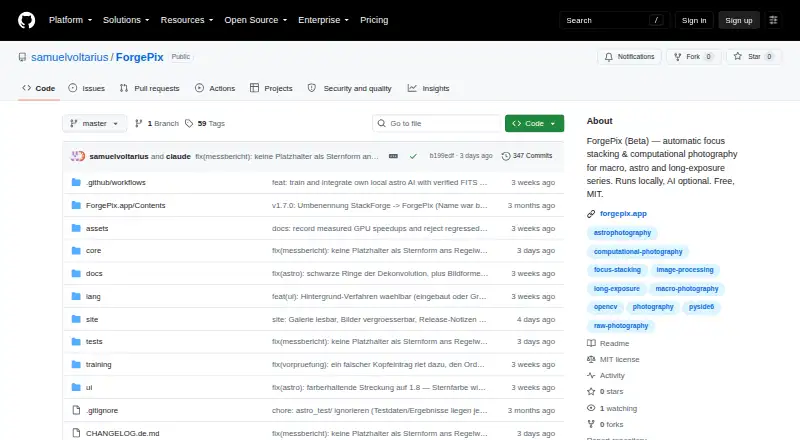
What ForgePix is
ForgePix is beta software for focus stacking and computational photography, with modules for Macro, Astro, Hybrid, and Long Exposure work. Its Automatic mode selects usable frames, aligns and merges them, then sharpens the result. For focus merges, it offers methods including Laplacian pyramid, depth map, weighted average, à-trous wavelet, and halo fix. Astro tools cover calibration-frame detection, star alignment, rejection methods, drizzle, multi-session stacking, and FITS export. Editing features include a Camera-Raw editor, retouch brush, batch processing, watch folder, and export presets. ForgePix says it processes images locally without AI, a server, or external astronomy software. Optional language-assistant connections can use compatible servers or hosted services, and optional external tools include Siril, GraXpert, StarNet++, and Cosmic Clarity. ForgePix supports RAW files and exports JPG, TIFF, layered Photoshop TIFF, and FITS. Prebuilt desktop downloads are listed for Linux, macOS, and Windows. It is free under the MIT license; its v1.28.0-beta is marked as a prerelease.
Who it suits
ForgePix suits photographers working with macro focus stacks, astrophotography, or long-exposure series who want frame alignment, merging, and local processing. Its desktop downloads cover Linux, macOS, and Windows.
What it does well
- Automatic mode selects, aligns, and merges frames.
- Includes five focus-merge methods.
- Astro tools include drizzle and multi-session stacking.
- Batch processing and manual retouching are included.
- Free under the MIT license.
What to know first
- The current v1.28.0-beta is a prerelease.
- Optional local AI image models are experimental.
- Procreate?
Limits
The free MIT plan is available free of charge. The current v1.28.0-beta is a prerelease beta; optional local AI image models are experimental and may alter faint structures, flux, or star shapes.
Plans
| Plan | Billed and limits | Price |
|---|---|---|
| Free (MIT) | Free software under the MIT license | Free |
As github.com lists them, read 29 Sept 2026. The maker's own page has the final word.
Getting started
- Open the ForgePix project website on GitHub.
- Choose the prebuilt download for macOS, Windows, or Linux.
- Install or launch the downloaded app on a supported desktop system.
- Choose a module for your macro, astro, hybrid, or long-exposure work.
- Use Automatic mode or select editing, stacking, and export tools for your images.
ForgePix is a desktop image-stacking and editing app for photographers working with macro, astrophotography, or long-exposure series. It is a strong fit for people who want those workflows together in a free, local-processing tool. Its broad feature set is appealing, but beta status makes it a less certain choice for work that depends on a settled release.
Overview
Four modules—Macro, Astro, Hybrid, and Long Exposure—organize ForgePix around different image-series workflows. Automatic mode selects usable frames, aligns and merges them, then applies gentle sharpening; users who want to steer a focus merge can choose among several methods instead. The result is a notably broad toolkit for a free desktop app, though the beta label is a reason to be cautious about relying on it for critical production work.
ForgePix says its processing works locally without AI, a server, or external astronomy software. Optional integrations extend that setup, but are not prerequisites for the core workflow. The interface is in German and English, and users can add languages by translating a language file.
Key features
Stacking and editing
Focus-merge choices include Laplacian pyramid, depth map, weighted average, à-trous wavelet, and halo fix. That range gives users alternatives to the one-click path when they want to choose a merging approach. Automatic alignment, RAW support, batch processing, and manual retouching are supported. A Camera-Raw editor and retouch brush handle edits, while a watch folder and export presets suit recurring jobs. Outputs include JPG, TIFF, layered Photoshop TIFF, and FITS.
Astrophotography and integrations
The Astro module brings calibration-frame detection, star alignment, rejection methods, drizzle, multi-session stacking, and FITS export into the app. That makes ForgePix relevant to astrophotographers who want stacking tools without requiring separate astronomy software for the stated workflow. Siril, GraXpert, StarNet++, and Cosmic Clarity are optional external tools.
Optional language-assistant connections work with OpenAI-compatible servers such as Ollama, llama.cpp, LM Studio, and vLLM, as well as OpenAI and OpenRouter. Assistant setup sends preview frames, a sharpness profile, basic EXIF data, and the user's request; it does not send original files or location data. Local AI image models are experimental, are not enabled automatically, and may change faint structures, flux, or star shapes. Those caveats matter especially for astrophotography, where preserving subtle structures can be important.
Pricing
ForgePix is free: the Free (MIT) plan costs nothing and is distributed under the MIT license. It is not a time-limited trial. The published plan is the app itself, with no paid tier or seat or usage quota to weigh against the price. Its main trade-off is not a cheaper feature-restricted plan, but beta status: v1.28.0-beta is marked as a prerelease and not a release candidate.
Platforms
Prebuilt desktop downloads are listed for Linux, macOS, and Windows. ForgePix is therefore an option across the three major desktop platforms, but not a mobile app. The MIT license is relevant to users who want software they can use under that license.
Who it's for
Choose ForgePix if you need focus stacking or astrophotography tools alongside editing and batch workflows, and prefer a free app whose core processing stays local. It is particularly compelling for users who value the Astro module's calibration, alignment, and multi-session tools or want several focus-merge methods in one desktop package.
Look elsewhere if beta software is unsuitable for your workflow, if you need a mobile version, or if experimental AI image processing must preserve faint detail without risk of alteration. The optional assistant also sends preview and related data, so users unwilling to share those items should leave that integration out of their workflow.
Pros and cons
- Pros: Macro, Astro, Hybrid, and Long Exposure modules bring several image-series workflows together.
- Pros: Multiple focus-merge methods, RAW support, retouching, batch processing, and a watch folder cover both merging and follow-up work.
- Pros: Core processing is described as local and does not require AI, a server, or external astronomy software.
- Pros: The app is free under the MIT license, with prebuilt downloads for Linux, macOS, and Windows.
- Cons: It is a beta prerelease, not a release candidate, which makes it a less reassuring choice for workflows that demand release stability.
- Cons: Experimental local AI image models can alter faint structures, flux, or star shapes, a material risk for detail-sensitive astrophotography.
- Cons: Assistant connections send preview frames, sharpness profile, basic EXIF data, and the user's request, which may not suit every privacy preference.
Alternatives
Browse focus-stacking software for a broader set of options. Consider ImageFocus Alpha if you need a free option that also runs on Android and iOS, or if you use compatible Euromex camera models, for which it is designed. PlaneFuse is another free, MIT-licensed choice for personal or commercial use, with web, API, and self-hosted options alongside desktop platforms. Choose Shine Stacker if you want a free download described by its maker as open source under LGPL-3.0. Aduku Stacker is another free option for macOS and Windows. PICOLAY is free for non-commercial use on Windows and is offered as is without warranty. ChimpStackr, CKAN, and Enfuse are also alternatives for Windows, macOS, and Linux.
Verdict
ForgePix is an easy recommendation for photographers who want a free, local desktop toolkit spanning focus stacking, astrophotography, and image editing. Its strongest reason to choose is the breadth of those workflows in one app; its clearest reason to look elsewhere is beta status, especially if release stability matters more than the feature range.
Verdict
ForgePix brings focus stacking, astrophotography workflows, and image editing tools into one beta desktop app. Its beta status and experimental local AI image models are worth noting; those models are optional and are not enabled automatically.
Questions
How much does ForgePix cost?
The Free (MIT) plan costs nothing.
Is ForgePix open source?
It is distributed under the MIT license.
Which systems does ForgePix support?
Prebuilt downloads are listed for Linux, macOS, and Windows.
What file formats can it export?
Listed output formats are JPG, TIFF, layered Photoshop TIFF, and FITS.
Does ForgePix use AI or a server to process images?
ForgePix says it works fully locally without AI, a server, or external astronomy software. Optional language assistants and experimental local AI image models are available.
Is ForgePix a stable release?
The v1.28.0-beta listing labels it a prerelease and says it is a beta version rather than a release candidate.
Facts from ForgePix's own pages
- AI data handling
- For its optional language assistant, the setup states that preview frames, sharpness profile, basic EXIF data, and the user's wish are sent, while original files and location data are not. · github.com, 29 Sept 2026
- AI integrations
- Optional language-assistant connections include OpenAI-compatible servers such as Ollama, llama.cpp, LM Studio, and vLLM, as well as OpenAI and OpenRouter. · github.com, 29 Sept 2026
- Astrophotography
- Astro features include calibration-frame detection, star alignment, rejection methods, drizzle, multi-session stacking, and FITS export. · github.com, 29 Sept 2026
- Automatic workflow
- Its one-click Automatic mode selects usable frames, aligns and merges them, and applies gentle sharpening. · github.com, 29 Sept 2026
- Editing and export
- Built-in tools include a Camera-Raw editor, retouch brush, batch processing, watch folder, and export presets. · github.com, 29 Sept 2026
- Experimental AI limits
- The local AI image models are experimental, are never enabled automatically, and may alter faint structures, flux, or star shapes. · github.com, 29 Sept 2026
- External tools
- Optional external tools include Siril, GraXpert, StarNet++, and Cosmic Clarity. · github.com, 29 Sept 2026
- Focus stacking
- Focus merge methods include Laplacian pyramid, depth map, weighted average, à-trous wavelet, and halo fix. · github.com, 29 Sept 2026
- Languages
- The interface includes German and English, and users can add languages by translating a language file. · github.com, 29 Sept 2026
- License
- ForgePix is distributed under the MIT license. · github.com, 29 Sept 2026
- Local processing
- ForgePix says it works fully locally without AI, a server, or external astronomy software. · github.com, 29 Sept 2026
- Modules
- The app includes Macro, Astro, Hybrid, and Long Exposure modules. · github.com, 29 Sept 2026
- Purpose
- ForgePix is beta software for automatic focus stacking and computational photography for macro, astrophotography, and long-exposure series. · github.com, 29 Sept 2026
- Release status
- The GitHub releases page labels v1.28.0-beta a prerelease and says it is a beta version rather than a release candidate. · github.com, 29 Sept 2026
- Supported desktop systems
- Prebuilt downloads are listed for macOS, Windows, and Linux. · github.com, 29 Sept 2026
Where ForgePix stands on Freedom251
- Focus Stacking Software#8 of 24