Freedom251 › Focus Stacking Software
Focus Stacking Online
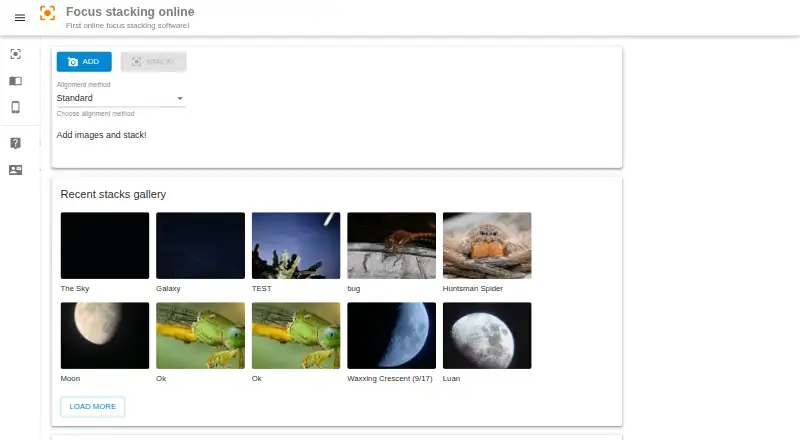
What Focus Stacking Online is
Focus Stacking Online is a browser-based tool for combining photos of the same scene taken with different focus distances. It blends the sharp regions from each picture into one image, a technique the maker highlights for macro photography, where depth of field may be shallow. Add the pictures, choose Standard or Beta alignment and a reference image, stack the set, then download the result. The maker says Beta can produce better results than Standard in some cases; it recommends choosing a reference picture based on how much of the subject is in focus. The service is free to use online and requires no software installation. It is described as working on home laptops and smartphones, and the listed platforms include web, Windows, macOS, Linux, Android, and iOS. A stack can range from two images to more than 100. The homepage also describes a recent stacks gallery and a gallery feature for sharing to social media. The maker recommends keeping the camera fixed, since shake or scene changes can complicate stacking.
Who it suits
It suits photographers seeking sharper images from multiple focus distances, particularly for macro subjects. It may also suit people who want to stack images in a browser without installing software.
What it does well
- Free online use
- No software installation needed
- Standard and Beta alignment methods
- Works on laptops and smartphones
- Gallery feature for social sharing
What to know first
- Camera shake can complicate stacking
- Scene changes can complicate stacking
Plans
| Plan | Billed and limits | Price |
|---|---|---|
| Free | online focus stacking | Free |
As focusstackingonline.com lists them, read 14 Oct 2026. The maker's own page has the final word.
Getting started
- Open https://focusstackingonline.com/ in a web browser.
- Add the pictures you want to combine.
- Choose Standard or Beta alignment and select a reference picture.
- Stack the images, then download the result.
Focus Stacking Online is a browser tool for photographers who want to combine frames focused at different distances without installing software. It is a sensible fit for macro work and other subjects with limited depth of field, provided the camera and scene stay steady.
Overview
The service blends the sharp regions of multiple pictures into one image. Its workflow is straightforward: add the pictures, choose an alignment method and a reference frame, create the stack, then download the result. That browser-based approach suits people working across laptops and smartphones, while avoiding an installation. The trade-off is that movement or changes in the scene can make the frames harder to combine, so careful capture remains important.
Focus stacks can range from two frames to more than 100. The maker recommends choosing a reference picture based on how much of the object is in focus, giving users a practical way to guide the result. A recent-stacks gallery and social-sharing feature may help users display work, though they are peripheral to the main task.
Key features
- Standard and Beta alignment: Two methods offer a choice for different image sequences. Beta can outperform Standard in some cases, but users should not expect it to be better for every stack.
- Reference picture selection: Users choose a frame to guide the stack, with the maker advising that the amount of the object in focus should inform the choice.
- Online workflow: Add, align, stack and download in a browser, with no software installation required. This favors convenience over a locally installed workflow.
- Gallery and sharing: The homepage describes a recent-stacks gallery and a feature for sharing work to social media.
Pricing
Focus Stacking Online is free: the Free plan costs nothing and covers online focus stacking. No paid tier is needed to use the service, which makes it an easy option to try for occasional or regular stacking. There are no stated seat, quota, trial or renewal terms to weigh.
Platforms
The supported platform is web, and the maker says the service works in a browser on home laptops and smartphones. The directory lists Android, iOS, Linux, macOS and Windows as platforms, but the workflow itself is online rather than a platform-specific installed application.
Who it's for
This is best suited to photographers who want a free way to merge differently focused frames, especially macro photographers working with shallow depth of field. It also makes sense for users who prefer not to install software. Those who need a dependable result from frames with camera shake or changing scenes should look for a workflow better suited to correcting inconsistent captures.
Pros and cons
- Pro — No installation: Stacking runs in a browser, which is convenient on supported laptops and smartphones.
- Pro — Choice of alignment: Standard and Beta give users two methods, with Beta potentially outperforming Standard in some cases.
- Pro — Free access: The core online stacking workflow has a free plan.
- Con — Capture discipline matters: Camera shake and scene variation can make stacking harder, so the service is less appealing when frames are inconsistent.
- Con — No stated security practices or compliance certifications: Users with specific security or compliance requirements have no stated assurance to rely on.
Alternatives
The Focus Stacking Software directory is a useful next stop for comparing more options. Choose CKAN if you want free software for Linux, macOS or Windows and an MIT license. ImageFocus Alpha is another free option across Android, iOS, Linux, macOS and Windows, but it is designed for compatible Euromex camera models. Pick PlaneFuse for free personal or commercial use with web, API and self-hosted platforms as well as desktop systems. ChimpStackr is a free, GPL-3.0 multi-platform focus-stacking option for Linux, macOS and Windows. focus-stack is another free option for those three desktop platforms. ForgePix offers free MIT-licensed software for Linux, macOS and Windows. OpenFocus may suit users who want an MIT-licensed option with a GUI for Windows and macOS and a CLI for Windows, macOS and Linux. Shine Stacker is a free download for Windows, macOS and Linux, with an LGPL-3.0 license.
Verdict
Choose Focus Stacking Online if you want a free, browser-based route to combining differently focused photos, particularly for macro work, and can keep the capture sequence steady. Its no-install workflow and two alignment choices are the main reasons to use it. Look elsewhere if your workflow depends on correcting substantial movement between frames or on stated security and compliance assurances.
Verdict
Focus Stacking Online offers a free browser workflow for combining differently focused photos, with two listed alignment methods and a downloadable result. Keeping the camera and scene steady is important to avoid making the stack harder to create.
Questions
Is Focus Stacking Online free?
Yes. The service is described as free to use online, and its Free plan costs nothing.
Do I need to install software?
No. The maker says a web browser is needed and no software installation is required.
Which devices can I use?
The maker says the online service works on home laptops and smartphones. Its listed platforms are Android, iOS, Linux, macOS, web, and Windows.
How does the stacking workflow work?
Add pictures, choose an alignment method and reference picture, stack the images, then download the result.
What alignment methods are available?
The service lists Standard and Beta. The maker says Beta can outperform Standard in some cases.
How many images can a stack contain?
The maker says a focus stack may range from two images to more than 100 images.
Facts from Focus Stacking Online's own pages
- Alignment methods
- The page lists Standard and Beta alignment methods and says Beta can outperform Standard in some cases. · focusstackingonline.com, 9 Oct 2026
- Beta alignment
- A Beta alignment method is available and may outperform Standard on some stacks. · focusstackingonline.com, 14 Oct 2026
- Browser use
- The maker says users need a web browser and do not need to install software. · focusstackingonline.com, 9 Oct 2026
- Browser workflow
- It runs online in a web browser and does not require software installation. · focusstackingonline.com, 14 Oct 2026
- Capture advice
- The maker recommends keeping the camera fixed because camera shake and scene variation can make stacking harder. · focusstackingonline.com, 9 Oct 2026
- Capture stability guidance
- The maker recommends fixing the camera in place because handshake and scene variation make processing harder. · focusstackingonline.com, 14 Oct 2026
- Domain history
- ScamAdviser reports a WHOIS registration date of 29 December 2019 and describes the domain as about six years old at its review time. · scamadviser.com, 14 Oct 2026
- Download output
- After stacking, users can download the resulting focus-stacked picture. · focusstackingonline.com, 14 Oct 2026
- Free access
- The homepage describes the service as completely free online focus-stacking software. · focusstackingonline.com, 14 Oct 2026
- Gallery
- The homepage describes a recent stacks gallery and a gallery feature for sharing to social media. · focusstackingonline.com, 9 Oct 2026
- Image upload
- Users add their source pictures through an Add control before processing. · focusstackingonline.com, 14 Oct 2026
- Image workflow
- Users add pictures, choose an alignment method and reference picture, stack the images, then download the result. · focusstackingonline.com, 9 Oct 2026
- Independent practical praise
- An iNaturalist user reported that it worked impressively well for a free online program and made it central to a mobile macro workflow. · inaturalist.org, 14 Oct 2026
- Independent usage example
- An iNaturalist observation records a two-image handheld stack processed with Focus Stacking Online. · inaturalist.org, 14 Oct 2026
- Large stack guidance
- The maker says a stack can range from two images to more than 100 images. · focusstackingonline.com, 14 Oct 2026
- Licence
- Wikipedia classifies Focus Stacking Online as a proprietary web application. · en.wikipedia.org, 14 Oct 2026
- Limit: alignment failures
- The iNaturalist report says perspective shifts can prevent proper alignment or cause the program to fail to stack images. · inaturalist.org, 14 Oct 2026
- Limit: complex subjects
- The iNaturalist author found that long legs, spines and antennae can confuse alignment and produce doubled or broken areas. · inaturalist.org, 14 Oct 2026
- Limit: processing time
- The iNaturalist author reports that processing a stack can take a few minutes. · inaturalist.org, 14 Oct 2026
- Macro orientation
- The maker positions the product for macro photography, where close subjects have shallow depth of field. · focusstackingonline.com, 14 Oct 2026
- Mobile and desktop compatibility
- The site metadata lists compatibility with Android, iOS, Windows, Linux and Mac OS. · scamadviser.com, 14 Oct 2026
- Mobile use report
- A Photography Stack Exchange answer describes the product as browser-based and usable from a smartphone. · photo.stackexchange.com, 14 Oct 2026
- Notable news
- The homepage highlights a gallery-feature update with social-media sharing as its current news item. · focusstackingonline.com, 14 Oct 2026
- Ownership transparency
- ScamAdviser reports that the WHOIS owner uses an identity-protection service, so the underlying owner is not publicly identified there. · scamadviser.com, 14 Oct 2026
Where Focus Stacking Online stands on Freedom251
- Focus Stacking Software#5 of 24