CombineZP
What CombineZP is
CombineZP is a Windows focus-stacking program that combines focused areas from multiple photographs into an image with greater depth of field. It is suited to close-up and macro photography, where focus stacking can bring more of a subject into focus. The documented stacking methods include Do Stack and Pyramid Maximum Contrast. It provides quick and thorough image alignment; thorough alignment includes rotation correction. Batch processing can stack images, while configurable memory usage lets users adjust for image sets that place heavier demands on the computer. Macro parameters can also be edited for additional control over close-up stacking. JPEG is the documented output format.
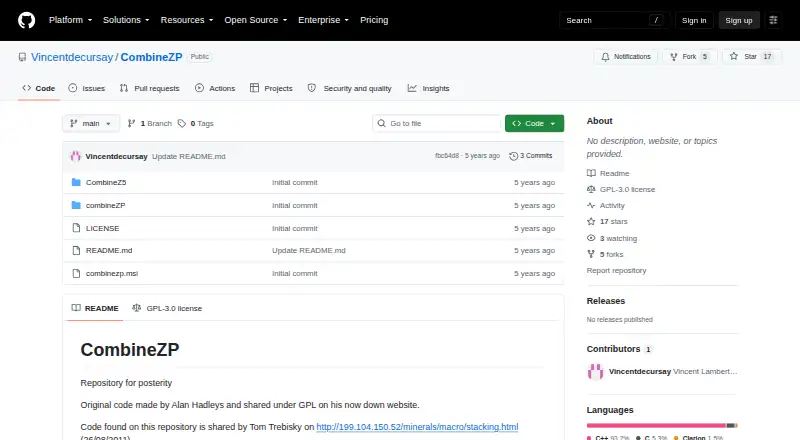
CombineZP is free and GPL-licensed. The repository identifies its license as GPL-3.0 and preserves code originally made by Alan Hadley and shared under the GPL. Its README references a compiled Windows x86 version, version 1.0, updated January 27, 2012, in a file named combinezp.msi. The repository lists no published releases and describes itself as being kept for posterity. CombineZP works with Wine on Linux according to a microscopy tools page, though its supported platform is Windows. The repository also contains CombineZ5 and combineZP directories alongside the license, README, and installer.
Who it suits
CombineZP suits Windows users who want to stack close-up or macro photographs, align images, and control memory use for larger image sets. It may also suit users running Windows software through Wine on Linux.
What it does well
- Combines focused areas from multiple photographs.
- Offers quick and thorough alignment, including rotation correction.
- Includes Do Stack and Pyramid Maximum Contrast methods.
- Supports batch processing and configurable memory usage.
- GPL-3.0 licensed and free.
What to know first
- The referenced compiled version is version 1.0 (x86), updated January 27, 2012.
- The repository lists no published releases.
- JPEG is the documented output format.
Limits
The README references a compiled version 1.0 (x86), updated January 27, 2012. JPEG is the documented output format.
Plans
| Plan | Billed and limits | Price |
|---|---|---|
| Free | GPL-licensed; compiled version referenced as version 1.0 (x86) | Free |
As github.com lists them, read 8 Oct 2026. The maker's own page has the final word.
Getting started
- Download the referenced combinezp.msi installer from the repository.
- Install the compiled Windows x86 version 1.0.
- Load photographs for focus stacking.
- Choose an alignment and stacking method, then save the result as JPEG.
Verdict
Choose CombineZP if you use Windows for close-up or macro focus stacking and want alignment options, batch processing, and adjustable memory use. Look elsewhere if you need a newer documented build or an output format other than JPEG.
Questions
Is CombineZP free?
Yes. It is GPL-licensed, and the repository identifies the license as GPL-3.0.
Which platforms does it support?
Windows is the listed platform. A microscopy tools page says it works with Wine on Linux.
What does CombineZP do?
It combines focused areas from multiple photographs into an image with greater depth of field.
What output format is documented?
JPEG is the documented output format.
Is there a compiled version to download?
The README references combinezp.msi, a compiled version 1.0 (x86) updated January 27, 2012.
Does it have published releases?
The repository lists no published releases.
Facts from CombineZP's own pages
- Alignment
- The software provides quick and thorough image alignment, with rotation correction in thorough alignment. · itechguides.com, 8 Oct 2026
- Batch processing
- A research paper describing CombineZP says it offers batch processing for stacking images. · pmc.ncbi.nlm.nih.gov, 8 Oct 2026
- Code provenance
- The repository says its code was shared by Tom Trebisky on August 26, 2011. · github.com, 8 Oct 2026
- Download build
- The README identifies a compiled version as version 1.0 (x86), updated January 27, 2012, with filename combinezp.msi. · github.com, 8 Oct 2026
- Download reference
- The repository README references a compiled version listed as version 1.0 (x86), updated January 27, 2012, with filename combinezp.msi. · github.com, 8 Oct 2026
- Focus stacking
- CombineZP combines focused areas from multiple photographs into an image with greater depth of field. · itechguides.com, 8 Oct 2026
- Integrations
- The opened repository and product pages do not list integrations. · github.com, 8 Oct 2026
- Intended use
- A third-party microscopy tools page lists CombineZP among free and open-source focus-stacking tools. · github.com, 8 Oct 2026
- Intended users
- The product page describes CombineZP as suited to Windows users doing close-up or macro focus stacking. · itechguides.com, 8 Oct 2026
- License
- GitHub identifies the repository license as GPL-3.0. · github.com, 8 Oct 2026
- Macro controls
- The product page says users can edit macro parameters for additional control over close-up stacking. · itechguides.com, 8 Oct 2026
- Maintenance
- A third-party microscopy tools page describes CombineZP as not maintained. · github.com, 8 Oct 2026
- Memory controls
- The product page says users can configure memory usage for image sets that place heavier demands on the computer. · itechguides.com, 8 Oct 2026
- Original author
- The repository says the original code was made by Alan Hadley and shared under GPL on his now-down website. · github.com, 8 Oct 2026
- Output
- The product page documents JPEG as the output format. · itechguides.com, 8 Oct 2026
- Platform
- A third-party microscopy tools page describes CombineZP as a stacker for MS Windows that works with Wine on Linux. · github.com, 8 Oct 2026
- Project description
- The repository states that it has no description, website, or topics provided. · github.com, 8 Oct 2026
- Purpose
- The repository preserves CombineZP, whose original code was made by Alan Hadley and shared under the GPL. · github.com, 8 Oct 2026
- Release availability
- The repository lists no published releases. · github.com, 8 Oct 2026
- Releases
- The repository's GitHub Releases page says there are no releases. · github.com, 8 Oct 2026
- Repository contents
- The repository contains CombineZ5 and combineZP directories, a GPL-3.0 license file, a README, and a combinezp.msi installer. · github.com, 8 Oct 2026
- Repository status
- The repository describes itself as a repository for posterity. · github.com, 8 Oct 2026
- Security
- The opened repository and product pages provide no security or compliance claims. · github.com, 8 Oct 2026
- Stacking methods
- The product page names Do Stack and Pyramid Maximum Contrast among its stacking methods. · itechguides.com, 8 Oct 2026
Where CombineZP stands on Freedom251
- Hex Editors#8 of 32
- Focus Stacking Software#9 of 24