Freedom251 › Focus Stacking Software
PICOLAY
What PICOLAY is
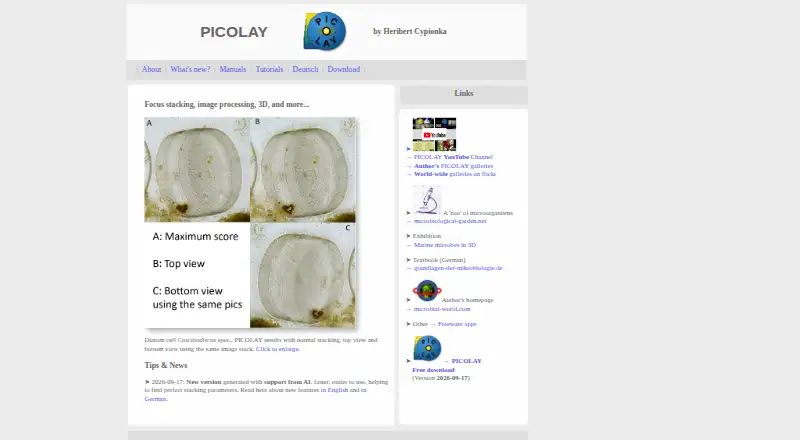
PICOLAY is a free Windows program that creates improved images from picture series. Its focus-stacking function combines sharp regions from images captured at different focus levels in a z-stack. It can also produce depth maps, 3D projections, stereo images, hologram views and 3D animations from stacks. Editing tools cover resizing, color and sharpness adjustments, filters, rotation, flipping, painting, cloning, text and scale bars. The program can align stack images by their x and y positions and even out brightness. It runs without installation and can be copied to a folder or USB stick. Downloads include 64-bit versions and a 32-bit ZIP; the download page identifies Version 2026-09-29 as the current release and lists AI-supported builds. The maker notes that antivirus software may flag the download, provides the program as-is without warranty, and permits free non-commercial use. Manuals are available in five languages, alongside tutorials and FAQs.
Who it suits
PICOLAY may suit Windows users working with image stacks who want focus stacking, 3D outputs and editing tools. Its stated free use is for non-commercial purposes.
What it does well
- Focus stacking combines sharp areas from image stacks.
- Creates depth maps and 3D views.
- Runs without installation.
- Manuals are available in five languages.
What to know first
- Free use is limited to non-commercial purposes.
- The program is provided without warranty.
- The maker warns the new program may contain bugs.
- Some antivirus software may flag the download.
Limits
The free plan is for non-commercial purposes. PICOLAY is provided without express or implied warranty, and the maker warns that the new program may contain bugs.
Plans
| Plan | Billed and limits | Price |
|---|---|---|
| PICOLAY | Free for non-commercial purposes · offered as is without warranty | Free |
As picolay.de lists them, read 4 Oct 2026. The maker's own page has the final word.
Getting started
- Visit the PICOLAY website.
- Choose a 64-bit download or the 32-bit ZIP version.
- Copy the program to a folder or USB stick; installation is not required.
- Open the program and consult the linked manuals, tutorials, or FAQs if needed.
Verdict
PICOLAY combines stack processing, image editing and 3D outputs in a portable Windows program. Note the non-commercial-use condition, no-warranty terms and the maker’s warning that the new program may contain bugs.
Questions
How much does PICOLAY cost?
The listed plan is free, for non-commercial purposes.
Can I use it for commercial work?
The maker states that PICOLAY may be used freely for non-commercial purposes.
Which operating system does it support?
Windows is the listed platform.
Does PICOLAY need to be installed?
No. It runs without installation and can be copied to a folder or USB stick.
What download versions are available?
The download page offers 64-bit versions and a 32-bit ZIP version.
What warranty does it include?
The maker provides PICOLAY as-is without express or implied warranty.
Facts from PICOLAY's own pages
- 3D imaging
- It can create depth maps, 3D projections, stereo images, hologram views, and 3D animations from stacks. · picolay.de, 4 Oct 2026
- Alignment
- It can align displaced stack images by their x and y positions and harmonize their brightness. · picolay.de, 4 Oct 2026
- Commercial use
- The maker states that PICOLAY may be used freely for non-commercial purposes. · picolay.de, 4 Oct 2026
- Current download
- The download page labels the current release Version 2026-09-29 and lists AI-supported builds. · picolay.de, 4 Oct 2026
- Documentation
- Manuals are available in English, German, French, Italian, and Spanish, with tutorials and FAQs also linked from the site. · picolay.de, 4 Oct 2026
- Download formats
- The download page offers 64-bit versions and a 32-bit ZIP version. · picolay.de, 4 Oct 2026
- Focus stacking
- It combines sharp areas from images taken at different focus levels in a z-stack. · picolay.de, 4 Oct 2026
- Image editing
- It includes image resizing, color and sharpness adjustments, filtering, rotation, flipping, painting, cloning, text, and scale-bar tools. · picolay.de, 4 Oct 2026
- Portability
- PICOLAY runs without installation and can be copied to a folder or USB stick. · picolay.de, 4 Oct 2026
- Purpose
- PICOLAY generates improved images from picture series on Windows computers. · picolay.de, 4 Oct 2026
- Recent development
- The maker’s September 2026 note says PICOLAY is being coded with Claude under the author’s direction and warns that the new program may contain bugs. · picolay.de, 4 Oct 2026
- Security note
- The maker says some antivirus software may flag the download because the site lacks broad distribution and a strong reputation score. · picolay.de, 4 Oct 2026
- Support contact
- The maker’s September 2026 program note invites feedback at [email protected]. · picolay.de, 4 Oct 2026
- Warranty
- The maker provides PICOLAY as-is without express or implied warranty. · picolay.de, 4 Oct 2026
Where PICOLAY stands on Freedom251
- Focus Stacking Software#15 of 24