Freedom251 › ISO Creation Software
Folder2ISO
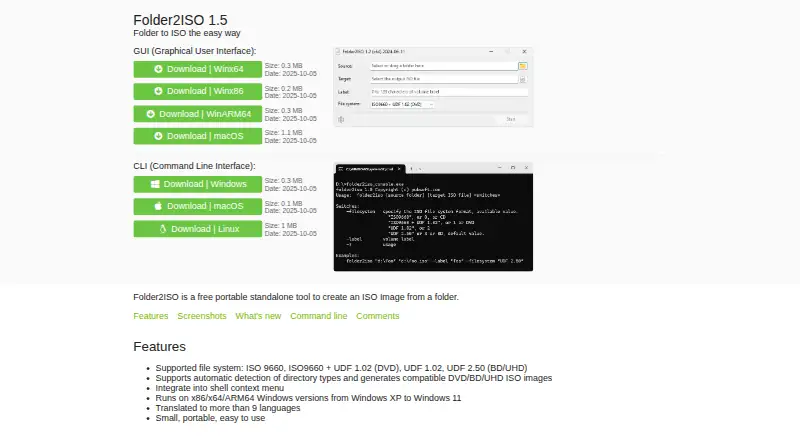
What Folder2ISO is
Folder2ISO is a free, portable tool that creates an ISO image from a folder. It supports ISO 9660, ISO 9660 with UDF 1.02, UDF 1.02, and UDF 2.50. It can detect directory types and produce compatible DVD, BD, and UHD ISO images. The tool is available as a graphical application for Windows and macOS, with command-line downloads listed for Windows, macOS, and Linux.
Windows versions are listed for x86, x64, and ARM64, from Windows XP through Windows 11. The Windows shell context menu integration provides another way to access the tool. In command-line use, provide a source folder and a destination ISO file, with switches for the filesystem format and volume label. The site says Folder2ISO has been translated into more than nine languages. Version 1.5, dated 2025-10-05, improves how file and folder creation and modification dates are preserved. The listed plan costs nothing, but the license allows use and distribution only for noncommercial purposes; commercial use or distribution requires the author's permission. Folder2ISO creates ISO images, but it does not burn discs, edit images, or convert images. The software is provided as-is without express or implied warranties, and the author disclaims liability for specified damages, including data loss.
Who it suits
Folder2ISO suits people who need to package a folder as an ISO image, including users who want to choose among ISO 9660 and UDF formats. It can work for graphical users on Windows or macOS and for command-line users on Windows, macOS, or Linux, provided their use is noncommercial unless they have the author's permission.
What it does well
- Creates ISO images from folders in four listed filesystem formats.
- Detects directory types for compatible DVD, BD, and UHD images.
- GUI downloads include Windows x86, x64, ARM64, and macOS.
- Command-line downloads are listed for Windows, macOS, and Linux.
- Windows shell context-menu integration is listed.
What to know first
- Commercial use or distribution requires the author's permission.
- It does not burn discs, edit images, or convert images.
- The software is provided without express or implied warranties.
Limits
The free plan permits noncommercial use and distribution. Commercial use or distribution requires the author's permission.
Plans
| Plan | Billed and limits | Price |
|---|---|---|
| Free | Noncommercial use and distribution; commercial use or distribution requires the author's permission | Free |
As folder2iso.com lists them, read 8 Oct 2026. The maker's own page has the final word.
Getting started
- Visit https://www.folder2iso.com/.
- Choose a GUI download for Windows x64, x86, or ARM64, or macOS; command-line downloads are listed for Windows, macOS, and Linux.
- On Windows, use the listed shell context-menu integration if that suits your workflow.
- For command-line use, provide a source folder and target ISO file, with switches for filesystem format and volume label.
- Use the software for noncommercial purposes unless you have the author's permission for commercial use or distribution.
Folder2ISO is a portable tool for turning a folder into an ISO image, with graphical and command-line options. It is best suited to people who need a focused folder-to-image workflow on desktop systems, rather than a broader disc utility.
Overview
Folder2ISO keeps its job narrow: it creates an image from a folder, not a finished disc or an edited image. Its support for several filesystem formats and automatic detection for DVD, BD, and UHD directory types gives users useful choices without expanding into burning or image conversion.
Version 1.5, dated 2025-10-05, improves preservation of file and folder creation and modification dates. That makes it a more considered option for folder archives where timestamps matter. The software is provided as-is without express or implied warranties, and the author disclaims liability for specified damages, including data loss.
Key features
- Filesystem options: ISO 9660, ISO 9660 + UDF 1.02, UDF 1.02, and UDF 2.50 cover several image-format needs. This flexibility is useful when a target requires a particular format, but Folder2ISO does not edit or convert existing images.
- DVD, BD, and UHD detection: Automatic detection of directory types can generate compatible images for these disc types, reducing format guesswork.
- GUI and command line: A graphical interface suits occasional folder conversion, while the command-line interface accepts a source folder and target ISO file, with switches for filesystem format and volume label. That gives repeatable workflows a more direct route.
- Windows shell integration: The context-menu integration can make the tool easier to reach during routine folder work on Windows.
- Language support: The software is translated into more than nine languages.
Pricing
Folder2ISO is free for noncommercial use and distribution. There is no paid plan described; commercial use or distribution requires permission from the author. That restriction is decisive for businesses and anyone redistributing the software as part of a commercial offering.
The license also provides the software as-is without express or implied warranties, with the author disclaiming liability for specified damages including data loss. Users who need stronger assurances around data handling should account for that before relying on it for important archives.
Platforms
Folder2ISO supports Linux, macOS, and Windows. GUI downloads are available for Windows x64, x86, and ARM64, and macOS; command-line downloads are available for Windows, macOS, and Linux. The site says Windows versions from XP through Windows 11 are supported across x86, x64, and ARM64. This range and the command-line builds make it practical across different desktop setups, though Linux users are offered the command-line option rather than a listed GUI download.
Who it's for
Folder2ISO suits home users and other noncommercial users who want a portable way to create an ISO from a folder, especially when they need to choose among ISO 9660 and UDF formats or preserve file and folder timestamps. It is also a reasonable fit for command-line workflows that need explicit source, output, format, or volume-label settings.
It is not the right choice for disc burning, image editing, or image conversion, and commercial use requires the author's permission. Users seeking a broader disc-making workflow should choose software whose scope includes those tasks.
Pros and cons
- Pro: Free, portable, and available across Windows, macOS, and Linux, with both GUI and command-line download options.
- Pro: Four filesystem-format choices and automatic DVD, BD, and UHD detection give users more control over the resulting image.
- Pro: The latest listed version improves preservation of creation and modification dates, a useful detail for archives.
- Con: It creates images from folders but does not burn discs, edit images, or convert images, so it cannot replace a wider-purpose disc suite.
- Con: Commercial use and distribution require the author's permission, limiting its suitability for business deployment.
- Con: The as-is warranty and liability terms leave users responsible for weighing the risk of relying on it for important data.
Alternatives
Browse ISO Creation Software for more options in this category.
- mkpsxiso is another free option for Linux, macOS, and Windows, licensed under GPL-2.0.
- Open Burning Suite is a free, open-source alternative for Linux, macOS, and Windows under the BSD 2-Clause license.
- PhotoDirector is a macOS and Windows freemium option, with a free Essential plan described as limited-feature and requiring no payment information.
- bchunk is a free Linux and macOS command-line utility for converting a .bin image and .cue track index, rather than creating an ISO from a folder.
- Express Burn is a macOS and Windows freemium option with a free non-commercial plan and a free trial.
- ImgBurn is a free Windows disc-burning application for readers whose priority is burning rather than folder-based image creation.
- InfraRecorder is free CD/DVD-burning software for Windows, offered as beta software.
- SysTools ISO Creator offers a free version with limits on large ISO files and saving edited or bootable ISOs; its Full Version starts at $29, paid once and removes the file limit.
Verdict
Choose Folder2ISO if you need a portable, no-cost way to make folder-based ISO images and its format choices suit your workflow. Its cross-platform command-line availability and timestamp preservation make it a capable focused utility for noncommercial use. Look elsewhere if you need burning, image editing or conversion, or commercial use without first obtaining the author's permission.
Verdict
Choose Folder2ISO if you need a portable way to create folder-based ISO images and its listed formats meet your needs. It offers GUI and command-line download options across several operating systems. Look elsewhere if you need disc burning, image editing or conversion, or commercial use without first obtaining the author's permission.
Questions
How much does Folder2ISO cost?
The listed Free plan costs nothing. Its license permits noncommercial use and distribution; commercial use or distribution requires the author's permission.
Which operating systems have downloads?
GUI downloads are listed for Windows x64, x86, and ARM64, and macOS. Command-line downloads are listed for Windows, macOS, and Linux.
Which ISO filesystem formats does it support?
It supports ISO 9660, ISO 9660 with UDF 1.02, UDF 1.02, and UDF 2.50.
Can Folder2ISO burn or edit images?
No. The listed capabilities do not include disc burning, image editing, or image conversion.
Can I use Folder2ISO commercially?
Commercial use or distribution requires permission from the author.
What does the command-line interface need?
It accepts a source folder and target ISO file, with switches for filesystem format and volume label.
Facts from Folder2ISO's own pages
- Command line
- The command-line interface accepts a source folder and target ISO file, with switches for filesystem format and volume label. · folder2iso.com, 8 Oct 2026
- Commercial use
- The license permits use and distribution for noncommercial purposes; commercial use or distribution requires permission from the author. · folder2iso.com, 8 Oct 2026
- Disc types
- It can automatically detect directory types and generate compatible DVD, BD, and UHD ISO images. · folder2iso.com, 8 Oct 2026
- Downloads
- The site lists GUI downloads for Windows x64, x86, and ARM64 and macOS, plus command-line downloads for Windows, macOS, and Linux. · folder2iso.com, 8 Oct 2026
- File systems
- It supports ISO 9660, ISO 9660 + UDF 1.02, UDF 1.02, and UDF 2.50. · folder2iso.com, 8 Oct 2026
- Integration
- The listed features include integration into the Windows shell context menu. · folder2iso.com, 8 Oct 2026
- Languages
- The site says the software is translated into more than nine languages. · folder2iso.com, 8 Oct 2026
- Latest listed version
- The homepage lists version 1.5, dated 2025-10-05, with improved preservation of file and folder creation and modification dates. · folder2iso.com, 8 Oct 2026
- Purpose
- Folder2ISO is a free, portable standalone tool for creating an ISO image from a folder. · folder2iso.com, 8 Oct 2026
- Warranty
- The software is provided as-is without express or implied warranties, and the author disclaims liability for specified damages including data loss. · folder2iso.com, 8 Oct 2026
- Windows support
- The site says it runs on x86, x64, and ARM64 Windows versions from Windows XP to Windows 11. · folder2iso.com, 8 Oct 2026
Where Folder2ISO stands on Freedom251
- ISO Creation Software#7 of 33